Computer Security First Exam
 Call Kai
 Learn
Learn Practice Test
 Spaced Repetition
 Match
Match Flashcards
 Knowt Play
1/97

There's no tags or description
Looks like no tags are added yet.
Name | Mastery | Learn | Test | Matching | Spaced | Call with Kai | Chat |
|---|
No analytics yet
Send a link to your students to track their progress
98 Terms
Computer Security
the ability of a system to protect information and system resources with respect to confidentiality and integrity
Aspects of Security
Prevention: take measures that prevent your assets from being damaged
Detection: take measures so that you can detect when, how, and by whom an asset has been damaged
Reaction: take measures so that you can recover your assets or to recover from a damage to your assets
Computer Security goals
Confidentiality: Preventing, detecting or deterring the improper disclosure of information
Integrity: Preventing, detecting, or deterring the improper modification of data
Availability: Preventing, detecting, or deterring the unauthorized denial of service or data to legitimate users
Authenticity: Ensuring that users of data/resources are the persons they claim to be
Accountability: Able to trace breach of security back to responsible party
Confidentiality
Prevent unauthorized disclosure of information
Aspects of confidentiality
Privacy: protection of personal data
Secrecy: protection of data belonging to an organization
Integrity
Detection (and correction) of intentional and accidental modifications of data in a computer system
Availability
The property that a product’s services are accessible when needed and without undue delay
DoS
Denial of Service is the prevention of authorised access of resources or the delaying of time-critical operations
DDoS
Distributed Denial of Service occurs when multiple sources contribute to denial of service simultaneously
Accountability
Audit information must be selectively kept and protected so that actions affecting security can be traced to the responsible party
Users are identified and authenticated to have a basis for access control decisions.
The security system keeps an audit log (audit trail) of security relevant events to detect and investigate intrusions.

Principles of Computer Security: Where to focus security controls?
Data: Format and content of data
Operations: Operations allowed on data
Users: Access control of data based on user
Principles of Computer Security: Where to place security controls?
Lower layers offer more generic control
Higher layers allow most functionality and ease of use

Principles of Computer Security: Security, functionality and ease-of-use linked together?
increasing Security hampers functionality & ease-of-use
Most secure computer is the one not plugged in and buried in 30 cu. ft. of concrete!

Principles of Computer Security: Centralized or Decentralized Security Control?
A central security authority provides much better control but may act as a bottleneck for productivity
A decentralized security control provides ability to fine tune security control for applications making system easy to us
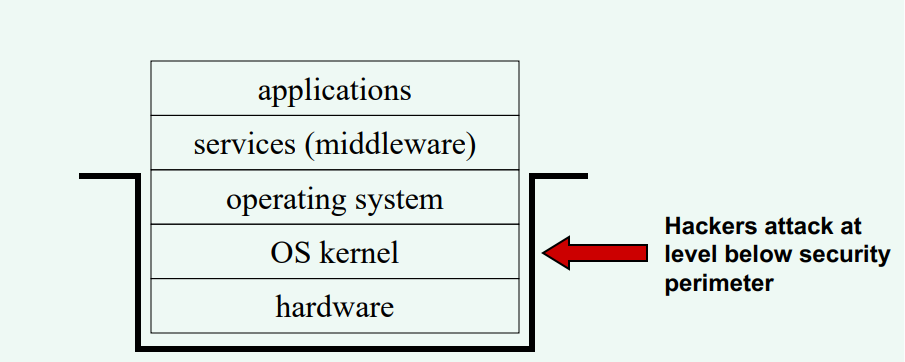
Principles of Computer Security: How do you stop an attacker from getting access to a layer below your protection mechanism?
Tools to bypass protection mechanisms
Recovery Tools: These can read the hard disks byte-to-byte without acquiescing to high level security checks
Unix Devices: Unix treats physical memory devices like files, so, if improper access controls are defined a hacker can read disks
Backups: Backups are made to recover data in a computer crash. If not stored properly data can be read from the backup media
Security Policy
A definition of information security with a clear statement of management's intentions
What can a security polocy include?
Compliance with legislative and contractual requirements
Security education, virus prevention and detection, and business continuity planning
A definition of general and specific roles and responsibilities for the various aspects of information security program in business
an explanation of the requirement and process for reporting suspected security incidents, and
the process, including roles and responsibilities, for maintaining the policy document.
Medical records pose particular security problems. Assume that your medical records can be accessed on-line. On the one hand, this information is sensitive and should be protected from disclosure. On the other hand, in an emergency it is highly desirable that whoever treats you has access to your records. How would you draft your security policy and use prevention, detection and recovery to secure your records?
Compliance & Accountability: Mandate strict compliance with health privacy regulations and establish clear penalties for unauthorized access.
Audit Review & Incident Response: Routinely review emergency access logs to verify legitimate clinical need. If unauthorized access occurred, initiate immediate incident response and revoke compromised access credentials.
Audit Logging: Maintain detailed, tamper-resistant audit trails that record every instance of record access, including user ID, timestamp, patient ID, and access type.
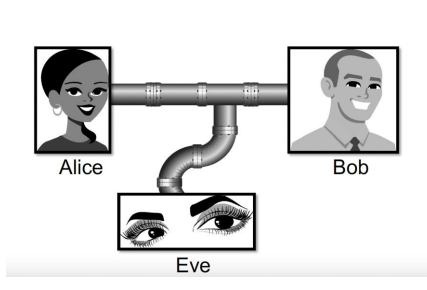
Eavesdropping
The interception of information intended for someone else during its transmission over a communication channel.
Man-in-the Middle
Alteration: unauthorized modification of information

DoS
The interruption or degradation of a data service or information access

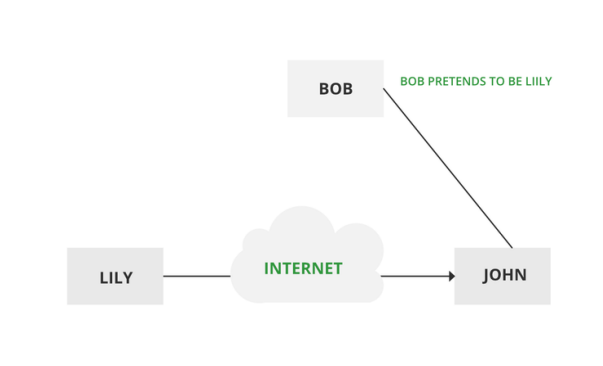
Masquerading
The fabrication of information that is purported to be from someone who is not actually the author
Repudiation
the denial of a commitment or data receipt.
This involves an attempt to back out of a contract or a protocol that requires the different parties to provide receipts acknowledging that data has been received.
Correlation and traceback
the integration of multiple data sources and information flows to determine the source of a particular data stream or piece of information.

10 security principles
Economy of mechanism: This principle stresses simplicity in the design and implementation of security measures.
Fail-safe defaults: This principle states that the default configuration of a system should have a conservative protection scheme.
Complete mediation: The idea behind this principle is that every access to a resource must be checked for compliance with a protection scheme.
Open design: According to this principle, the security architecture and design of a system should be made publicly available.
Separation of privilege: This principle dictates that multiple conditions should be required to achieve access to restricted resources or have a program perform some action.
Least privilege: Each program and user of a computer system should operate with the bare minimum privileges necessary to function properly.
Least common mechanism: In systems with multiple users, mechanisms allowing resources to be shared by more than one user should be minimized.
Psychological acceptability: This principle states that user interfaces should be well designed and intuitive, and all security-related settings should adhere to what an ordinary user might expect.
Work factor: According to this principle, the cost of circumventing a security mechanism should be compared with the resources of an attacker when designing a security scheme.
Compromise recording: This principle states that sometimes it is more desirable to record the details of an intrusion than to adopt more sophisticated measures to prevent it.
Encryption and Decryption
The message M is called the plaintext. Alice will convert plaintext M to an encrypted form using an encryption algorithm E that outputs a ciphertext C for м.
C = E(M)
M = D(C)
The encryption and decryption algorithms are chosen so that it is infeasible for someone other than Alice and Bob to determine plaintext M from ciphertext C. Thus, ciphertext C can be transmitted over an insecure channel that can be eavesdropped by an adversary.
Cryptosystem
1. The set of possible plaintexts
2. The set of possible ciphertexts
3. The set of encryption keys
4. The set of decryption keys
5. The correspondence between encryption keys and decryption keys
6. The encryption algorithm to use
7. The decryption algorithm to use
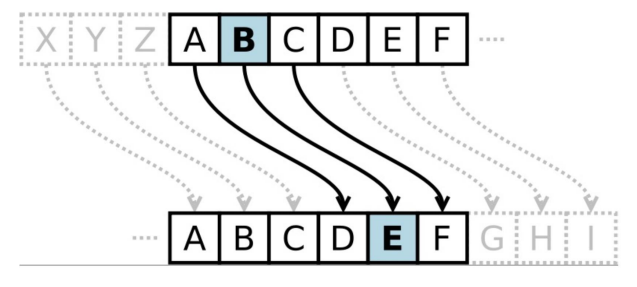
Caesar Cipher
Replace each letter with the one "three over" in the alphabet.
Symmetric Cryptosystems
Alice and Bob share a secret key, which is used for both encryption and decryption.

Symmetric Key Distribution
Requires each pair of communicating parties to share a (separate) secret key.

Public-Key Cryptography
Separate keys are used for encryption and decryption.
Bob has two keys: a private key, SB, which Bob keeps secret, and a public key, PB, which Bob broadcasts widely.
In order for Alice to send an encrypted message to Bob, she need only obtain his public key, PB, use that to encrypt her message, M, and send the result, C = EpB (M), to Bob. Bob then uses his secret key to decrypt the message as M = DsB (C).

Public Key Distribution
Only one key is needed for each recipient

Digital Signatures
Public-key encryption provides a method for doing digital signatures
To sign a message, M, Alice just encrypts it with her private key, SA, creating C = EsA(M).
Anyone can decrypt this message using Alice's public key, as M' = DPA(C), and compare that to the message M.
Cryptographic Hash Functions
A checksum on a message, M, that is:
One-way: it should be easy to compute Y=H(M), but hard to find M given only Y
Collision-resistant: it should be hard to find two messages, M and N, such that H(M)=H(N).
Examples: SHA-1, SHA-256.
Buffer Overflow
a very common attack mechanism
A condition at an interface under which more input can be placed into a buffer or data holding area than the capacity allocated, overwriting other information.
Attackers exploit such a
condition to crash a system or
to insert a specially crafted code that allows
them to gain control of the system.
programming error when a process attempts to store data beyond the limits of a fixed sized buffer
overwrites adjacent memory locations
locations could hold other program variables, parameters, or program control flow data
buffer could be located on the stack, in the heap, or in the data section of the process
Buffer Overflow Attacks
to exploit a buffer overflow an attacker needs:
to identify a buffer overflow vulnerability in some program that can be triggered using externally sourced data under the attacker’s control
to understand how that buffer is stored in memory and determine potential for corruption
identifying vulnerable programs can be done by:
inspection of program source
tracing the execution of programs as they process oversized input
using tools such as fuzzing to automatically identify potentially vulnerable programs
Stack Buffer Overflows
occur when buffer is located on the stack
also referred to as stack smashing
used by Morris Worm
exploits included an unchecked buffer overflow
are still being widely exploited
Stack Frame
when one function calls another it needs somewhere to save the return address
also needs locations to save the parameters to be passed into the called function and to possibly save register values
Shellcode
code supplied by attacker
often saved in buffer being overflowed
traditionally transferred control to a user command-line interpreter (shell)
Machine Code
specific to processor and operating system
traditionally needed good assembly language skillsto create
more recently a number of sites and tools have been developed that automate this process
Buffer Overflow Defenses
Compile Time: aim to harden programs to resist attacks in new programs
Run-time: aim to detect and abort attacks in existing programs
Compile-Time Defenses: Programming Language
use a modern high level language
not vulnerable to buffer overflow attacks
compiler enforces range checks and permissible operations on variables
Disadvantages:
additional code must be executed at run time to impose checks
flexibility and safety comes at a cost in resource use
distance from the underlying machine language and architecture means that access to some instructions and hardware resources is lost
limits their usefulness in writing code, such as device drivers, that must interact with such resources
Compile-Time Defenses: Safe Coding Techniques
C designers placed much more emphasis on space efficiency and performance considerations than on type safety
programmers need to inspect the code and rewrite any unsafe coding
programmers have audited the existing code base, including the operating system, standard libraries, and common utilities
Compile-Time Defenses: Language Extensions / Safe Libraries
Handling dynamically allocated memory is more problematic because the size information is not available at compile time
requires an extension and the use of library routines
programs and libraries need to be recompiled
likely to have problems with third-party applications
concern with C is use of unsafe standard library routines
one approach has been to replace these with safer variants
Libsafe is an example
library is implemented as a dynamic library arranged to load before the existing standard libraries
Compile-Time Defenses: Stack Protection
add function entry and exit code to check the stack for signs of corruption
use random canary
value needs to be unpredictable
should be different on different systems
Stackshield and Return Address Defender (RAD)
GCC extensions that include additional function entry and exit code
function entry writes a copy of the return address to a safe region of memory
function exit code checks the return address in the stack frame against the saved copy
if change is found, aborts the program
Executable Address Space Protection
use virtual memory support to make some regions of memory nonexecutable
requires support from memory management unit (MMU)
long existed on SPARC / Solaris systems
recent on x86 Linux/ Unix/Windows systems
issues
support for executable stack code
special provisions are needed
Run-Time Defenses: Address Space Randomization
manipulate location of key data structures
stack, heap, global data
using random shift for each process
large address range on modern systems means wasting some has negligible impact
randomize location of heap buffers
random location of standard library functions
Run-Time Defenses: Guard Pages
place guard pages between critical regions of memory
further extension places guard pages between stack frames and heap buffers
Heap Overflow
attack buffer located in heap
no return address
defenses
heap non-executable
randomizing the allocation of memory on the heap
Global Data Overflow
can attack buffer located in global data
defenses
non executable or random global data region
move function pointers
guard pages
Malware
is software that enters a computer system without the user’s knowledge or consent and then performs an unwanted and harmful action
Imprison: Ransomware
prevents a user’s endpoint device from properly and fully functioning until a fee is paid
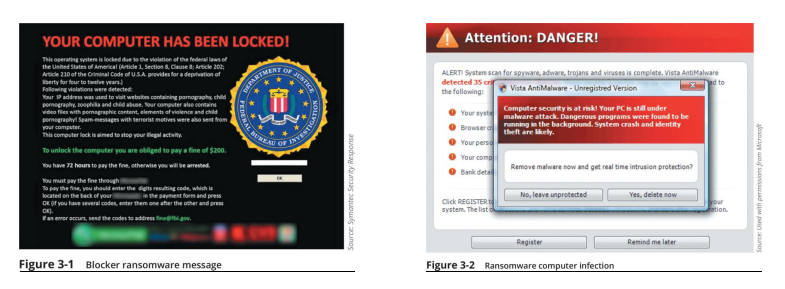
Imprison: Cryptomalware
is a type of malware that imprisons users and encrypts all files on the device so that none of them can be opened

Launch: Virus
There are two types of viruses: a file-based virus and a fileless virus
• A file-based virus is malicious code that is attached to a file that reproduces itself on the
same computer without any human intervention
• An armored file-based virus goes to great lengths to avoid detection
• Techniques include split infection and mutation
• The virus first unloads a payload to perform a malicious action, then the virus replicates itself by inserting its code into another file (on the same computer)
Launch: fileless virus
does not attach itself to a file but instead takes advantage of native services and processes that are part of the OS to avoid detection and carry out its attacks
Launch: Worm
is a malicious program that uses a computer network to replicate (sometimes called a network virus)
Designed to enter a computer through the network and then take advantage of a vulnerability in an application or an OS on the host computer
Actions that worms have performed include deleting files on the computer or allowing the computer to be remotely controlled by an attacker
Launch: Bot
Another type of malware allows the infected computer to be placed under the remote control of an attacker for the purpose of launching attacks
When hundreds, thousands, or even millions of bot computers are gathered into a logical computer network, they create a botnet under the control of a bot herder
Infected bot computers receive instructions through a command and control (C&C) structure from the bot herders
Snoop: Spyware
is tracking software that is deployed without the consent or control of the user
Snoop: Keylogger
A keylogger silently captures and stores each keystroke that a user types on the computer’s keyboard
The threat actor can then search the captured text for any useful information such as passwords, credit card numbers, or personal information
A keylogger can be a software program or a small hardware device
Deceive: Potentially Unwanted Program (PUP)
A PUP is software that the user does not want on their computer
Deceive: Trojan
A computer Trojan is an executable program that masquerades as performing a benign activity but also does something malicious
Deceive: Remote Access Trojan (RAT)
A RAT has the basic functionality of a Trojan but also gives the threat agent unauthorized remote access to the victim’s computer by using specially configured communication protocols
This creates an opening to the victim’s computer allowing the threat agent unrestricted access
Evade: Backdoor
A backdoor gives access to a computer, program, or service that circumvents any normal security protections
Evade: Logic bomb
A logic bomb is computer code that is typically added to a legitimate program but lies dormant and evades detection until a specific logical event triggers it
Evade: Rootkits
A rootkit is malware that can hide its presence and the presence of other malware on the computer
cross-site scripting (XSS) Attack
a website that accepts user input without validating it and uses that input in a response can be exploited
An attacker can take advantage in an XSS attack by tricking a valid website into feeding a malicious script to another user’s web browser

Injection
Attacks called injections introduce new input to exploit a vulnerability
One of the most common injection attacks (SQL injection) inserts statements to manipulate a database server
• SQL stands for Structured Query Language
• SQL injection targets SQL servers by introducing malicious commands into them
• By entering crafted SQL statements as user input, information from the database can be extracted or the existing can be manipulated
Request Forgery: Cross-Site Request Forgery (CSRF)
CSRF takes advantage of an authentication “token” that a website sends to a user’s web browser
If a user is currently authenticated on a website and is then tricked into loading another webpage, the new page inherits the identity and privileges of the victim, who may perform an undesired function on the attacker’s behalf

Request Forgery: Server-Site Request Forgery (SSRF)
• An SSRF takes advantage of a trusting relationship between web servers
• SSRF attacks exploit how a web server processes external information received from another server
• Some web applications are designed to read information from or write information to a specific URL
• If an attacker can modify that target URL, they can potentially extract sensitive information from the application or inject untrusted input into it

Replay
Replay attacks are commonly used against digital identities
After intercepting and copying data, the threat actor retransmits selected and edited portions of the copied communications later to impersonate the legitimate user
Many digital identity replay attacks are between a user and an authentication server
Attacks on Software: Memory Vulnerabilities
• Some memory-related attacks are called resource exhaustion attacks because they “deplete” parts of memory and thus interfere with the normal operation of the program in RAM
• Other memory-related attacks attempt to manipulate memory contents such as buffer overflow attacks and integer overflow attacks
• A buffer overflow attack occurs when a process attempts to store data in RAM beyond the boundaries of a fixed-length storage buffer
This extra data overflows into the adjacent memory locations
• In an integer overflow attack, an attacker changes the value of a variable to something outside the range that the programmer had intended by using an integer overflow
Attacks on Software: Improper Exception Handling
• Some attacks are the result of poor coding on the part of software developers
• Software that allows the user to enter data but has improper input handling features does not filter or validate user input to prevent a malicious action
• Another improper exception handling situation is a NULL pointer/object dereference
When an application dereferences a pointer that has a value of NULL, it typically will cause a program to crash or exit
Attacks on Software: Attacks on External Software Components
• In addition to attacking the software directly, threat actors also target external software components
• These include the following:
Application program interface (API)
Device driver
Dynamic-link library (DLL)
Which type of application attack might use the following syntax? ‘whatever’ AND email IS NULL;
SQL injection
Which of the following is a concern of using AI and ML in cybersecurity?
Tainted training data
Use the knowledge about malware you gained from this module to answer the following question: With the trend towards employees working from home, which type of malware do you think presents the most risk for organizations and their employees? Why? What are some things that can be done to mitigate the risks?
Ransomware and Remote Access Trojans (RATs) present the greatest risk to work-from-home environments because remote employees often operate on less secure home networks, enabling attackers to easily gain unauthorized control or encrypt critical shared corporate data. These risks can be mitigated by enforcing Multi-Factor Authentication (MFA), deploying Endpoint Detection and Response (EDR) tools, securing remote access with VPNs, and conducting regular phishing awareness training.
Attack Vectors
An attack vector is a pathway or avenue used by a threat actor to penetrate a system
Social Engineering Attacks
Social engineering is a means of eliciting information (gathering data) by relying on the weaknesses of individuals
Social Engineering Attacks: Impersonation
is masquerading as a real or fictitious character and then playing the role of that person with a victim
Social Engineering Attacks: Phishing
is sending an email message or displaying a web announcement that falsely claims to be from a legitimate enterprise in an attempt to trick the user into surrender private information or taking action
Social Engineering Attacks: Redirection
is when an attacker directs a user to a fake lookalike site filled with ads for which the attacker receives money for traffic generated to the site
Social Engineering Attacks: Spam
is unsolicited email that is sent to a large number of recipients

Social Engineering Attacks: Hoaxes
are false warnings, often contained in an email message claiming to come from the IT department
Social Engineering Attacks: Physical Procedures
Dumpster Diving involves digging through trash receptacles to find information that can be useful in an attack
Tailgating occurs when an authorized person opens an entry door, one or more individuals can follow behind and also enter
Shoulder Surfing allows an attacker to casually observe someone entering secret information, such as the security codes on a door keypad
Which type of attack is NOT a form of social engineering attack?
Zero day

MitM and MitB attacks

Privilege Escalation
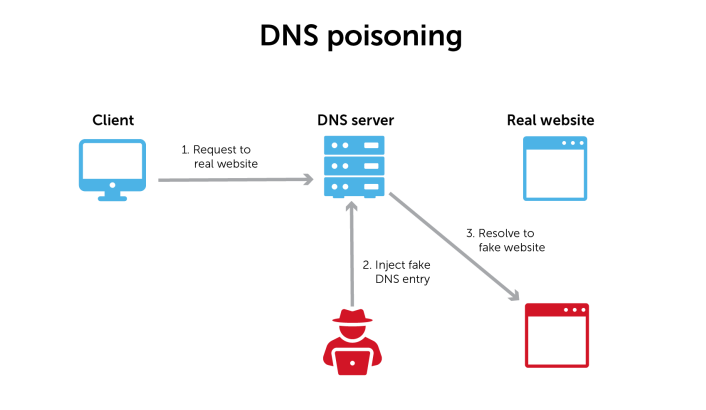
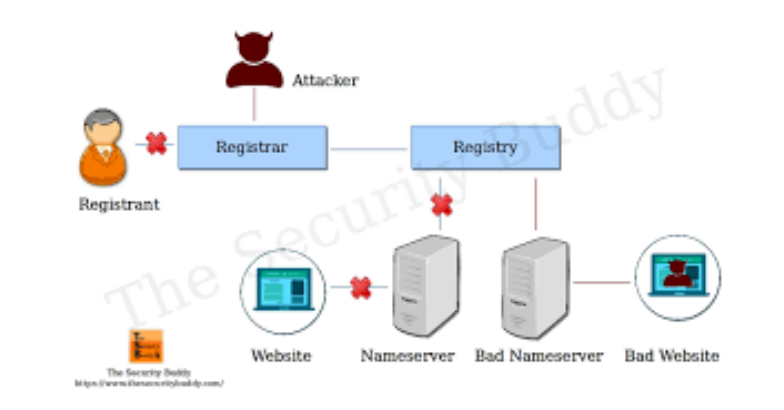
DNS Hijacking/ Poisoning

ARP Spoofing Attack

TCP/IP Hijacking

DoS and DDoS

Smurf Attack

Spoofing

Driver Manipulation
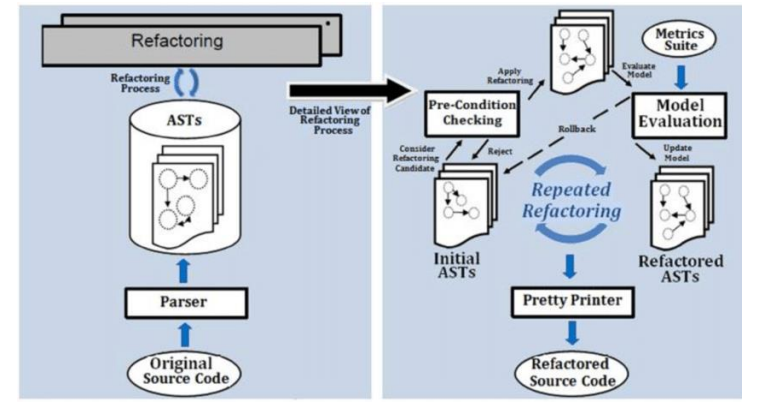
Refactoring
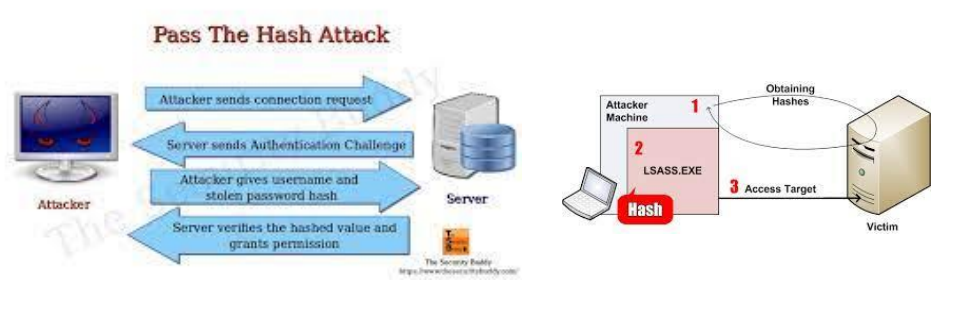
Pass the Hash
Typosquatting