Professor Messor 3.3 | Recovery Sites, Network Redundancy, and Availability Concepts
 Call Kai
 Learn
 Practice Test
 Spaced Repetition
 Match
 Flashcards
 Knowt Play
1/14

There's no tags or description
Looks like no tags are added yet.
15 Terms
Active-passive
Involve two devices where only one is active at a time. The secondary device remains in standby, ready to take over if the primary device fails.
These devices constantly communicate, synchronizing configuration settings and real-time session information. In the event of a failure, the standby device takes over immediately, ensuring continuity with the same configurations. This failover can happen at any moment, so the passive device must always be online and ready to switch roles without interrupting service.
Active-passive example
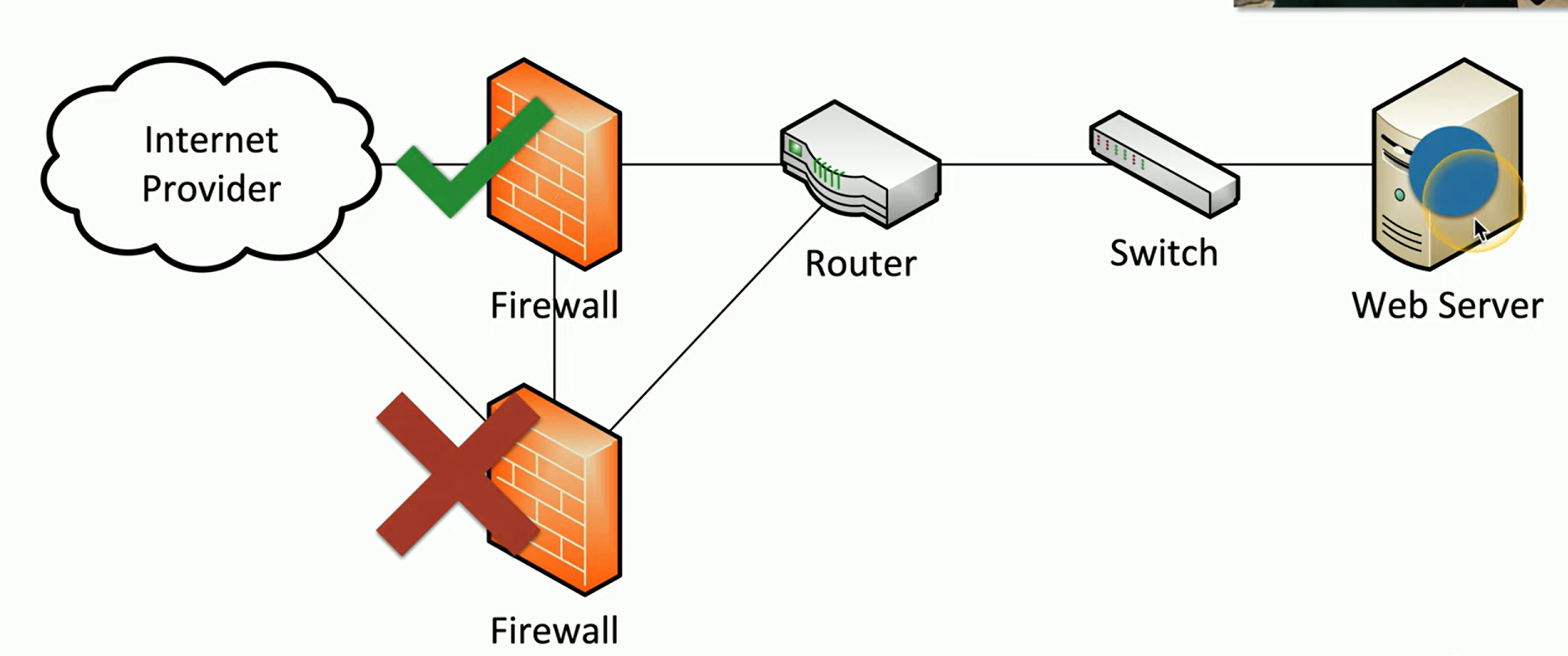
Imagine having an internet provider with two firewalls: one is actively handling traffic, while the other remains in passive mode. The active firewall manages all the network traffic, while the passive firewall stays on standby, waiting in case the active one fails. These firewalls are connected with a dedicated link, constantly exchanging "hello" messages to check each other's status. If the active firewall goes down, the passive one detects this and takes over seamlessly.
Active-active
Both devices are in use simultaneously, sharing the workload. While this setup offers better resource utilization and redundancy, it’s more complex to design and manage.
Data can move in multiple directions, requiring careful planning and a thorough understanding of the network infrastructure. Balancing and controlling the data flows can be challenging, making ongoing monitoring and management critical for stability and efficiency.
Active-active example
Both firewalls are operating simultaneously and are always available. Traffic might pass through one firewall while another set of traffic flows through the other, requiring careful configuration. The firewalls need to recognize that traffic could take different paths at any time, so their configurations must be properly synchronized to ensure seamless operation.
Diverse paths
Involve creating multiple paths for connectivity, such as using more than one internet service provider (ISP). This setup ensures that if one ISP connection fails, the redundant or diverse path to the secondary ISP keeps the network operational.
Implementation may require additional hardware, careful engineering, and advanced dynamic routing protocols to manage the failover process. Local devices need configurations that recognize multiple paths to maintain internet access. This approach enhances redundancy by eliminating reliance on a single provider, ensuring better uptime and reliability.
Internal network diversified example
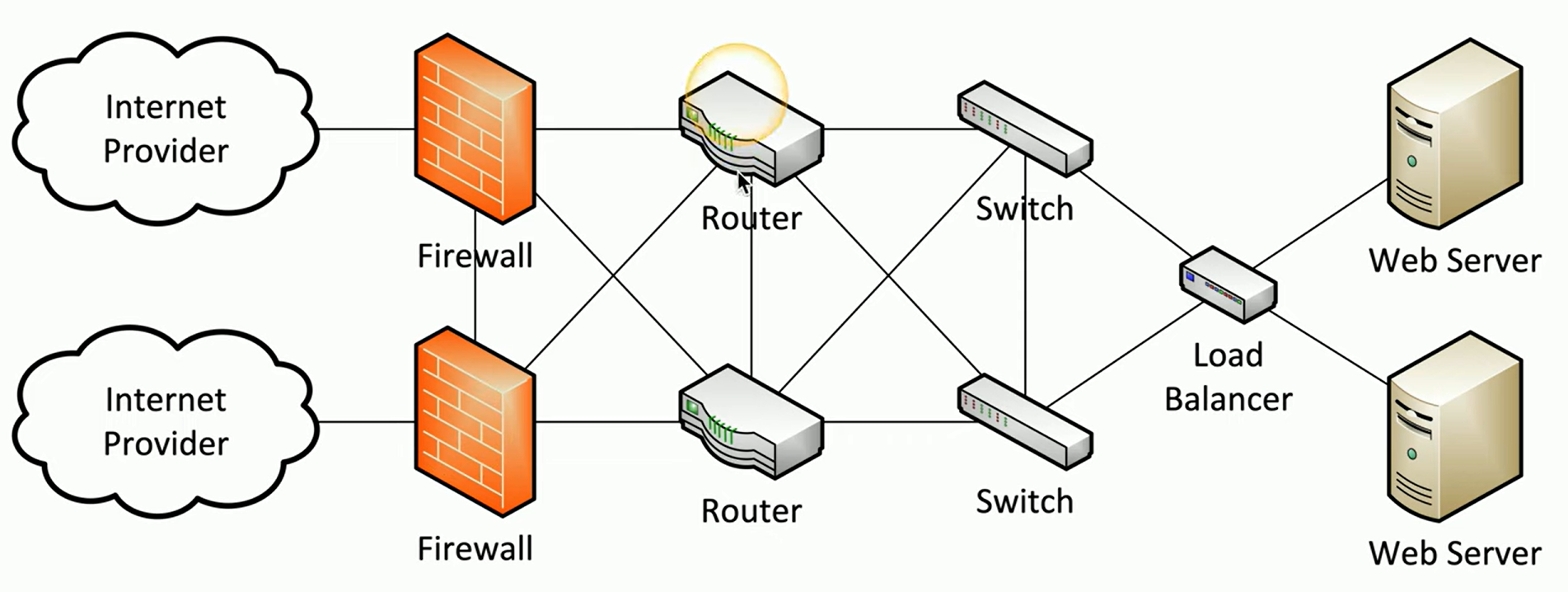
Involves having multiple internet providers, diverse paths into separate firewalls, and redundant routers and switches. In this setup, a single load balancer connects to multiple web servers. However, it's possible to add redundancy by using multiple load balancers as well. The key benefit is that losing any single device or link does not disrupt operations, as alternative paths and devices maintain network continuity.
FHRP (First Hop Redundancy Protocol)
Is designed to ensure availability if the default gateway fails. Typically, a computer is configured with a single default gateway, but if that gateway becomes unavailable, it steps in. It allows another router on the same subnet to automatically take over the IP configuration and continue serving as the default gateway.
VRRP (Virtual Router Redundancy Protocol)
Creates a virtual default router that isn’t tied to a single physical device. The default gateway is a virtual IP address shared among multiple routers. If the primary router fails, another router automatically takes over, ensuring continuous data flow without interruptions.
Recovery
Recovery Time Objective (RTO) refers to the amount of time it takes to restore systems to a specific service level after a disruption.
Recovery Point Objective (RPO) focuses on how much data needs to be available before we can say that we’re back up and running.
Mean Time to Repair (MTTR) measures the time required to repair and restore a system after a failure. It answers the question: "How long will it take to fix this issue?"
Mean Time Between Failures (MTBF) estimates how long a system is expected to run before a failure occurs. It’s used to predict reliability and is higher for systems with fewer moving parts, like solid-state devices, compared to those with more mechanical components.
Network device backup and restore
As a network administrator, maintaining routers, switches, firewalls, and other infrastructure devices involves regularly backing up firmware and configurations. Every network device has unique settings like IP addresses, security configurations, and port assignments that need to be preserved. Most devices allow you to download and upload these configurations, enabling you to easily restore them in case of failure. Automated backup processes can run nightly to save current configurations, ensuring a recent copy is always available.
Site resiliency
Many organizations develop disaster recovery plans that include a separate recovery facility to handle emergencies. This involves setting up an alternate physical site where operations can continue if the primary location encounters issues. When a disaster occurs, business processes shift to the alternate site, allowing the organization to address the problem while maintaining operations. Depending on the severity, the secondary location might be used for weeks or even months. Once the primary site is operational again, the organization will revert back.
Cold site
A type of disaster recovery site that is essentially an empty building with no pre-installed hardware, data, or personnel. In the event of a disaster, the organization must bring its own equipment, applications, and data.
The site provides only the physical space and infrastructure, such as power and cooling, but it is the organization's responsibility to set up and configure everything needed to restore operations. This approach typically involves transporting staff to the site to establish a functional environment from scratch.
Hot site
Is a fully equipped disaster recovery facility that mirrors the primary site. It includes duplicate hardware, power systems, and data. The site is kept up-to-date with automated replication of applications, software, and data from the primary site. In the event of a disaster, operations can quickly switch, often with minimal downtime, as the site is continuously maintained to be an exact replica of the primary site.
Warm site
Offers a middle ground between a cold site and a hot site. It provides essential infrastructure such as rack space and HVAC but does not include the complete set of hardware and data found in a hot site. You may need to supply some hardware yourself or use pre-provided hardware but will still need to bring applications and data. This type of site balances cost and recovery time, offering a quicker setup than a cold site without the high expense of maintaining a hot site.
Cloud site
Utilizes an established cloud provider to offer recovery resources without managing a separate physical facility. It can scale to provide the necessary infrastructure for recovery, with costs typically based on usage or a flat fee. While cloud sites eliminate the need for physical space and hardware management, data and applications still need to be migrated to the cloud. Large data storage requirements can present challenges, so it's important to plan how data will be transferred