Pro Tools 101 Exam
 Call Kai
 Learn
Learn Practice Test
 Spaced Repetition
 Match
Match Flashcards
 Knowt Play
1/139

There's no tags or description
Looks like no tags are added yet.
Name | Mastery | Learn | Test | Matching | Spaced | Call with Kai | Chat |
|---|
No analytics yet
Send a link to your students to track their progress
140 Terms
Which of the following connection types can be used for DIGITAL transfers?
S/PDIF, AES/EBU
The frequency range of human hearing is generally accepted to be between _________.
20Hz and 20,000Hz
The word "frequency" refers to the ___________ of a sound.
pitch
To record an audio signal into Pro Tools, the signal must be converted into binary information that can be stored, read, and manipulated by a computer. This process is called:
analog to digital conversion
The differences between a standard Pro Tools "Studio" type of system with a USB interface and a Pro Tools|HDX or Ultimate system with dedicated DSP hardware include:
Standard host based systems are host-based, ProTools|HDX systems are not.
How is frequency measured?
Hz / kHz
What Windows/PC shortcut modifier is equivalent to the Mac's OPTION key?
Alt
What Windows/PC shortcut modifier is equivalent to the Mac's SHIFT key?
Shift
What Windows/PC shortcut modifier is equivalent to the Mac's COMMAND key?
Control
What Windows/PC shortcut modifier is equivalent to the Mac's CONTROL key?
Start
True or False: It's best to have dual hard drives and multi-core processors on a computer system when working with digital audio.
True
True or False: D/A converters, A/D converters, and mic preamps are built into audio interfaces.
True
True/False: Powered Nearfield Monitors are the best speakers for small home studios.
Correct!
True
True or False: A microphone with a 1/4" connector and an on/off switch is a professional-grade microphone.
False
True or False: A power conditioner is (or should be) an essential component of your DAW.
True
What is another name for a standard microphone cable/connection?
XLR
What is the name for the latest type of USB connection that Apple now uses for their Thunderbolt 3 protocol?
USB-C
True/False: Cat5 cabling is now being used for digital audio transmission and recording.
True
Check all of the production tasks that Pro Tools can be used for:
Audio Processing
MIDI Production
Notation and Scores
Mixing and Automation
Audio for Video & Post-Production
What is the name of the law that specifies the relationship between sample rate and audio frequency?
Nyquist's Theorum
For every 1 bit increase in bit depth, you gain how much dynamic range?
6dB
What audio interfaces listed below are compatible with a standard Pro Tools "Studio" system? (check all that apply)
Motu M4
Focusrite Scarlett 2i2
Mackie Onyx 2x2
SSL 2+
What audio interfaces below are compatible with Pro Tools|Ultimate systems?
ProTools HD| OMNI
ProTools HD| MADI
ProTools HD| I/O
ProTools| MTRX
Why is the sample rate of a digital recording important?
C. It determines the range of frequencies that can be captured in the recording.
D. It affects the file size of the recorded file.
The maximum dynamic range of 16-bit audio is:
96dB
What unit measurement is used to indicate the amplitude of a sound?
Decibels
Which companies have played a role in developing ProTools software?
B. Digidesign
C. Avid Technology
When turning on the devices in your system, which device should be turned on last?
Monitor Speakers
The __________ window displays MIDI and automation data for Aux Input tracks, Instrument tracks, and MIDI tracks.
MIDI Editor
Which of the following files stores waveform display data for the audio in a Pro Tools session, enabling the session to open more quickly?
the WaveCache file
The "Bounced Files" folder in your Pro Tools session folder is:
The default location for files created by the ProTools Bounce to Disk function.
Which of the following is used to authorize Pro Tools software (and to store plug-in licenses) and must be present for Pro Tools to run?
An iLok USB smart key
Where is the Pro Tools session file (.ptx) automatically stored when you create a Pro Tools session?
inside the session folder
True or False: If the WaveCache file is deleted or goes missing, you will no longer be able to open your Pro Tools session.
False
True or False: When you use the Pro Tools "View Menu" or "Options Menu," you will always be checking items on and off. (Choosing items from these two menus will never open a secondary/floating window.)
True
True or False: When you select items in Pro Tools' "Setup Menu," a secondary floating window will always open on the screen.
True
In what menu do you find Edit Window Scrolling Options?
Options
Where do you go to change the Hardware Buffer Size setting?
Setup menu > Playback Engine
Which main Pro Tools window displays audio waveforms and can be used to work directly with audio, MIDI, and video files on tracks?
Edit Window
Which ProTools window provides access to Pan controls and Volume Faders for each track?
Mix Window
Refer to the image.
the window shown in the screenshot is... Edit Window
the area labeled B across the top is... Toolbar
the area labeled B on the sides are known as... Side Columns
the buttons labeled C at the top are... Edit Tools
the controls labeled D on the top-right are commonly known as... Transport Controls

Refer to the image.
the window shown is... Mix Window
the signal routing controls labeled A at the top of the window are... insert selectors
the signal routing controls labeled B toward the top of the window are... Send selectors
the signal routing control labeled C in the middle of the window is the... input selector
the signal routing control labeled D in the middle of the window is the... output selector
the control labeled E in the middle of the window is the... automation selector
the slider labeled F at the bottom of the window is the ____ for the track... volume fader

Refer to the image.
the window shown is called the... Transport Window
the controls labeled A on the left side of the window are commonly known as... Transport controls
the are labeled B in the middle of the window displays the... Counter
the controls labeled C on the right side of the window are part of the... MIDI controls

What dialog box lets you choose the audio device to use for Pro Tools playback/recording (such as a USB microphone, an audio interface, or your computer's built-in speakers)?
The Playback Engine dialog box
The Transport window can be accessed from the ____ menu.
Window
What is the purpose of the Session File Backups folder inside the Pro Tools session folder?
Stores session backup files created by the Auto Backup function
When working in a session document, where are recorded audio files stored by default?
inside the Audio Files folder
Which of the following is affected by the Hardware Buffer Size setting?
Monitoring latency during recording on Native systems
The __________ window lets you view, edit, arrange, and print MIDI data as music notation.
Score Editor
Which of the following steps takes place when you create a Pro Tools session?
A. the system creates a top-level session folder and various subfolders.
C. The system creates a session file with a .ptx extension.
Which of the following types of operations can be found under the View menu in Pro Tools?
Commands that affect parts of a window, such as showing or hiding a view in the Edit window.
Which of the following functions are available under the Edit menu in Pro Tools?
Cut, Copy and Paste
How can you quickly zoom out to get a full track view that fills the Edit window with the longest visible track in the session?
Double-click on the Zoomer tool
Refer to the image.The currently selected Edit tool is called:
The Trim tool
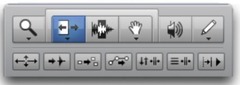
Refer to the image.The currently selected Edit tool is called:
the Grabber tool

Refer to the image.
The currently selected Edit tool is called:
the Selector tool

Which Edit mode should you use if you want to place a clip by specifying a precise numeric location in a dialog box (as shown below)?
Spot
True or False: The only way to completely zoom out and reset both the vertical and horizontal zoom of your session is by double-clicking on the zoom tool button.
True
What tool can select an entire audio clip with one click?
Grabber Tool
Refer to the image.
the button labeled A
trim tool
the button labeled B selector tool
the button labeled C grabber tool

Refer to the image. The combo button labeled A is called the _______ tool.
Smart

Refer to the image.
the button labeled A
wait for note
the button labeled B
metronome
the button labeled C MIDI merge
the button labeled D tempo ruler enable
In what menu will you find access to Click/Countoff options?
Setup
Which Edit mode should you use if you want the clip start to "snap" to Grid boundaries (as shown below)?
Absolute Grid
Which of the following is a type of Ruler available in Pro Tools?
Bars|Beats
Min:Secs
Timecode
Refer to the image. What is the purpose of the Metronome button in the MIDI Controls section of the Transport window?
To turn the click on or off

Which of the following methods can be used to hide a ruler in the Edit window?
Choose View > Rulers > Hide and select a checked ruler
Option-click (Mac) or Alt-Click (Windows) on a ruler name in the Timeline display area
TRUE or FALSE? The Sub Time Scale determines the timebase units used in the Start, End, and Length fields in the Edit window.
False

Refer to the image. What is the indicated selector used for?
Setting the grid value.
Refer to the image. Which Edit mode should you use if you want clips to swap positions on a track when dragged on top of one another, without overlapping?
Shuffle

The Workspace Browser can be used to do which of the following:
Locate and open a session
TRUE or FALSE? The Main Time Scale determines the timebase units used in the Main Counter in the Edit window.
True

Which of the following is NOT a type of ruler?
Comments
TRUE or FALSE:
Pro Tools allows you to add audio tracks to your session after you create the session.
TRUE
TRUE or FALSE:
The "Track Delete" command can be reversed by choosing Edit > Undo.
FALSE
Which of the following is a type of cursor available in the Edit window?
Playback Cursor
Edit cursor
The Workspace Browser can be used to do which of the following:
Locate and open a session
Import audio to a session
Refer to the image.When enabled, the Link Timeline and Edit Selection option (outlined in red) does which of the following:
Links the Playback and Edit cursors

Pro Tools supports recording at bit depths up to:
32-bit floating point
The Dashboard in Pro Tools allows you to:
Open and existing session or create a new one
Pro Tools supports recording at sample rates up to ______ with a compatible audio interface.
192kHz
What actions can be initiated from the Dashboard? Check all that apply!
Create a new blank session on local storage
Create a new blank project, with or without cloud backup
Create a new session or project from a template
Open a session or project from a list of recently opened Pro Tools documents
Open a project that you created or are a collaborator on.
Open a session from a connected storage location on your system
What are some available options for the Session Parameter settings in the Pro Tools Dashboard? Check all that apply!
Audio File Type
Bit Depth
Sample Rate
I/O Settings
What audio file types are NATIVE to Pro Tools? (In other words, what audio file types can you choose as a session parameter when you start a new session?)(Check all that apply!)
.wav
.aiff
What is the default audio file type in Pro Tools on both Mac & Windows systems?
.wav
Under what menu can you find the command that lets you add a track to your session?
Track
Check all of the different types of tracks that are supported in Pro Tools software:
mono audio
stereo audio
MIDI
Auxiliary Input (aux)
Instrument
Video (only one in Pro Tools, additional in |HD)
VCA
Master Fader
Basic Folder
Routing Folder
True or False: The Playback Cursor "Locator" (tiny blue arrow) appears in your main timescale ruler.
True
This "save" command is useful for saving a copy of the current session under a different name or in a different hard drive location. It does not allow for saving a "complete" session that includes audio files - it links to the original session's audio files.
Save as
True or False: You can open a Pro Tools session from the Workspace Browser by double-clicking on it.
True
What feature needs to be engaged to link the Playback & Edit cursors in Pro Tools?
Link Timeline & Edit Selection
What tool can be used to set the playback point by clicking directly on a track, creating an insertion point?
Selector
How can you change a track name in Pro Tools? (There are actually more ways than this, but this is the one they want you to know for the exam.)
Double-click on the track name in the Edit window or Mix window
Which of the following are types of Folder tracks?
A. basic folders
B. Routing folders
Which of the following is a function of the Save As command?
To save a local session document under a different name
Refer to the image. The Rulers area highlighted with a dark overlay is called:
A timeline selection
How can you open a session that you've located with a Workspace browser?
Double-click on the session file displayed in the Workspace browser
To deselect all selected tracks in Pro Tools, hold ________ while clicking on the nameplate of one of the selected tracks.
Option (Mac) or Alt (Windows)
Which is an advantage of a Pro Tools Project compared to a Pro Tools Session?
Projects can use cloud backup to protect your work against loss in the event of drive failure
Projects run faster and use less CPU than Sessions
When you delete an Audio track in Pro Tools, any clips that were on the track will:
Remain in the Clip List