Network+ Lesson 19: Network Attacks
 Call Kai
 Learn
 Practice Test
 Spaced Repetition
 Match
 Flashcards
 Knowt Play
1/30

There's no tags or description
Looks like no tags are added yet.
31 Terms
Malware
Malicious software designed to damage systems or networks
Types: viruses, worms, trojans, ransomware
Also: spyware, keyloggers, logic bombs, rootkits
Virus
Attaches to legitimate software; runs when the host runs
Needs user action to spread (open file, run program)
Types: file infector, macro (documents), boot sector (MBR)
Defense: updated antivirus (signatures + heuristics), regular scans
Worm
Self-replicating malware that spreads on its own
No host program or user action needed
Exploits vulnerabilities in network services
Defense: patching, antimalware, segmentation, firewalls
Also: traffic filtering, disable unneeded services, training
Trojan
Disguised as or hidden inside legitimate software
Tricks users into running it
Defense: patching, antimalware, segmentation, firewalls
Also: traffic filtering, user training
Ransomware
Blocks access or encrypts files until a ransom is paid
Payment usually demanded in cryptocurrency
Direct threat to availability
Spreads via phishing, malicious ads, software vulnerabilities
Key defense: data backups (plus patching, antimalware, training)

Spyware
Secretly gathers data without user knowledge or consent
Logs keystrokes, captures screens, records browsing, accesses files
May activate cameras and microphones
Runs hidden; sends data to a third party
Defense: anti-spyware, patching, secure browsing, training
Rootkit
Provides continued privileged access to a system
Actively hides its presence from admins and users
Installed by an intruder or piggybacks on other software
Defense: anti-rootkit tools, system hardening, patching
Secure boot blocks unauthorized code at startup
Logic Bomb
Malicious code that triggers when conditions are met
Triggers: date/time, program launch, account deletion, command
Does not replicate; dormant until triggered; hard to detect
Often planted by disgruntled insiders
Defense: code reviews, access controls, change management, backups
DDoS (Distributed Denial-of-Service)
Floods a target or its infrastructure with traffic
Disrupts normal traffic to a server, service, or network
Uses many compromised systems, including IoT devices
Compromised systems (often via a trojan) form a botnet

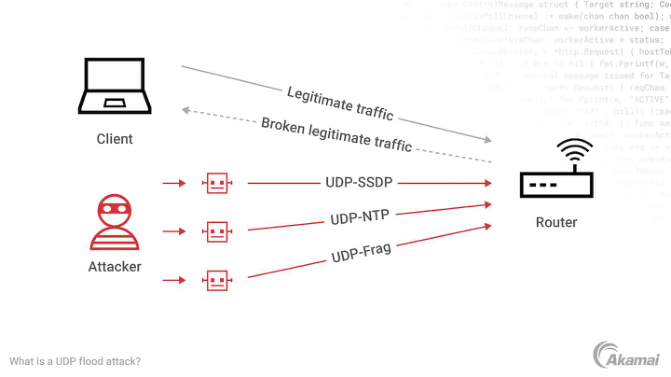
UDP Flood
Overwhelms random ports on the target with UDP packets
Goal: slow down or crash the target
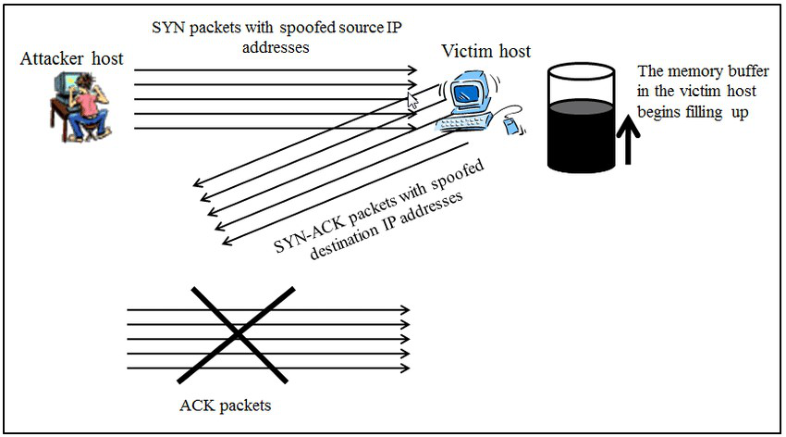
SYN Flood
DoS attack on the TCP three-way handshake
Overwhelms the target so it can't answer legitimate traffic
Amplification and Reflected DDoS
Amplification: abuses protocols (e.g. DNS) to magnify traffic to the target
Reflected: third-party servers are tricked into sending traffic to the victim
IP spoofing is one way to reflect traffic

DDoS Mitigation
Increase bandwidth
Use DDoS protection services
Routers/firewalls with built-in DDoS protection
VLAN Hopping
Sends packets from one VLAN into another
Bypasses Layer 2 security/segmentation
Can expose sensitive systems on other VLANs

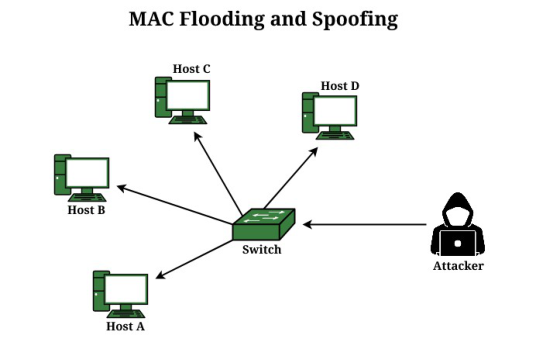
MAC Flooding
Floods a switch with fake MAC addresses
Switch fails open and acts like a hub
Broadcasts all traffic to all ports
Lets attacker intercept data or disrupt the network
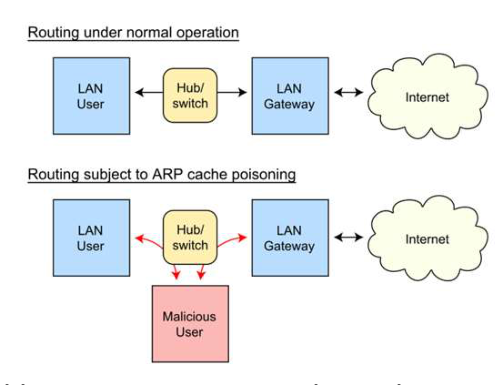
ARP Spoofing and ARP Poisoning
Attacker sends falsified ARP messages on the LAN
Links attacker's MAC to a legitimate host's IP address
Attacker can intercept, modify, or block that host's traffic
Leads to on-path attacks and data breaches
DNS Spoofing (DNS Cache Poisoning)
Corrupts the DNS cache with false information
Redirects users from a real site to a fraudulent one
User doesn't notice; often used for phishing

DNS Amplification and DNS Tunneling
Amplification: DDoS using public DNS servers
Small query generates a much larger response at the target
Tunneling: hides other data inside DNS queries/responses
Tunneling is often used to exfiltrate data
DNS Hijacking
Diverts DNS queries to a malicious DNS server
Leads users to fraudulent sites or intercepts traffic
Done by compromising the DNS server or victim's DNS settings
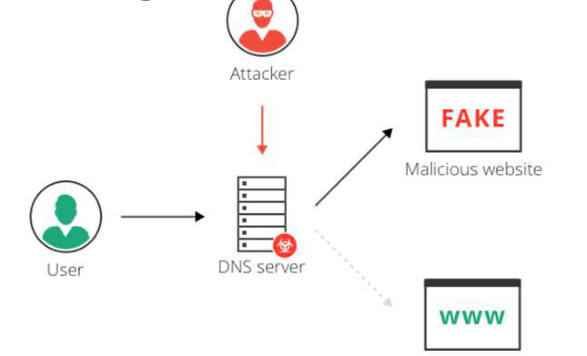
DNS Attack Mitigation
DNSSEC: verifies responses come from the correct source, untampered
Update and patch DNS servers
Monitor DNS traffic for unusual patterns
Rogue Devices and Services
Unauthorized devices connected without permission
Can intercept or manipulate network traffic
Common examples: rogue DHCP servers and rogue APs
Rogue DHCP Server
Unauthorized DHCP server giving out incorrect IP settings
Can route client traffic through the attacker (on-path)
Causes network disruption

Rogue Access Point
Unauthorized Wi-Fi AP installed without admin consent
Allows unauthorized access to network resources and data

Evil Twin
Malicious AP using the same SSID as a legitimate one
Tricks users into connecting
Attacker intercepts transmitted data

On-Path Attack
Attacker sits in the communication path between two parties
Formerly called man-in-the-middle (MitM)
Intercept via compromised equipment, unsecured Wi-Fi, ARP spoofing
Eavesdropping: passively captures credentials and data

On-Path Techniques
Session hijacking: steals session tokens to impersonate the victim
Data manipulation: alters data, injects content, redirects users
SSL stripping: downgrades HTTPS to unencrypted HTTP
Social Engineering
Attacks carried out through human interaction
Tricks people into breaking security procedures
Goal: access to systems, networks, locations, or money
- Defense: user education and email filtering
- Defense: two-factor authentication and incident response
- Finds passwords, personal details, financial records
- Defense: shred documents, wipe devices, locked disposal bins
- Targets PINs at ATMs, passwords, security codes
- Done directly or with technology
- Without the authorized person's knowledge or consent
- Physical security breach