IS390 Book Supplement A
 Call Kai
 Learn
Learn Practice Test
 Spaced Repetition
 Match
Match Flashcards
 Knowt Play
1/24

Earn XP
Description and Tags
Online Chapter A
25 Terms
Systems analysis
the process of understanding and specifying in detail what the information system should accomplish
Includes activities that allow a person to understand, identify, and specify what a system should accomplish to fulfill needs and solve problems.
what is a systems analyst a liason between
Liaison between tech world and business world - sometimes called business analyst
house analogy for systems analyst vs design
ANALOGY: Think of a house!
We need diagrams and plans of how the house will be built! We need to understand what kind of house is being built, what materials we need, what kind of HVAC, which we then use to build out the house!
Requirements and specifications → plan the implementations
“the systems analyst acts like an architect who discovers what the client needs, and the system designer creates the detailed blueprints that developers use to build.”
systems design
the process of specifying in detail how the many components of the information system should be physically implemented
includes activities that allow a person to describe the specifics of how components of the information system will be physically implemented to apply the solution, and actually function.
systems design vs systems analysis in simple terms
System design builds upon the system analysis- analysis considers the “what,” whereas design considers the “how” of implementation when solving a problem.
systems analyst
a business professional who uses analysis and design techniques to solve business problems by using information technology
Example of “Problems to be Solved” (more in slides)
identify the starting problem and 3 levels of development
LEVEL 1 Starts with: Situation: a customer wants to be able to order products at any time of the 24 hours day
LVL1 - Situation: a customer wants to be able to order products at any time of the 24 hours day → the problem is processing these orders 24/7 without increasing selling cost
LVL 2 - So production needs to carefully plan how much of each product to produce a week → the problem is how to estimate this based on dozens of parameters and scenarios
LVL 3 - Suppliers want to minimized inventory holding cost by shipping manufacturing parts in daily smaller batches → the problem is how to order in smaller lots and daily shipments to maximize supplier discounts
example of marketing problem wanting to be solved:
Situation: Marketing wants to better anticipate customer needs by tracking purchasing patterns and buyer trends
Problem: how to collect and analyze customer data to make it useful → very appropriate example for today!
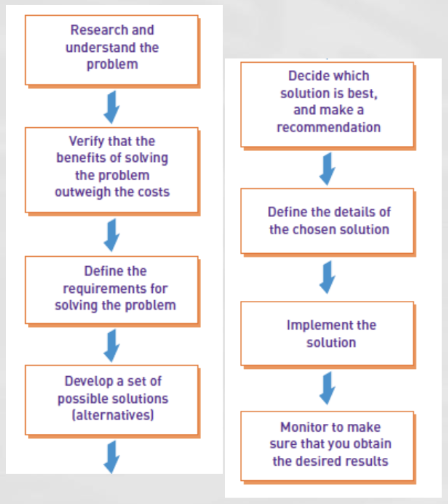
Analyst’s Approach to Problem Solving - 8 steps
A well structured thought process!
1. Research and understand the problem you want to solve
2. Verify the benefit outweighs the cost
Ex. taking a project bc it meets you mission should have value in a non-profit space,
but in for-profit spaces, you need to make sure resources are not in negative post production
3. Define the requirements for solving the problem
4. Develop possible solutions and alternatives
Sometimes you have legal or tech limitations that require alt options
Options are great when presenting to businesses!
5. Decide which solution is best and make a recommendation (based on all the info you have) → narrow down to a set of options
6-8. Define implement and monitor the solution and ensure u have desired results
Important bc you want to know if it worked and can continue! Good to know results for future application too
Systems concepts Vocab
System
Information System
Subsystem
Functional Decomposition
System Boundary
Automation Boundary
System – a collection of interrelated components that function together to achieve some outcome
Information system – a collection of interrelated components that collect, process, store, and provide as output the information needed to complete business tasks
Subsystem – a system that is part of a larger system
Ex. an HR system is the larger major system, but time and attendance is a subsystem within it
Functional decomposition – dividing a system into components based on subsystems that are further divided into smaller subsystems
System boundary – the separation between a system and its environment that inputs and outputs must cross
Automation boundary – the separation between the automated part of a system and the manual part of a system
Information Systems & Subsystems Diagram
CRM is main systems, and the red boxes are the subsystems

System Components Diagram
We interface with the system, so we are also part of the system
Tasks completed by people also count!
Pieces in diagram:
Computer support system
Hardware
Inputs
Outputs
People
Software
Data
Procedures

Systems Concepts Diagram
Automation boundary is what is done by the system!
Ex. transactions are done by system, we just do the input (? check!)
Example of a digram describing what human does vs what computer does (check in textbook too??)^^


Meaning of this diagram
All information systems at some point will rely on a database, weather part of a subsystem or replicated etc
BASLINE, all info systems heart of data is stored in the database!
Database is where all transaction, data processing, and data storage happens
Excel is fine for small instances but is is not enough for an enterprise!
where does transaction, data processing, and data storage happen?
in the Database!
Types of Information Systems
Customer relationship management (CRM) system
Supply chain management (SCM) system
Accounting and financial management (AFM) system
Human resource management (HRM) system
Manufacturing management system
Knowledge management system (KMS)
Collaboration support system (CSS)
Business intelligence system
Enterprise resource planning (ERP)
Customer relationship management (CRM) system – a system that supports marketing, sales, and service operations involving direct and indirect customer interaction
Supply chain management (SCM) system – a system that seamlessly integrates product development, product acquisition, manufacturing, and inventory management
Accounting and financial management (AFM) system – a system that records accounting information needed to produce financial statements and other reports used by investors and creditors
Many diff names for this
FM, Finance, Finance App, etc
Human resource management (HRM) system – a system that supports such employee-related tasks as payroll, benefits, hiring, and training
HRIS, HR, HRM, many diff acronyms
Manufacturing management system – a system that controls internal production processes that turn raw materials into finished goods
Knowledge management system (KMS) – a system that supports the storage of and access to documents from all parts of the organization
Collaboration support system (CSS) – a system that enables geographically distributed personnel to collaborate on projects and tasks
Business intelligence system – a system that supports strategic planning and executive decision making
Enterprise resource planning (ERP) – a process in which an organization commits to using an integrated set of software packages for key information systems

Knowledge and Skills Required of a Systems Analyst
Tools required
Techniques List
Diagram
Tools – a software application that assists developers in creating models or other components required for a project
Techniques –strategies for completing specific system development activities
Project planning techniques
Cost/benefit analysis techniques
Interviewing techniques
Requirements modeling techniques
Architectural design techniques
Network configuration techniques
Database design techniques
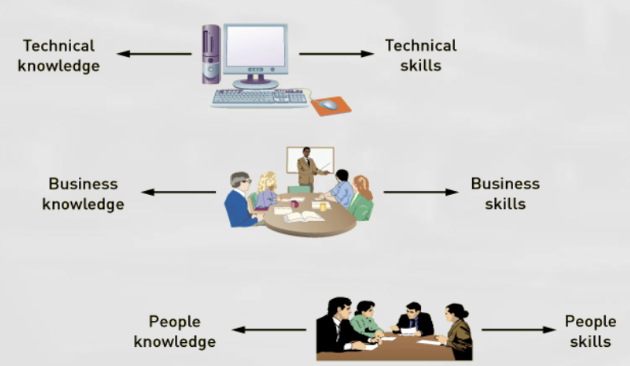
List of Key technical knowledge and skills
Computers and how they work
File, database, and storage hardware and software
Input and output hardware and software
Computer networks and protocols
Programming languages, operating systems, and utilities
Communication and collaboration technology such as digital telephones, videoconferencing, and Web-based document management systems
List of key business knowledge questions/points and skills
What business functions do organizations perform?
How are organizations structured?
How are organizations managed?
What type of work goes on in organizations (finance, manufacturing, marketing, customer service, etc)?
What the specific organization does
What makes it successful
What its strategies and plans are
What its traditions and values are
Pay attention to company culture! Esp if you are global company, you should know where and how they operate, and timezones!
People Knowledge and Skills main points
(summarized from notes section)
Core Reliance: Interpersonal skills are essential because analysts depend on diverse stakeholders to deliver a project from start to finish.
Key Interactions: Analysts must build rapport with resistant users, negotiate resources with management, and lead varied development teams.
Role Flexibility: Analysts must seamlessly adapt between being a mentor, manager, collaborator, and leader throughout the day.
Key Analysis Related Careers
Spaces/industries of these careers
How have software development jobs shifted
new opportunities for analyst careers
a wide variety of skills, organizations, and roles
In-house development, including analysis and design, is especially
common in security-sensitive industries, national defense, and
jobs have shifted to companies that produce and sell ERP and package software
New opportunities:
sales and support of ERP software;
business analysts for user organizations;
auditing, compliance, and security;
Web development
Variety of job titles and pathways
Programmer analyst
Business systems analyst
System liaison
End-user analyst
Business consultant
Systems consultant
Systems support analyst
Systems designer
Software engineer
System architect
Web architect
Webmaster
Web developer
What does a system analyst do, what skills do they need, and who are they
(summarized from notes)
A system’s analysts solves business problems by using IT
System analyst needs broad knowledge of a variety of skills- including tech, business, people knowledge and skills
Systems analysis and design work is done by people with a variety of job titles
What is a system
a collection of interrelated components that function together to achieve some outcome
what are information system components
can be thought of as subsystems that interact or as hardware, software, inputs, outputs, data, people, and procedures
Many diff types of systems solve org problems, including CRM systems, supply chain management systems, HR management systems, manufacturing management systems, accounting and financial management systems