Chapter 2: Data
BINARY NUMBERS
- Any digital data has a numerical representation using binary numbers.
- A bit is the smallest unit of information stored or manipulated on a computer; it consists of either zero or one.
Base Conversion
Binary to Decimal Conversion
- Of course, binary numbers are rarely used in real life.
- Therefore, programmers must be able to go back and forth between the binary numbers we use in computing and the decimal numbers that we use in everyday life.
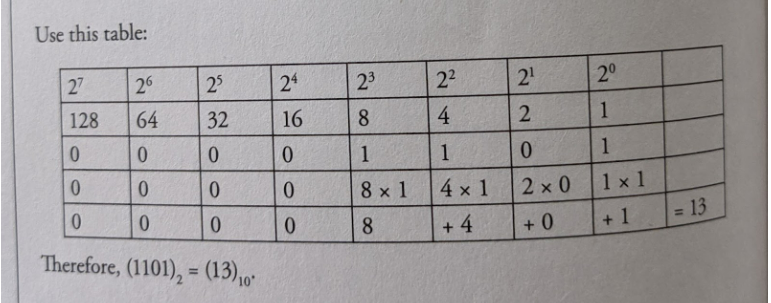
- The key is to remember that the different binary digits represent different powers of 2.
- For example, let's use the binary number 1101.
Decimal to Binary Conversion
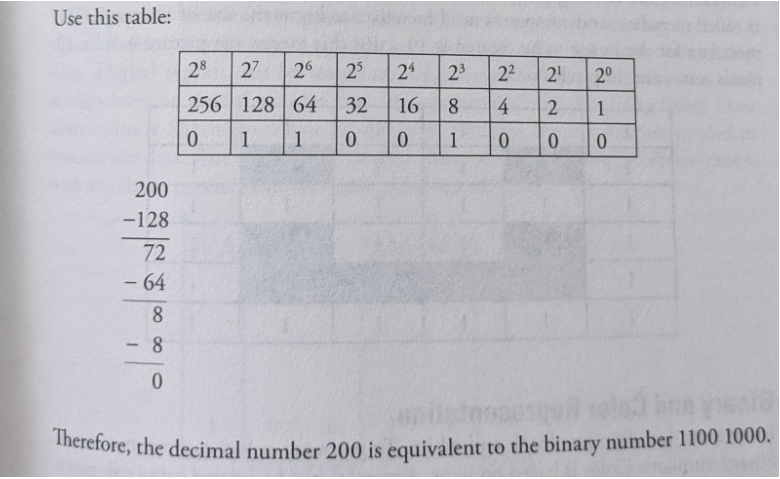
- We need to find the powers of 2 that add up to the given decimal number. Start by finding the largest power of 2 that is less than the number.
- Subtract that number from the original, and repeat until you're down to 0.
- Try the example of the decimal number 200.
Digital Images as Bits
- Images displayed on the screen are converted into binary formats and then processed by a computer displayed on our screen.
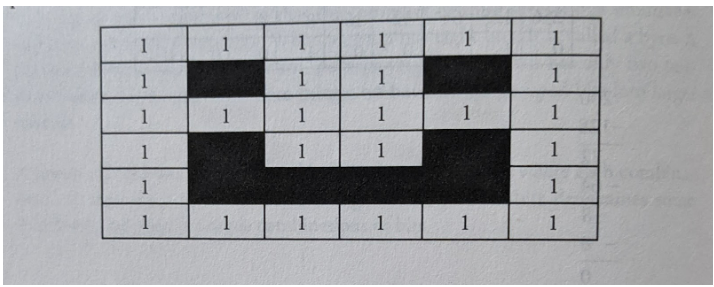
- Digital images: are a collection of pixels. where each pixel consists of binary numbers.
- If we say that one is black (or on) and o is white (or off), then a simple black and white picture can be created using binary Draw a grid and color the squares (1-black and 0-white) to create the picture
- However, before creating the grid, the site of the grid needs to be known.
- This data is called metadata, and computers need metadata to know the size of an image.
- The metadata for the image to be created is 10 x 10; this means the picture will be 10 pixels across and 10 pixels down.
Binary and Color Representation
- Images: are not often just black and white.
- To represent colors computers also use binary numbers.
- Color: is based on light.
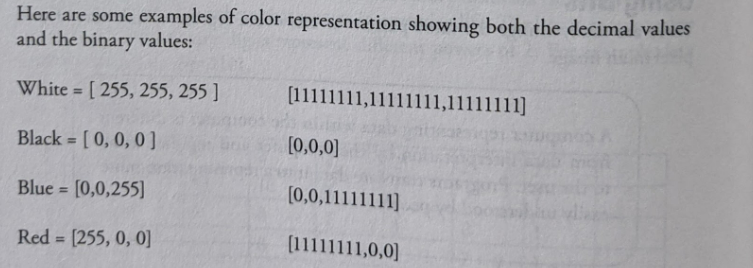
- Any color can be created using red, green and blue light.
- The maximum value for any color in decimal 255, which is repte sented by 11111111 in binary.
- The minimum number is 0.
Music as Bits
- An analog signal exists throughout a continuous interval of time and takes on a continuous range of values.
- A digital signal is a sequence of discrete symbols.
- If these symbols are zeros and ones, we call them hits.
- As such, a digital signal is neither continuous in time nor continuous in its range of values.
- Sampling: is recording an analog signal at regular discrete moments and converting them to a digital signal.
- Digital signals are resilient against noise.
DATA COMPRESSION
- Data compression: is used everywhere.
- Mp3, mp4, rar, zip, jpg, and png files (along with many others) all use compressed data.
- Compression: is also an important consideration when it comes to backing up and archiving your important files, particularly for uploading over the Internet.
- Compression is a two- way process: a compression algorithm can be used to make a data package smaller, but it can also run the other way, to decompress the package into its original form.
- Data compression: is useful in computing to save disk space, or to reduce the bandwidth used when sending data (eg, over the Internet).
- Data compression deals with taking a string of bytes and compressing it down to a smaller set of bytes, whereby it takes either less bandwidth to transmit the string or to store it to disk.
- Lossless algorithms: are those that can reconstruct the original message exactly from the compresed message, and lossy algorithms can only reconstruct an appsimation of the original message.
- Lossless algorithms are typically used for text, and lowy algorithms for images and sound where a little bit of loss in resolution is often undetectable, or at least acceptable.
- Lossless compression: packs data in such a way that the compressed package can be decompressed, and the data can be pulled out exactly the same as it went in.
- Text compression: is another important area for lossless compression.
- It is very important that the reconstruction is identical to the original text, as very small differences can result in statements with very different meanings.
- Lossy compression is a technique that does not decompress digital data back to 100% of the original.
- Lossy methods can provide high degrees of compression and result in smaller compressed files, but some number of the original pixels, sound waves, or video frames are removed forever.
- Lossy is used in an abstract sense, however, and does not mean random lost pixels, but instead means loss of a quantity such as a frequency component, or perhaps loss of noise.
- Images: high image compression loss can be observed in photos when enlarged
- Music: there is a difference between an MP3 music and a high-resolution audio file
- Video: moving frames of video can handle a greater loss of pixels compared to an image
USING PROGRAMS WITH DATA
- The increase in digitization of information, mixed with multiple transactions, has resulted in a flood of data.
- The advancement in technology has promoted the rapid growth of data volume in recent years.
- By analyzing large data sets of data, it is possible to categorize connections from unconnected data sources and find specific patterns.
- Data extraction: is the process of obtaining data from a database or software such as a social media website so that it can transport it to another software (such as spreadsheets) designed to support online analytical processing.
- Data extraction is the first step.
- The next step is to transform (either through filters or programs).
- The final step is to analyze using graphs and other data visualization tools.
Below are the steps to extract data and analyze them:
- Analyze the data sources.
- Data sources are found in different forms like web pages, emails, and chat video files, audio files, text documents, customer messages.
- Know what will be done with the results of the analysis.
- It is vital to understand what sort of outcome is required.
- Is it a trend, effect, cause, quantity, or something else that is needed?
- Decide the tools needed to read the data, and the repositories such as databases needed to store the data.
- Clean the data of whitespace, symbols, duplicates, etc.
- Understand the data patterns and text flow. This should be done using visualization tools.
How to read and analyze graphs
- A graph is a pictorial representation, a diagram used to represent data.
- It usually is used to depict a relationship.
- Graphs and charts: represent data in points, lines, bars, pie charts, and scatter plots.
- Different types of graphs and charts display data in different ways.
- Some are better suited than others for different uses.
- Picture graphs: use pictures to represent values.
- Bar graphs: use either vertical or horizontal bars to represent the values.
- Line graphs: use lines to represent the values.
- Scatter plots: represent the data with points, and then a best-fit line is drawn through some of the points.