Networks and the effects of using them (chapter 4)
Networks
Network Interface Card (NIC)
A NIC is needed to allow a device to connect to a network
NIC converts binary data into electrical signal which allows access to a network
The NIC is usually integrated inton the motherboard on most modern computers.
Each NIC is given a unique hardwired MAC address at the manufacturing stage, this uniquely identifies a device.
WNICs are the same as NICs, they are also used to connect devices to a network, but the use wireless connectivity, using an antenna to communicate with networks via microwaves
Media Access Control (MAC) Address
The MAC address uniquely identifies a device when it is connected to a network
It is made up of 48 bits, shown as 6 groups of hexadecimal digits - the first 6 hex digits are the manufacturers code,and the second group of hex digits are the unique serial number of the device itself. (eg: 00 - 1C - B3 - 4F - 25 - FF)
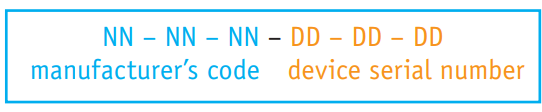
Also known as the physical address as it uniquely identifies a device
MAC addresses are reliable for identifying data senders and receivers on a network, as they never change, making them useful for identifying network faults.
If NIC replaced then the MAC address will also change
Internet Protocol (IP) Addresses
Whenever a computer connects to a network it is given an IP address,which is usually assigned by the ISP
Internet Protocols define the rules agreed upon by senders and receivers of data communicating through the network
An IP address essentially identifies the location of a device on a network
The IP address changes every time you login at different locations.
IPv4: Based on 32 bits, written as 4 groups of eight bits ( eg: 254.25.28.77 )
IPv6: Uses a 128-bit address, written as 8 groups of hex digits
Data Packets
Data is moved around networks in the form of data packets
The data is split into packets for network transmission and ressembled at the destination.
Packet Header contains: 1. Senders and receivers IP address, 2. Sequence number, 3. Packet size, 4. Total number of packets in the message
Router Role: 1) It checks the destination IP address to determine the next step. 2) PAckets pass through multiple routers before reaching their final destination. 3) Headers ensure correct reassemble at the receiving station
Hubs
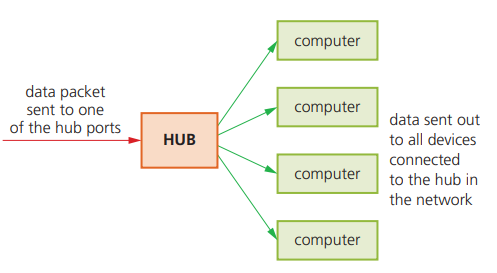
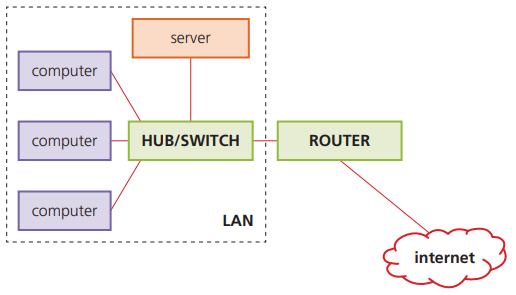
Hubs are hardware devices that can have a number of other devices connected to them
They are used to connect devices to form a LAN
A hub will take a data packet received at one of its ports and broadcast it to every device connected to it, because the data packets are delivered to every device connected - 1) hubs are not very secure as all the devices connected will receive each data packet. 2) There will be unnecessary traffic, which results in reduced bandwidth
Switches
Switches are the ‘intelligent’ versions of hubs
They also connect devices together to form a LAN
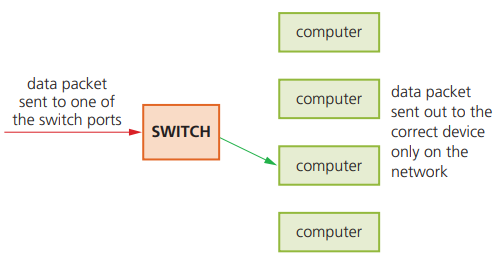
Unlike a hub, a switch stores the MAC address of all devices connected
A switch matches the MAC address of an incoming data packet arriving at one of its ports , and directs it to the correct device
None of the other device will see the this data packet
Bridges
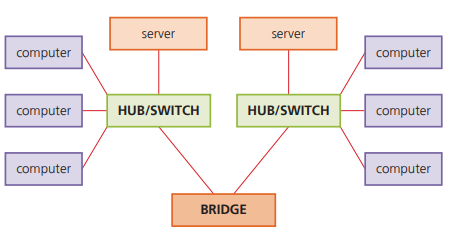
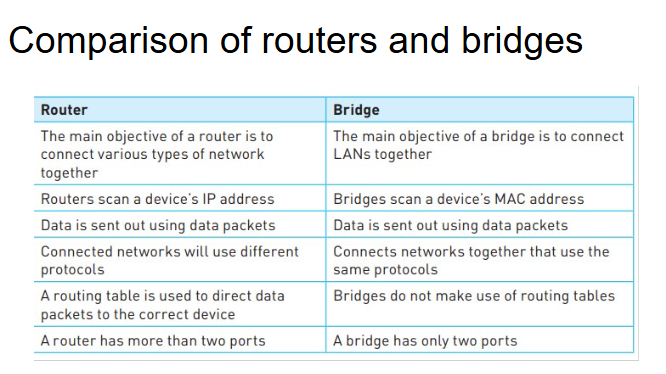
They are devices that connect one LAN to another LAN that uses the same protocol
They are often used to connect different parts of LAN so that they can function as a single LAN
Routers
They are used to route data packets from one network to another network, based on IP addresses
Each router has its own IP address
Routers are used to join a LAN to the internet
Routers know where to send data packets by consulting a routing table (stored on the routers RAM)
The routing table will contain information about the routers immediate network.
Wi-Fi and Bluetooth
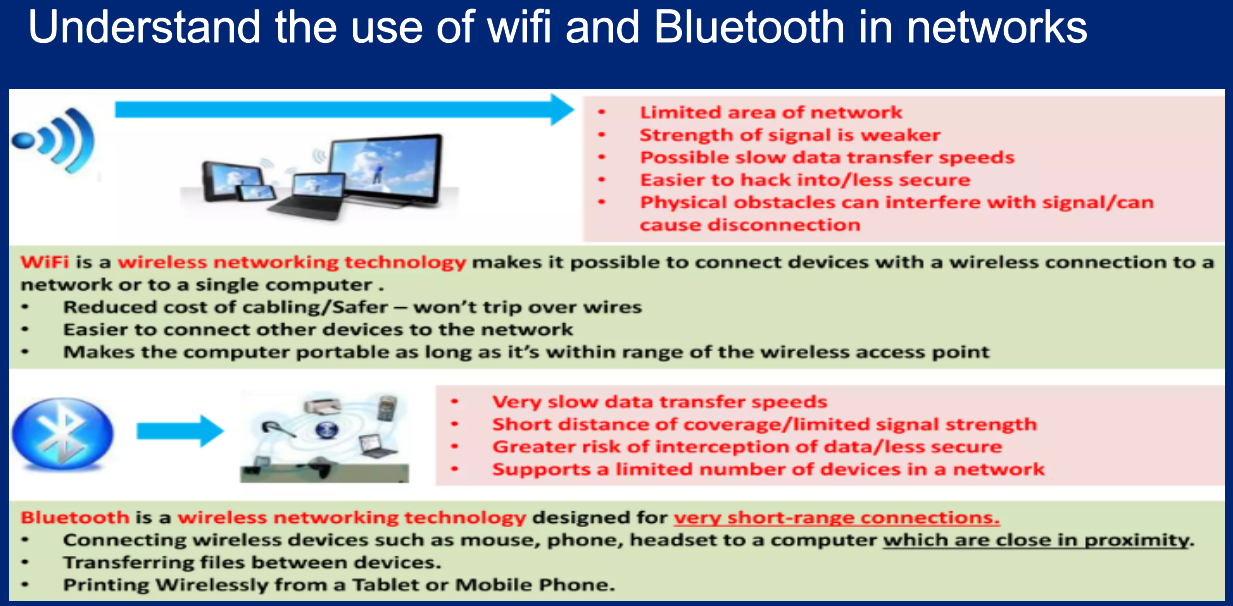
Both Wi-FI and Bluetooth offer wireless communication between devices
Both use electromagnetic radiation as the carrier of data transfer
Bluetooth is useful:
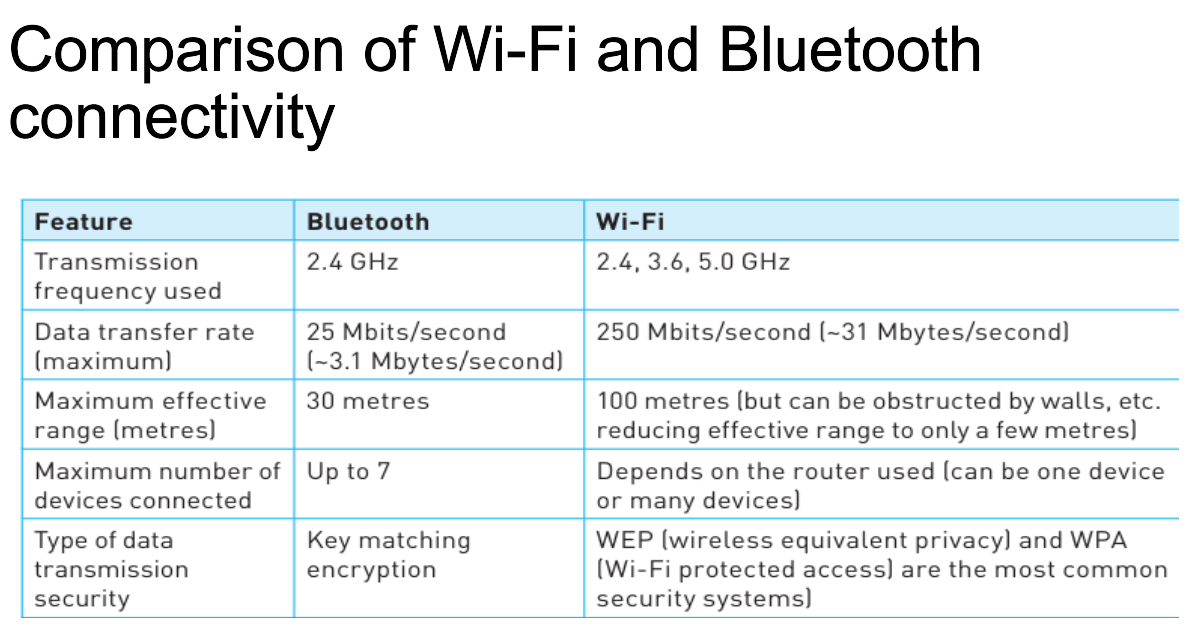
when transferring data between two or more devices which are very close together (less than 30 metres)
when the speed of data transmission is not critical
for low-bandwidth applications (eg: using hardware audios like headsets)
Wi-Fi is best suited to:
operating full scale networks because it offers much faster data transfer rates, better range and better security than bluetooth
Cloud Computing (Storage)
Cloud Storage:
Data is stored on remote servers
Thousands of servers in may different locations
Data Redundacy:
Same data is stored on more than one server in case of maintenance or repair
Allowing clients to access data at any time
Types of Cloud Storage Systems
Public Cloud:
storage environment where the client and cloud storage provider are different companies
Private Cloud:
The client and cloud storage provider are a single organization
Hybrid Cloud:
combination of the two previous environments
some data resides in the private cloud
less-commercial data can be accessed from a public cloud storage provider
Advantages:
files stored in the cloud can be accessed at any time, any device, anywhere in the world
no need for client to carry an external storage device with them
provides the user with remote backup of data
unlimited storage capacity
Disadvantages:
Problems accessing or downloading their data with slow or unstable internet connection
Failure of the cloud storage company is always posssible which poses a risk of loss of all backup
Expansive
Computer Networks
What is a Network? : Networking takes place when two or more computers connect together via wires, satelite, telephone line or through Wi-Fi
Advantages of Networking
Communicate with other network users (eg: email,instant messaging)
Sharing of hard resources such as printers and internet connections
Disadvantages of Networking
Viruses can spread when the computers are connected
Loss of data can also take place
Local Area Network (LAN)
A LAN is a private network within a single building or site
A LAN will consist of a number of computers and devices that are connected to hubs or switches
Advantages:
Sharing of resources
EAsy communication between users
Disadvantages:
Slower access to internet
Spread of viruses throughout the whole network
Wireless Local Area Network (WLAN)
Similar to LANs but no wires or cabels
Provide wireless network communications over fairly short distances using radio or infrared signals
Advantages:
Adding new computers and device is very easy
SInce no cabling, there is safety improvement
Disadvantages:
Data transfer rate is slower compared to LAN
Security is a big issue, since anyone can access the network
Wide Area Network (WAN)
A WAn is a network that extends over a large area
A WAN is created by using several LANs together using a router
Connection technologies like radio link, cables, satellites are used for WAN
Advantages:
Files and data can be shared over a large area
Computers can be connected over a large area accross countries
Disadvantages:
Data transfer rate is slower compared to LAN
Security can be an issue
Netork Issues and Communications
How to protect passwords? :
Run anti-spyware software
Change passwords on regular basis
Passwords should not be easy to crack
Zero login and Biometrics: Allows users to login to computer systems without the need to type in a password
Zero login recognises a user by a number of features based on:
biometrics
behavioral patterns
Biometrics - Fingerprint and Face recognition
Behavioral Patterns - your typing speed, your normal location, how you swipe the screen, how you walk
Adavnatages:
enhanced security
easier and quicker way to login
Magnetic Stripe Cards:
Cards have a magnetic stripe on the revious side
The stripe is read by swiping it through a card reader
Access only allowed if the scanned data matches the data in a data base
How to secure magnetic stripe cards
Holographic image is designed to make the forgery of the card more difficult
Holographic images change color or appear to have a moving object as the image is viewed from different angles
Holographic images are difficult to copy
Photographic image of the card user is printed onto the card surface
Smart Cards
By inserting a tag ( chip and antenna) into a security card,it can act as a smart contactless card
The chip on the smart card can store data like name, security number, sex, date of birth and a PIN
Physical Tokens
Form of authentication in the form of a physical, solid object
They contain internal clocks and when a PIN and other authentication details are entered , then an OTP is generated
Types of Physical Tokens
Disconnected physical token: key in data manually
Connected physical token: No need to key in data manually
Electronic Tokens
Software installed on a users device, like a smartphone
When the website requests the user to authnticate who they are, the user opens the app on their device, the app will gnerate a one time OTP which is valid for less than a minute
Virus (Malware): A computer virus is designed to spread from one computer to another and interfere with other computer operations
Anti-Virus Software
Protects devices against a potential virus attack
Features:
Check softwares before they are run or loaded on a computer
Allows the virus to be automatically deleted
allows the user to make the decision about deletion
Video Conferencing
It is a communication method that uses both video and sound,
It is a substitute for face-to-face conferences
It is carried out in real time and makes use of some form of network
Basic hardware includes:
webcams
large monitors
microphones
speakers
Advantages
Easier to access important documents when people are in their own building
Possible to hold conferences on a short notice
Very convenient, doesnt require travel time and is sustainable
Disadvantages
There is potential lag in responses whne talking
Images can jerk due to poor network
Can be expansive to set it up
Audio Conferencing
Audio conferencing refers to meetings held between people using audio equipment, it can be done over the standard telephone network
Basic Hardware Needed:
a computer
external microphones or speakers
standard phone
internet phone
Using VoIP allows an organiser to create a group of people to ttake part in the conference call
Web Conferencing
Uses the internet to permit conferencing to take place
As with video conferencing, it is also carried out in real time and allows the following types of meetings to take place:
bussiness meeting
online education
presentations
Feautures:
Slide presentations using presentation software can be posted on the conference website in advance
Sharing of live presentations,or other live demonstrations
Draw or write on a whiteboard using their mouse or keyboard