Ch 1 - Systems, Roles, and Development Methodologies
Information
Information fuels business and can be the critical factor in determining the success or failure of a business
Systems Analysis and Design
Used to understand what ppl need to be able to systematically analyze data input and flow, process or transform data, store data, and output information the context of a particular organization or enterprise.
analyze, design, and implement improvements to the computerize IS that support users and functions of business
Users
Emphasis on working with software users; on performing analysis of their business, objective; and communication of planned system
Role of a Systems Analyst
Seek to identify and solve the right problems by performing a analysis of client’s systems
Improvements involve:
support of users’ work tasks
Must be Ethical:
Shouldn’t promise features of software that you may not deliver
Must be Secure:
Must design new systems with an awareness of what you can do to design security into a system from the beginning
Always examine systems you are updating or improving for ways to address vulnerabilities and improve training for security issues
Must be Planned:
Greater satisfaction
Must have EQ:
Be able to work with people of all descriptions and be experience in working with computers
Roles of an Analyst: Consultant
Acting as a systems consultant means you understand the organiztion culture or subcultures
Outside consultant means using systematic methods and IS users to understand culture
Roles of an Analyst: Supporting Expert
Draws on professional expertise concerning computer hardware and software and their uses in the business
Doesn’t manage projects, serves as a resource
Roles of an Analyst: Agent of Change
Must interact with users and management (if they are not one and the same) from the very beginning of your project
Understand what they need to support their work so change can take place
Qualities of a Systems Analyst
Problem Solver
Tackle through application of tools, techniques and experience
Communicator
Relate to people
Coding experience and communicate what is needed
Personal and professional work ethics
Self-disciplined
Systems analysis is a demanding career, but ever-changing
The Systems Development Life Cycle (SDLC)
the salad didn’t look clean
distinctive phases to initiate the software production for client requirements
called predictive life cycle with planned phases unfolding sequentially
Step 1: Identifying problems, Opportunities, and Objectives
An analyst is concern with identifying problems, opportunities and objectives
Opportunities are situations the analyst believes can be improved by using IS
Involved
Users
analysts
systems managers
If problem does not require a computer system, new solution
Brainstorming
Step 2: Determining Human Information
Interviewing, sampling, investigating hard data, observing decision makers’ behavior and office environments
Prototyping
mock up of a product
Human Computer interaction
Involved
Analysts, users, operations managers, operations workers
Understanding the who,what,where, how and why
Step 3: Analyzing System Needs
Analyze system needs
Data flow diagrams (DFD) record input processes, and output of business functions
Structured decisions are those for which the conditions, condition alternatives, actions,, and action rules can be determined
structured English, decision tables, and decision trees
Provides system proposal, cost-benefit analyses of alternatives; and makes recommendations on what should be done
Step 4: Designing the Recommended System
Devise human computer interaction
the interface connects the user with the system and is extremely important
Designed with the help of users to make sure the system is audible, legible, and safe
Ex) keyboard, onscreen menus, and graphical user interfaces (GUIs)
Design databases that will store data needed by decision makers in the org
Example:
Macs
Better security
Intelligent backup using the built-in Time Machine
The multitude of applications already included
Reliability of setup and networking
Ability to sync Macs with other Macs and iPhones
Design itself
Step 5: Developing and Documenting Software
Analyst works with users to develop effective documentation for software, including procedure manuals, online help, and websites featuring frequently asked questions or Read Me files shipped with new software
Users are involved from the beginning, documentation should address the questions they have raised and solved jointly with the analyst
Documentation
Tells users how to use software and what to do if software problems occur
Coders design, code, and remove syntactical errors from computer program.
Code walkthrough, explaining complex portions of the software to the team
Step 6: Testing and Maintaining the System
Test plan created
Maintenance of the system and its documentation begin in this phase
Maintenance must be kept to a minimum
Step 7:Implementing and Evaluating the System
Train users, plan for smooth conversion, convert files to new ones, installing equipment, and bringing the new system into production
Evaluation included but takes place in every part
Analyst job is cyclical, so must solve a problem forcing them to return to the previous phase
The Impact of Maintenance
Time spent on maintenance is 48% to 60% of the total time spent developing systems. It is ongoing
1) Corrects software errors (bugs must be corrected)
2) Enhance software’s capabilities in response to changing organizational needs, generally involving one of the following three situations
Users request additional features after they become familiar eith the computer system
Business changes over time
Hardware and software are changing at an accelerated pace
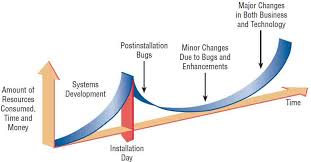
Figure 1.2 show resources (time and money) spent on system development and maintenance
Cost of maintenance more than cost of creating an entirely new information systems
Using CASE Tools
Computer-aided software engineering (CASE)
Created to improve routine work using automated support
Increases productivity, communicate more effectively with users, and integrate the work that they do on the system form the beginning to the end of the life cycle
Info recorded in CASE repository
Helps make analysis reports
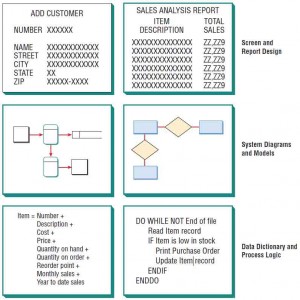
The Repository Concept
Examples; Visible Analyst (CASE tool w/ repository and other features), Microsoft Visio (software), OmniGraffle (software) allow users to draw and modify diagram easily
Benefits
CASE helps communicate during brainstorm
Data flow
Request corrections
Make changes
Model of requirements
Draw boundaries for a project
Visualize how the project meshes with other parts of the orgs
The Agile Approach
A software development method based on values, principles, and core practices
Communication
Simplicity
Feedback
courage
^ Important values to have for SA’s
Interactive
Incremental
Scrum
Sprint cycle lasts between two and four weeks
Development team is expected to produce a potentially releasable product
Applications or websites are constantly changing
Each iteration boasts a new set of features produced during the spring cycle
Five Stages of Agile Approach
Exploration
Planning
Iterations to the first release
Productionizing
Maintenance
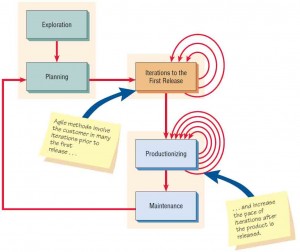
The five stages of the agile modeling development process show that frequent iterations are essential for successful system development
Exploration
Explore environment, assert conviction, assemble team, asses member skills
Duration: a few weeks to a few months
Tasks
Examine tech to build new system
Estimate time needed for a variety of tasks
Goal:
Get customer to refine a story enough to estimate time to build solution into the system you are planning
Planning
Establish plan to deliver solution (two months to half a year)
Duration: Short
Planning Game (kent beck)
team of dev and stakeholders discuss and prioritize user stories for the next development iteration, estimating effort, and deciding which stories to focus based on their value to the project
Time, expense, and uncertainty
Goal: Limit uncertainty
Simple solution, feedback, and adapt design
Story cards: task, notes, and provide an area for task tracking
Iterations to the First Release
Cycles of testing, feedback and change
Duration: three weeks in duration
Goal
Run customer written function tests at the end of each iteration
Question whether the schedule needs to be altered or whether you are tackling too many stories
Celebrate progress
Productionizing
Software revision turn around in one week
Duration: One week
Goal
Daily briefings
Product released, but may be improved
Celebrate occasion
Maintenance
Kept running smoothly
Goal
Add features, consider customer suggestions, and team members rotated on or off the team
Object-Oriented Systems Analysis and Design
Object-Oriented Similarities to SDLC
Dev of systems that must change rapidly in response to dynamic business environ
Complicated IS undergoing maintenance, adaptation and redesigd
Unified Modeling Language
Used to break down a system into a use case model
Difference:
Examines objects that are part of the system
customers, items, oprders, and so on
Object Oriented Similarities to SDLC
SDLC and O-O more slower than agile
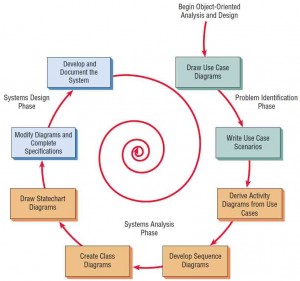
The Steps In The UML Development Process
Define the Use Case Model
Identifies actors and major events initiated by the actors
Draw diagrams called Use Case Diagram to show flow of events
Write up case scenario in words the steps that are normally performed
During the Systems Analysis Phase, Begin Drawing UML Diagrams
Draws activity diagrams of all major activities
Creates one or more sequence diagrams for each use case that show the sequence of activities and their timing
Continuing in the Analysis Phase, Develop Class Diagrams
Nouns in use cases are objects that potentially can be grouped into classe
Example:
Every automobile is an object that shares characteristics with other automobiles (class)
Still in the Analysis Phase, Draw Statechart
Class diagrams used to draw state-chart diagrams
Statechart diagrams helpful in modifying class diagrams, so iterative process of UML modeling continues
Begin Systems Design by Modifying the UML Diagrams, then Complete the Specifications
Modify existing system (diagrams)
Derive classes, their attributes, and methods
Class specifications for each class
Develop method specifications that detail the input and output requirements for each method, along with a detailed description of the internal processing of the method
Develop and Document the System
More complete documentation and UML diagrams, faster development
Spiral Model (Often focus on small, quick iterations of development)
Small part of the system, high-priority item or item that has greatest risk
Design and implementation
Repeated w/ analysis of the next part, design, and some implementation
Repeated until project is complete
Cloud Development Life Cycle
Cloud Computing
Organizations and individuals users can use web services, database services, and application services over th internet without hardware, software, or software tools
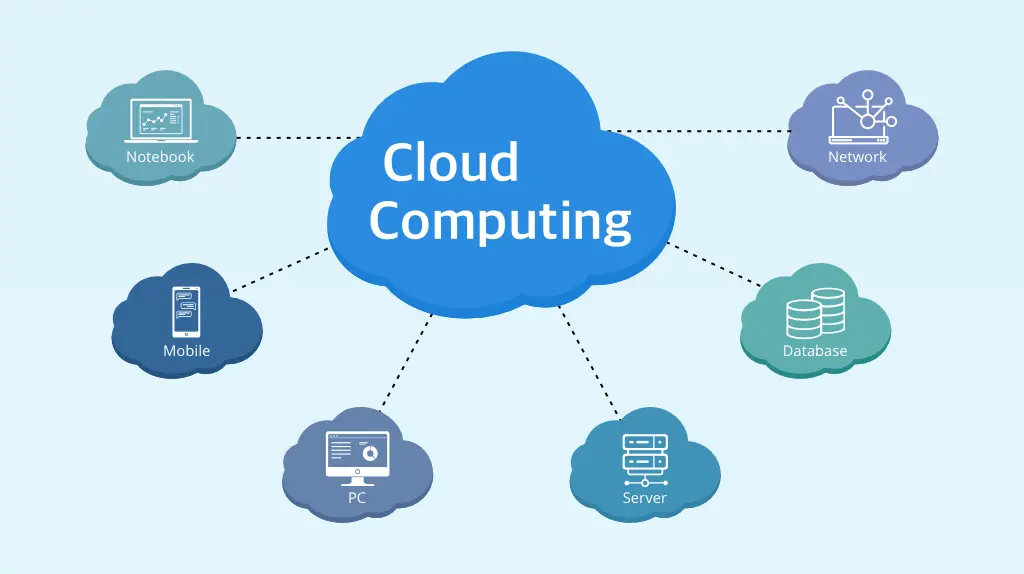
Cloud computing offers many services
Web browsers used to access applicatons
Scalable to suit growing (or changing) demand by users. The model of Software as a Service (SaaS) is included in the concept of cloud computing
Not necessary to have IT infrastructure, enables small companies with smaller and less predictable budgets to make advances in processing more quickly
disaster revoery, lower cost, and increased flexibility
Google apps, AWS, Akami, CRM software
Cloud Computing Trade-Offs
Security and privacy
(improved staff training, making security of cloud computing a strategic priority, and so on)
SA must evaluate and compare cloud providers can be valuable to your client
Public cloud
external cloud
less critical data
Private cloud
Internal one
data control
Factors in Choosing a Cloud Provider
If a client of the cloud services provider is hacked, how will it adversely affect other businesses the cloud providers is hosting?
How can your client be srue data are completely deleted from cloud systems when these systems are eventually decommissioned?
Are the data architectures being used by the cloud providers over cost or security concerns, it would be realistic to do so?
Are there too many nonstandard practices and property programming structures in use, making transferring data out of the question?
How can your client be certain that no one at the cloud provider or their staff working for other clients has access to your organizaton’’s data?
ERP Systems and the Cloud
Enterprise Resource Planning Systems
Integrated management of main business proceses often in real time and mediated by software and technology
No need to purchase new IT , new versions and upgrades of ERP software are maintained and installed by the ERP cloud vendor and switching to other modules may be less cumbersome
Workday
Addresses costs, soolution to IT business problems and variable level of service
NetSuite
account software, real-time invetory management, CRM software, ecommerce, and real time global business management to small and medium enterprise
Implementing CDLC
Five essential Characteristics
One demand self service
Broad network access
Resource pooling
Rapid elasticity
Measured service
Three service models include:
Software as a Service (Saas)
Platform as a Service (Paas)
Infrastructure as a Service (laas)
Four Deployment Models
Private Cloud
Community cloud
Public Cloud
Hybrid Cloud
CDLC
Predicative life cycle
Phases
1. Data gathering
Devleopment
Launch
Continuing operations
Optimization
Improvement
Inexpensive testing (pentesting)
Collaboartion with the development ecosystem permits the developers access to data and a lower amount of time invested for other tasks such as a diverse range of sytem tests
Faster approach than traditional SDLC
Integration with cloud services (AWS) give businesses the potential to scale up acrosst he organization rapidly
SDLC
Does not offer penetration testing only after installation
5 Strategic Considerations in Implementing Cloud-Based Systems
Save money on premises data centers, maintenance and support personal = use cloud based systems
Start small and build your cloud endeavors gradually so that they can be expanded later
Choose multiple cloud providers in order to avoid getting stuck with one vendor
Monitor changes closely. Visibility of applications and data from multiple systems
Develop an integration strategy
Choosing Which Systems Development Method to Use
Understand org first
Budget time and resources and develop a project proposal
Interview org members and gather detailed data using questionnares and sample data from existing reports
Observe how business is currently trasnsacted
Similarties
SDLC and OOAs both require extensive planning and diagramming
Agile approach and OOA both allow subsystems to be built one at t ime untilt he entire system is complete
Agile, SDLC, CLDC all concerned with the way data logicall moves through the system
THE SDLC APPROACH
systems have been developed and documented using SDLC
it is important to document each step of the way
upper-level management feels more comfortable or safe using SDLC
there are adequate resources and time to complete the full SDLC
AGILE METHOD
There is project champion of agile methods in the org
application need to be developed quickly in response to a dynamic environment
a rescue takes place (the system failed and there is no time to figure out “what went wrong)
the customer is satisfied with incremental improvements
executives and analysts agree with the principles of agile metho
OBJECT ORIENTED METHOD
the problems modeled lend themselves to classes
an org supports the UML learning
systems can be added gradually, one subsystem at atime
reuse of previously written software is a possibility
it is acceptable to tackle the difficult problem first
THE CDLC APPROACH
the justification for the systems project is to save money usually spent for on premises data centers
the project cans tart small and build
multiple cloud providers can be used
changes created by the cloud can be monitored for visibility of apps and data from multiple systems
an integration strategy can be developed to capitalize on new synergies
Developing Open Source Software
Users and coders can study, share, and modify the code or computer instructions
The Open Source Movement
Open Source Communities
Ad hoc
Standardized
Organized
Commercial
General structure
environment
Goals
methods
User community
licensing
The Third Design Space
Make a new design environment happen
Collab result in new, shared software, and innovative software development processes
Benefits of Corporate participation in Open Source Software Development
Rational
Save money
Perform less maintenace
Contribute within limits
Reducing long-term costs
Increase marketing benefits
Making the first move
Emotional
Accepting responsibility
Improving shared software
Gaining community influence
Relinquishing the gatekeeper role
Improving developers skills
Extending the life of projects
Licensing and Compliance
Product of community consensus, so diff communities use diff licenses
Be compliant with license
Experience with open source a skill to add to resume
The Role of the Analyst in Open Source Software
Shotage of open source developers and huge demand
Linux kernal
Mozilla Firefox
Android
Apache
Responsive design
While you are participating in the open source community, you are at the same time employed by an org that wants to leverage your participation in the open soruce community to incorprote OSS designs
Summary
adaptive lifecyle
agent of change
agile approach
bespoke software
cloud computing
computer-assisted software engineering (CASE)
enterprise resource planning (ERP) system
exploration phase
human–computer interaction
iterations to the first release phase
Linux kernel
maintenance phase
object-oriented systems analysis and design
open source communities
open source software (OSS)
planning game
planning phase
predictive lifecycle
private cloud
productionizing phase
prototyping
public cloud
Scrum
security
stakeholder
systems analysis and design
systems analyst
systems consultant
systems development life cycle (SDLC)
Third Design Space
unified modeling language (UML)
Review Questions