Cloud Service Models: IaaS, PaaS, SaaS
Cloud Service Models
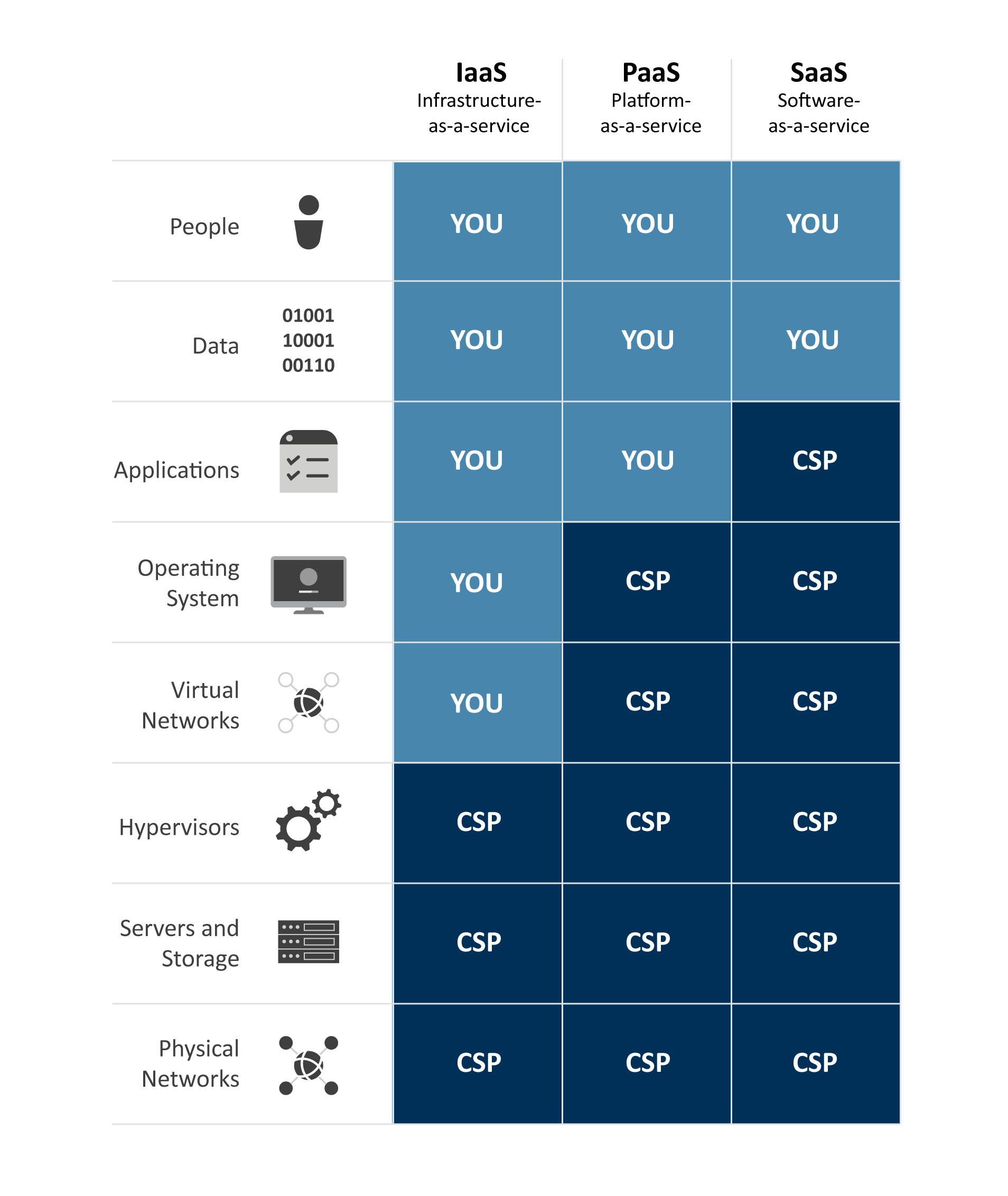
Table. Comparison of cloud service models.
Table Description
There are three primary service models within cloud computing: infrastructure as a service (IaaS), platform as a service (PaaS), and software as a service (SaaS). However, the industry also includes the catch-all term X as a service (XaaS), where X could be nearly anything from security, accounting, hardware, etc. This structure is based on the shared responsibility model. Each of these models is a classification of responsibilities. This means that in each model, the consumer and the provider are responsible for different aspects of the service offering; however, note that in all cases, the customer remains responsible for, and the owner of, the data.
IaaS
You will start by learning about IaaS because it bears the closest resemblance to a corporate data center. First, you must understand the word infrastructure. In this context, infrastructure refers to the physical servers, storage, and networking that is required to exist before you can create any virtual servers or install any applications. This underlying infrastructure is maintained by the cloud provider so that you may focus your attention on the virtual machines and your applications. The cornerstones of the IaaS offering are server virtualization, storage virtualization, and network virtualization. Infrastructure as a service is very customizable, but it also means you are responsible for managing more things, such as the virtual machine configuration, its operating system, and all the patches that it requires.
With regard to server virtualization, the cloud provider manages the hypervisor and the underlying hardware. You, as the consumer, are given access to a web portal, which enables you to create virtual machines and customize their resources to fit your business and application needs. The cloud provider allows you to choose the number of CPUs, the amount of RAM, the amount of storage, and even the number of network cards in the VM.
Storage virtualization helps cloud providers offer you storage solutions that can expand in size or change in performance based on your business needs. When creating your VMs, you may be given the choice to provision regular storage at the normal price or very fast storage at a premium price. Your selection will depend on your application's requirements.
Network virtualization gives cloud providers the ability to create virtual private cloud (VPC) networks for each of their customers, keeping each VPC network isolated from the others. As a consumer, you may even create additional networks to isolate your virtual machines for testing or development purposes. Your VMs will use the VPC network to communicate with each other just like the physical computers in your data center use your internal network to communicate with each other. The VPC network may also have routers and firewalls that allow your VMs access to the internet or to other data centers around the world.
Server virtualization continues to play an important role in cloud computing, both for private clouds hosted within corporate data centers and for public clouds such as Google, Microsoft, and Amazon. Not only are virtual servers the flagship product offering in the infrastructure as a service (IaaS) cloud service model, virtual servers are also used by cloud providers behind the scenes to deliver their customer-facing platform as a service (PaaS) and software as a service (SaaS) products.
A word of caution is warranted here. The cloud provider typically has little to no interaction with your virtual machines, leaving you with the responsibility to protect them from disaster (via replication) and data loss (via regular backups). In the event that one of the cloud provider's physical servers were to fail, the cloud provider is responsible for repairing their equipment; however, depending on your support agreement with the cloud provider, they may or may not be financially liable to you for the outage or responsible for restarting your virtual server following the outage.
Also, keep in mind that in most legal jurisdictions, the cloud provider is not obligated to automatically back up your data, keep archive copies of your data, or even move your data to another location without your express consent and direction. This is not much different than deploying a VM in your own home lab environment. It is not automatically backed up or replicated to another location. If you suffer a hardware failure, you lose the VM. The principle advantages of IaaS solutions are that you can customize the infrastructure to suit your needs, install nearly any application in your VMs, and, if desired, implement high availability and backups for your solution. When deploying a production application to the cloud, build redundancy and disaster recovery into your design by deploying at least two of everything: one instance in a nearby data center for production use, and one instance in a geographically distant data center for safekeeping.
PaaS
If you just need a platform on which to deploy your application or you simply need a database without the hassle of managing the server, PaaS makes this easy. In PaaS solutions, the cloud provider is responsible for the virtual servers and, in some cases, the services that run on top of them, such as a database engine, and provides you with a platform on which you can run your code or store your data.
You may have seen or heard about PaaS services in the past and yet not realized it because cloud providers rarely label their services as IaaS, PaaS, or SaaS. One example of a PaaS offering is basic web hosting, a service that has been around since the dawn of the web. Web hosting, like all PaaS offerings, is a partially managed service. The provider gives you limited control over a web server that they maintain for you. You have the ability to log in and upload your code, but they maintain the server for you, including the virtual hardware, guest OS, web services, and the patching for the OS and web services.
PaaS solutions are particularly attractive for application developers because it allows them to deploy their code to an application runtime environment, such as Java, .NET, or Node.js, that is backed by an ambiguous pool of compute resources. That may sound magical, but the cloud provider's goal is to abstract the details of the resource consumption away from the application code and allow the application to scale up and down based on its load, such as the number of people using the application, or the amount of data the application is processing.
A branch of PaaS solutions designed to further simplify the deployment of application code has gained so much popularity that it has been given its own name: serverless computing. The term serverless is not intended to imply that there are no servers, but rather that the consumer of the service (the developer in this case) typically is not even made aware of the number of servers being used in the back end to run the application. These solutions are also gaining in popularity because they can quickly deploy and then scale new applications with minimal effort required by the IT operations team, thereby increasing the reaction time of IT to changing business needs.
SaaS
SaaS solutions, like PaaS solutions, are often overlooked because they are so ubiquitous. The term software in SaaS could represent nearly anything you consume over the internet. A few examples include social media (Facebook), word processing (Office 365), and a line of business applications (Salesforce). Even now, you are using an SaaS solution to view this course and read this text. Software as a service allows consumers to store and potentially publish information without the need to manage the underlying applications or infrastructure.