cfap finals reviewer (FINAL)
LESSON 4 – INTRODUCTION TO
PROGRAMMING
Lessons |
|---|
• What is Programming? |
• Debugging |
• Formal and Natural Languages |
What is Programming? |
|---|
The way of the program
• Computers can only execute programs
written in low-level languages; thus, programs written in a high-level language
have to be processed before they can run
• Two kinds of programs process high-level
languages into low-level languages:
- Interpreters – read a high level program and executes it
- Compilers – read the program and translates in completely before the program starts running
—--------------THE INTERPRETER—----------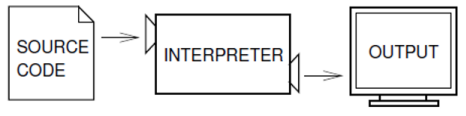
• Processes the program a little at a time, alternately reading lines and performing computations
• Does what the program says
—-------------THE COMPILER—----------------
• The high-level program is called the
source code and the translated program is called the object code or the executable
• Once a program is compiled, you can
execute it repeatedly without further translation
—The Python Programming Language—
• An example of a high-level language
• Emphasizes code readability
• Supports multiple programming paradigms
• Its syntax allows programmers to express
concepts in fewer lines of code
•Considered an interpreted language because Python programs are executed by an interpreter
• Two ways to use the interpreter:
– Command-line mode
– Script mode
—--------Python: Command-line—-----------
• You type Python programs and the interpreter prints the result:
• In the above figure, the first line is the command that starts the Python interpreter.
• The next two lines are messages from the interpreter
• The third line starts with >>> which is the prompt the interpreter uses to indicate that it is ready
• We type print 1 + 1 and the interpreter replied 2
—----------------Python: script —--------------
• Alternatively, you can write a program in a 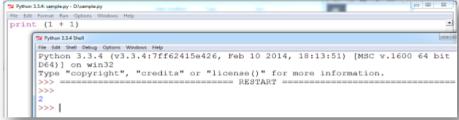 file and use the interpreter to execute the contents of the file called script
• To execute the program, we have to tell the interpreter the name of the script by opening it
• The process of executing programs may differ in various development environments
—-------------What is a program?-------------
• A sequence of instructions that specifies how to perform a computation
• The computation might be something mathematical but it can also be a symbolic computation
• The details look different in different languages but a few basic instructions appear in just every language:
– Input: Get data from the keyboard, a file or other device
– Output: Display data on the screen or send data to a file
– Math: Perform basic math operations like addition
– Conditional Execution: check for certain conditions and execute the appropriate sequence of statements
– Repetition: Perform some action repeatedly
What is a program?
• Programming is the process of breaking a large, complex task into smaller and smaller subtasks until the subtasks are simple enough to be performed with one of these basic instructions
DEBUGGING |
|---|
What is debugging?
• Programming is a complex process and
because it is done by human beings, it often
leads to errors
• Programming errors are called bugs
• The process of tracking down bugs and
correcting them is called debugging
• Three kinds of errors can occur in a program:
- Syntax errors
- Runtime errors
- Semantic errors
—-------------SYNTAX ERRORS----------------
• Python can only execute a program if the program is syntactically correct; otherwise, the process fails and returns an error message
• Syntax refers to the structure of a program and the rules about that structure
• For example, in English, a sentence must begin with a capital letter and end with a period. This sentence contains a syntax error
• If there is a single syntax error anywhere in your program, Python will print an error message and quit and you will not be able to run your program
—------------RUNTIME ERRORS—-------------
• Errors that does not appear until you run
the program
• Also called exceptions because they
usually indicate that something exceptional (and bad) has happened
—----------SEMANTIC ERRORS—-------------
• If there is a semantic error in your
program, it will run successfully (will not
generate any error message) but it will not do the right thing
• The problem is that the program you wrote is NOT the program you wanted to write
—----------Experimental Debugging—-------
• One of the most important skills you will acquire in programming is debugging
• Debugging is one of the most intellectually rich, challenging and interesting parts of programming, like a detective work
• Debugging is also like an experimental science: once you have an idea what is going wrong, you modify your program and try again
• Programming is the process of gradually debugging a program until it does what you want
Formal and Natural Languages |
|---|
• Natural languages are the languages that people speak such as English, Spanish and French
• Not designed by people, but evolved naturally
• Formal languages are languages that are
designed by people for specific applications like the notation that mathematicians use
• Chemists also use a formal language to represent the chemical structure of molecules
• Programming languages are formal languages that have been designed to express computations
—-------------Formal Languages—------------
• Have strict rules about syntax
• Syntax rules come in two flavors: tokens and structure
• Tokens – basic elements of the languages such as words, numbers and chemical elements
• Structure – the way the tokens are arranged
• When you read a sentence in English or a
statement in formal language, you have to
figure out what the structure of the sentence is – the process is called parsing
—-------Formal vs. Natural Language-------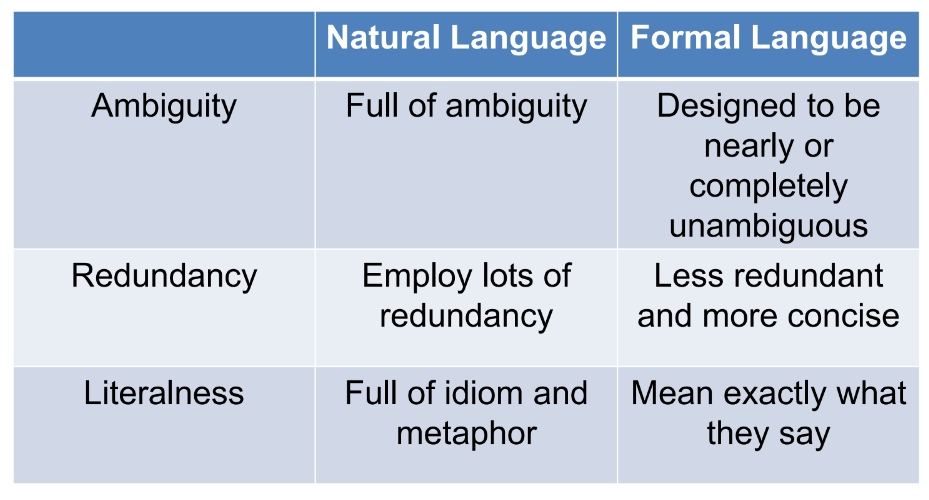
DEFINITION OF TERMS
Lesson 4
Bugs
- Programming errors
Command-in line mode
- Python's command-line mode allows you to enter and execute Python code directly within the terminal or command prompt, line by line, without the need for separate scripts or files.
Compilers
- Programs that translate high-level programs into low-level languages before execution.
Debugging
- The process of identifying and fixing errors or bugs in a program.
Formal language
- are languages that are designed by people for specific applications
Interpreters
- Programs that read and execute high-level programs line by line.
Natural language
- Languages that people speak (english, spanish, etc.)
Object code/ executable
- The translated program that can be executed by a computer.
Parsing
- analyzing code or data to understand its structure and meaning according to the syntax rules of a particular programming language or format.
Programming
- Process of creating set of instructions for a computer to execute
Runtime Errors
- Errors that does not appear until you run the program and are also called exceptions since they usually indicate that something exceptional (bad) has happened
Script
- a set of instructions or commands written in a programming language that tells a computer what to do step by step.
Script mode
- Writing Python code in a file and executing it using the interpreter.
Semantic Errors
- the program you wrote is NOT the program you wanted to write (produces a different outcome)
Source code
- Original high-level program written by programmer
Structure
- the way the tokens are arranged
Syntax
- structure of a program and the rules about that structure
Syntax Errors
- when the code violates the rules or structure of the programming language, making it unable to be interpreted or executed by the computer.
Tokens
- Basic elements
- the smallest individual units or building blocks of a program, such as keywords, identifiers, operators, punctuation marks, and constants, which are recognized by the language's compiler or interpreter.
LESSON 5 – VARIABLES, EXPRESSIONS AND STATEMENTS
The First Program |
|---|
• The first program written in a new language is called “Hello, World!”
• Sample print statement:
print (“Hello, World!”)
• The quotation marks in the program mark the beginning and the end of the value; they don’t appear the result
Values and Types |
|---|
• A value is one of the fundamental things - like a letter or a number - that a program manipulates
• Example:
2 is an integer
“Hello, World!” is a string
• If not sure what type a value has, the interpreter can tell you:
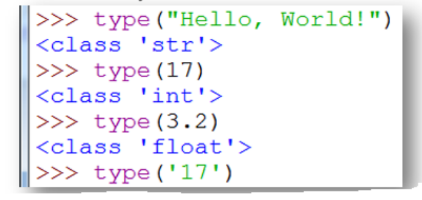
• What about values like ‘17’ and ‘3.2’ ? They look like numbers but they are in quotation marks like strings
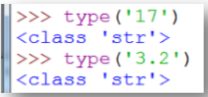
• Python interprets numbers with commas as a comma-separated list of integers, which it prints consecutively. This is not a legal integer in python but is is a legal expression:

Variables |
|---|
• One of the most powerful features of a programming language is the ability to manipulate variables
• A variable is a name that refers to a value
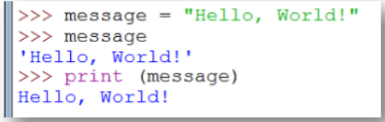
• The assignment statement creates new variables and gives them values:
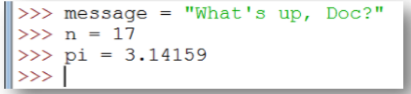
• Single quotes and double quotes do the same thing, but if the string contains a single quote, you have to use double quotes to enclose it
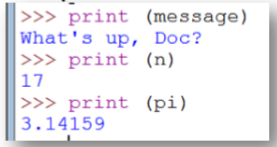
• The print statement also works with variables:
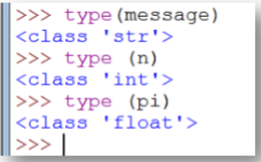
• Variables also have types; again, we ask the interpreter what they are:
Variables and Keywords |
|---|
• Programmers generally choose names for their variables that are meaningful - they document what the variable is used for
• Python, like most PLs, are case sensitive so the variables Bruce and bruce are two different variables
• The underscore character (_) can appear in a name and used in names with multiple words such as my_name or price_of_tea_in_ china
• If you give a variable an illegal name, you get a syntax error:
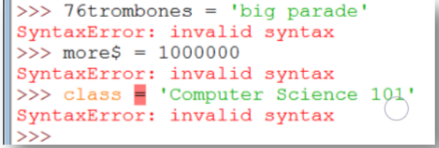
• 76 trombones is illegal because it does not begin with a letter
• more$ is illegal because it contains an illegal character, $
• class is a Python keyword which can’t be used as a variable name
• Keywords define the language’s rules and structure, and they cannot be used as variable names
• Python has 29 keywords: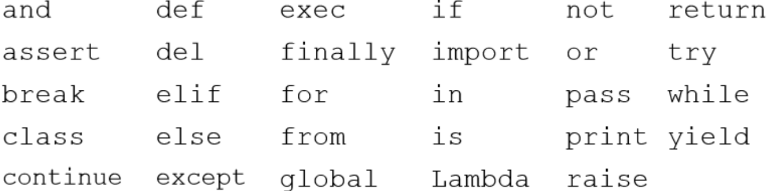
Statements
Statements |
|---|
• A statement is an instruction that the Python interpreter can execute
• So far, we have seen two kinds of statements: print and assignment
• When you type a statement on the command line, Python executes it and displays the result
• The result of a print statement is a value
• Assignment statements don’t produce result
• A script usually contains a sequence of statements. If there is more than one statement, the results appear one at a time as the statements execute
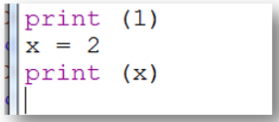
• produces output:
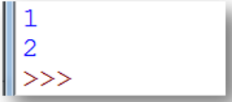
• again, the assignment statement produces no output
Evaluating Expressions |
|---|
• An expression is a combination of values, variables and operators. If you type an expression on the command line, the interpreter evaluates it and displays the result:
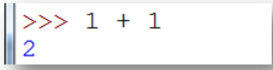
• Although expressions contain values, variables and operators, not every expression contains all these elements. A value all by itself is considered an expression and so is a variable
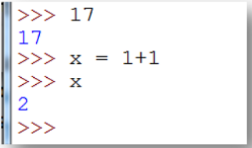
• Confusingly, evaluating an expression is not quite the same thing as printing a value
• In a script, an expression all by itself is a legal statement but it doesn’t do anything. The script..
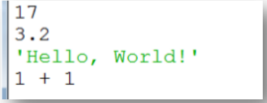
..produces no output at all. You must use the print statement to display the value
Operators and Operands |
|---|
• Operators are special symbols that represent computations like addition and multiplication
• The values the operator uses are called operands
• Example:

• The symbol +, -, and /, and the use of parentheses for grouping, mean in Python what they mean in mathematics
• The asterisk (*) is the symbol for multiplication and ** is the symbol for exponential
• When variable name appears in the place of an operand, it is replaced with its value before the operation is performed
• Addition, subtraction, multiplication, division and exponentiation all do what you expect but in the earlier versions of Python, divisions are performed as Integer division where only whole numbers are printed and decimal values are discarded
Order of Operations |
|---|
• When more than one operator appears in an expression, the order of evaluation depends on the rules of precedence
• Python follows the same precedence rules for its mathematical operators that mathematics does
• PEMDAS:
- Parentheses have the highest precedence and can be used to force an expression in the order you want
- Exponentiation has the next highest precedence, so 2 ** 1 + 1 is 3 and not 4, and 3*1**3 is 3 and not 27
- Multiplication and Division have the same precedence, which is higher than Addition and Subtraction, which also have the same precedence
• Operators with the same precedence are evaluated from left to right so in the expression minute*100/60, the multiplication happens first, yielding 5900/60 which in turn yields 98
Operations on Strings |
|---|
• In general, you cannot perform mathematical operations on strings, even if the strings look like numbers
• The following are illegal:

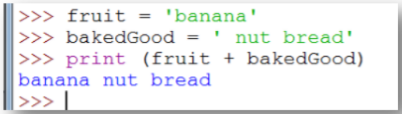
• Interestingly, the + operator does work with strings, although it does not do exactly what you might expect
• For strings, the + operator represents concatenation, which means joining the two operands by linking them end-to-end:
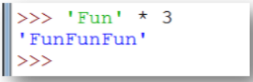
• The * operator also works on string; it performs repetition
Composition |
|---|
• One of the most useful features of programming languages is their ability to take small building blocks and compose them:
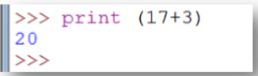
• In reality, the addition has to happen before the printing so the action aren’t actually happening at the same time

• You can also put arbitrary expressions on the right-hand side of an assignment:

• However, the left-hand side of an assignment statement has to be a variable name, not an expression which makes the following illegal

DEFINITION OF TERMS
Lesson 5
Arbitrary
- means "undetermined; not assigned a specific value."
Assignment
- A statement that assigns a value to a variable.
Concatenation
- process of combining two or more strings or sequences together to create a single string or sequence.
- it's commonly performed using an operator like "+" to join strings or lists. For instance, concatenating "hello" and "world" would result in "helloworld".
Integer
- An integer is a type of value that can be stored in a variable. Integers are whole numbers that can be positive, negative, or zero.
Interpreter
- An interpreter is a program that directly executes the instructions in a high-level language, without converting it into machine code.
Keyword
- A reserved word that is used by the compiler to parse a program
PLs
- Programming Language/System (PL/S) is a language developed by IBM to replace assembly language. It is a machine language.
Print statement
- A statement in a program that displays the variables, object, or text to the output device (screen)
Rules of Precedence
- The set of rules governing the order in which expressions involving multiple operators and operands are evaluated.
Script
- A script is a list of programmatically-written instructions that can be carried out on command.
String
- In any computer programming language, a string is a sequence of characters used to represent text.
Syntax error
- Syntax errors are mistakes in the source code, such as spelling and punctuation errors, incorrect labels, and so on, which cause an error message to be generated by the compiler.
Value
- A number or string (or other thing to be named later) that can be stored in a variable or computed in an expression.
LESSON 6 – CONDITIONALS
Objectives:
• To understand how to use conditions
• To identify operators and expressions needed for creating conditions
• To identify alternative executions for conditions
—----------The Modulus Operator—----------
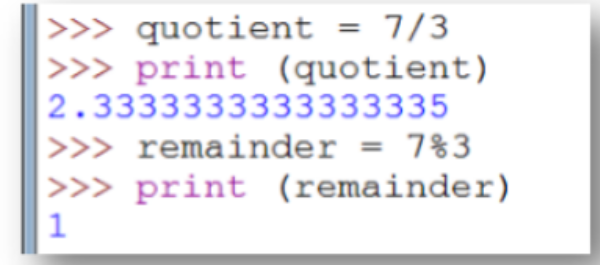
- The modulus operator works on integers and integer expressions
- It yields the remainder when the first operand is divided by the second
- In Python, the modulus operator is a percent sign (%)
- So 7 divided by 3 is 2 with 1 left over
- Also you can extract the right-most digits or digits from a number
—----------Boolean Expressions—-----------
■ A boolean expression is an expression that is either true or false
■ One way to write a boolean expression is to use the operator == which compares two values and produce a boolean value:
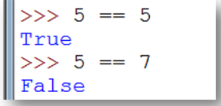
■ True and False are special values that are built into Python
■ The == operator is one of the comparison operators; the others include:
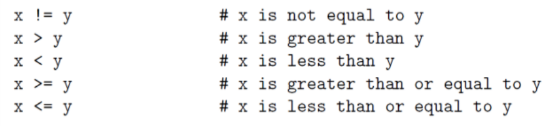
■ Some Pythons symbols are different from the mathematical symbols.
■ A common error is to use a single sign (=) instead of a double sign (==). Note that = is an assignment operator and == is a comparison operator
‘
—--------------Logical Operators—------------
■ There are three logical operators:
- and
- or
- not
■ The semantics of these operators is similar to their meaning in English:
☐ x > 0 and x < 10 is true only if x is greater than 0 and less than 10
☐ n%2 == 0 or n%3 == 0 is true if either of the conditions is true, that is, if the number is divisible by 2 or 3
☐ The not operator negates a boolean expression so not (x > y) is true if (x > y) is false, that is, if x is less than or equal to y
■ The operands of the logical operators should be boolean expressions, but Python is not very strict:
Any nonzero number is interpreted as true
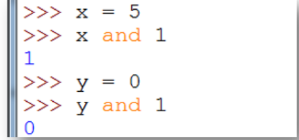
■ In general, this sort of thing is not considered good style. If you want to compare a value to zero, you should do it explicitly
—-----------Conditional Execution—---------
■ In order to write useful programs, we almost always need the ability to check conditions and change the behavior of the program accordingly which is given by conditional statements
■ The simplest form:
if x > 0:
print ("x is positive")
■ The boolean expression after the if statement is called the condition. If it is true, then the indented statement gets executed. If not, nothing happens
■ Like other compound statements, the if statement is made up of a header and a block of statements:
HEADER:
FIRST STATEMENT
…
LAST STATEMENT
■ The header begins on a new line and ends with a colon (:) The indented statements that follow are called a block
■ The first unindented statement marks the end of the block
—-----Conditional execution (cont..)--------
■ A statement block inside a compound statement is called the body of the statement
■ There is no limit on the number of statements that can appear in the body of an if statement but there has to be at least one
■ Occasionally, it is useful to have a body with no statements. In that case, you can use the pass statement which does nothing
—--------Alternative Execution—-------------
■ A second form of the if statement is alternative execution in which there are two possibilities and the condition determines which one gets executed
■ Syntax:
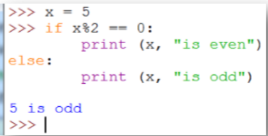
■ If the condition is false, the second set of statements is executed. Since the condition must be true or false, exactly one of the alternatives will be executed
■ The alternatives are called branches because they are branches in the flow of execution
—---------Chained Conditionals—------------
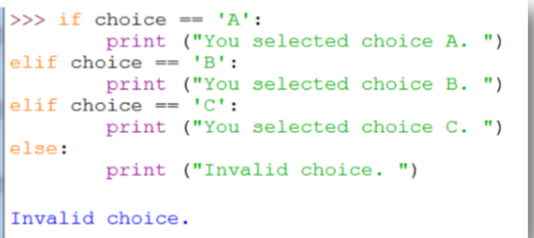
■ Sometimes, there are more than two possibilities and we need more than two branches. One way to express a computation like that is a chained conditional:
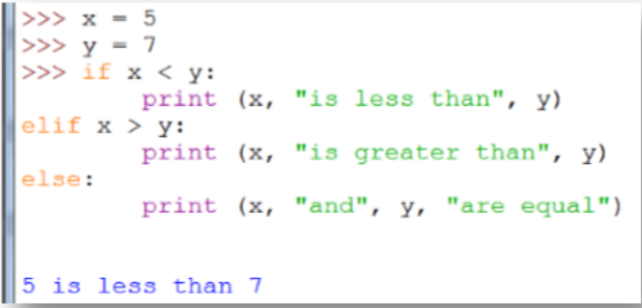
■ elif is an abbreviation of "else if"
■ Again, exactly one branch will be executed
■ There is no limit to the number of elif statements, but the last branch has to be an else statement
—------------Nested Conditionals—-----------
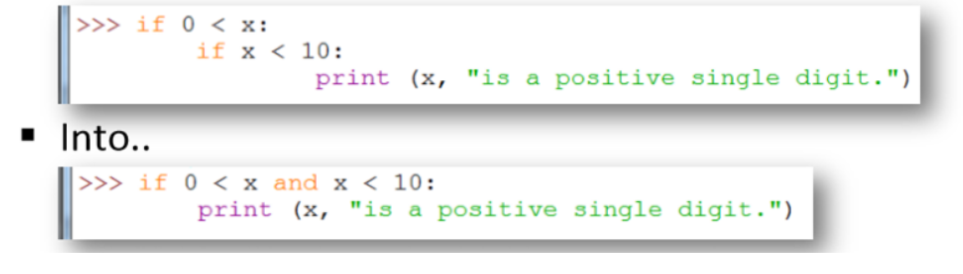
■ One conditional can also be nested within another. We could have written the following example as follows:
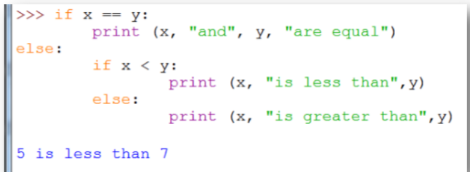
■ The outer conditional contains two branches: the first branch contains a simple output statement while the second branch contains another if statement
■ Though indentation of the statements makes the structure apparent, nested conditionals become difficult to read very quickly. In general, it is a good idea to avoid them when you can
■ Logical operators often provide a way to simplify nested conditional statements. We can rewrite the following code using a single conditional:
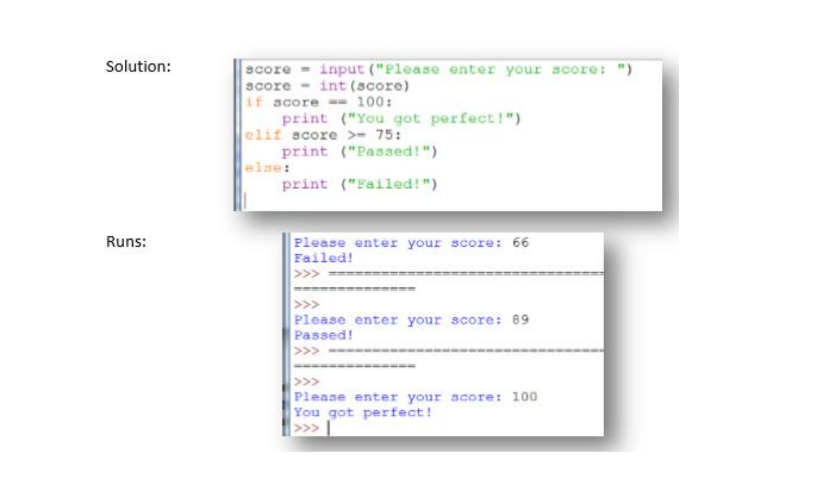
■ Read a score. Print “passed” if the score is greater than or equal to 75. Otherwise, it prints “failed”. If the score is 100, you will print “You got perfect!”
DEFINITION OF TERMS
Lesson 6
Alternative Execution
- If the condition is false, the second set of statements is executed.
- Alternative execution in programming refers to using conditional statements, like "if" and "else," to execute different blocks of code based on whether certain conditions are true or false.
Block
- is a group of statements or code enclosed within braces {} or an indented section, often used to define the scope of variables, functions, control structures (like loops or conditionals), or to create a distinct section of code that executes together.
Boolean expression
- Boolean expressions are conditions that evaluate to either true or false
- boolean expressions are a subset of conditions used to make decisions in programming.
Branches
- refer to different paths or directions that code execution can take based on conditions or decisions.
- They are typically created using conditional statements like if-else or switch-case, allowing the program to choose different actions or sequences of code based on specific conditions being met or not.
Chained conditionals
- involve a series of conditional statements (if, elif, else in Python) where multiple conditions are checked in sequence, allowing the code to follow different paths depending on which condition is found to be true, or to proceed to a default action if none of the conditions are met.
Conditions
- refer to expressions or statements that evaluate to either true or false.
- They are used to control the flow of a program by determining which code gets executed based on whether the conditions are met or not. These conditions often involve comparisons, logical operations, or other criteria that guide the program's behavior.
Execution
- refers to the process of running or carrying out a program's instructions by a computer or interpreter.
Expressions
- are combinations of values, variables, operators, and function calls that, when evaluated, produce a single value.
- They can represent computations, operations, or data and can range from simple calculations to complex evaluations involving functions and logical operations.
Logical operators
- are symbols or keywords used to combine or manipulate boolean values (true or false).
- They include operators like "and," "or," and "not," allowing programmers to create compound conditions and perform logical operations to make decisions or control the flow of a program based on multiple conditions.
Modulus operator
- represented by the symbol "%",
- calculates the remainder of a division operation between two numbers. It returns the leftover value after dividing one number by another. For instance, 10 % 3 equals 1 because 10 divided by 3 gives a remainder of 1.
Nested
- the practice of placing one construct within another similar construct.
- For example, nesting loops involves putting one loop inside another, and nesting conditional statements involves putting one if statement inside another.
- It's a way of organizing and structuring code by enclosing one construct within another to achieve more complex behaviors or structures.
Nested conditionals
- use of conditional statements (like if, elif, else in Python) within another conditional block. This means having an if statement inside another if statement, or an if statement inside an else or elif block.
Operand
- is a term used to describe the entities or values that an operator acts upon. In an expression like "3 + 4," the numbers 3 and 4 are operands, and the "+" sign is the operator that performs an operation (addition, in this case) on these operands.
Operators
- is a symbol or keyword that performs a specific operation on one or more operands (values or variables). For example, addition (+), subtraction (-), multiplication (*), and division (/) are all operators used to perform mathematical operations on operands. There are also logical operators like "and," "or," and "not" used in boolean expressions to evaluate conditions.
Semantics
- refers to the meaning or interpretation of code, particularly how the instructions and structures convey intended actions or behavior within a programming language. It involves understanding the logic, purpose, and effects of the code beyond just its syntax.
 goodluck mga atecoh