Final exam MIS
Unknown
Topic 1
Intro to Information Systems
Why Should I Study Information Systems?
Being an informed user of IT allows individuals to fully benefit from technology and provide valuable input.
IT offers a wide range of career opportunities, including programming, business analysis, project management, and executive roles.
Managing information resources is crucial due to their strategic value and the complexity involved.
You, The Informed User
Understanding the workings of IT applications enhances personal benefits and enables valuable contributions.
Recommendations and selection of IT applications become more informed.
Awareness of new technology and its impact on performance is increased.
Entrepreneurial ventures can be better supported through IT understanding.
IT Offers Career Opportunities:
IT professionals have various career options, such as programmers, analysts, project managers, and CIOs.
Job rankings and demand for IT professionals remain strong.
Managing Information Resources:
Managing information resources is challenging due to their strategic value, costs, and the evolving role of the MIS department.
Traditional functions of the MIS department include system development, computer operations, and infrastructure planning.
New consultative functions of the MIS department involve informed user involvement and partnerships with business units.
Overview of Computer-Based Information Systems:
Data is the elementary description of things
Information refers to data that have been organized so that they have meaning and value to the recipient. e.g a grade point average (GPA) by itself is data, but a student’s name coupled with their GPA is information.
Knowledge consists of data and/or information that have been organized and processed to convey understanding. e.g a company recruiting found that student with GPAs over 3.0 experienced the greatest success in its management program
Computer-based information systems consist of IT components (hardware, software, databases, networks) and non-IT components (procedures, people).
They provide capabilities such as numerical computations, communication, data storage, information access, data interpretation, and process automation.
Types of computer-based information systems include functional area information systems (FAIS), enterprise resource planning (ERP) systems, transaction processing systems (TPS), and interorganizational information systems (IOS).
How Does IT Impact Organizations?
IT has a transformative impact on entire industries, bringing about changes in business relationships and increasing organizational agility.
The use of IT can reduce the number of middle managers and change the nature of managerial decision-making.
IT creates new job categories and affects employees' health and safety.
Importance of Information Systems to Society:
IT affects our quality of life by changing the way we work and blurring the boundaries between work and leisure
In healthcare, IT enables better diagnoses, research, surgical planning, and administration.
The emergence of cognitive computing, such as IBM Watson, and the use of robotics revolutionize various sectors.
Generative AI:
Generative AI, including ChatGPT and DALL-E, produces content across many domains.
It has applications in writing, translation, media production, design, and more.
Topic 2
Organizational Strategy, Competitive Advantage, and Information Systems
Business Processes:
A business process is an ongoing collection of related activities that create a product or service of value to the organization, its business partners, and/or its customers. It typically consists of three elements: inputs, resources, and outputs. Business processes can enhance competitive advantage by increasing efficiency, effectiveness, and adding value.
Examples of Business Processes:
Ordering an E-ticket from an Airline Website
Executing the Process: IT informs employees when it's time to complete tasks, provides required data, and a means to complete the task.
Capturing and Storing Process Data: IT captures and stores transaction data in real-time.
Monitoring Process Performance: IT evaluates information to determine how well the process is executed at both process and instance levels.
Digitizing Travel Expense Business Process:
How IT helps reduce costs.
Providing better choices for employees when submitting expenses.
Ideas for improving travel expense systems.
Business Process Improvement (BPI)
Incremental approach to move towards business-process-centered operations, often using methodologies like Six Sigma.
Business Process Management (BPM):
Management system supporting continuous BPI initiatives over time, involving process modeling, business activity monitoring, and BPM suites.
Business Process Reengineering (BPR)
Radical redesign of business processes for increased productivity and profitability.
Measures of Excellence in Executing Business Processes:
Customer satisfaction
Cost reduction
Cycle and fulfillment time reduction
Quality
Differentiation
Productivity
Business Pressures, Organizational Responses, and IT Support:
Market Pressures:
Globalization
Changing nature of the workforce
Powerful customers
Technology Pressures:
Technological innovation and obsolescence
Information overload
Societal/Political/Legal Pressures:
Social responsibility and philanthropy
Compliance with government regulations
Protection against terrorist attacks
Ethical issues
Organizational Responses:
Strategic systems
Customer focus
Make-to-order and mass customization
E-business and e-commerce
Competitive Advantage and Strategic Information Systems:
Porter’s Competitive Forces Model:
Threat of entry of new competitors
Bargaining power of suppliers
Bargaining power of customers (buyers)
Threat of substitute products or services
Rivalry among existing firms within the industry
Porter’s Value Chain Model:
Primary activities (production and distribution)
Support activities contributing to competitive advantage
Strategies for Competitive Advantage:
Cost leadership
Differentiation
Innovation
Operational effectiveness
Customer orientation
Topic 3
Data & Knowledge Management
Managing Data:
Difficulties of Managing Data:
Data Increase and Scattering:
Exponential growth of data.
Scattered data throughout organizations.
Multiple Sources:
Internal, personal, external, and new sources of data.
Data Challenges:
Outdated data, media rot, security concerns, quality, and integrity issues.
Legal Requirements:
Compliance with regulations like GDPR, Bill 198.
Data Governance:
A subset of IT governance.
Objectives: Enable available, transparent, and useful data, ensuring a "single version of the truth."
Involves a planned approach to data management, formal processes, policies, and well-defined rules.
Data Governance Areas:
Master Data Management: Ensures uniformity, accuracy, stewardship, and accountability of shared master data assets.
Metadata Management: Manages metadata about other data.
Data Quality: Ensures data meets criteria for accuracy, completeness, validity, consistency, uniqueness, timeliness, and fitness for purpose.
Data Catalog: Ensures data, information, and technology assets are easily discoverable.
Data Lineage: Manages data origin, movement over time.
Managing Big Data:
Issues: Untrusted sources, dirty data.
Requires a database environment (relational, NoSQL, data lakes).
Examples: SAP, Snowflake, Amazon, Microsoft, Cassandra, MongoDB.
Uses: Open data, experiments, micro-segmentation, new business models.
Data Warehouses and Data Marts
Data Warehouse: Repository of historical data organized by subject.
Data Mart: Scaled-down version for end-user needs in a strategic business unit (SBU) or department.
Characteristics: Organized by subject, uses OLAP, integrated, time-variant, nonvolatile, multidimensional.
Generic Data Warehouse Environment:
Source systems, data integration, storing data, metadata, data quality, BI governance, users.
Data Lakes:
Examples of data types.
Considerations before using data from multiple sources.
Benefits of Data Lakes:
Derive value from unlimited data types.
No need for all answers in advance.
No limits on querying data.
Provide a unified view of data across the organization.
Fundamentals of Relational Database Operations:
Query Languages: SQL, Query by Example (QBE).
Entity Relationship Modeling: Business rules, data dictionary, relationships (unary, binary, ternary), cardinality, normalization, and joins.
Knowledge Management:
Concepts and Definitions:
Knowledge: Intellectual capital/assets.
Knowledge Management (KM): Process manipulating important unstructured knowledge in the organization's memory.
Explicit Knowledge: Objective, rational, technical.
Tacit Knowledge: Subjective, experiential.
Knowledge Management Systems (KMS) Cycle:
Acquisition, capture, organization, storage, dissemination, use, and maintenance of knowledge.
Topic 4
E-Business and E-Commerce
Overview: Definitions and concepts
Electronic commerce: the process of buying, selling, transferring, or exchanging products, services, or information via computer networks, including the internet
Electronic business: a broader concept than e-commerce that also includes servicing customers, collaborating with business partners, and performing electronic transactions within an organization
Types of organizations and their degree of digitization:
Brick sand mortar: purely physical organizations, no EC
Virtual organizations: pure-play, digital only organizations, only EC
Clicks and mortar organizations: partial EC with primary physical presence
Types of E-commerce
Business to consumer (B2C)
Business to business (B2B)
Consumer to consumer (C2C)
Business to employee (B2E)
E-government (G2C or C2B)
Mobile commerce (m-commerce)
Social commerce
Conversational commerce
Commerce Business models
Online direct marketing
Electronic tendering system
Name your own price
Affiliate marketing
Viral marketing
Group purchasing
Online auctions
Product customization
Electronic marketplaces and exchanges
Bartering online
Deep discounters
Membership
Major e-commerce mechanisms
Electronic catalogs
Electronic auctions
Reverse auction
Forward auction
Electronic storefronts
E-malls
Electronic marketplaces
Electronic payment mechanisms
Electronic cheques
Electronic cards
Digital online payments
How e-credit cards work
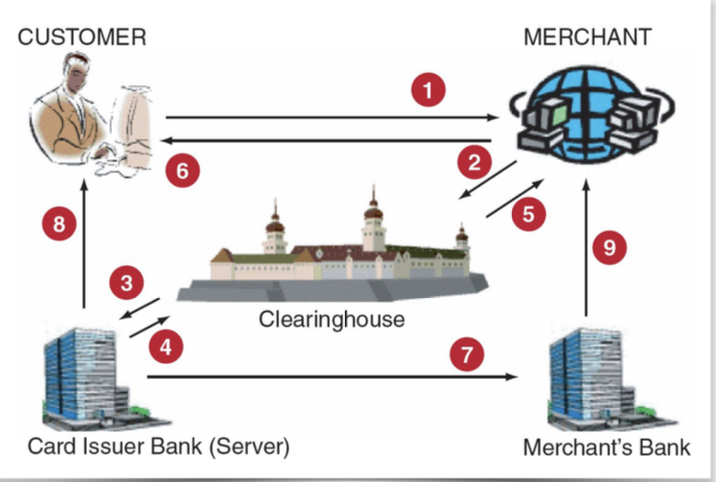
Benefits of e-commerce
National and international markets are more accessible
Lower costs of processing, disturbing, and retrieving information
Provides access to a vast number of products and services 24/7
Deliver information, services, and products to people in cities, rural areas, and developing countries
Limitations of e-commerce
Lack of universally accepted security standards
In less developed countries telecommunications bandwidth is often insufficient, and web access is expensive
Perceptions that e-commerce is insecure
Business to consumer electronic commerce
Electronic storefronts and malls
Electronic retailing
Electronic storefront
Electronic mall
Online services industry
Disintermediation
Financial technology
Online securities trading
The online job market
Travel services
Online advertising
Topic 5
Ethics, Privacy, and Information Security
Ethics:
Principles of right and wrong guiding behavior.
Ethical Frameworks:
Utilitarian approach
Rights approach
Fairness approach
Common good approach
Deontology approach
Approach for Resolving Ethical Issues:
Traditional approach
Giving voice to values (GVV) approach
Recognize an ethical issue
Identify an ethical issue
Get the facts
Purpose and choice
Evaluate alternative actions
Stakeholder analysis
Make a decision and test it
Powerful response
Scripting and coaching
Ethics in the Corporate Environment:
Fundamental Tenets:
Responsibility
Accountability
Liability
Unethical ≠ Illegal.
Ethics and Information Technology:
Categories of Ethical Issues:
Privacy
Accuracy
Property
Accessibility
Privacy:
Introduction:
Right to be left alone and free of unreasonable personal intrusions.
Information Privacy: Protection of personal data.
Digital Dossiers:
Profiling, data aggregators (LexisNexis, Acxiom, Statistics Canada).
Electronic Surveillance:
Surveillance by employers, governments, institutions.
Ex:: Cameras, sensors, geotags, Google/Microsoft street view, drones.
Personal Information in Databases:
Locations and record keepers.
Concerns: Accuracy, change, security, data use, disclosure.
Internet Bulletin Boards, Newsgroups, Social Networking:
Free speech vs. privacy.
Derogatory information influencing decisions.
Privacy Codes and Policies:
Guidelines for protecting privacy.
Methods of informed consent: Opt-out, opt-in (Privacy by default).
Ethics & Privacy Standards & Legislations:
European Directive on Data Privacy (GDPR).
Canadian Standards Association (CSA) Model Code.
Canada’s Personal Information Protection and Electronic Documents Act (PIPEDA).
International Aspects of Privacy:
Global nature of the Internet complicates data privacy.
Inconsistent standards, transborder data flow.
Information Security:
Today’s Challenges:
Interconnected, interdependent, wirelessly networked business environment.
Smaller, faster, cheaper computers.
Decreasing skills necessary for hacking.
International organized crime in cybercrime.
Lack of management support.
Human Errors Risk Areas:
Higher-level employees with greater access privileges pose greater threats.
Human resources and information systems pose significant threats.
Social Engineering:
An attack using social skills to manipulate employees.
Types of Software Attacks:
Virus, worm, phishing attack, spear phishing.
Ways to Protect Information Resources:
Risk management, risk analysis, risk mitigation.
Risk Mitigation:
Risk acceptance, risk limitation, risk transference.
Control Environment:
Encompasses management attitudes toward controls, as evidenced by management actions and stated policies addressing supervision and ethical issues.
Information System Auditing:
Accumulation and evaluation of evidence to prepare a report about the information.
Topic 6
Cloud Computing
Evolution of IT Infrastructure:
Tabulating Machine (1900):
Mainframes (Early 1900):
Personal Computers (1980s):
Enterprise Computing (1990s):
Cloud Computing (2000s):
Challenges of Traditional IT Infrastructure:
Cost, complexity, non-strategic.
Characteristics of Cloud Computing:
On-demand, pay-as-you-go, accessed over the Internet, pooled resources, virtualized servers.
Server Virtualization:
Reduces the number of servers.
Decreases power consumption.
Scalable and efficient.
Benefits of Cloud Computing:
Reduces upfront capital and operational expenses.
Eliminates the task of procuring, configuring, and maintaining hardware and software.
Efficient use of infrastructure.
Quick setup of applications with less maintenance.
Flexible approach to adjusting IT resources.
Increases scale and power of IT.
Fault tolerance and high availability.
Positive impact on employees.
Types of Cloud:
Public Cloud:
Private/Internal/Corporate Cloud:
Hybrid Cloud:
Vertical Cloud:
Multi-cloud:
Types of Cloud Computing Service:
Infrastructure as a Service (IaaS):
Ex: Amazon, Google.
Platform as a Service (PaaS):
Ex: Amazon, Google.
Software as a Service (SaaS):
Ex: Shopify.
Concerns & Risks with Cloud Computing:
Legacy IT systems.
Reliability.
Privacy and security.
Legal and regulatory environment.
Criminal use.
Web Services and Service-Oriented Architecture (SOA):
Web Services:
Applications delivered over the Internet (the cloud).
Benefits: Use existing Internet infrastructure, easy access to remote/local data, quick creation of new applications.
Service-Oriented Architecture (SOA):
Collection of web services used to build an organization’s IT applications.
Based on four protocols: XML, SOAP, WSDL, and UDDI.
Topic 7
Information Systems within Organizations
Transaction Processing Systems (TPS):
Characteristics of a TPS:
Continuous “real-time” data collection.
Efficiently handles high volumes of data and large variations.
Avoids errors and downtime.
Records results accurately and securely.
Maintains privacy and security.
Functional Area Information Systems (FAIS):
Information Systems for Accounting and Finance:
Financial planning and cost of money.
Budgeting, capital budgeting.
Managing financial transactions, handling multiple currencies.
Virtual close, investment management, budgetary control.
Auditing, payroll.
Information Systems for Production/Operations Management:
Inventory management.
Quality control.
Materials requirements planning (MRP).
Manufacturing resource planning (MRP II).
Just-in-time systems (JIT).
Computer-integrated manufacturing.
Product life cycle management.
Information Systems for Human Resource Management:
Recruitment.
Performance evaluation.
Training.
Employee records.
Benefits administration.
Reports:
Routine reports.
Ad-hoc (on-demand) reports.
Drill-down reports.
Key indicator reports.
Comparative reports.
Exception reports.
Enterprise Resource Planning (ERP) Systems:
Benefits:
Improved organizational flexibility and agility.
Decision support.
Improved business processes for increased quality and efficiency.
Limitations:
Change in methods may be needed.
Can be complex, expensive, and time-consuming.
Implementing ERP Systems:
On-premise ERP implementation.
Vanilla approach, custom approach, best of breed approach.
Software-as-a-Service (SaaS).
Enterprise Application Integration (EAI).
ERP II Systems:
Interorganizational ERP systems.
Provide links among a company’s key business systems and relevant parties.
ERP Modules:
Core ERP Modules:
Financial management.
Operations management.
Human resource management.
Extended ERP Modules:
Customer relationship management (CRM).
Supply chain management (SCM).
Business analytics.
E-Business.
Major Causes of ERP Implementation Failure:
Failure to involve affected employees.
Trying to do too much too fast.
Insufficient training.
Failure in proper data conversion and testing.
Advantages of Cloud-Based ERP System (SaaS):
Can be used from any location with Internet access.
Avoids initial hardware and software expenses.
Scalable—can extend ERP support to new processes and partners.
Disadvantages of Cloud-Based ERP System (SaaS):
Security concerns.
Sacrifice control over a strategic IT resource.
Lack of control over IT resources during problems.
ERP Support For Business Processes:
The Procurement, Fulfillment, and Production Process.
Interorganizational Processes: ERP with SCM and CRM.
Interorganizational Processes: ERP with SCM and CRM:
SCM and CRM help coordinate activities in an industry.
ERP SCM can place automatic requests to buy products in real time.
ERP CRM generates forecasting analyses based on critical variables
Topic 8&9
Customer Relationship Management & Supply Chain Management
Customer Relationship Management (CRM):
CRM treats customers differently based on their needs and value to the company.
Involves customer intimacy, lifetime value, and customer churn.
CRM strategy vs. CRM systems.
Low-end CRM systems vs. high-end CRM systems.
Customer Touch Points.
Data consolidation enables a 360-degree view of a customer.
Collaborative CRM facilitates sharing customer information across functional areas.
Customer identity management creates a 360-degree view across the entire organization.
Operational CRM Systems:
Support front-office business processes.
Customer-facing applications and customer-touching applications.
Provide benefits like efficient and personalized marketing, sales, and service.
Offer a 360-degree view of each customer.
Customer-Facing Applications:
Customer service and support (CIC) and call centers.
Salesforce automation (SFA), contact management system, sales lead tracking system.
Sales forecasting system, product knowledge system, configurators.
Marketing, cross-selling, upselling, bundling, campaign management.
Customer-Touching Application (e-CRM):
Search and comparison capabilities.
Technical information and services, customized products and services.
Personalized web pages, FAQs, email, automated response, loyalty programs.
Analytical CRM Systems:
Analyze customer data for targeted marketing, customer acquisition, cross-selling, upselling.
Input into decisions related to products and services.
Financial forecasting and customer profitability analysis.
Other Types of CRM Systems:
On-demand CRM systems (SaaS).
Mobile CRM systems interacting directly with consumers through portable devices.
Open-source CRM systems with available source code (e.g., SugarCRM).
Social CRM systems using social media technology for collaborative conversation.
Real-time CRM for organizations to respond to customer interactions in near real-time.
Supply Chain & Supply Chain Management:
Supply Chain:
Supply Chain Visibility, Inventory Velocity.
Structure and Components of Supply Chains: Upstream, Internal, Downstream, Reverse flows.
Components of Supply Chains:
Tiers of suppliers (Tier 3: Basic products, Tier 2: Sub-assemblies, Tier 1: Integrated components).
Flows in the supply chain: Materials flows, Information flows, Financial flows.
5 Basic Components and Benefits of Supply Chain Management:
Plan, Source, Make, Deliver, Return.
Benefits: Reduce problems along the supply chain, uncertainty, risks, improve business processes, customer service, profitability, and competitiveness.
The Push Model vs. the Pull Model:
Push model (Make-to-stock, Mass Production).
Pull model (Make-to-order, not suitable for long lead times).
Problems along the Supply Chain:
Uncertainties (e.g., demand forecast, delivery times).
Coordination challenges—Bullwhip effect.
Solutions to Supply Chain Problems:
Vertical integration, using inventories, just-in-time (JIT) inventory system.
Information sharing through vendor-managed inventory (VMI).
IT Support for Supply Chain Management:
Electronic Data Interchange (EDI) and XML-Based Web Services:
EDI is a communication standard for routine document exchange.
Benefits: Minimizes errors, ensures security, less cycle time, more productivity.
Disadvantages: Business processes may need restructuring.
Extranets:
Link business partners over the Internet, providing access to specific areas of each other’s corporate intranets.
Types: Company and its dealers/customers/suppliers, industry’s extranet, joint ventures.
Portals and Exchanges:
Enable close collaboration between companies and suppliers.
Types: Procurement portals (upstream) and distribution portals (downstream).
Topic 10
Business Analytics
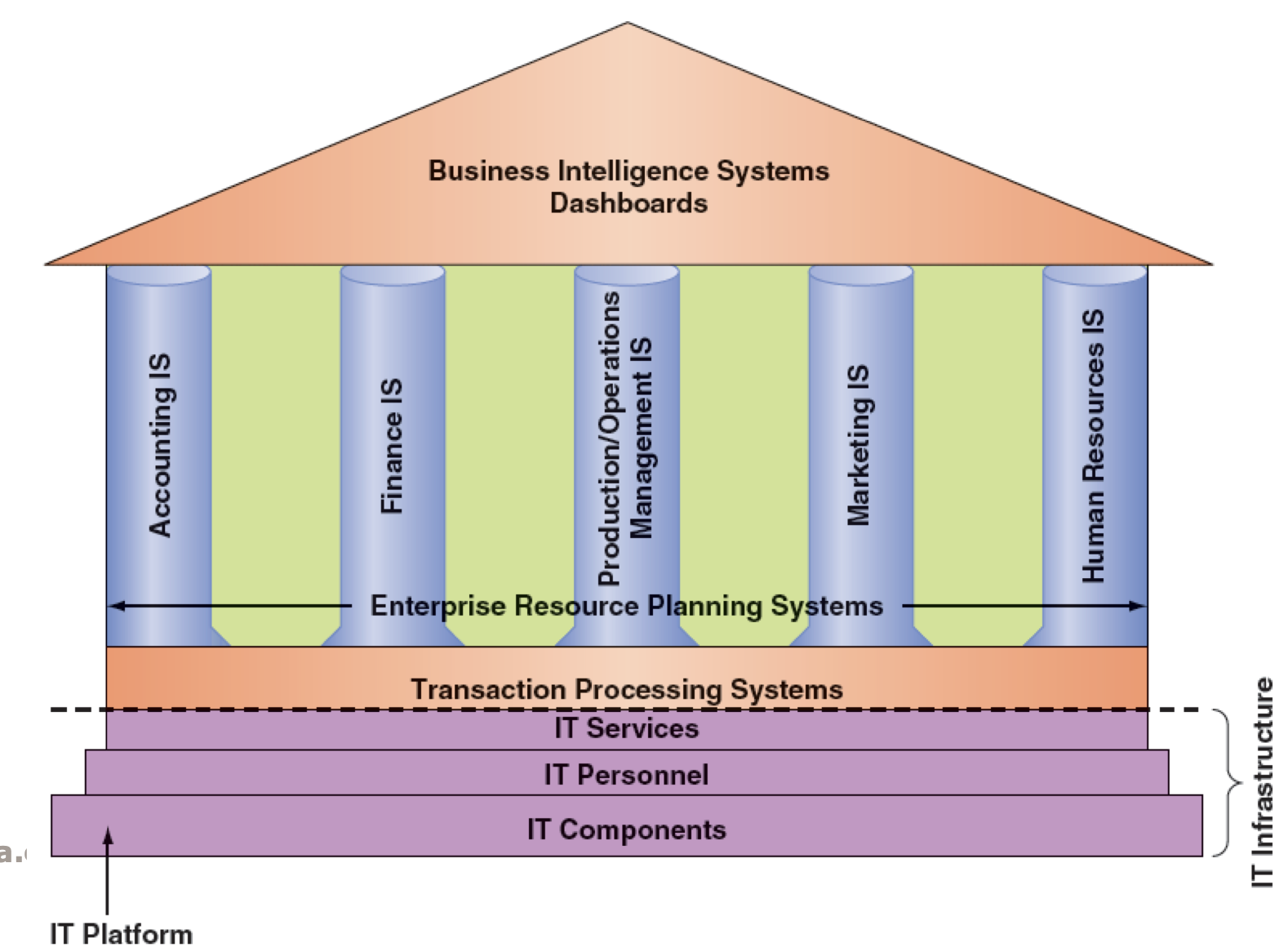
Business Intelligence
↓
Application
Business Analytics
↓
The Process
The Manager’s Job and Decision Making
Three basic roles of a manager according to Mintzberg (1973)
Interpersonal
Head honcho (ex: leaders)
Informational
Monitor what's happening
Decisional
People such as entrepreneurs that need to make decisions
Why Managers Need IT Support:
Decision making is challenging due to the following trends:
The number of alternatives is constantly increasing.
Most decisions must be made under time pressure.
More uncertainty in the decision environment, making decisions more complex.
Often necessary to rapidly access remote information, consult with experts, or conduct group decision-making sessions.
The Business Analytics Process:
Business Analytics (BA)
The process of developing actionable decisions or recommendations for actions based on insights from historical data using applications, technologies, and processes.
Three specific analytics targets:
Development of one or a few related analytics applications.
Development of infrastructure to support enterprise-wide analytics.
Support for organizational transformation.
Business Analytics Tools:
Excel.
Multidimensional analysis (OLAP).
Data mining.
Decision-support systems.
Statistical procedures: Descriptive statistics, affinity analysis, linear, multiple, and logistic regression, and others.
Descriptive Analytics:
Summarizes what has happened in the past, enabling decision-makers to learn from past behaviors.
Tools in descriptive analytics:
Online Analytical Processing (OLAP) or multidimensional analysis.
Data mining.
Decision-support systems.
Sensitivity analysis.
What-if analysis.
Goal-Seeking analysis.
Predictive Analytics:
Examines recent and historical data to detect patterns and predict future outcomes and trends.
Examples of fields using data mining (predictive analytics):
Retailing and sales.
Banking.
Manufacturing and production.
Insurance, police work.
Health care.
Marketing, politics.
Weather, social good.
Goes beyond descriptive and predictive models by recommending one or more courses of action and identifying likely outcomes.
Requires predictive analytics plus actionable data and a feedback system to track outcomes.
Tools in prescriptive analytics:
Statistical procedures: Optimization, Simulation, Decision trees.
Presentation Tools:
Dashboards provide easy access to timely information and direct access to management reports.
Characteristics:
User-friendly, supported by graphics.
Allows management to examine exception reports & drill down into detailed data.
Topic 11
Acquiring Information Systems and Applications
Planning for and Justifying IT Applications:
IT Strategic Plan:
Aligned with the organization's strategic plan.
Provides for an IT architecture that networks users, applications, and databases seamlessly.
Efficiently allocates IS development resources among competing projects.
IS Operational Plan:
IS environment: A summary of the information needs of the individual functional areas & of whole organization
Objectives of the IS function: best current estimate of the goals of the IS function
Constraints on the IS function (technological, financial, personnel).
Application portfolio: a prioritized inventory and project plan.
Resource allocation and project management details: List of who does what, how, and when
Evaluating and Justifying IT Investment:
Assessing Costs: Direct and indirect costs.
Assessing Benefits: Tangible and intangible benefits.
Cost-Benefit Analysis: Four common approaches: Net Present Value (NPV), Return on Investment (ROI), Break-even analysis, Business case approach.
Strategies for Acquiring IT Applications:
Fundamental Decisions:
Amount of computer code to write.
Payment method for the application.
Application's running and originating location.
Acquisition Strategies:
Purchase a pre-written application.
Customize a prewritten application.
Lease the application.
Application Service Providers (ASP) and Software-as-a-Service (SaaS) vendors.
Use open-source software.
Outsourcing.
Continuous development.
Employ custom development.
Advantages and Limitations of the Buy Option:
Advantages: Variety, trial, time-saving, known product, personnel saving.
Disadvantages: May not meet needs, difficult to modify, lack of control, integration challenges, vendor-related risks.
Traditional Systems Development Life Cycle (SDLC):
SDLC Stages:
Systems investigation.
Systems analysis.
Systems design.
Programming and testing.
Implementation.
Operation and maintenance.
SDLC Team:
Users, systems analysts, programmers, technical specialists, stakeholders.
SDLC: Systems Investigation:
Solutions: Do nothing, modify existing, develop a new system.
Feasibility study: Technical, economic, behavioral feasibility.
SDLC: Systems Analysis:
Examination of the business problem.
Deliverable: System requirements (functional, non-functional, vendor).
SDLC: Systems Design:
Blueprint describing how the system resolves the business problem.
Deliverable: Technical system specifications, integration blueprint.
SDLC: Programming and Testing:
Programming: Translating design specifications into computer code.
Testing: Assessing whether the code produces expected results, detecting errors.
SDLC: Implementation:
Conversion strategies: Direct, pilot, phased, parallel.
SDLC: Operations and Maintenance:
Systems operate while meeting objectives.
Types of maintenance: Debugging, updating, adding new functions.
Alternative Methods and Tools for Systems Development:
Joint application design (JAD).
Rapid application development (RAD).
Agile development.
End-user development.
DevOps.
Tools for Systems Development: Prototyping, CASE tools, component-based development, object-oriented development, containers, low-code development platforms.
Agile Development:
Key Terms: Sprints, Scrum, Backlog, Burndown chart, Epic, Features, User story, Task.
Team Composition: Scrum master, Product owner, Others (developer, tester, BA, etc.).
Activities/Ceremony: Sprint Planning, Retrospective, Backlog Refinement.
Topic 12
Wireless devices
Advantages
Small enough, portable
Sufficient computing power to perform productive tasks
Wireless communication through the internet and other devices
Disadvantage
Workers can capture and transmit sensitive confidential or proprietary information
Figure 1: Dematerialization with smartphones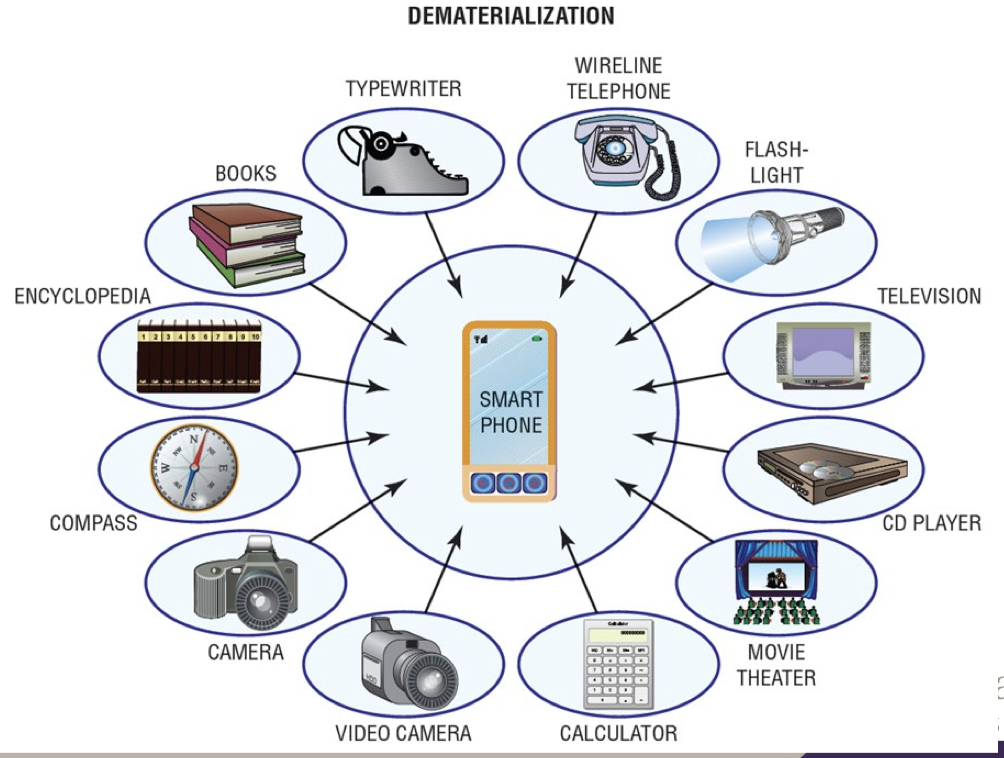
Wireless Transmission Media
Wireless media (or broadcast media) transmits signals without wires
Types of wireless media channels include
Microwave, Satellite, and Radio
Wireless Media
Channel | Advantages | Disadvantages |
|---|---|---|
Microwave | High bandwidth and relatively inexpensive | Must have unobstructed line of sight, and susceptible to environmental interference |
Satellite | High bandwidth and large coverage area | Expensive, must have unobstructed line of sight, signals experience propagation delay, must use encryption for security |
Radio | High bandwidth, signals pass through walls, and easy to install+cheap | Creates electrical interference problems, susceptible to snooping unless encrypted |
3 basic types of telecommunications satellites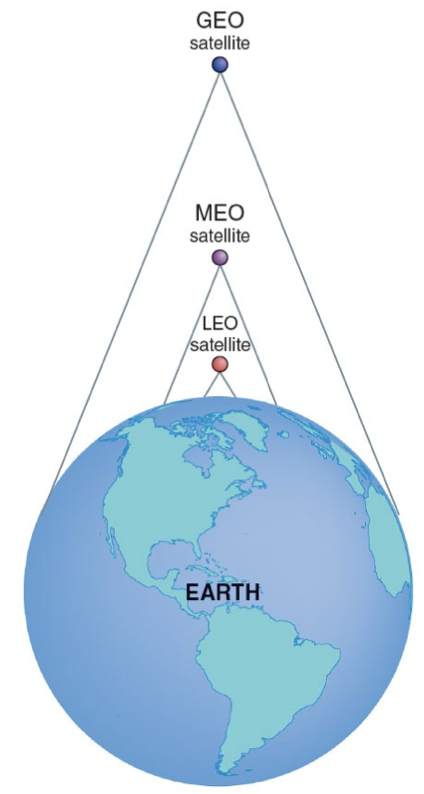
Geostationary earth orbit (GEO)
Satellites move slow to point on earth
Few satellites needed for global coverage
Transmission delay of 0.25 seconds
Most expensive to build and launch
Longest orbital life of many years
22,300 mile orbit, number 8, TV signal
Middle earth orbit (MEO)
Satellites move average to point on earth
Average number needed for global coverage
Requires medium-powered transmitters
Not much transmission delay
Cheaper to build and launch
6-12 year orbit life
6,434 mile orbit, number 10-12, GPS
Low earth orbit (LEO)
Satellites move fast to point on earth
Large number needed for global coverage
Requires only low-power transmitters
Negligible transmission delay
Shortest orbit (5 years)
Cheapest to build and launch
400 to 600 miles, number many, Telephone
Global Positioning Systems (GPS)
Wireless system that uses satellites to enable users to determine their location wherever on earth.
Supported by MEO satellites
In cars and phones, used to navigate, map, survey, and 911 location
3 additional GPS systems planned/operational
Russia 2011: GLONASS
EU 2016: Galileo
China 2022: Beidou
Additional Satellite Applications
Internet over satellite (IoS)
Way to access the internet without a cable
Mainly used in rural areas as cables are too costly/physically impossible
Commercial imaging
Satellite based earth images
Used for tracking moving objects such as planes, zooming in on physical objects (ex: roads), or examining sky/land (ex: forests, weather)
The images can be integrated with other data (ex: census data) to monitor urban development
Radio and Other Internet Access Models
Radio transmission
Used to connect outer equipment and local area networks (LANs)
Ground-based between transmitters/receivers or as digital radio provided by satellite
Google Loon
Balloons provide internet access to rural and remote areas by creating aerial wireless networks using balloons
Startup Altaeros’ Internet blimps
As functional as cellular towers, with a larger footprint
One super tower covers 10 000 km
so it would take 20-30 ground-based towers to cover same area
Major threats to wireless network
Rogue access point
Evil twin attack (may use a hotspotter)
War driving
Eavesdropping
Radio Frequency Jamming
Ranges of wireless networks
Short Range | Medium Range |
|---|---|
|
|
Wide Area Wireless Networks
Cellular radio (or cellular telephones)
Ex: 1G, 2G, 2.5G, 3G (CDMA, EV-DO, HSPA, GSM), 4G (LTE, XLTE), 5G
Wireless broadband (or WiMAX)
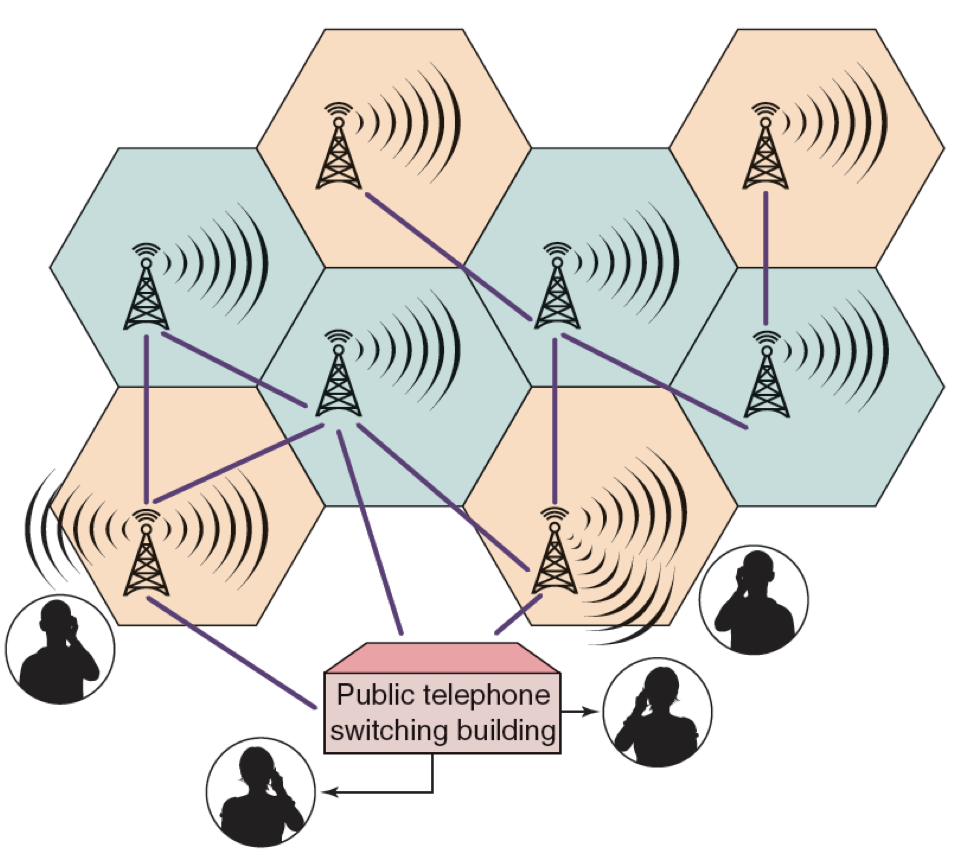
Figure 5: A cellular network
and the public switched
telephone system
Wireless Broadband or WiMAX
Worldwide Interoperability for Microwave Access (WiMAX)
WiMAX name for IEEE Standard 802.16
Wireless access range of up to 50 km (31 miles)
Data transfer rate of up to 75 Mbps
A secure system offering voice and video
Mobile computing
Mobility and broad reach
They create five value added attributes
Ubiquity
Convenience
Instant connectivity
Customization
Localization
Mobile commerce (m-commerce)
Drivers include
Widespread availability of mobile devices
Declining prices of the devices
Bandwidth improvement
Applications
Financial services
Location based application and services
Mobile advertising
Intra Business applications
Accessing information
Telemetry application
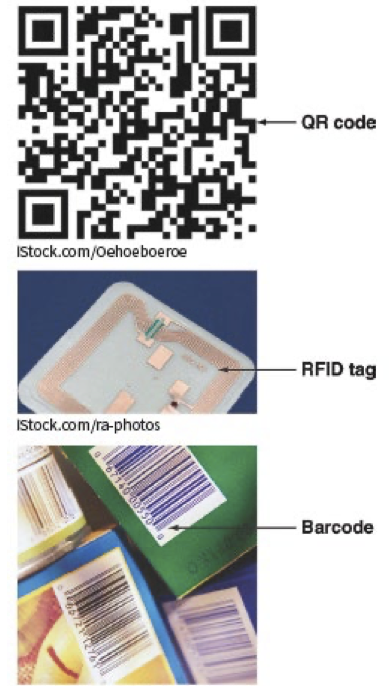
Radio-Frequency Identification (RFID)
can be active (use battery, greater distance, more expensive) or passive
Figure 6 barcodes, RFID tags and Qr codes →
QR codes have many advantages over barcodes because they
Store more information
Have text, numbers, url’s, & even japanese characters
Are smaller; they store information horizontally & vertically
Can be read from and direction or angle meaning harder to midread
More resistant to damage
Examples of the Internet of Things in Use
Smart home
Digital twins
Health care
Automotive industry
Supply chain management
Environmental monitoring
Infrastructure management
Energy management
Agriculture (enabling precision agriculture)
Transportation
Farming