Writing a Cover Letter
Introduction
- Writing cover letters is often an important step for: paid positions, summer research opportunities (like UCF’s SURF program), and internships.
- UCF’s Surf Program: Summer research opportunities
- For this course, you will be writing a cover letter to: a service organization to apply for an internship with them
Learning Outcomes
Upon successful completion of this module, you will be able to:
- Understand the format for a well written cover letter
- Be able to recognize useful, qualified resources to reference
- Critique your own written cover letter
Cover Letter Formatting
- The formate for a cover letter is ___: fairly universal; however, there are some changes or additions you can use to make it your own
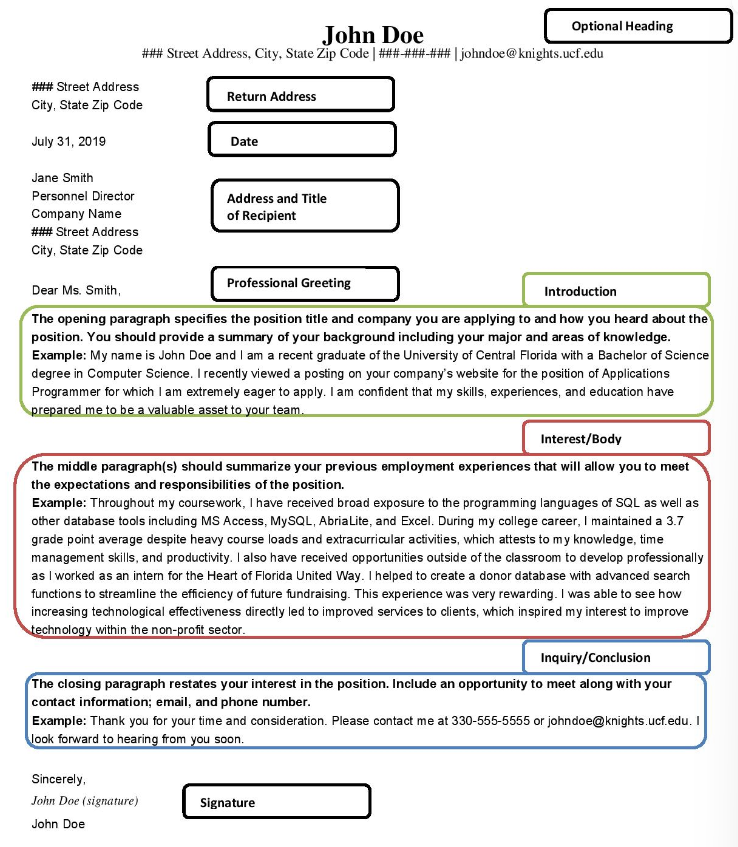
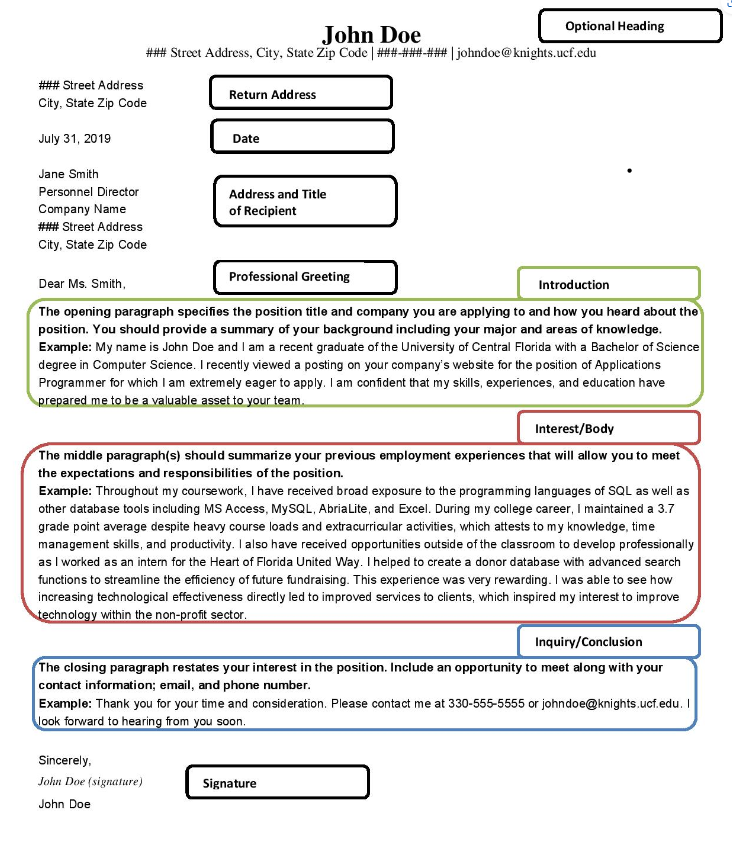
- Optional Heading: Put your name in bold on top. then below list out your address, number and email. → ### Street Address, City, State Zip Code | ###-###-### | name@knights.ucf.edu
- Return Address: ### Street Address City, State Zip Code
- Date: Month (written) Day, Year (4 digits)
- Professional Greeting: Dear (title),
- Introduction: The opening paragraph specifies the position title and company you are applying to and how you heard about the position. You should provide a summary of your background including your major and areas of knowledge
- Introduction Example: My name is John Doe and I am a recent graduate of the University of Central Florida with a Bachelor of Science degree in Computer Science. I recently viewed a posting on your company’s website for the position of Applications Programmer for which I am extremely eager to apply. I am confident that my skills, experiences, and education have prepared me to be a valuable asset to your team.
- Interest/Body: the middle paragraph (s) should summarize your previous employment experiences that will allow you to meet the expectations and responsibilities of the position
- Inquiry/Conclusion: The closing paragraph restates your interest in the position. Include an opportunity to meet along with your contact information; email, and phone number.
- Inquiry/Conclusion Example: Thank you for your time and consideration. Please contact me at ###-###-#### or (name)@knights.ucf.edu. I looiik forward to hearing from you soon.
- Signature: Sincerely, (signature), (Name)
Optional Heading
- Resume and Reference pages often utilize a heading that includes: your name in large font with a variety of contact information just underneath
- The contact information in your optional heading could be: your address, email, phone, website, or any combination of them.
- Some applicants include the optional heading at: the top of their cover letter in order to make each document match so employers know each of those pieces go together.
- Other applicants opt to leave the personal heading out and: begin with the return address to follow a more traditional format
- If the optional heading is included, the return address: would not need to be listed separately on the page as it would be included under the heading
Return Address
- Applicants who select not to include the heading at the top of the page would begin their cover letter with the: return address.
- The return address should be: the primary location the applicant resides at
- Some students who live on campus choose to use a ___ address instead: home
- It is up to each individual if they would rather list: an in-state address versus an out-of-state address
Date
- Write the date as the day you are: submitting your application materials
- Some applications may begin writing their: cover letter but spend up to a week or more having it reviewed by multiple resources.
- It is preferred that the date listed is: as close to the date of submission for when employers begin reviewing materials
Address and Title of Recipient
- The address and title of recipient should be: as specific as possible to the individual overseeing the search process
- The individual overseeing the search process is usually: the supervisor for the position or sometimes someone specific in the HR department
- If a name isn’t listed, just include the: address
- If a name and address aren’t listed, use the address on the organization website’s home or contact page
Professional Greeting
- Use the same name under: the recipient’s information that is the contact person or supervisor for the position
- If you absolutely cannot find the correct point of contact, make sure that you use: a professionally appropriate general greeting such as “To Whom It May Concern,” or “Dear Sir or Madam.”
Introduction
- In the introduction, tell the reader: your name, the degree you are pursuing, and the year that you are in (based on graduation date)
- Make sure you mention: if you have experiences or skills, or have done well in a course that is directly relevant to the position
- Avoid giving: your whole life story, as your resume should provide further details
Interest
- Write about your career: interests and how these interests link to the position to which you are applying
- Writing about your interests and how they link to the position you’re applying for shows the reader that you are: committed and have done your own investigation into the organization and the specific position
- Include specifics from: your research of the organization, such as paraphrasing the mission statement or commenting on a recent event/campaign/success story
- Don’t say ““I am interested in your organization because I want to go to medical school.” Instead, you might say, “I am interested in working on curing infectious diseases, and hope to continue on to medical school after graduation. For this reason, working with your oganization’s campaign to decrease X disease is interesting to me.
Inquiry
- Make sure to inquire about: an action at the close of your letter
- Ask for: a timeline
- Offer to send: additional materials
- You can also let the reader know your: availability
- Be clear on exactly what you are: asking for or offering
- When it is simpler for a reader to respond, : they are more likely to do so
Signature
- Lastly, end the cover letter with: a professional closing such as “sincerely” or “thank you for your time” followed by your name in print
- Leave space between: the closing and your name in order to leave a signature
- There are multiple tricks to including your signature and the goal is for it not look: authentic, not just a script font through word
- One signature option is to print your: cover letter, sign it, and scan the signed document back onto your computer or laptop
- Another signature option is to sign a: blank piece of paper, scan it and save it as an image, then copy and paste the picture of your signature onto the cover letter
- One final signature option is: to download your document into various software programs that have the capability of an e-signature
- Another signature formate option is to: type name and the degree you are currently seeking
What makes a good cover letter?
- How many paragraphs should a cover letter have?: 2-5 short paragraphs
- Cover letters should of clear evidence of: research on the position and organization
- Cover letters should contain NO: spelling errors
- Cover letters should utilize: correct grammar
- Avoid: jargon, slang and contractions
- Use correct ___: titles (Dr., Prof, etc,)
- Make sure that the cover letters contains: a signature
Other tips
- Make sure the letters are: individually catered to the specific position for which you are applying
- Use the ____ to convey your strengths and key skills the employer is looking for: job description
- Expand on and add to: your resume but try not to repeat the same content
Writing
- Draft #1: Just write !
- For the first draft, do not worry about getting the wording perfect
- Compare the job description and requirements with: your resume and cover letter
- Are you clearly conveying how ____?: you meet their needs
- Draft #2: Reduce the cover letter to one page
- Check that you have clearly communicated how: you are the best candidate for that position and organization
- Be consistent in: your style and writing.
- Proofread your letter after: editing
Additional Resources
- UCF’s Career Services Cover and Thank You Letter Handout (Job Search Communications): https://webcourses.ucf.edu/courses/1424554/files/97284186?wrap=1
- UCF’s Career Services CS Cover Letter Samples: https://webcourses.ucf.edu/courses/1424554/files/97284183?wrap=1
- UCF’s Writing Center Formatting guide from UCF University Writing Center: https://uwc.cah.ucf.edu/wp-content/uploads/sites/9/2015/04/sample-cover-letters.pdf
- Another Cover Letter Writing Guide: https://webcourses.ucf.edu/courses/1424554/files/97284352?wrap=1
- Reference the Cover Letter assignment submission for a rubric to help guide you in your writing: https://webcourses.ucf.edu/courses/1424554/assignments/7865771
Vocabulary
Professional Greeting: Name of the contact person or supervisor
Introduction: States your qualifications (degree, skills, etc.)
Interest: Shows that you have done your research
Inquiry: Includes an ‘ask’ or an ‘offer’
Draft #1 is when you: just write it!
Draft #2 is supposed to: clearly convey that you are the best candidate
Left off on Cover Letter Tips, Tricks, Resources and Review
Yellow Dig
Canva Template
Career services or writing center appointment