Chapter 9 - Data Design
Data Design Concepts
Data Structures
Definition: Framework for organizing, storing, and managing data
- Comprised of files or tables that interact in various ways
- Each file or table contains data about people, places, things, or events
Mario and Danica: A Data Design Example
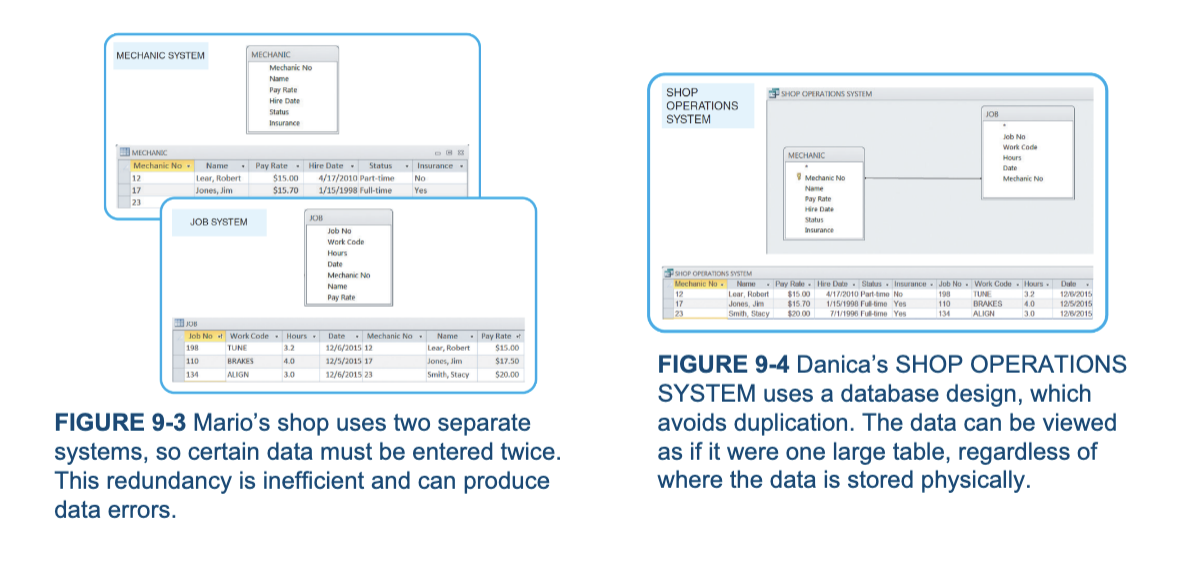
Mario’s auto shop uses file-oriented systems
- Mechanic System used the Mechanic file to store data about shop employees
- Job System uses the Job file to store data about work performed at the shop
Danica’s auto shop uses a relational model
- Shop Operations System: tables are linked by a common field named Mechanic No field
Database Management System
Definition: Collection of tools, features, and interfaces that enables users to add, update, manage, access, and analyze data
Advantages:
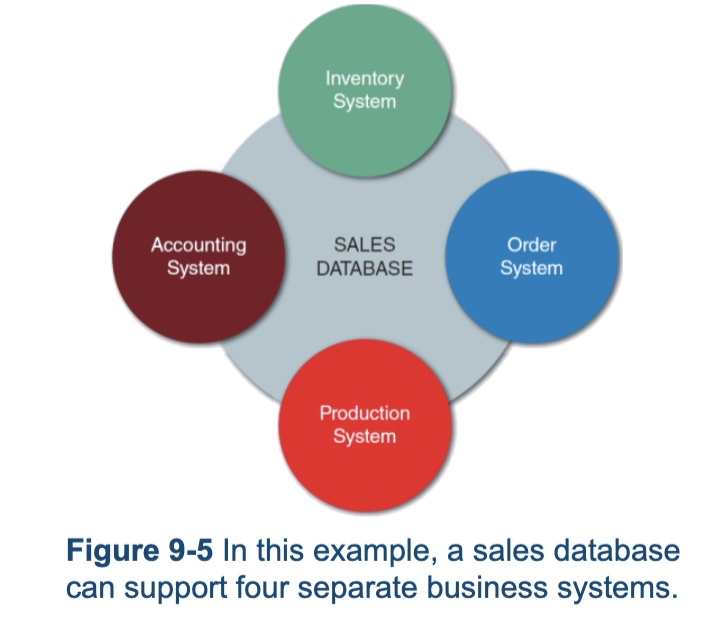
- Scalability
- Economy of scale
- Enterprise-wide application
- Stronger standards and better security
- Data independence
DBMS Components
Interfaces for users, database administrators, and related systems
Users
Work with predefined queries and switchboard commands
Database Administrators
Responsible for DBMS management and support
Related Information Systems
DBMS provides support to related information systems
Schema
Definition: Descriptions of all fields, tables, and relationships
- Subschema: Database portions that a particular system or user needs or is allowed to access
Physical Data Repository
- Contains the schema and subschemas
- Can be centralized or distributed
- Uses open database connectivity (ODBC) compliant software
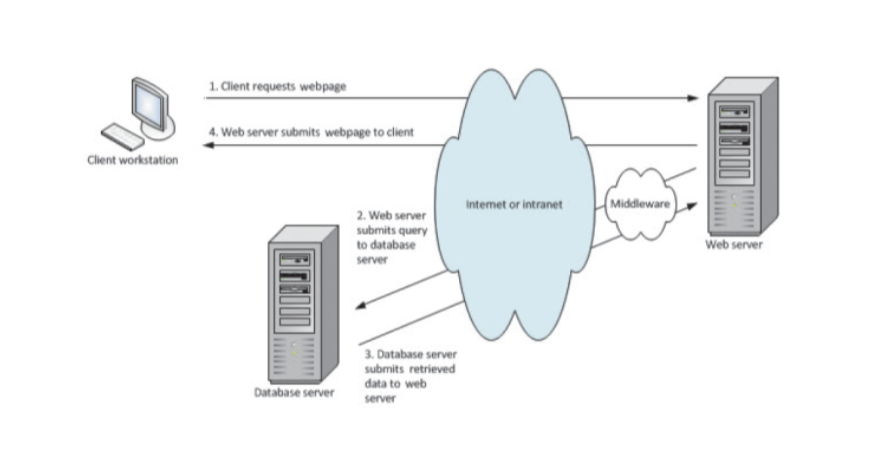
Web-Based Design
- Databases are created and managed by using languages and commands that have nothing to do with HTML
- Objective: Connect the database to the Web and enable data to be viewed and updated
- Middleware: used to integrate different applications and allow them to exchange data
- Web-based data must be secure, yet easily accessible to authorized users
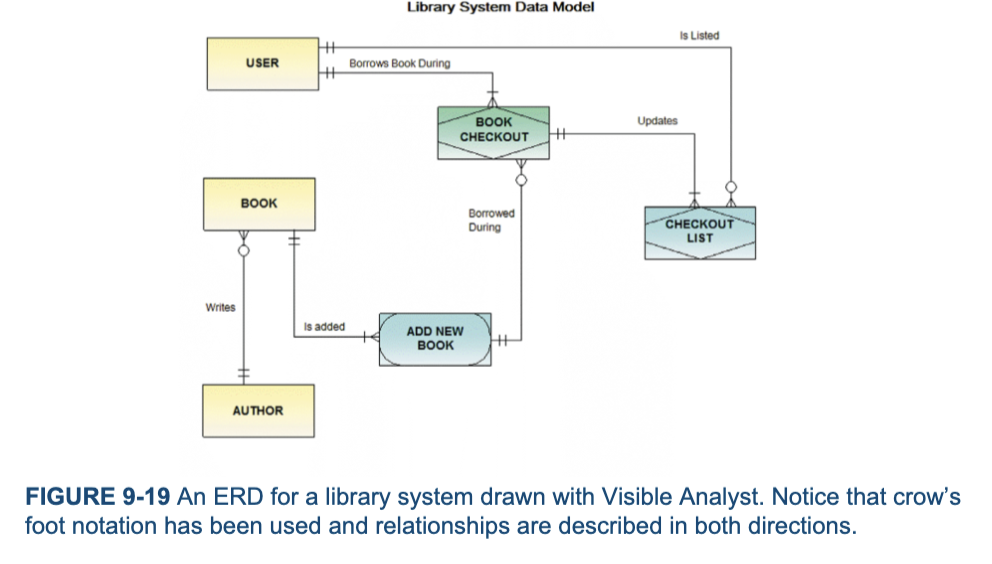
Entity-Relationship Diagrams
Drawing an ERD
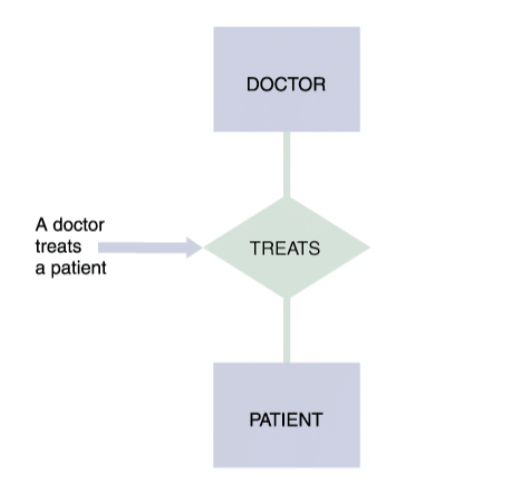
- List the entities that were identified during the systems analysis phase
- Consider the nature of the relationships that link them
Types of Relationships
- One-to-one relationship (1:1)
- One-to-many relationships (1:M)
- Each instance of the second entity can associate with only one instance of the first entity
- Many-to-many relationship (M:N)
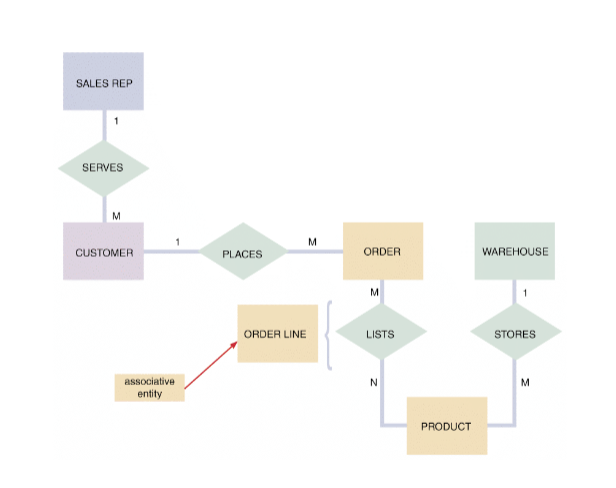
Cardinality
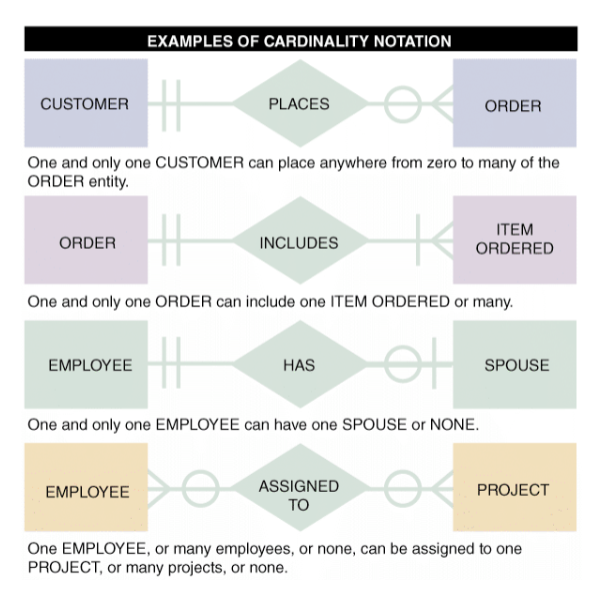
Definition: Describes numeric relationships between two entities
- Shows how instances of one entity relate to instances of another entity
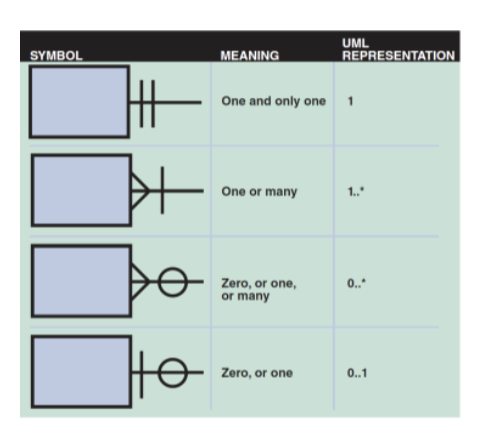
- Crows’s foot notation indicates various possibilities using circles, bars, and symbols
Data Normalization
Normalization: Creating table designs by assigning specific fields or attributes to each table in the database
- Table Design: Specifies fields
- Identifies the primary key in a particular table or file
Normalization Stages
- Unnormalized design
- First normal form
- Second normal form
- Third normal form
Three Steps of Data Normalization
- Remove all repeating groups and identify the primary key(s)
- Ensure that all monkey attributes are fully dependent on the primary key
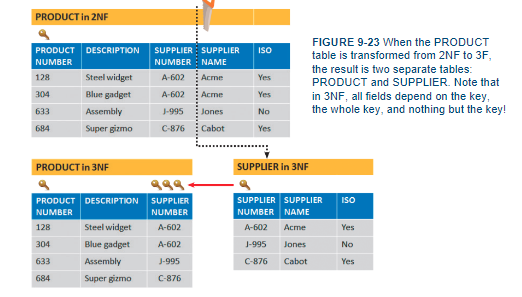
- Remove any transitive dependencies
- Nonkey fields which are dependent on other monkey attributes
Standard Notation Format
Used to show a table’s structure, fields, and primary key
- The primary key field(s) is underlined
- NAME ( FIELD 1, FIELD 2, FIELD 3)
- Recognition of repeating group fields is important
- Repeating Group: set of one or more fields that can occur any number of times in a single record
- Each occurrence would possess different values
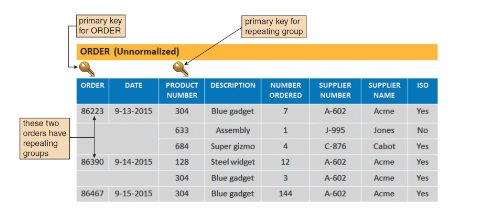
First Normal Form (1NF)
- All rows must have the same number of columns
- Each table cell should contain a single value
- Does not contain a repeating group
- Each record needs to be unique
- Identify the primary key
- Converting an unnormalized design to 1NF requires expansion of the table’s primary key to include the primary key of the repeating group
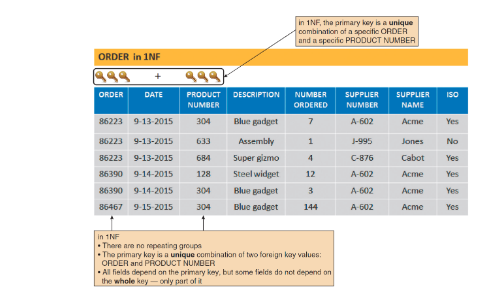
Second Normal Form (2NF)
Examples of functional dependence
- Field A is functionally dependent on Field B if the value of Field A depends on Field B
- A table design is in 2NF if it is in 1NF and all fields not part of the primary key are functionally dependent on the entire primary key
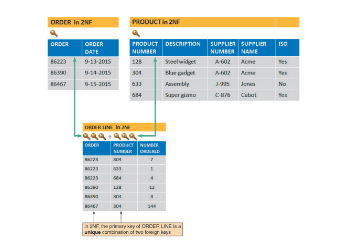
Third Normal Form (3NF)
- Design is in 3NF if ever non-key field depends on the key, the whole key, and nothing but the key
- Avoids redundancy and data integrity problems that still can exist in 2NF designs
Two Real-World Examples
Two Scenarios:
- School
- Technical service company
Codes
Overview
- Shorter than the data they represent
- Save storage space and costs
- Decrease data entry time and transmission time
- Reveal or conceal information
- Reduce data input errors
- Easier to remember
Types of Codes
- Sequence codes
- Block sequence codes
- Alphabetic codes
- Category codes
- Abbreviation codes
- Mnemonic codes
- Significant digit codes
- Derivation codes
- Cipher codes
- Action codes
Designing Codes
- Keep codes concise and consistent
- Allow for expansion
- Keep codes stable and make them unique
- Use sortable codes and a simple structure
- Avoid confusion and make codes meaningful
- Use a code for a single purpose
Data Storage and Access
Tool and Techniques
Data Warehouse
- An integrated collection of data that can include seemingly unrelated information, no matter where it is stored in the company
Data Mart
- Designed to serve needs of a specific department
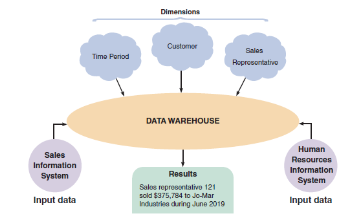
Data Mining
- Looks for meaningful data patterns and relationships
- Suggested Goals for Data Mining:
- Increase the number of pages viewed per session and referred customers
- Reduce clicks to close
- Increase checkouts per visit and average profit per checkout
Logical versus Physical Storage
- Logical Storage: Data that a user can view, understand, and access, regardless of how or where that information actually is organized or stored
- Physical Storage: Strictly hardware related
- Involves the process of reading and writing binary data to physical media
Data Coding
- Extended Binary Coded Decimal Interchange Code (EBCDIC)
- Mainframe computers and high-capacity servers
- American Standard Code for Information Interchange (ASCII)
- Used on most personal computers
- Binary storage format
- Represents numbers as actual binary values
- Unicode: uses two bytes per character
Storing Dates
International Organization for Standardization (ISO) requires a format of four digits for the year, two for the month, and two for the day (YYYYMMDD)
- Absolute Date: total number of days from some specific base date
Data Control
- Well-designed DBMS
- Must provide built-in control and security
- Forms of data protection
- Limited access to files and databases
- User ID and passwords
- Permissions and encryption
- Backup copies of databases must be retained for a specified period of time
- Recovery procedures can be used to restore