Paper 2 Topic 6: Programming
2.1 Develop code
2.1.1 Be able to write programs in a high-level programming language.
→python
2.1.2 Understand the benefit of producing programs that are easy to read and be able to use techniques (comments, descriptive names (variables, constants, subprograms), indentation) to improve readability and to explain how the code works.
Good programs are easy to read and understand.
Use:
Comments – explain what the code does
# This calculates the area of a rectangle, #Main program, #Global variablesDescriptive names – e.g.
total_price, nottpIndentation – shows program structure
Constants – e.g.
PI = 3.14159(doesn’t change) and Variables e.g.Area = 0.0
2.1.3 Be able to differentiate between types of error in programs (logic, syntax, runtime).
Syntax error – errors in the programming language, breaks programming rules (e.g. missing
:)Logic error – code runs but gives the wrong result, e.g. using the wrong arithmetic operator or mixing up variable names
Runtime error – Errors which cause a program to crash such as dividing by 0 or 'index out of range'.
2.1.4 Be able to design and use test plans and test data (normal, boundary, erroneous).
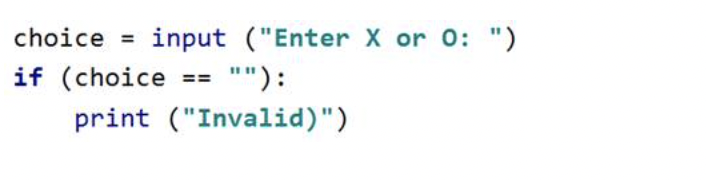
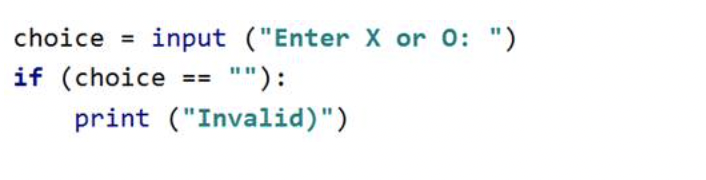
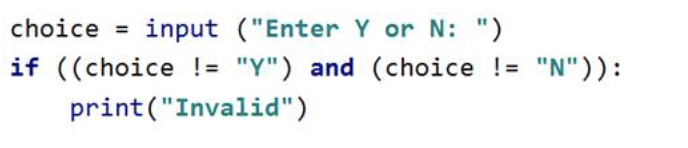
There are 4 types of data test/check. Each of them uses an if statement.
Presence check: checks if any data is inputted
Length check: checks if the length of the inputted data is as required
Range check: checks if data is in required range

Look Up check: checks if data is in a given data set/reference list
2.1.5 Be able to interpret error messages and identify, locate and fix errors in a program.
Common error messages:
Syntax error: broke the rules of the language — it can’t even run.
Example:
print("Hello"Error message:
SyntaxError: unexpected EOF while parsingMeaning: You forgot a closing bracket or quote.
Fix: Add the missing ) or ".
Name error: used a variable or function name that doesn’t exist.
Example:
print(nmae)Error message:
NameError: name 'nmae' is not definedMeaning: The variable nmae hasn’t been defined — maybe it’s a typo.
Fix: Change it to name.
Type error: tried to combine incompatible data types
Example:
age = 10
print("Age: " + age)
Error message:
TypeError: can only concatenate str (not "int") to strMeaning: You can’t mix strings and integers directly.
Fix: Convert the integer:
print("Age: " + str(age))IndexError: tried to access an element that doesn’t exist in a list.
Example:
numbers = [1, 2, 3]
print(numbers[5])
Error message:
IndexError: list index out of rangeMeaning: The list only has items at positions 0, 1, and 2.
Fix: Check your loop or index value.
Value Error: gave the wrong type of data to a function
Example:
num = int("hello")
Error message:
ValueError: invalid literal for int() with base 10: 'hello'
Meaning: You can’t turn the word "hello" into a number.
Fix: Make sure input is numeric.
Indentation error : incorrect/missing indentation
2.1.6 Be able to determine what value a variable will hold at a given point in a program (trace table).
Trace table example:
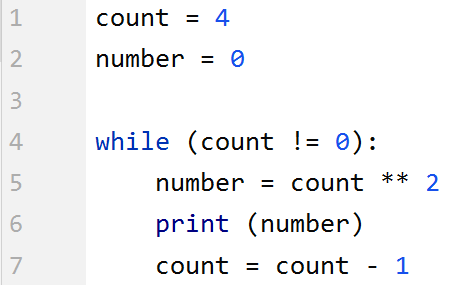
count | number | output |
4 | 0 |
|
| 16 |
|
|
| 16 |
….
2.1.7 Be able to determine the strengths and weaknesses of a program and suggest improvements.
Be able to identify:
Strengths (e.g. efficient, readable)
Weaknesses (e.g. no validation, slow)
Suggest improvements (e.g. add functions, optimize loop).
2.2 Constructs
2.2.1 Understand the structural components of a program (variable and type declarations, command sequences, selection, iteration, data structures, subprograms).
Main building blocks:
Variables and Constants– store data, data type declared at the beginning of the program
Commands – instructions, built-in subprograms
Selection –
if,elif,elseIteration – loops (
for,while)Data structures – lists, arrays, records, 2D lists
Subprograms – functions/procedures
2.2.2 Be able to use sequencing, selection and iteration constructs in their programs.
Sequence – steps in order
x = 3
y = 4
print(x + y)
Selection – decision making
if score >= 50:
    print("Pass")
else:
    print("Fail")
Iteration – repetition
for i in range(5):
    print(i)
2.3 Data types and structures
2.3.1 Understand the need for, and understand how to use, data types (integer, real, Boolean, char, string).
Type | Example | Description |
|---|---|---|
Integer | 5 | Whole number |
Real/Float | 3.14 | Decimal number |
Boolean | True/False | Yes/No logic |
Char | 'A' | Single character |
String | "Hello" | Sequence of chars |
(PLS p.5)
2.3.2 Understand the need for, and understand how to use, data structures (records, one-dimensional arrays, two-dimensional arrays).
(PLS p.10)
1-dimensional data structure : arrays(holds multiple data of the same data type under the same identifier), records(holds multiple data of different data types)
2-dimensional data structure:
![theHouse[0,2] ="sink"](https://knowt-user-attachments.s3.amazonaws.com/3511d27e-c004-4ee0-85f7-f4565609c005.png)
2.3.3 Understand the need for, and how to manipulate, strings.
(PLS p.11-12)
2.3.4 Understand the need for, and how to use, variables and constants.
(PLS p.5)
2.3.5 Understand the need for, and how to use, global and local variables when implementing subprograms.
Local – only used inside a function
Global – used anywhere in the program
total = 0   # global variable

def add():
    local_num = 5  # local variable
    global total
    total += local_num
(PLS p.8)
2.4.1 Understand how to write code that accepts and responds appropriately to user input.
(PLS p.5)
2.4.2 Understand the need for, and how to implement, validation.
There are 4 types of data test/check. Each of them uses an if statement.
Presence check: checks if any data is inputted
Length check: checks if the length of the inputted data is as required
Range check: checks if data is in required range
Look Up check: checks if data is in a given data set/reference list
2.4.3 Be able to write code that reads/writes from/to a text file.
X
2.5 Operators
(PLS p.6)
2.5.1 Understand the purpose of, and how to use, arithmetic operators (add, subtract, divide, multiply, modulus, integer division).
Operator | Meaning | Example | Result |
|---|---|---|---|
+ | Add | 5 + 2 | 7 |
- | Subtract | 5 - 2 | 3 |
* | Multiply | 5 * 2 | 10 |
/ | Divide | 5 / 2 | 2.5 |
// | Integer divide | 5 // 2 | 2 |
% | Modulus(gets remainder) | 5 % 2 | 1 |
2.5.2 Understand the purpose of, and how to use, relational operators (equal to, less than, greater than, not equal to, less than or equal to, greater than or equal to).
Operator | Meaning | Example | Result |
|---|---|---|---|
== | Equal to | 5 == 5 | True |
!= | Not equal to | 5 != 3 | True |
< | Less than | 2 < 5 | True |
> | Greater than | 5 > 2 | True |
<= | Less or equal | 3 <= 3 | True |
>= | Greater or equal | 4 >= 2 | True |
Relational operators can also be used with strings, which are treated as their equivalent ascii value.
E.g. Apple<Banana
2.5.3 Understand the purpose of, and how to use, logic operators (AND, OR, NOT).
Operator | Meaning | Example | Result |
|---|---|---|---|
AND | Both true | (x>0 and y>0) | True if both true |
OR | Either true | (x>0 or y>0) | True if one true |
NOT | Opposite | not(x>0) | Negates result |
2.6 Subprograms
2.6.1 Understand the benefits of using subprograms and be able to write code that uses user-written and pre-existing (built-in, library) subprograms.
(PLS p.8, 9 and 13)
2.6.2 Understand the concept of passing data into and out of subprograms (procedures, functions).
Procedure – performs action, no return
Function – returns a value
Example:
def add(a, b):
    return a + b
2.6.3 Be able to create subprograms that use parameters.
Parameters are variables used inside subprograms. When the subprograms is called, it takes in a piece of data as “the variable” and performs an algorithm on it.
Example:
def square(num):
    return num * num
Call it:square(5) → returns 25