CSI: Code (copy)
Managing Databases:
--Create a Database:
CREATE DATABASE database_name;

-- Drop a DataBase
DROP DATABASE database_name;


--Create a Table:
CREATE TABLE table_name (column1 datatype,
column2 datatype,
column3 datatype,
);


-- Example of creating a table
CREATE TABLE Persons (PersonID int, LastName varchar(255), FirstName varchar(255), Address varchar(255), City varchar(255)
);


-- Drop a Table DROP
TABLE table_name;

-- Add a column to a table using ALTER
ALTER TABLE table_name ADD column_name datatype;
Managing Tables
Altering a table
-- Drop a column in a table using ALTER:
ALTER TABLE table_name DROP COLUMN column_name;
Inserting Data into a table
-- Insert Data into a table
INSERT INTO table_name (column1, column2, column3, ...) VALUES (value1, value2, value3, ...);
-- If you are adding values for all the columns of the table, you do not need to specify the column names in the SQL query.
INSERT INTO table_name VALUES (value1, value2, value3, ...);Selecting Data from a database
-- This will select only the customerName and city from the database
SELECT CustomerName, City FROM Customers;
-- This will select all the columns from the database
SELECT * FROM Customers;Filtering records
-- This will select all the customers that live in Mexico
SELECT * FROM Customers
WHERE Country = 'Mexico';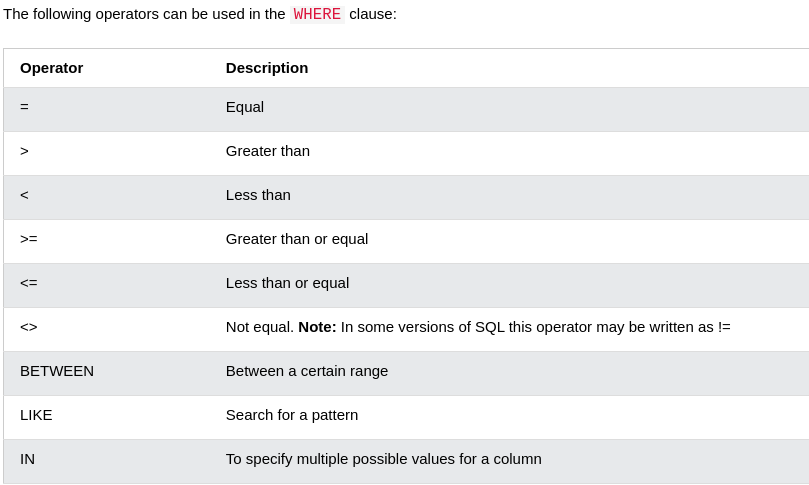
AND, OR and NOT
The
ANDoperator displays a record if all the conditions separated byANDare TRUE.The
ORoperator displays a record if any of the conditions separated byORis TRUE.The
NOToperator displays a record if the condition(s) is NOT TRUE.
--Example of using AND/OR
SELECT column1, column2, ...
FROM table_name
WHERE condition1 AND/OR condition2 AND/OR condition3 ...;
--Example of using NOT
SELECT column1, column2, ...
FROM table_name
WHERE NOT condition;BETWEEN
--This will select only rows where the price is between 10 and 20
SELECT * FROM Products
WHERE Price BETWEEN 10 AND 20;
ORDER
SELECT column1, column2, ...
FROM table_name
ORDER BY column1, column2, ... ASC|DESC;
ascending or descending order deference's
Ascending order (ASC) arranges items from lowest to highest
Descending order (DESC) organizes items from highest to lowest.
UPDATE
The UPDATE statement is used to modify the existing records in a table.
UPDATE table_name
SET column1 = value1, column2 = value2, ...
WHERE condition;
--Example
UPDATE Customers
SET ContactName = 'Alfred Schmidt', City = 'Frankfurt'
WHERE CustomerID = 1;DELETE
The DELETE statement is used to delete existing records in a table.
DELETE FROM table_name WHERE condition;--Example
DELETE FROM Customers WHERE CustomerName='Alfreds Futterkiste';--Delete all records
DELETE FROM table_name;Primary Key
The following SQL creates a PRIMARY KEY on the "ID" column when the "Persons" table is created:
CREATE TABLE Persons (
    ID int NOT NULL,
    LastName varchar(255) NOT NULL,
    FirstName varchar(255),
    Age int,
    PRIMARY KEY (ID)
);
Foreign key
The following SQL creates a FOREIGN KEY on the "PersonID" column when the "Orders" table is created
CREATE TABLE Orders (
    OrderID int NOT NULL,
    OrderNumber int NOT NULL,
    PersonID int,
    PRIMARY KEY (OrderID),
    FOREIGN KEY (PersonID) REFERENCES Persons(PersonID)
);