CS2113 Review
Classes And Objects
Defining a Class and Creating Objects
class Car {
    String model;
    int year;

    void display() {
        System.out.println("Model: " + model + ", Year: " + year);
    }
}

public class Main {
    public static void main(String[] args) {
        Car myCar = new Car();  // Creating an object
        myCar.model = "Toyota";
        myCar.year = 2020;
        myCar.display();
    }
}
Mutators (Setters) and Accessors (Getters)
Encapsulation hides fields and provides methods to access them.
class Person {
    private String name;

    public void setName(String newName) { // Mutator
        name = newName;
    }

    public String getName() { // Accessor
        return name;
    }
}

public class Main {
    public static void main(String[] args) {
        Person p = new Person();
        p.setName("Alice");
        System.out.println(p.getName()); // Output: Alice
    }
}setName()changes thenamefield, whilegetName()retrieves it.
Private Helper Methods
Private methods are used within the class to help other methods.
class Calculator {
    public int addPositiveNumbers(int a, int b) {
        if (isPositive(a) && isPositive(b)) {
            return a + b;
        } else {
            return 0; // Returns 0 if any number is negative
        }
    }

    private boolean isPositive(int num) { // Private helper method
        return num >= 0;
    }
}

public class Main {
    public static void main(String[] args) {
        Calculator calc = new Calculator();
        System.out.println(calc.addPositiveNumbers(5, 3));  // Output: 8
        System.out.println(calc.addPositiveNumbers(-2, 3)); // Output: 0
    }
}
Constructor Overloading
Multiple constructors allow object creation with different parameters.
class Dog {
    String name;
    int age;

    Dog() { // Default constructor
        name = "Unknown";
        age = 0;
    }

    Dog(String n, int a) { // Parameterized constructor
        name = n;
        age = a;
    }

    void display() {
        System.out.println(name + " is " + age + " years old.");
    }
}

public class Main {
    public static void main(String[] args) {
        Dog d1 = new Dog();
        Dog d2 = new Dog("Buddy", 3);
        d1.display();
        d2.display();
    }
}Dog()is a default constructor.Dog(String, int)allows specifying values when creating an object.
Parameters of Reference Types
Objects passed as parameters are references, meaning changes affect the original object.
class Box {
    int value;
}

public class Main {
    public static void modify(Box b) {
        b.value += 10;
    }

    public static void main(String[] args) {
        Box myBox = new Box();
        myBox.value = 5;
        modify(myBox);
        System.out.println(myBox.value); // Output: 15
    }
}
Static Fields and Methods
Static members belong to the class rather than a specific object.
class StringUtils {
    static String defaultMessage = "Hello, World!"; // Static field

    static String toUpperCase(String text) { // Static method
        return text.toUpperCase();
    }
}

public class Main {
    public static void main(String[] args) {
        System.out.println(StringUtils.defaultMessage);

        System.out.println(StringUtils.toUpperCase("java"));
    }
}
Static Field (
defaultMessage): Belongs to the class, not an instance.Static Method (
toUpperCase): Converts a string to uppercase and can be called without creating an object.No Object Needed: We access
StringUtils.defaultMessageand callStringUtils.toUpperCase()directly.
ArrayList
How to define an ArrayList
import java.util.ArrayList;

public class Main {
    public static void main(String[] args) {
        // Creating an ArrayList of Strings
        ArrayList<String> names = new ArrayList<>();

        // Creating an ArrayList of Integers
        ArrayList<Integer> numbers = new ArrayList<>();
    }
}
Common ArrayList Methods
Adding Elements (add()) -
ArrayList<String> fruits = new ArrayList<>();

fruits.add("Apple");
fruits.add("Banana");
fruits.add("Cherry");

System.out.println(fruits); // Output: [Apple, Banana, Cherry]
Getting Size (size()) -
System.out.println(fruits.size()); // Output: 3
Accessing Elements (get(index)) -
System.out.println(fruits.get(1)); // Output: Banana (Index starts at 0) Changing an Element (set(index, value)) -
fruits.set(1, "Blueberry"); System.out.println(fruits); // Output: [Apple, Blueberry, Cherry] Removing Elements (remove(index) or remove(object)) -
fruits.remove(2); // Removes "Cherry"
System.out.println(fruits); // Output: [Apple, Blueberry]

fruits.remove("Apple"); // Removes "Apple"
System.out.println(fruits); // Output: [Blueberry]
Checking if an Element Exists (contains()) -
System.out.println(fruits.contains("Blueberry")); // Output: true
System.out.println(fruits.contains("Cherry"));   // Output: false
Clearing All Elements (clear()) -
fruits.clear();
System.out.println(fruits); // Output: []
Checking if Empty (isEmpty()) -
System.out.println(fruits.isEmpty()); // Output: true/
Iterating Through an ArrayList
using a for loop
ArrayList<String> cities = new ArrayList<>();
cities.add("New York");
cities.add("London");
cities.add("Tokyo");

for (int i = 0; i < cities.size(); i++) {
    System.out.println(cities.get(i));
}
Enhanced For loop
for (String city : cities) {
    System.out.println(city);
}output:
New York
London
Tokyo
Classes and ArrayList
Example 1: Basic Class with an ArrayList
import java.util.ArrayList;

class NameList {
    ArrayList<String> names = new ArrayList<>();

    void addName(String name) {
        names.add(name);
    }

    void printNames() {
        System.out.println(names);
    }
}

public class Main {
    public static void main(String[] args) {
        NameList myNames = new NameList();
        myNames.addName("Alice");
        myNames.addName("Bob");
        myNames.printNames(); // Output: [Alice, Bob]
    }
}
Example 2: Class with Objects Stored in an ArrayList
import java.util.ArrayList;

class Person {
    String name;

    Person(String name) {
        this.name = name;
    }

    void sayHello() {
        System.out.println("Hello, my name is " + name);
    }
}

class PeopleList {
    ArrayList<Person> people = new ArrayList<>();

    void addPerson(String name) {
        people.add(new Person(name));
    }

    void introduceEveryone() {
        for (Person p : people) {
            p.sayHello();
        }
    }
}

public class Main {
    public static void main(String[] args) {
        PeopleList group = new PeopleList();
        group.addPerson("Alice");
        group.addPerson("Bob");
        group.introduceEveryone();
        // Output:
        // Hello, my name is Alice
        // Hello, my name is Bob
    }
}
Example 3: Searching in an ArrayList
import java.util.ArrayList;

class Person {
    String name;

    Person(String name) {
        this.name = name;
    }
}

class PeopleList {
    ArrayList<Person> people = new ArrayList<>();

    void addPerson(String name) {
        people.add(new Person(name));
    }

    boolean findPerson(String name) {
        for (Person p : people) {
            if (p.name.equals(name)) {
                return true;
            }
        }
        return false;

    }
}

public class Main {
    public static void main(String[] args) {
        PeopleList group = new PeopleList();
        group.addPerson("Alice");
        group.addPerson("Bob");

        System.out.println(group.findPerson("Alice")); // Output: true
        System.out.println(group.findPerson("Charlie")); // Output: false
    }
}
Input / Output
Reading from a File (File Input)
import java.io.File;
import java.io.FileNotFoundException;
import java.util.Scanner;

public class ReadFileExample {
    public static void main(String[] args) {
        try {
            File file = new File("example.txt"); // Open file
            Scanner scanner = new Scanner(file); // Read file

            while (scanner.hasNextLine()) { // Read each line
                String line = scanner.nextLine();
                System.out.println(line);
            }

            scanner.close(); // Close file after reading
        } catch (FileNotFoundException e) {
            System.out.println("File not found.");
        }
    }
}
Streams Using Strings (Reading from a String)
import java.util.Scanner;

public class StringStreamExample {
    public static void main(String[] args) {
        String data = "Hello\nThis is a test\n12345";
        Scanner scanner = new Scanner(data); // Read string like a file

        while (scanner.hasNextLine()) {
            System.out.println(scanner.nextLine());
        }

        scanner.close();
    }
} //output:
  //Hello
  //This is a test
  //12345
Writing to a File (File Output)
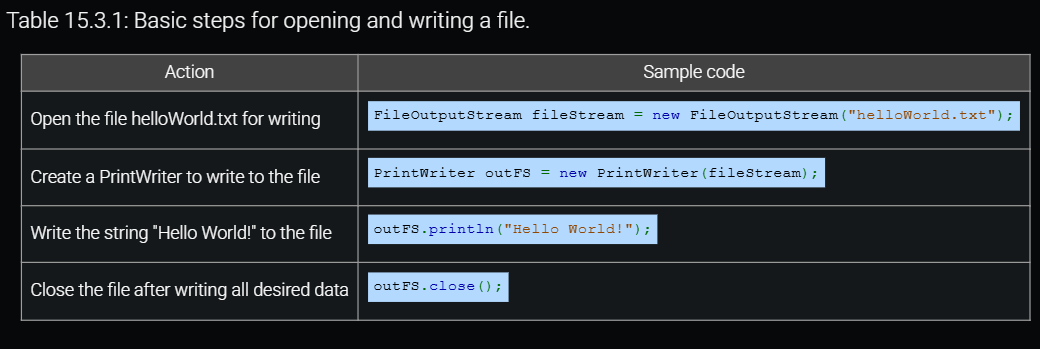
import java.io.FileWriter;
import java.io.IOException;

public class WriteFileExample {
    public static void main(String[] args) {
        try {
            FileWriter writer = new FileWriter("output.txt");//open file
            writer.write("Hello, World!\n"); // Write text
            writer.write("Writing to a file in Java.\n");
            writer.close(); // Always close the file
            System.out.println("File written successfully.");
        } catch (IOException e) {
            System.out.println("An error occurred.");
        }
    }
}
Inheritance
Derived Classes & Inheritance
A derived class (subclass) inherits properties from a base class (superclass).
This allows code reuse and avoids duplication.
// Superclass (Parent)
class Animal {
    void makeSound() {
        System.out.println("Some generic animal sound");
    }
}

// Subclass (Child)
class Dog extends Animal {
    void bark() {
        System.out.println("Woof! Woof!");
    }
}

public class Main {
    public static void main(String[] args) {
        Dog myDog = new Dog();
        myDog.makeSound(); // Inherited method
        myDog.bark(); // Child class method
    }
} //output:
  //Some generic animal sound
  //Woof! Woof!
Access by Members of Derived Classes
A subclass can access public and protected members of the parent class.
Private members are not directly accessible.
class Person {
    public String name = "John";  // Accessible
    private int age = 25;         // Not accessible

    public int getAge() {
        return age; // Use a method to access private members
    }
}

class Student extends Person {
    void showInfo() {
        System.out.println("Name: " + name); // ✅ Accessible
        System.out.println("Age: " + getAge()); // ✅ Access through method
    }
}

public class Main {
    public static void main(String[] args) {
        Student student = new Student();
        student.showInfo();
    }
}//output:
 //Name: John
 //Age: 25
Main Idea:
nameis public, so it's accessible.ageis private, so it must be accessed usinggetAge().
Protected Member Access
What is protected?
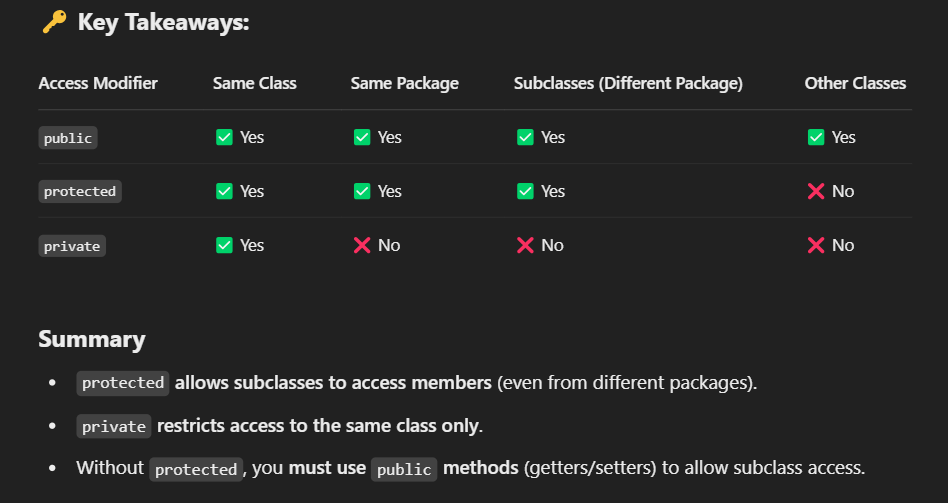
protectedallows members (fields/methods) of a class to be accessible:Inside the same package.
In subclasses (even in different packages).
If a member is
protected, a subclass can access it directly.protectedmembers can be accessed by derived classes, but not by external classes.
// File: Animal.java
package animals;

public class Animal {
    protected String species = "Unknown Animal"; // Protected member

    protected void makeSound() {
        System.out.println("Some animal sound");
    }
}

// File: Cat.java (Subclass in the same package)
package animals;

public class Cat extends Animal {
    void displayInfo() {
        System.out.println("Species: " + species); // ✅ Allowed
        makeSound(); // ✅ Allowed (protected)
    }
}

// File: Main.java (Testing access)
package animals;

public class Main {
    public static void main(String[] args) {
        Cat myCat = new Cat();
        myCat.displayInfo();
    }
}
❌ What Happens If It Was private Instead?
If we change protected to private, the subclass won't be able to access it directly.
// File: Animal.java
package animals;

public class Animal {
    private String species = "Unknown Animal"; // ❌ Now private!

    private void makeSound() { // ❌ Now private!
        System.out.println("Some animal sound");
    }
}

// File: Cat.java (Subclass in the same package)
package animals;

public class Cat extends Animal {
    void displayInfo() {
        System.out.println("Species: " + species); // ❌ ERROR! Can't   access private field
        makeSound(); // ❌ ERROR! Can't access private method
    }
}
Class Definitions
class Car {
    String brand;
    int speed;

    Car(String brand, int speed) {
        this.brand = brand;
        this.speed = speed;
    }

    void showDetails() {
        System.out.println(brand + " is moving at " + speed + " km/h");
    }
}

public class Main {
    public static void main(String[] args) {
        Car myCar = new Car("Toyota", 100);
        myCar.showDetails();
    }
}//output:
 //Toyota is moving at 100 km/h
Overriding Member Methods
A subclass can override a method from the superclass to change its behavior.
class Animal {
    void makeSound() {
        System.out.println("Animal makes a sound");
    }
}

class Dog extends Animal {
    @Override
    void makeSound() {
        System.out.println("Dog barks: Woof Woof!");
    }
}

public class Main {
    public static void main(String[] args) {
        Animal myAnimal = new Dog();
        myAnimal.makeSound(); // Calls the overridden method in Dog
    }
} //output: Dog barks: Woof Woof!
Polymorphism
A reference to a superclass can point to a subclass object.
Allows method overriding to enable different behaviors.
class Animal {
    void makeSound() {
        System.out.println("Animal makes a sound");
    }
}

class Cat extends Animal {
    @Override
    void makeSound() {
        System.out.println("Cat meows: Meow Meow!");
    }
}

class Dog extends Animal {
    @Override
    void makeSound() {
        System.out.println("Dog barks: Woof Woof!");
    }
}

public class Main {
    public static void main(String[] args) {
        Animal myAnimal1 = new Cat();
        Animal myAnimal2 = new Dog();

        myAnimal1.makeSound(); // Calls Cat's makeSound()
        myAnimal2.makeSound(); // Calls Dog's makeSound()
    }
} //output:
  //Cat meows: Meow Meow!
  //Dog barks: Woof Woof!
Animal myAnimal = new Dog();→ Superclass reference points to subclass object.Calls overridden methods dynamically at runtime (polymorphism).
ArrayLists of Objects
an ArrayList is a resizable array-like data structure. When working with objects, we store instances of classes inside an ArrayList<T>, where T is the object type.
Example 1: Storing Student Objects in an ArrayList:
import java.util.ArrayList;

class Student {
    String name;
    int age;

    public Student(String name, int age) {
        this.name = name;
        this.age = age;
    }

    @Override
    public String toString() {
        return "Student{name='" + name + "', age=" + age + "}";
    }
}

public class Main {
    public static void main(String[] args) {
        ArrayList<Student> students = new ArrayList<>();

        students.add(new Student("Alice", 20));
        students.add(new Student("Bob", 22));
        students.add(new Student("Charlie", 19));

        for (Student s : students) {
            System.out.println(s);
        }

      // Printing using a regular for loop
        for (int i = 0; i < students.size(); i++) {
            students.get(i).display(); // Calling the display method
        }
    }
}
Student{name='Alice', age=20}
Student{name='Bob', age=22}
Student{name='Charlie', age=19}
Example 2:
import java.util.ArrayList;

class Business {
    private String name;
    private String address;

    public Business(String name, String address) {
        this.name = name;
        this.address = address;
    }

    public String getName() {
        return name;
    }

    public void displayBusiness() {
        System.out.println("Business Name: " + name + ", Address: " + address);
    }
}

public class BusinessDirectory {
    public static void main(String[] args) {
        ArrayList<Business> businesses = new ArrayList<>();

        // Adding businesses
        businesses.add(new Business("ACME Corp", "123 Main St"));
        businesses.add(new Business("Tech Solutions", "456 Elm St"));
        businesses.add(new Business("Coffee House", "789 Oak St"));

        // Displaying all businesses
        System.out.println("Business Directory:");
        for (int i = 0; i < businesses.size(); i++) {
            businesses.get(i).displayBusiness();
        }

        // Removing a business (e.g., "Tech Solutions")
        for (int i = 0; i < businesses.size(); i++) {
            if (businesses.get(i).getName().equals("Tech Solutions")) {
                businesses.remove(i);
                break; // Stop after removing to avoid skipping an element
            }
        }

        // Displaying after removal
        System.out.println("\nAfter removing 'Tech Solutions':");
        for (int i = 0; i < businesses.size(); i++) {
            businesses.get(i).displayBusiness();
        }
    }
}
Business Directory:
Business Name: ACME Corp, Address: 123 Main St
Business Name: Tech Solutions, Address: 456 Elm St
Business Name: Coffee House, Address: 789 Oak St

After removing 'Tech Solutions':
Business Name: ACME Corp, Address: 123 Main St
Business Name: Coffee House, Address: 789 Oak St
Exceptions
Try-Catch
public class ExceptionExample {
    public static void main(String[] args) {
        try {
            int result = 10 / 0; // Division by zero causes an exception
            System.out.println(result);
        } catch (ArithmeticException e) {
            System.out.println("Error: Cannot divide by zero!");
        }
        System.out.println("Program continues...");
    }
}
Common Exception Types in Java
Exception Type | Cause |
|---|---|
| Division by zero ( |
| Accessing methods on |
| Accessing an invalid array index |
| File does not exist |
| Issues with input/output operations |
| Trying to convert invalid string to number |
Using throw Statements (Manually Throwing Exceptions)
The throw keyword is used to manually throw an exception inside a method.
public class ThrowExample {
    static void checkAge(int age) {
        if (age < 18) {
            throw new IllegalArgumentException("Age must be 18 or above")
        }

        System.out.println("Access granted!");
    }

    public static void main(String[] args) {
        try {
            checkAge(16); // This will throw an exception
        } catch (IllegalArgumentException e) {
            System.out.println("Error: " + e.getMessage());
        }
    }
}//output: Error: Age must be 18 or above.
User-Defined Exceptions (Custom Exceptions)
You can create your own exception class by extending Exception.
class InvalidAgeException extends Exception {
    public InvalidAgeException(String message) {
        super(message);
    }
}

public class CustomExceptionExample {
    static void checkAge(int age) throws InvalidAgeException {
        if (age < 18) {
            throw new InvalidAgeException("You must be 18 or older.");
        }
        System.out.println("Welcome!");
    }

    public static void main(String[] args) {
        try {
            checkAge(16);
        } catch (InvalidAgeException e) {
            System.out.println("Custom Exception: " + e.getMessage());
        }
    }
} //output: Custom Exception: You must be 18 or older.
Handling Exceptions with Files
import java.io.FileWriter;
import java.io.IOException;

public class FileExceptionExample {
    public static void main(String[] args) {
        try {
            FileWriter writer = new FileWriter("output.txt");
            writer.write("Hello, world!");
            writer.close();

            System.out.println("Successfully wrote to file.");

        } catch (IOException e) {
            System.out.println("Error: Could not write to file.");
        }
    }
}  //output: Successfully wrote to file.
Generics
What Are Generics in Java? -
Generics allow you to write flexible, reusable, and type-safe code. Instead of working with specific data types, generics let you define methods, classes, and interfaces that operate on different types without compromising type safety.
A generic method allows you to define a method that operates on different types.
public <T> void methodName(T param) { ... }<T>: Generic type parameter (T can be any type).T param: The parameter's type is determined at runtime.
public class MultiGenericMethod {
    // Generic method with two types
    public static <T, U> void displayPair(T first, U second) {
        System.out.println("First: " + first + ", Second: " + second);
    }

    public static void main(String[] args) {
        displayPair(1, "Apple");
        displayPair("Age", 25);
        displayPair(3.14, 10);
    }
}
First: 1, Second: Apple
First: Age, Second: 25
First: 3.14, Second: 10
✔ <T, U> allows for multiple generic types.
✔ Different types can be used in a single method call.
Defining a Generic Class
Syntax of a Generic Class
class ClassName<T> { ... }Example: A Generic Box Class
// Generic class
class Box<T> {
    private T item;

    public void setItem(T item) {
        this.item = item;
    }

    public T getItem() {
        return item;
    }
}

public class GenericClassExample {
    public static void main(String[] args) {
        Box<String> stringBox = new Box<>();
        stringBox.setItem("Hello");
        System.out.println("String Box: " + stringBox.getItem());

        Box<Integer> intBox = new Box<>();
        intBox.setItem(123);
        System.out.println("Integer Box: " + intBox.getItem());
    }
}
Recursive methods
Calling a recursive method
import java.util.Scanner;

public class RecursiveCalls {
   public static void backwardsAlphabet(char currLetter) {
      if (currLetter == 'a') {
         System.out.println(currLetter);
      }
      else {
         System.out.print(currLetter + " ");
         backwardsAlphabet((char)(currLetter - 1));
      }
   }

   public static void main (String [] args) {
      Scanner scnr = new Scanner(System.in);
      char startingLetter;

      startingLetter = scnr.next().charAt(0);

      backwardsAlphabet(startingLetter);

   }
}
Examples for Recursive
Write computeGrowth()'s recursive case to recursively call computeGrowth() with month + 1 and population multiplied by 2.
Ex: If the input is 400, then the output is:
month: 1, population: 400
month: 2, population: 800
month: 3, population: 1600
Rabbit population is at least 1600 in month 3.
Note: Assume input is non-negative.
import java.util.Scanner;

public class GrowthRecords {
   public static void computeGrowth(int month, int population) {
      System.out.println("month: " + month + ", population: " + population);

		if (population >= 1600) {
         System.out.print("Rabbit 1600 in month " + month + ".");
      }

      else {
         computeGrowth(month + 1, population * 2);
      }

   }

   public static void main(String[] args) {
      Scanner scnr = new Scanner(System.in);
      int population;

      population = scnr.nextInt();
		computeGrowth(1, population);
   }
}
Example
Integer variables totalDay and inventory are read from input. Complete purchases()'s recursive case:
If day is even, call purchases() to compute the next day's inventory as the current day's inventory minus 6.
Otherwise, call purchases() to compute the next day's inventory as the current day's inventory minus 13.
Ex: If the input is 5 270, then the output is:
Day: 5, inventory: 232
Note: x % 2 == 0 returns true if x is even.
import java.util.Scanner;

public class StockCount {
   public static void purchases(int totalDay, int day, int inventory) {
      if (day == totalDay) {
         System.out.println("Day: " + totalDay + ", inventory: " + inventory);
      }
      else {
         if (day % 2 == 0) {
            purchases(totalDay, day + 1, inventory - 6);
         }
         else{
            purchases(totalDay, day + 1, inventory - 13);
         }


      }
   }

   public static void main(String[] args) {
      Scanner scnr = new Scanner(System.in);
      int totalDay;
		int inventory;

      totalDay = scnr.nextInt();
		inventory = scnr.nextInt();
      purchases(totalDay, 1, inventory);
   }
}
fibonacci code
import java.util.Scanner;

public class LabProgram {

   public static int fibonacci(int n) {
       if (n < 0) {
           return -1;
       }
       else if (n == 0) {
           return 0;
       }
       else if (n == 1) {
           return 1;
       }
       else {
           return fibonacci(n - 1) + fibonacci(n - 2);
       }
   }

   public static void main(String[] args) {
      Scanner scnr = new Scanner(System.in);
      int startNum;

      startNum = scnr.nextInt();
      System.out.println("fibonacci(" + startNum + ") is " + fibonacci(startNum));
   }
}
Searching and algorithms
Searching algorithms
Linear search (also called sequential search) is a simple algorithm used to find a specific value (called the key) in a list. It checks each element of the list one-by-one from the beginning until it either finds the key or reaches the end of the list.
import java.util.Scanner;
public class LinearSearch {
   public static int linearSearch(int [] numbers, int key) {
      int i;

      for (i = 0; i < numbers.length; ++i) {
         if (numbers[i] == key) {
            return i;
         }
      }

      return -1; /* not found */
   }

   public static void main(String [] args) {
      Scanner scnr = new Scanner(System.in);
      int [] numbers = {2, 4, 7, 10, 11, 32, 45, 87};
      int i;
      int key;
      int keyIndex;

      System.out.print("NUMBERS: ");
      for (i = 0; i < numbers.length; ++i) {
         System.out.print(numbers[i] + " ");
      }
      System.out.println();

      System.out.print("Enter a value: ");
      key = scnr.nextInt();

      keyIndex = linearSearch(numbers, key);

      if (keyIndex == -1) {
         System.out.println(key + " was not found.");
      }
      else {
         System.out.println("Found " + key + " at index " + keyIndex + ".");
      }
   }
}
public static int linearSearch(int[] numbers, int key) {
int i;
for (i = 0; i < numbers.length; ++i) {
if (numbers[i] == key) {
return i; //returns indexNumber
}
}
return -1; /* not found */
}Purpose: Searches for the
keyin the arraynumbers.Loop: Goes through the array from index 0 to the end:
If the current number (
numbers[i]) equals thekey, it returns the indexi.If the key is not found after the loop, it returns -1 (a signal that the key isn't in the array).
return numbers[i]; // returns the actual value
keyIndex = linearSearch(numbers, key);

if (keyIndex == -1) {
   System.out.println(key + " was not found.");
}
else {
   System.out.println("Found " + key + " at index " + keyIndex + ".");
}
Calls the
linearSearch()method with the array and the key.If the return value is -1, the number wasn’t found.
Otherwise, it prints the index where the number was found.
Binary Search
A faster search, known as binary search, checks the middle contact first. If the desired contact comes alphabetically before the middle contact, binary search will then search the first half and otherwise the last half. Each step reduces the contacts that need to be searched by half.
import java.util.Scanner;

public class BinarySearch {
   public static int binarySearch(int [] numbers, int key) {
      int mid;
      int low;
      int high;

      low = 0;
      high = numbers.length - 1;

      while (high >= low) {
         mid = (high + low) / 2;
         if (numbers[mid] < key) {
            low = mid + 1;
         }
         else if (numbers[mid] > key) {
            high = mid - 1;
         }
         else {
            return mid;
         }
      }

      return -1; // not found
   }

   public static void main(String [] args) {
      Scanner scnr = new Scanner(System.in);
      int [] numbers = {2, 4, 7, 10, 11, 32, 45, 87};
      int i;
      int key;
      int keyIndex;

      System.out.print("NUMBERS: ");
      for (i = 0; i < numbers.length; ++i) {
         System.out.print(numbers[i] + " ");
      }
      System.out.println();

      System.out.print("Enter a value: ");
      key = scnr.nextInt();

      keyIndex = binarySearch(numbers, key);

      if (keyIndex == -1) {
         System.out.println(key + " was not found.");
      }
      else {
         System.out.println("Found " + key + " at index " + keyIndex + ".");
      }
   }
}
Selection Sort
public class SelectionSortExample {
    public static void selectionSort(int[] arr) {
        int n = arr.length;

        // One by one move the boundary of the unsorted subarray
        for (int i = 0; i < n - 1; i++) {
            // Find the minimum element in unsorted array
            int minIndex = i;
            for (int j = i + 1; j < n; j++) {
                if (arr[j] < arr[minIndex]) {
                    minIndex = j;
                }
            }

            // Swap the found minimum element with the first element
            int temp = arr[minIndex];
            arr[minIndex] = arr[i];
            arr[i] = temp;
        }
    }

    public static void main(String[] args) {
        int[] numbers = {29, 10, 14, 37, 13};
        selectionSort(numbers);

        System.out.println("Sorted array:");
        for (int num : numbers) {
            System.out.print(num + " ");
        }
    }
}