CS102: Sorting Algorithms
Bubble Sorting:
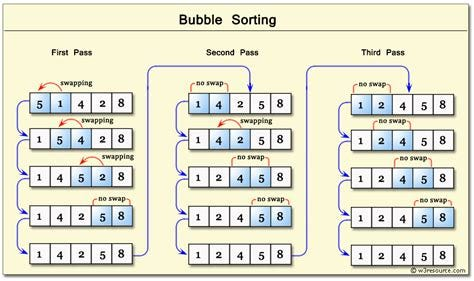
Manually sorts through an array, and changes the position of one individual element through each iteration.
Such as to modify vector <int> myVectorToBubbleSort = {1,4,2,8,5};
CoPilot Explanation
Bubble Sort is a simple sorting algorithm used in programming to sort elements in a list or array. It repeatedly steps through the list, compares adjacent elements, and swaps them if they are in the wrong order. The process is repeated until the list is sorted.
Here's how it works:
Start at the beginning of the list.
Compare the first two elements.
If the first is greater than the second, swap them.
Move to the next pair and repeat the comparison and swapping process.
Continue this for every pair of adjacent elements.
At the end of the first pass, the largest element will have "bubbled" to the end.
Repeat this process for the rest of the elements, reducing the unsorted portion each time.
#include <iostream>

using namespace std;

void bubbleSort(int arr[], int n) {
    for (int i = 0; i < n - 1; i++) {
        for (int j = 0; j < n - i - 1; j++) {
            if (arr[j] > arr[j + 1]) {
                // Swap arr[j] and arr[j+1]
                int temp = arr[j];
                arr[j] = arr[j + 1];
                arr[j + 1] = temp;
            }
        }
    }
}

void printArray(int arr[], int n) {
    for (int i = 0; i < n; i++) {
        cout << arr[i] << " ";
    }
    cout << endl;
}

int main() {
    int arr[] = {64, 34, 25, 12, 22, 11, 90};
    int n = sizeof(arr) / sizeof(arr[0]);
    bubbleSort(arr, n);
    cout << "Sorted array: \n";
    printArray(arr, n);

return 0;
}
Applications of Bubble Sort
Although Bubble Sort is not the most efficient algorithm for large datasets, it is useful in certain scenarios:
Teaching purposes: It's often used to introduce sorting algorithms because of its simplicity and intuitive process.
Small datasets: For small datasets or nearly sorted arrays, Bubble Sort can be effective.
Step-by-step visualization: Its step-by-step approach makes it useful for demonstrating sorting techniques.
Low resource environments: Since it doesn't require additional memory (in-place sorting), it is sometimes used in constrained environments.
Steps to Bubble Sort
1) First Iteration:
a. Access indices 0 and 1 (elements [0] and [1]).
b. Check to see if values are in a desired order (ex. least to greatest), and determine if values need to be swapped, or not-swapped.
ex. Use a boolean flag to True if swap, and to false if there is NO swapping occurring.
NOTE: Lookup examples of discrete true/false mathematics.
c. Move to indices 1 and 2, then repeat the process of step 2.
d. Repeat the process of step three until the bounds of the vector are reached.
2) Subsequent iterations:
a. (Through the use of a for or while-loop) Iterate
3) Final iteration:
a. When the loop is able through the vector without modifying the elements and their order within the array. This indicates that the elements of the array are sorted as desired in Step 1) b.
Selection Sorting
Copilot Explanation
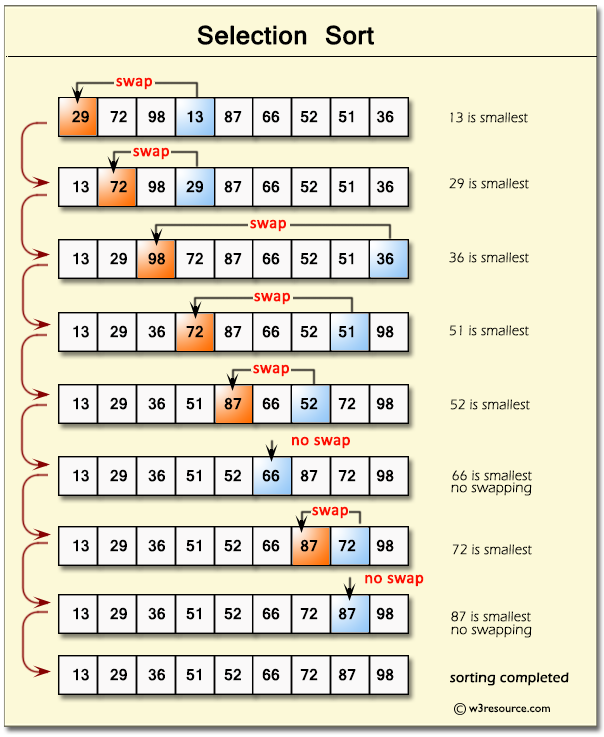
Selection Sort is another simple sorting algorithm, but it works differently than Bubble Sort. It repeatedly selects the smallest (or largest) element from the unsorted part of the array and places it in its correct position. This process continues until the entire array is sorted.
How Selection Sort Works
Start with the first element of the array.
Find the smallest element in the unsorted portion of the array.
Swap the smallest element with the current element.
Move to the next position and repeat the process for the remaining unsorted portion.
Continue until all elements are sorted.
#include <iostream>
using namespace std;
void selectionSort(int arr[], int n) {
    for (int i = 0; i < n - 1; i++) {
        // Find the index of the smallest element in the unsorted part
        int minIndex = i;
        for (int j = i + 1; j < n; j++) {
            if (arr[j] < arr[minIndex]) {
                minIndex = j;
            }
        }
        // Swap the smallest element with the first element of the
unsorted part
        int temp = arr[minIndex];
        arr[minIndex] = arr[i];
        arr[i] = temp;
    }
}
void printArray(int arr[], int n) {
    for (int i = 0; i < n; i++) {
        cout << arr[i] << " ";
    }
    cout << endl;
}
int main() {
    int arr[] = {64, 25, 12, 22, 11};
    int n = sizeof(arr) / sizeof(arr[0]);
    selectionSort(arr, n);
    cout << "Sorted array: \n";
    printArray(arr, n);
    return 0;
}
Steps to selection swap:
1) Accessing the Vector:
a. Access index 0 (the selected index) and call the value in it the default minimum
2) Iteration:
a. iterate (using a for or while-loop) to the right of the selected index position. Compare the default (the selected index) to the elements to the right of it in the array.
DOES NOT CONSIDER ELEMENTS TO THE LEFT
b. If the default value is smaller than an element to the right of itself in the array, it will swap its index with the aforementioned vector.
3) Exiting of the loop:
a. Once no elements are left to the right of the default value (the selected index), the for loop must be broken out of.
Similar to a Bubble Sorting algorithm, use a boolean flag to break out.
Insertion Sorting: (INCOMPLETE)
CoPilot Explanation:
Insertion sort is a simple yet efficient sorting algorithm that is often taught as an introduction to sorting in computer science. It works similarly to the way humans often sort playing cards in their hands: one card at a time, inserting it into its correct position relative to the cards already sorted.
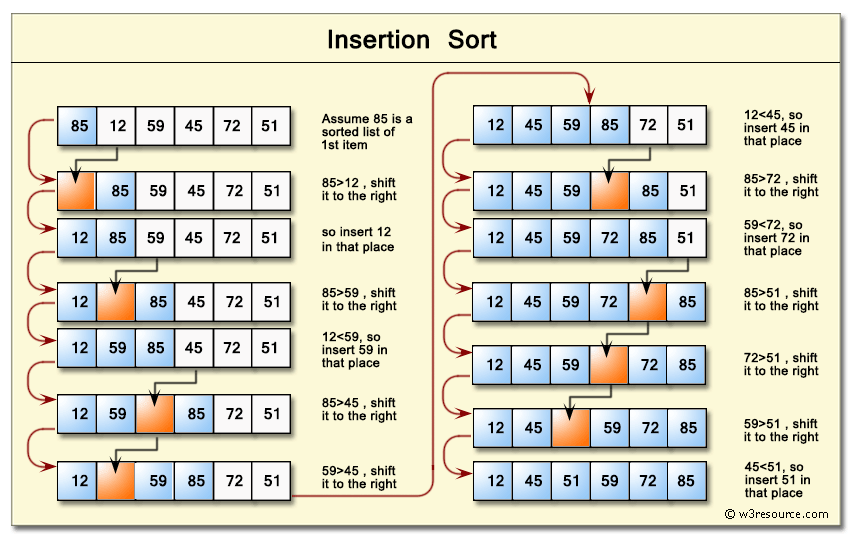
How it Works: The algorithm builds the sorted array one element at a time:
Start with the first element, assuming it is already sorted.
Take the next unsorted element and compare it backward through the sorted portion of the array.
Shift all larger elements in the sorted portion one position to the right.
Insert the current element into its correct position.
Repeat until all elements are sorted.
Characteristics
Best case (already sorted): O(n)
Average case: O(n²)
Worst case (reversed): O(n²)
Space complexity: O(1) (in-place sorting)
Example Code in C++:
#include <iostream>

using namespace std;

void insertionSort(int arr[], int n) {
    for (int i = 1; i < n; i++) {
        int key = arr[i];
        int j = i - 1;
        // Move elements of arr[0..i-1] that are greater than 				key
        // to one position ahead of their current position
        while (j >= 0 && arr[j] > key) {
            arr[j + 1] = arr[j];
            j = j - 1;
        }
        arr[j + 1] = key;
    }
}

int main() {
    int arr[] = {12, 11, 13, 5, 6};
    int n = sizeof(arr) / sizeof(arr[0]);
    insertionSort(arr, n);
    cout << "Sorted array: ";
    for (int i = 0; i < n; i++) {
        cout << arr[i] << " ";
    }
    return 0;
}