INF-101 10/12/23 (Computer Hardware Finish, Computer Software Start)
Defragment and Optimize Hard Drive
DIR - Directory
FAT - File Allocation Table
Starting point of the document you want to open.
To reduce the time for finding files on a hard drive, you should defragment your hard drive.
As you use your computers, the operating system gets fragmented, meaning the programs occupy a lot of space in the hard drive making the computer progressively slow.
A defragmenter won’t work if you have less than 50% of your space free.
To defragment a hard drive:
Open Disk Defragmenter by clicking Start.
Type Disk Defragmenter and then select it.
Under current status, select the disk you want to defragment.
Click Analyze disk to determine if the disk needs to be defragmented or not.
Click Defragment disk.
Disk Cleanup
To maintain the efficiency of your hard drive, you can use disk cleanup.
Device manager - Here you can see all devices connected to the computer.
Driver - A piece of software that allows a piece of hardware to work with the operating system.
If the mouse is not working, the driver fails and you need to restart the computer.
Reboot is used when you get an update.
Ports
A port is designed to accept a specific connector.
A connector plugs into a port.
Common ports
USB (A thumb-drive connector plugs into a USB)
Thunderbolt
HDMI
VGA - Video Graphics Adapter.
DVI - Digital Video Interface
Connectors
Connector - Specialized end of a cable or device that plugs into a port.
The USB is one of the most popular connectors for computer peripherals.
USB
USB - Specialized connector allowing data and power transfer
USB Drives - Inexpensive, durable, solid-state electronic storage devices.
USB drive = thumb drive = flash drive = jump drive.
HDMI
HDMI stands for High-Definition Multimedia Interference
It’s a standard interface for audio-video connectivity.
It allows for the transmission of high-definition audio and video signals.
It’s the standard for high-definition video.
Ethernet
Most common port for a wired network connection.
Used for local area networks or for connecting modems and routers to the internet.
There are categories:
CAT5 → Up to 100Mb/sec
CAT5e → Up to 1Gb/sec
CAT6 → Up to 10Gb/sec
CAT8 → Up to 40Gb/sec
Lightening Connectors
Designed by Apple for its products.
Has an 8-pin connector, high-speed data, and power transfer connection.
It can be connected to USB, HDMI, or VGA ports by using an adapter.
They are symmetrical so you don’t have to plug it in a certain direction.
VGA Connectors and Uses
They are an analog connector used for monitors and TVs during 1990
Replaced by HDMI
VGA were sometimes called HD-15 cords.
3.5 mm Audio Connectors and Uses
Small analog audio connector with 2-5 contacts.
Used with Sony walkmans and transistor radios in the 19th century.
MIDI
It allows for the interference and connectivity of digital musical devices to computers.
It can carry digital music signals.
Wireless Connections
Wireless Protocols
Protocol - Set of rules for communication between devices that determines how data is transmitted and received.
Wi-Fi uses the 802.11 protocol.
Wireless Ports and Connectors
They allow for the transmission of data between fixed and mobile devices using short-range radio waves or light waves.
Bluetooth signal is limited to approx 35 feet.
Wi-Fi
Wi-Fi stands for wireless fidelity.
Hotspot - A Wi-Fi transmission site.
Bluetooth
Short-distance wireless transmission technology.
Uses short-wavelength radio waves that pass easily through walls, furniture, etc.
Usually strong to about 35 feet.
IrDA
Infrared Data Association
Wireless connection using infrared radio waves.
Computer Graphics Hardware
Graphic Outputs
Graphics are the depiction of image data on a display or output device
Usually created by a separate processor within the computer known as the GPU (graphics processing unit).
Video Card
Video card = Graphics card
It performs graphics processing and creates video output.
It allows you to see video on a display device.
Screen Size
The actual viewable area of a display device.
Measured diagonally from one corner of the screen to the other.
Pixels
The smallest element in an electronic image.
Composed of red, green, and blue dots.
Resolution
The number of horizontal and vertical pixels on a display screen,
More pixels = Higher resolution
Color depth - Amount of data supporting each pixel
Native Resolution
Actual number of pixels of the display.
Pixel perfect - Pixels from incoming signal matches the native resolution of the display.
How a Computer Works
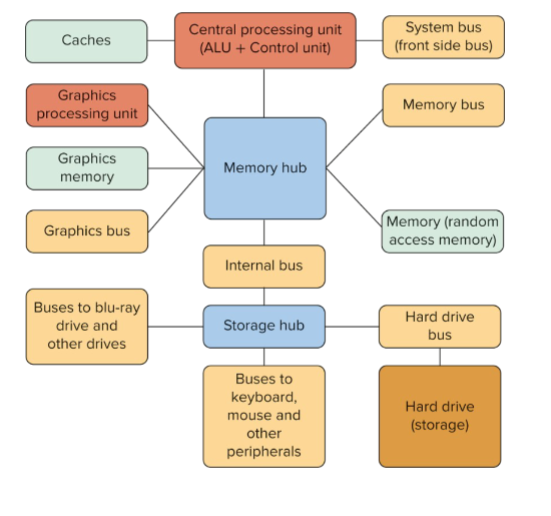
Computer System Design
Bits
Computers communicate in binary
It consists of 0 and 1.
It’s the smallest unit of data a computer can process.
Byte
A byte is eight bits grouped together.
Each number, special character, and letter of the alphabet is represented by a unique combination of bits.
Storage Capacity
Bits and bytes are also used to represent the quantity of data the computer processes.
Word Size
The amount of data a processor can hold and process at one time.
A 64-bit processor is faster than a 32-bit processor.
Boot Process
Boot process - The loading of an operating system into the main memory of a device.
UEFI has replaced the basic input/output system but it’s still called BIOS.
Computer Processor Speed
The speed is determined by a number of factors.
Clock speed
Bus width
Word size
Hertz
Used to measure frequency or how often something occurs.
Named for Heinrich Rudolf Hertz
Megahertz and Gigahertz
Megahertz is equal to one million cycles per second.
Gigahertz is equal to one billion cycles per second.
Computer Bus
Electronic pathway connecting computer parts.
The most important bus is the one connecting the CPU to the RAM.
Bus Width
The amount of data that can be transmitted at a given time.
The wider the bus, the more information.
Measured in bits
ASCII
America Standard Code for Information Interchange
Common encoding standard capable of representing 26 uppercase and lowercase letters used in English.
Uses 8 bits (1 byte) per character
Unicode
Unicode uses at least 16 bits (2 bytes) per character.
It’s the most common computer code.
It allows for foreign languages with a large number of characters.
Quantum Computing
It uses the power of atoms and molecules for memory and processing.
Module 6 - Computer Software
Software provides the structure and control necessary to run the computer and its peripherals.
Two major components
The operating system
Utility software
Computer Platform
Every computer must have an operating system (OS).
Platform - Operating system
The platform controls the function of a computer and determines which applications can be used on a device.
Windows Operating System
Windows is used in a variety of devices.
It’s the most popular in the world
Advantages
Thousands or more available programs
It runs on hardware from many sources
Disadvantages
Some think macOS is easier and more intuitive
MacOS
Advantages
Few viruses
Outstanding graphics capabilities
Attractive design
Disadvantages
Not as widely used as PCs
Cost more than comparable PCs
Can only use Apple-licensed software
Android OS
Google product based on Linux OS.
It’s the most popular OS for mobile devices outside the country.
Advantages
Integrated with Gmail and other Google apps
Phone apps are easily obtained and usually free
Disadvantages
Less user-friendly that Apple OS
Free apps include advertising
The iOS
Developed by Apple just for their mobile devices.
It comes with FaceTime, Safari, and Siri.
Linux OS
Free, open-source software.
Most servers, mainframes, and supercomputers use Linux.
It also runs most video game consoles and embedded computers.
Advantages
Free to download and use
Less susceptible to viruses
Modifiable by users
Disadvantages
Steep learning curve
Compatibility issues with some programs
Network Operating System
It’s the gateway to a network.
Coordinates the activities of multiple computers across a network.
Advantages
Enable resource sharing
Makes networks run smoothly
Disadvantages
Expensive to run and maintain
Require expertise to administer
Utility Programs
Included with both Windows and MacOS.
They perform maintenance tasks like:
Disk Cleanup
File maintenance
File search
System backup and restore