CH 05: Input and Output Devices
Input Devices:
Scanners
- can be two-dimensional (2D) or three-dimensional (3D)’
@@Two-Dimensional Scanners@@
- most common form of scanners
- generally used to input hard-copy documents
- convert images to an electronic form that can be stored in a computer
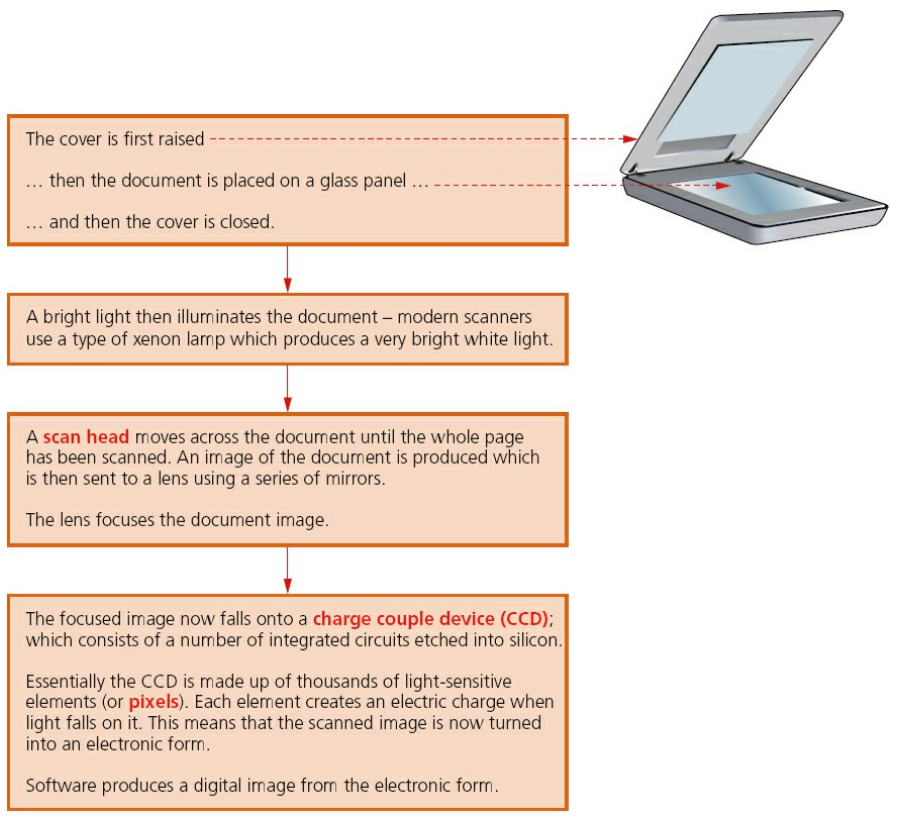
- Optical Character Recognition (OCR): computer software that allows scanned text from the document to be converted into a TEXT FILE FORMAT
- JPEG: scanned format of photograph or image
@@Applications of 2D Scanners at an Airport@@
- used to scan two-dimensional photographs in a passport and stored as JPEG
- a digital camera is used to photograph a passenger’s face and is stored as an image
- the two digital images are then compared using face recognition software
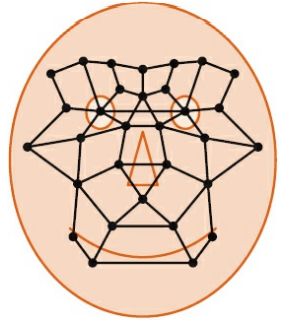
- 2D scanners can also be used to read passports and manipulate digital images
- OCR Technology can be used to manipulate digital images and store digital texts in ASCII format
@@Three-Dimensional Scanners@@
- scans and produces three-dimensional images of solid objects
- takes images at several points along three coordinates (x, y, z)
- Scanned images can be used in Computer-Aided Design (CAD) or sent to a 3D Printer to produce a physical model
- Technologies used in 3D scanners: lasers, magnetic resonance, white light, etc.
@@Application of 3D Scanning - Computed Tomographic (CT) Scanners@@
- Computed Tomographic (CT) Scanners: used to create a 3D image of a solid object
- Tomography Technology: builds an image through a series of very thin 2D “slices” that, when put together, represent the 3D solid object.
- Each “slice” is built up by use of X-rays, radio frequencies, or gamma imaging
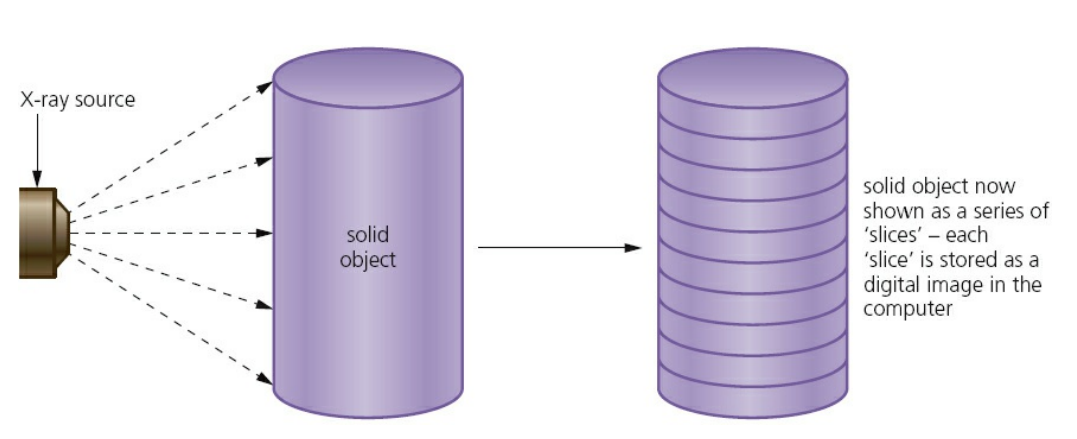
- The type of Tomographic Scanner depends on how the image is formed:
| Method | Type | Full Name |
|---|---|---|
| Radio Frequencies | MRI | magnetic resonance imaging |
| Gamma Rays | SPECT | single photon emission computed tomography |
| X-Rays | CT Scanner | computerized tomography |
Barcode readers/scanners
- series of dark and light parallel lines of varying thickness
- lines represent numbers 0 to 9
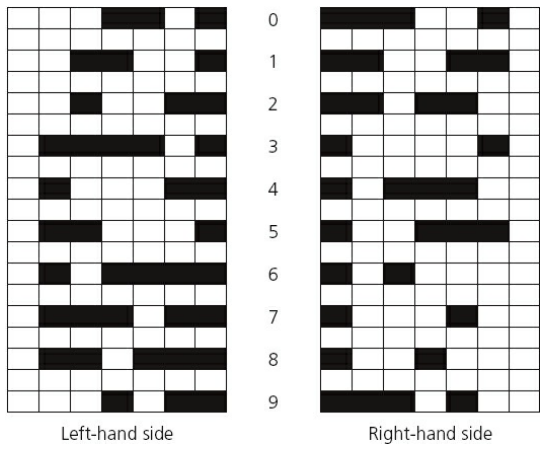
- Universal Product Code (UPC) Version A: adopts different codes for digits appearing on the left and digits appearing on the right
- left and right digits are separated by guard bars
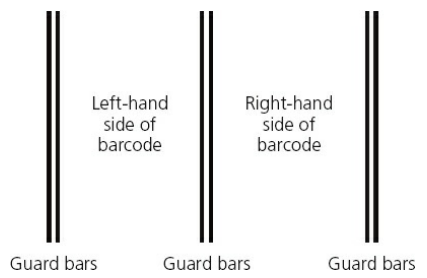
- digits representation in barcode
- barcode with number 543052:
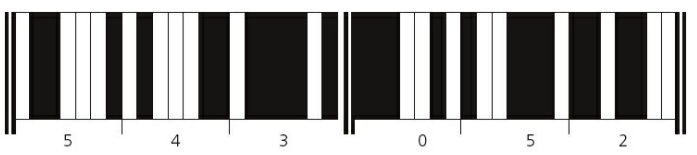
- Barcode Process:
- Barcode is read by a red laser or red LED (Light Emitting Diode)
- Reflects dark and light areas and a pattern is generated
- Light and Dark pattern (L & D) equivalent to binary is ‘0’ and ‘1’ respectively
Example:
“L D D D D D L D” = “0 1 1 1 1 1 0 1”
| Input/Output Device | How it is used |
|---|---|
| keypad | to key in no. of items, weight, or unreadable barcode |
| screen/monitor | show product information |
| speaker | outputs sound as the scanner is used |
| printer | prints out receipt/itemized list |
| magnetic stripe reader | reads customer’s credit/debit card |
| touchscreen | to select items by touching an icon |
- Key Field: uniquely identifies each stock item
- Point of Sale Terminal (POS): where price and other item details are sent back
- Advantages of using barcodes to management:
- easier and faster change prices on stock items
- more up-to-date information/sales trends
- reduces time and cost
- automatic stock control
- Advantages of using barcodes to customers:
- faster checkout queues
- reduced errors in charging customers
- itemized bills
- better track of “sell by dates”
Quick response (QR) code readers
- another type of barcode
- made up of a matrix made of filled-in dark squares on light background
- normal barcodes can hold 30 digits; QR codes can hold over 7000 digits
- can be scanned anywhere by modern smartphone cameras

- Advantages of QR codes:
- no need to write down website address
- can store website addresses/URLs
Digital cameras
- does not require films to record photos
- can be connected to a computer system via USB port or by Bluetooth
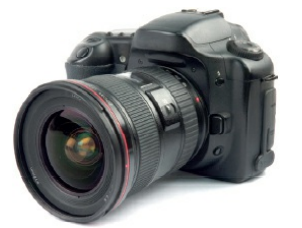
- Camera microprocessors can automatically carry out the following task:
- adjust shutter speed
- focus image automatically
- operate the flash automatically
- adjust the aperture size
- adjust the size of the image
- remove ‘red eye’ when the flash has been used
- Size of photograph file is dependent on the number of pixels
Example:
- A 14-megapixel camera will need 42 megabytes to store each raw (uncompressed)
- Quality of photograph depends on: type of lens used, and lighting
Keyboards
- most common method used for data entry
- used as an input device on computers, tablets, mobile phones, and other electronic items
- is connected to the computer via USB or wireless connection
- tablets and mobile phones used Virtual or Touchscreen keyboard technology
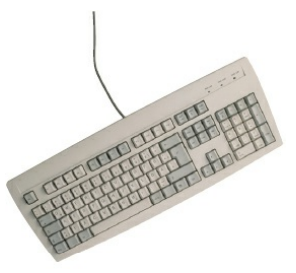
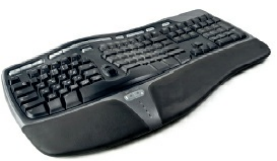
- Repetitive Strain Injury (RSI): injury in the hands and wrists caused by frequent use of keyboards
- Ergonomic Keyboards: can help to overcome RSI
Pointing devices (mouse)
- used to select icons on an application. Devices include: mouse, trackerball
- connected via USB or wireless connection
- modern type of pointing devices uses red LEDs to detect movement in the x-y direction (Optical Mouse)
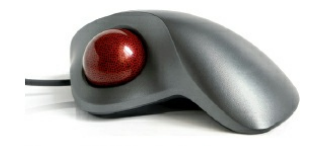
- Trackerballs are often used in industrial environments with minimal desk space
- Optical or Analog mice are used in typical computer applications with desk space
- Touchpad: a type of pointing device integrated into portable laptop computers
- contains a tactile sensor that allows user control by touch
Microphones
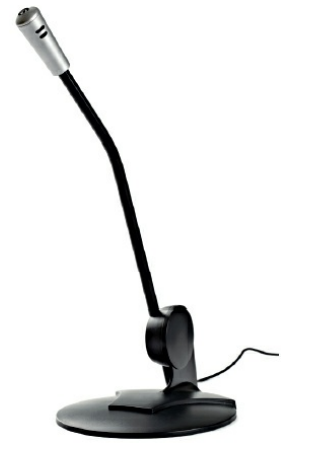
- are used to input sound into a computer
- either built into the computer or are external devices connected through USB port or wireless connection
- used in:
- doing ‘voice-over’ in a presentation
- speech recognition system
- voice recognition system
- enabling a disabled person to communicate
- Voice Recognition: detected voice of user is converted into digital.
- software compares detected wave pattern to stored wave patterns in memory for match.
- only certain key phrases can be recognized
- Speech Recognition: a different and more complex technology
- spoken words are recognized and shown on screen
- computer will convert sound wave into digital form
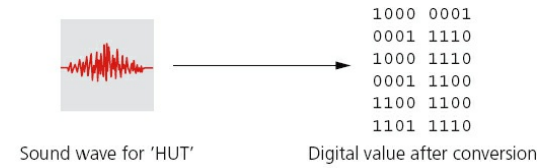
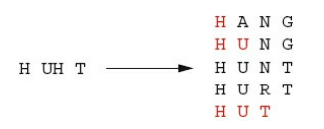
- Phenomes: smallest elements that make up a language
- phenomes are compared with words found in the built-dictionary:
Touchscreens
- most common form of input devices
- carry out multiple functions using simple touch
- mainly used in mobile phones
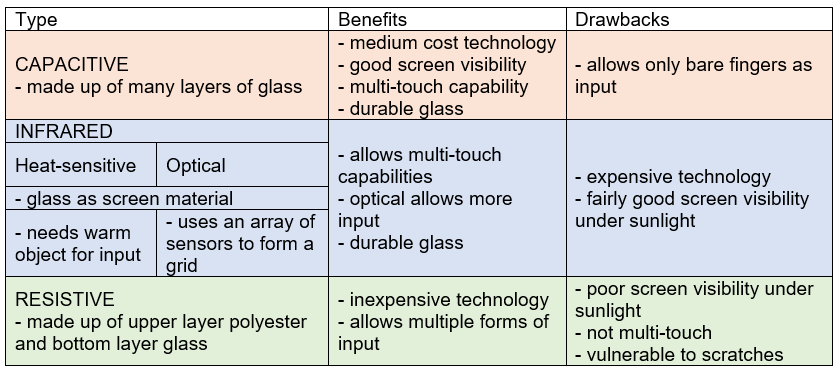
- Three major types of touchscreen technology:
Sensors
- Devices that read or measure physical properties (temperature, pressure, acidity, etc.)
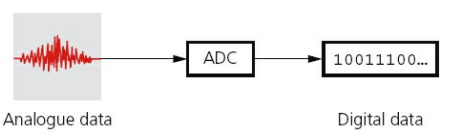
- Analogue: constantly changing values
- Analogue to Digital Converter (ADC): converts physical values into discrete digital values
- Digital Analogue Converter (DAC): used by the computer to control devices by converting digital signals to analogue
- Actuator: an electromechanical device such as a relay, solenoid, or motor
- Different types of sensors and its application:
| Sensor | Application |
|---|---|
| Temperature | heating systems, chemical process, temperature in greenhouses |
| Moisture/Humidity | moisture levels, humidity levels, dampness levels |
| Light \n | automatic street lighting, light levels, automatic car headlights |
| Infra-red/Motion | windscreen wipers, burglar alarm systems |
| Pressure | burglar alarm systems, weighing scales, gas pressure |
| Acoustic/Sound | burglar alarm systems, pipe leaks |
| Gas | Oxygen and Carbon Dioxide monitoring, pollution levels |
| pH | acidity/alkalinity levels in soil |
| Magnetic Field | anti-lock braking systems in motor vehicles |
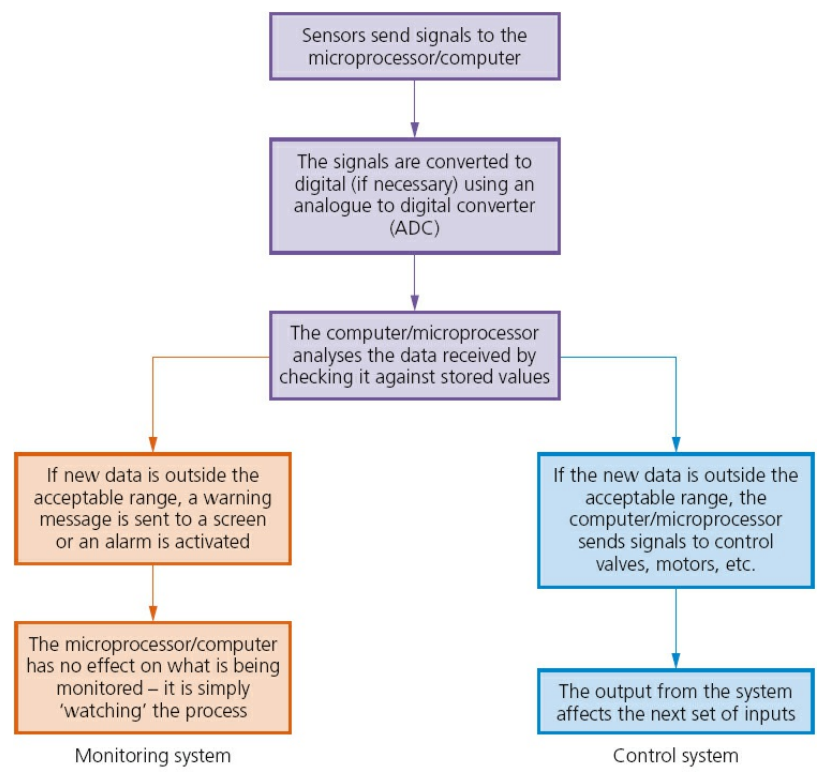
- Classification of Sensors (Monitoring and Control Systems):
@@Monitoring Applications@@
- Burglar Alarm System:
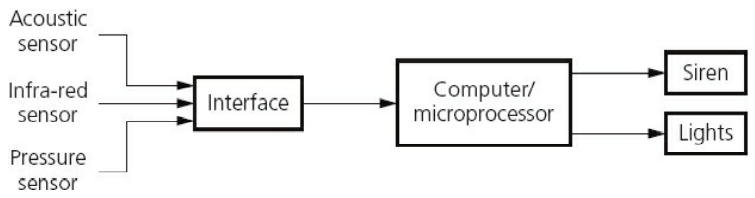
- Infra-red sensors pick up movements of intruders
- Acoustic sensors pick up footstep sounds or glass breaking
- Pressure sensors pick up the intruder’s weight from the doorway
- All signals are sent to the computer microprocessor and activate siren or lights when incoming data are outside the acceptable range
@@Control Applications@@
- Street Light
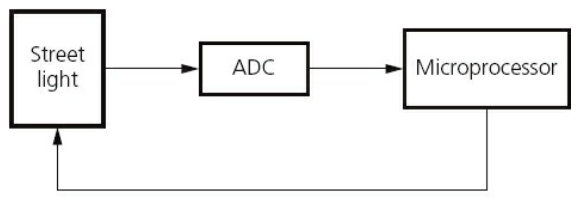
- Light sensors send signals to the ADC interface
- ADC converts signals to data and is sent to the Microprocessor
- The microprocessor evaluates the signals and turns the street lamps on or off depending on the given data
Interactive Whiteboards
- Devices that allow computer images to be displayed on a whiteboard using a digital projector
- allows users to write on the whiteboard
- information written and copied on the whiteboard can be stored for later use
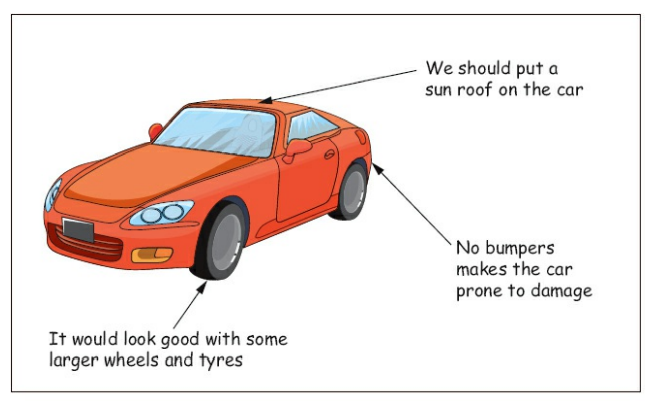
- Example of a whiteboard:
Output Devices:
Paper Printers
@@Inkjet Printers@@
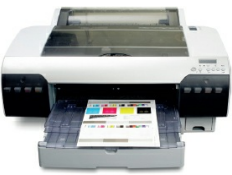
- Inkjet printers are made up of:
- Print Head: consists of nozzles that spray droplets of ink onto paper
- Ink Cartridges: stores different colors of ink
- Stepper Motor and Belt: moves the print head across the page
- Paper Feed: automatically feeds paper into the printer
- Thermal Bubble: utilizes localized heat which vaporizes ink causing the ink to form tiny bubbles
- Piezoelectric: a tiny electrical charge is given to a crystal located at the back of the ink reservoir for each nozzle. This creates vibrations that force ink to be ejected onto the paper
- Inkjet Printing Process
- Document data is sent to a printer driver
- Printer driver checks format of paper and if chosen printer is available
- Data is sent to the printer and stored in a printer buffer
- Sensors check if paper is available in the feed tray
- Print head moves from side to side across paper to print document
- Once done, the paper is advanced to the output tray
- Whole process is repeated until there is no more data in printer buffer
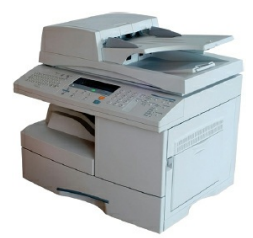
@@Laser Printers@@
- makes use of properties of static electricity to produce text and images
- uses dry powder ink rather than liquid ink
- can print whole pages in one go
- doesn’t run out of ink halfway through the print
- Laser Printing Process
- Document data is sent to a printer driver
- Printer driver checks format of paper and if chosen printer is available
- Data is sent to the printer and stored in a printer buffer
- Sensors check if paper is available in the feed tray
- Print drum is given positve charge
- Drum rotates while a laser beam removes positive charges in certain areas leaving negatively charged areas matching the document or image
- The drum is coated with postively charged Toner (powedered ink)
- Negatively charged paper is rolled over the drum and the toner sticks to the surfaces
- Electric charge on paper is removed after one rotation of the drum
- Paper goes through a fuser heating and melting the ink
- Discharge lamp removes all electric charge from drum
@@Applications of Inkjet and Laser Printers@@
- Inkjet Printers
- One-off photos
- Best for colored printing
- Low quantity-High quality print
- Laser Printers
- high volume printing
- posters and flyers
- monochrome printing
3D printers
- primarily used in Computer-Aided Design (CAD) applications
- Additive Manufacturing: builds up a solid object layer by layer using powdered resins, metal, paper, or ceramic powder
- Subtractive Manufacturing: removal of material to make an object
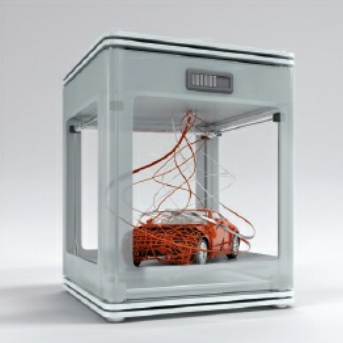
- Two types of 3D printing:
- Direct 3D printing: uses inkjet technology; the print head can move left to right, up and down.
- Binder 3D printing: uses two passes for each of the layers; the first pass sprays dry powder while the second pass a binder is sprayed to form a solid layer
@@3D Printing Process@@
- Design is made using CAD software
- Design is converted to 3D printer format
- Solid object is built up through additive manufacturing
- Object is removed from the printer
@@Uses of 3D Printing@@
- Prosthetic Limbs
- Reconstructive Surgery
- Aerospace Manufacturing
- Fashion and Art
- Vintage Car Parts
2D/3D cutters
- Three-dimensional (3D) laser cutters can recognize an object in the x-y-z direction
- Two-dimensional (2D) laser cutters can only recognize an object in the x-y direction
- 3D laser cutters can cut the following materials:
- glass
- crystal
- metal
- polymer
- wood
Actuators
- used in many control applications involving sensors and devices such as ADC and DAC
Loudspeakers
- Sound is produced from a computer by passing the digital data through a Digital Analogue Converter (DAC) and then through an Amplifier; finally the sound emerges from a (loud) Speaker.
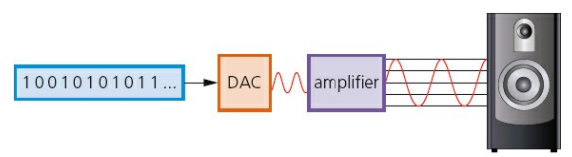
- Sampling Rate: rate at which the DAC can translate the digital output into analogue voltages
- 1 byte = 8bits
LCD/LED monitors
- Liquid Crystal Display/Diode (LCD): front layer of monitor is made up of liquid crystal diodes
- Pixels (Picture Elements): tiny diodes grouped together in threes or fours
- Cold Cathode Fluorescent Lamp (CCFL): used as a backlighting method for LCDs before LEDs
- uses two fluorescent tubes behind LCD screen
- Light Emitting Diode (LED): used as a backlighting method for modern LCDs
- Advantages of LED:
- reaches max brightness almost immediately
- gives whiter light
- brighter light improving colour definition
- thinner monitors using LED technology
- lasts almost indefinitely
- consumes very little power
- Organic Light Emitting Diodes (OLED): uses organic compound to create semi-conductors which are very flexible
- organic films are sandwiched between two charged electrodes (Cathode and Anode)
- no longer uses LCD technology; OLED is self-contained system
- Advantages of OLED:
- thinner, lighter, and more flexible displays
- can be made from plastic rather than glass
- gives brighter light than LEDs
- do not require backlighting methods
- uses much less power than LCDs
- can be made into large thin sheets
- very large field of view (170 degrees)
Projectors (LCD and DLP)
- used to project computer output onto larger screens or even onto interactive whiteboards
- often used in presentations or in multimedia applications
@@Digital Light Projector (DLP)@@
- uses millions of micromirrors on a small DLP chip
- number of micromirrors and their arrangements determines the resolution of the digital image
- Micromirrors tilt towards the light source means they are ON; Micromirrors tilt away from light source means they are OFF
- can produce 1024 grey shades
@@LCD Projectors@@
- older technology than DLP
- A bulb generates a powerful beam of white light from inside the projector body
- The beam of light is sent to a group of chromatic-coated mirrors that reflects light back at different wavelengths (red, green, and blue)
- These wavelengths pass through three LCD screens that show images
- The images are combined using a special prism to produce full color images
- The image passes through the projector lens onto a screen