MIS 443 Lecture 24 Data Centers
Data Centers
Data Center Fundamentals
Cloud Computing: Elastic resources that can expand and contract, pay-per-use, infrastructure on demand, multi-tenancy supporting multiple independent users with security and resource isolation.
Cost Amortization: Sharing infrastructure costs, flexible service management, resilient design to isolate failures, workload movement across locations.
High Availability
Internet services aim for high availability, typically at least 99.99% uptime (four nines), equating to about one hour of downtime per year.
Achieving fault-free operation is challenging due to the number of hardware and software components.
Types of Data Centers
Enterprise Data Centers:
Built, owned, and operated by companies for their end users.
Optimized for their specific needs.
Managed Data Centers:
Managed by third-party companies (Managed Services Providers - MSP).
Provide all necessary infrastructure: servers, storage, and network resources.
Colocation Data Centers:
Companies rent space within a data center owned by others.
The data center provides infrastructure (building, cooling, bandwidth, security).
The company manages its components (servers, storage, firewalls).
Cloud Data Centers / Hyperscale Data Centers:
Massive, centralized, custom-built facilities operated by a single company.
Support cloud service providers (CSPs) and large internet companies with enormous compute, storage, and networking requirements.
Examples: Amazon Web Services (AWS), Microsoft Azure, Google Cloud, and Oracle.
Edge Data Centers:
Located close to end-users to deliver low latency and high bandwidth.
Crucial in content distribution and cloud computing.
Modular Data Centers:
Standardized pre-engineered and prefabricated buildings.
Include power and cooling infrastructure.
Used to house computer servers and network equipment.
Ownership
Major providers and operators: Amazon Web Services (AWS), Microsoft Azure, Google Cloud, Meta Platforms, Equinix, Digital Realty, NTT Global Data Centers, CyrusOne, GDS Holdings, and KDDI’s Telehouse.
These companies operate over 1,250 facilities worldwide.
Data Center Architecture
Modern data centers have shifted from on-premises physical servers to virtual networks.
Support applications and workloads across pools of physical infrastructure and into multi-cloud environments.
Data exists and is connected across multiple data centers, the edge, and public and private clouds.
Data centers must communicate across these multiple sites, both on-premises and in the cloud.
Even the public cloud is a collection of data centers.
When applications are hosted in the cloud, they use data center resources from the cloud provider.
Building Blocks
Server Racks
Cluster Switch
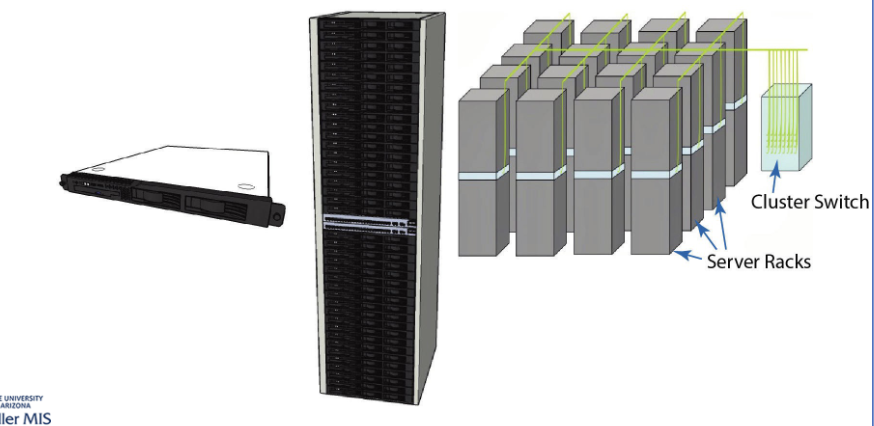
Server Virtualization
Allows multiple applications/operating systems to run on the same physical server.
Examples: VMware, Citrix, Windows Server with Hyper-V. SQL.
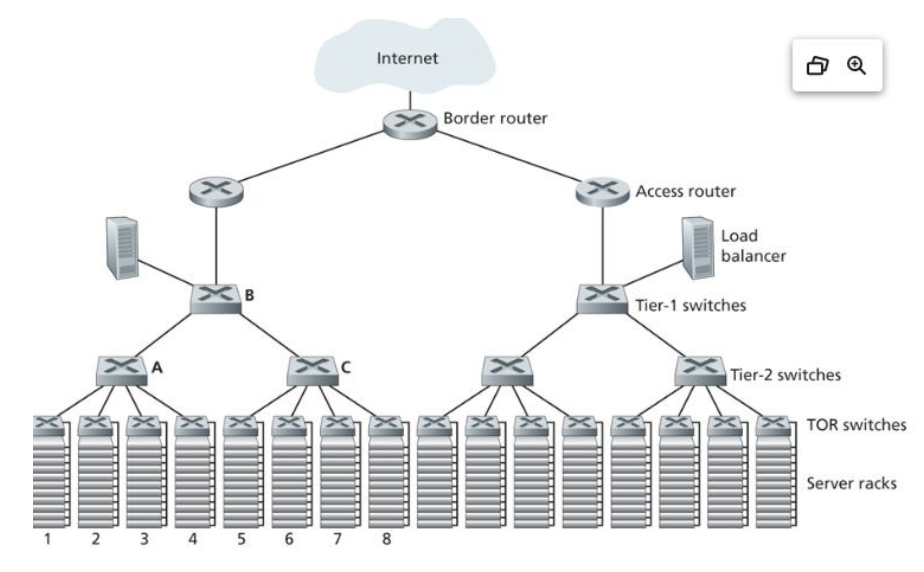
Top-of-Rack (ToR) Architecture
Each rack of servers has a top-of-rack switch.
Modular design with preconfigured racks, power, network, and storage cabling.
Aggregates to the next level.
Inside a Data Center
Compute: high-end servers with fast memory and computing power, the "brain" of the datacenter.
Storage: critical business data stored in a storage facility, with several copies, on media ranging from tape to SSDs.
Networking: interconnectivity between devices inside the data center and the outside world, including routers, switches, control hubs, etc.
Inside a Data Center - Storage
Historical Context:
In 1956, IBM shipped the world's first hard disk drive (HDD) in the RAMAC 305 system.
It used 50 24-inch platters, stored 5 megabytes of data, and occupied more space than two refrigerators, costing $50,000.
Modern HDDs:
Today, a laptop hard drive commonly exceeds a terabyte.
As of the end of 2023, the largest HDD on the market is 22 terabytes.
Solid State Drives (SSDs):
ExaDrive 100TB SSD is available for data centers.
The biggest model, EDDCT100, retails for $40,000 or $400 per TB.
Storage Technology - HDD
A hard disk drive (HDD) is an electromechanical data storage device that stores and retrieves digital data using magnetic storage.
It uses one or more rigid, rapidly rotating platters coated with magnetic material.
Still used, although less popular than SSDs in the PC market.
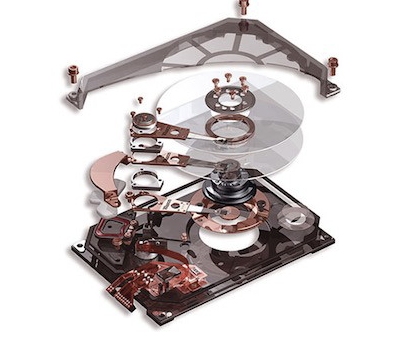
Hard Disk Drive (HDD) Performance
Hard drives cannot match the speeds at which CPUs operate.
Latency in HDDs is measured in milliseconds (ms) compared to nanoseconds (ns) for CPUs.
It typically takes an HDD 10-15 ms to find data and begin reading it.
Storage Technology - Solid State Drives (SSDs)
SSDs emerged around the same time as RAID (Redundant Array of Independent Disks).
First commercial availability in the early 90s.
Surpassed HDDs in units sold in 2021.
HDDs still constitute the bulk of actual storage capacity sold year over year.
Unlike HDDs, SSDs have no moving parts and do not use magnetic storage.
They read and write data by pushing electrons through an array of transistors that store their state, even when the device is powered off.
SSDs offer massive speed boosts.
Their smaller form factor has made SSDs the standard storage medium on virtually all new laptops.
Data centers have been slower to embrace solid state, largely preferring the tried-and-true HDD.
NAND Flash - Non-Volatile Memory
Data is saved to a pool of NAND flash.
NAND is made up of floating gate transistors.
NAND flash retains its charge state even when not powered up, making it a type of non-volatile memory.
DRAM, in contrast, is volatile, losing data if not quickly refreshed.
Storage – SSD v HDD
The price of a gigabyte is decreasing every year, but SSDs still cost eight times more than HDDs with comparable storage capacity.
SSDs have lower power consumption, far lower heat output, and higher environmental tolerances than HDDs.
SSDs' small form factor can reduce the data center’s physical footprint, further reducing overhead costs.
SSDs are expected to outlive their HDD counterparts, reducing replacement costs.
Storage – SSD NVMe
NVMe (nonvolatile memory express) is a storage access and transport protocol for flash and next-generation SSDs.
Delivers the highest throughput and fastest response times for enterprise workloads.
NVMe accesses flash storage via a PCI Express (PCIe) bus, which supports tens of thousands of parallel command queues.
NVMe storage is important in the enterprise data center because it saves time.
NVMe leverages not just solid-state storage but also today’s multicore CPUs and gigabytes of memory.
Storage – SSD v HDD (Durability)
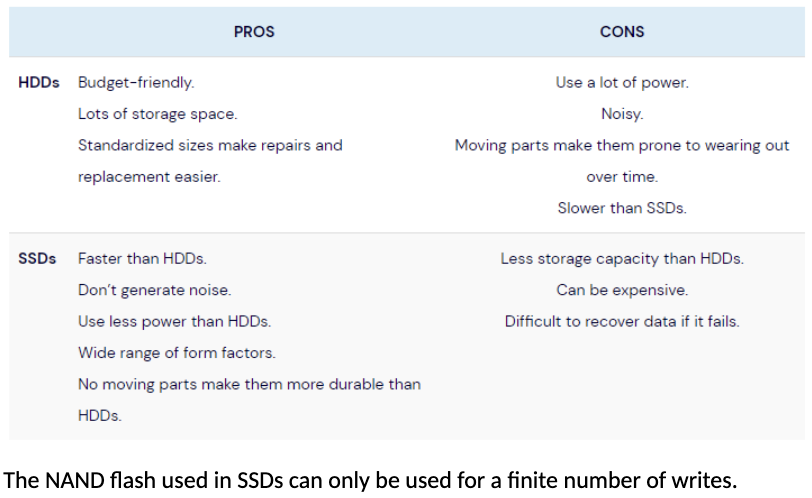
$Google Container Data Center Tour
Extreme Modularity
Containers
Portable
Speed up
Reduce cost
Just A “Small Internet”?
A data center is not just a collection of servers.
Why?
Administered as a single domain
Trusted administrators
No need to be compatible with the “outside world” (except for traffic to/from users)
No need for international standards bodies (though standards can help)
Front-End Traffic
Data sizes are driven by user-consumed content.
Growth is largely due to high bit-rate content (videos and photos).
Mobile users are a new traffic source.
Data Center Challenges
Traffic load balancing
Support for VM
Achieving bisection bandwidth
Power saving/cooling
Security
How to manage it
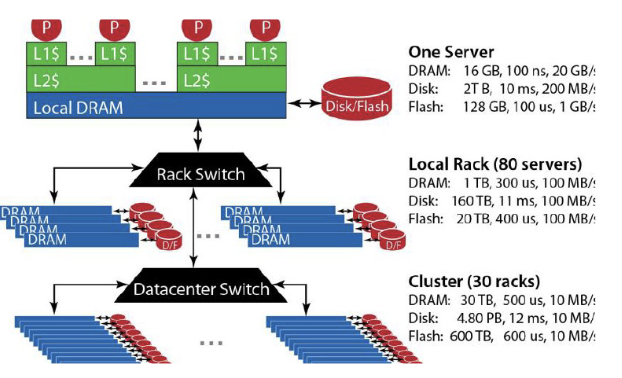
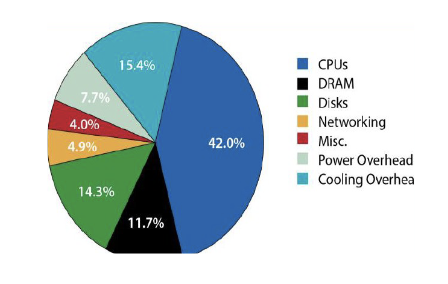
Datacenter Network Architecture
Giant-Scale Services:
Challenges for network services:
High availability
Critical in today’s environment: $1000/s of lost revenue during downtime
Evolution
Growth
Benefits of Network Services
Access anywhere, anytime
Availability via multiple devices
Groupware support (calendaring, teleconferencing, messaging, etc.)
Lower overall cost (multiplex infrastructure over active users)
Dedicated resources are typically 98% idle
Central administrative burden
Simplified service updates (update the service in one place, or 100 million?)
Traditional Topologies
Single point of failure
Oversubscription of links higher up in the topology
Lowers the total cost of the design
Typical designs: factor of 2.5:1 (400 Mbps) to 8:1 (125 Mbps)
Cost:
Edge: $7,000 for each 48-port GigE switch
Aggregation and core: $700,000 for 128-port 10GigE switches
Cabling costs are not considered!
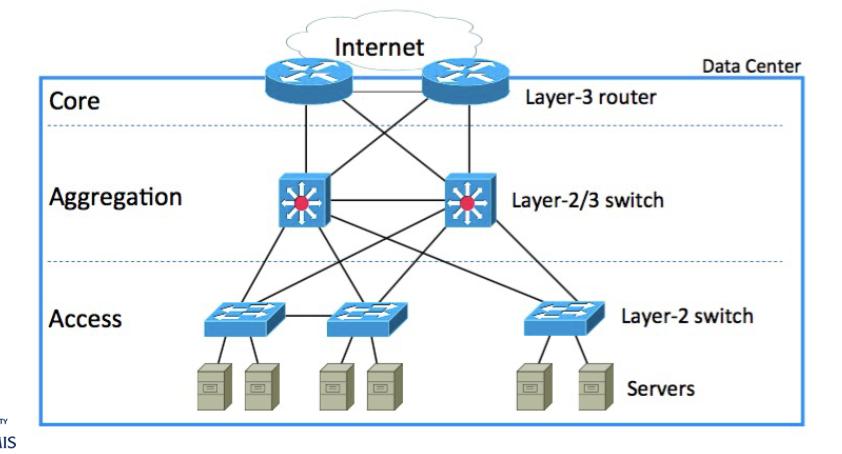
Traditional Data Center Topology
Core, Aggregation, Access layers
Internet connection point
Layer-3 routers, Layer-2/3 switches, Layer-2 switches
Server racks at the access layer
Modern Data Centers
Modern data centers have evolved from traditional IT architecture to cloud architecture.
Virtualization enables resources to be abstracted from physical limits and pooled into capacity that can be allocated across multiple applications and workloads.
Virtualization also enables software-defined infrastructure (SDI), which can be provisioned, configured, run, maintained, and ‘spun down’ programmatically, without human intervention.
Cloud Architecture and SDI
Optimal utilization of compute, storage, and networking resources.
Rapid deployment of applications and services. SDI automation makes provisioning new infrastructure as easy as making a request via a self-service portal.
Scalability. Virtualized IT infrastructure is far easier to scale than traditional IT infrastructure.
Variety of services and data center solutions. Companies and clouds can offer users a range of ways to consume and deliver IT, all from the same infrastructure.
Cloud-native development. Containerization and serverless computing, along with a robust open-source ecosystem, enable and accelerate DevOps cycles and application modernization.
Disk Storage and I/O Performance
Businesses continue to consume and rely upon larger amounts of disk storage.
The expanding gap between server processing power and available I/O performance of disk storage is a growing concern.
I/O interfaces are the mediums in which data are sent from internal logic to external sources and from which data are received from external sources.
The interface signals can be unidirectional or bidirectional, single-ended or differential, and could follow one of the different I/O standards.
Performance Management Calculations
Statistics: Availability (uptime), Downtime, Mean time between failures (MTBF), Mean time to repair (MTTR)
Availability =
MTBF (Mean Time Between Failures) is the average time elapsed between a failure and the next occurrence.
MTTR (Mean Time To Repair) is the time it takes to run a repair after a failure.
MTBF is calculated by dividing the total time a piece of equipment is running (i.e., uptime) by the number of breakdowns.
Core Switch
A core switch is a high-capacity switch positioned in the physical core or backbone of a network.
In a public Wide Area Network (WAN), a core switch interconnects edge switches.
In a Local Area Network (LAN), a core switch interconnects workgroup switches.
Redundancy and Disaster Recovery
Data center downtime is costly, so operators and architects increase system resiliency through various measures.
These measures include redundant arrays of independent disks (RAIDs) and backup data center cooling infrastructure.
Many large data center providers have data centers located in geographically distinct regions for failover in case of disasters.
The Uptime Institute uses a four-tier system to rate data center redundancy and resiliency:
Tier I: Basic redundancy capacity components, such as UPS and 24/7 cooling.
Tier II: Additional redundant power and cooling subsystems, such as generators and energy storage devices.
Tier III: Redundant components, requiring no shutdowns during maintenance or replacement.
Tier IV: Fault tolerance with several independent, physically isolated redundant capacity components.
Inside - Data Center RAID
RAID (Redundant Arrays of Independent Disks) addresses the need for increased storage capacity and redundancy.
Dozens of HDDs can be operated in unison, storing and retrieving data interspersed across all drives, behaving like one giant drive.
RAID gives data centers a deep well of storage and redundancy to prevent data loss.
2023 and Beyond
The future of data centers is dynamic, focusing on sustainability, efficiency, and adaptability.
Edge Computing:
Increasing need for data processing closer to the source.
Involves processing data locally on devices or at the edge of the network.
Reduces latency and improves efficiency.
May lead to the development of smaller, distributed data centers.
5G Technology:
Enables faster and more reliable connectivity.
Expected to impact data centers by increasing data volume.
Requires data centers to be strategically located to support increased demand for low-latency services.
Green Data Centers:
Growing focus on sustainability.
Emphasis on Energy efficiency, renewable energy sources, and environmentally friendly practices.
Future data centers may incorporate advanced cooling technologies and energy-efficient hardware.
AI and Machine Learning Integration:
Data centers are likely to incorporate AI and ML for tasks like predictive maintenance, resource optimization, and security monitoring.
AI can help automate routine tasks, improve efficiency, and enhance overall performance.
Hybrid and Multi-Cloud Architectures:
Many organizations are adopting hybrid and multi-cloud strategies.
Data centers will need to evolve to support these diverse and interconnected infrastructures.
Providing seamless integration and efficient data transfer between different environments.
Security and Privacy Concerns:
Data centers will need to prioritize security measures due to increasing cyber threats.
This includes robust cybersecurity protocols, encryption, and compliance with data protection regulations.
Modular Data Centers:
Pre-fabricated and scalable designs are gaining popularity.
Allow for quicker deployment, scalability, and easier maintenance.
Quantum Computing Impact:
Future data centers may need to adapt to integrate quantum computing capabilities for specific tasks.
Such as solving complex optimization problems.
Containerization and Microservices:
Containerization technologies like Docker and orchestration tools like Kubernetes are changing application deployment.
Data centers may increasingly adopt containerized and microservices architectures.
Aiming for more efficient resource utilization and scalability.
Resilience and Disaster Recovery:
Ensuring the resilience of data centers and implementing robust disaster recovery plans will remain critical.
Involves redundancy, backup systems, and geographical diversity to mitigate the impact of potential failures or disasters.
Next Lecture
Starting Team Project Presentations!
Bitcoin and Blockchain (Optional for you to view in Content)
Read Chapter 1: Introduction & Chapter 8. The Bitcoin Network, in Mastering Bitcoin, 2nd Edition, by Andreas M. Antonopoulos. Available online.
Supplemental Reading on Data Center Network Architecture
CN-TDA Section 6.6.1 - Data Center Architectures