CPE 3600 Midterm 1
Midterm Exam Study Guide
Agile
4 Core Principles of the Agile Manifesto:
Individuals and Interactions: Over processes and tools.
Working Software: Over comprehensive documentation.
Customer Collaboration: Over contract negotiation.
Responding to Change: Over following a plan.
Define Agile Software Development: Agile is an iterative approach to software development that emphasizes flexibility, collaboration, customer feedback, and rapid delivery of functional software.
Agile vs. Waterfall:
Agile: Iterative, flexible, continuous delivery and feedback.
Waterfall: Sequential, rigid, and requires full completion before moving to the next phase.
Example Agile Workflow:
Sprint Planning → Sprint Execution → Daily Stand-ups → Sprint Review → Sprint Retrospective.
Importance of Unit Testing and Validation in Agile: Unit testing ensures each component functions correctly, supporting the Agile focus on delivering high-quality, working software quickly.
Define a Development Sprint: A time-boxed period (usually 1-4 weeks) during which specific work has to be completed and made ready for review.
Stages: Planning, Execution, Review, Retrospective.
Purpose of Stand-up (Scrum) Meeting: To synchronize team members and discuss progress, roadblocks, and plans for the day.
3 Questions Asked in Each Stand-up Meeting:
What did you do yesterday?
What will you do today?
Are there any impediments in your way?
Relationship between Scrum and Agile: Scrum is a framework within Agile methodologies that defines specific roles, events, and artifacts to facilitate Agile practices.
Benefits of Agile:
Flexibility and adaptability to change.
Improved customer satisfaction.
Faster delivery of functional software.
Increased collaboration and team dynamics.
Define Product and Sprint Backlog:
Product Backlog: An ordered list of features, enhancements, and fixes needed for the product.
Sprint Backlog: A subset of the product backlog items that the team commits to completing in a sprint.
Purpose of Each Element of a User Story:
As a [type of user]: Who will benefit from the feature.
I want [goal]: What the user wants to achieve.
So that [reason]: Why the feature is valuable.
Role of the Scrum Master: Facilitates the Scrum process, ensures adherence to Agile principles, removes obstacles, and supports the team.
Role of the Project Owner: Represents the stakeholders, manages the product backlog, prioritizes needs, and ensures the team delivers value.
Requirements
3 Characteristics of Good Requirements:
Clear: Unambiguous and easily understood.
Testable: Can be validated through testing.
Feasible: Achievable within project constraints.
Problematic Qualities of a Requirement:
Vague language.
Lack of clarity on priority.
Dependencies on other requirements.
Define Extra-Functional Requirements: Specifications that define the system's operational qualities, such as performance, security, and usability.
6 Cs for Good Requirements:
Clear
Concise
Consistent
Correct
Complete
Cohesive
Write a Requirement Using the EARS Template:
"In the event that [condition], the system shall [action] to [result]."
Architecture Design
Two Components of High-Level Design:
Architecture: Overall structure and organization.
Components: Individual elements and their interactions.
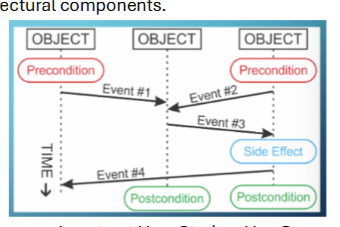
Sequence Diagrams for Interactions: Illustrate how objects interact in a particular scenario over time, detailing message flow.
Compare User Stories, Use Cases, and Scenarios:
User Stories: High-level requirements focused on user needs.
Use Cases: Detailed descriptions of how users will interact with the system.
Scenarios: Specific instances or examples of use cases in action.
Components Included in a Use Case:
Title
Actors
Preconditions
Main flow of events
Alternative flows
Postconditions
Hardware Abstraction Layer and CubeMX Configuration
Benefits and Weaknesses of CubeMX:
Benefits: Simplifies configuration, provides graphical interface, reduces human error.
Weaknesses: May abstract away important details, learning curve for beginners.
Importance of the USER Code Block in CubeMX: Allows developers to add custom code without being overwritten during reconfiguration.
Three Modes for Hardware Calls in ST HAL:
Blocking Mode
Non-blocking Mode
Polling Mode
Familiar HAL Interfaces:
GPIO: General Purpose Input/Output
TIM: Timer
ADC: Analog to Digital Converter
USART: Universal Synchronous/Asynchronous Receiver-Transmitter
I2C: Inter-Integrated Circuit
Data Passing into a HAL Interface: Data is typically passed via structures or parameters defined in function calls to configure peripherals.
Difference Between Interrupt Handler and Callback Function:
Interrupt Handler: Executes in response to hardware interrupts.
Callback Function: A function passed as an argument to be executed at a later time.
Significance of Hardware Handlers: Handle events triggered by hardware (like interrupts) and manage resource allocation efficiently.
Serial Communication
Compare SPI, I2C, and UART:
SPI: High-speed, synchronous, full-duplex, requires more pins.
I2C: Multi-master, supports multiple devices on two wires, slower than SPI.
UART: Asynchronous, uses two wires (TX, RX), simpler for point-to-point communication.
Consistencies for Successful UART Communication:
Baud Rate
Data Format (e.g., parity, stop bits)
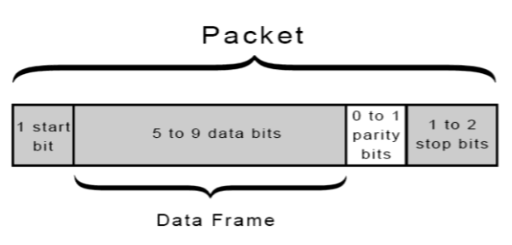
Sketch a UART Data Packet:
Start Bit → Data Bits → Parity Bit → Stop Bit
Explain the 8N1 Protocol:
8 data bits, No parity, 1 stop bit.
Difference Between Baud, Bit, and Data Rate:
Baud Rate: The number of signal changes per second.
Bit Rate: Number of bits transmitted per second.
Data Rate: The amount of usable data transmitted per second.
Calculate the Parity Bit for a Given Data Sequence:
For even parity, count the number of 1s; if odd, set parity bit to 1; if even, set to 0.
For odd parity, do the opposite.
Why I2C is Common:
Simple wiring (two wires), supports multiple devices, widely used in embedded systems.
Sketch a Simple I2C Configuration:
Master (microcontroller) connected to multiple slave devices via SDA and SCL lines.
Importance of Addressing in I2C: Each device has a unique address, ensuring the correct device responds to commands from the master.
Real-Time Operating Systems
RTOS vs. General Purpose OS:
RTOS: Deterministic, prioritizes time-critical tasks, guarantees response times.
General Purpose OS: Non-deterministic, designed for a wide range of tasks, lacks timing guarantees.
Motivation for CMSIS-RTOS Interface: Provides a standardized API for RTOS operations, promoting code portability and compatibility.
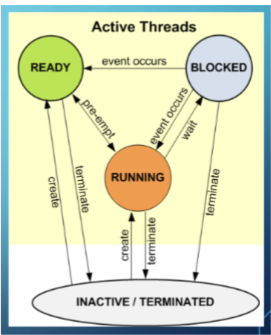
Sketch CMSIS-RTOS Model of Thread States:
States: Ready, Running, Blocked, Suspended, Terminated with transitions like "Start," "Yield," "Block," etc.
Main Features of CMSIS-RTOS:
Task Management
Event Flags
Timers
Queues
Mutexes
Semaphores
Memory Pools
Advantage of Event Flags vs. Waiting on a Flag: Event flags allow multiple tasks to wait on the same flag and can signal events more efficiently than polling.
Why Not All Calls Can Be Made from ISR/Callback: Some operations (like blocking calls) can disrupt real-time performance and may lead to deadlocks or resource conflicts.
Advantage of Using osWait vs. HAL_Delay():
osWaitallows other tasks to run while waiting, improving multitasking and responsiveness, whereasHAL_Delay()blocks the task.Define OS Tick: A periodic interrupt that increments a system timer, used for task scheduling and timekeeping in an RTOS