Input/Output In Operating Systems
Input/Output in Operating Systems
Input/Output (I/O) refers to the communication between a computer system and external devices such as keyboards, mice, printers, and disks.
The operating system plays a crucial role in managing and controlling I/O operations to ensure efficient and reliable data transfer.
I/O devices are classified into two categories: block devices and character devices.
I/O Operations
Input operations involve transferring data from external devices to the computer's memory.
Output operations involve transferring data from the computer's memory to external devices.
I/O operations can be synchronous or asynchronous:
Synchronous I/O blocks the execution of a program until the operation is completed.
Asynchronous I/O allows the program to continue executing while the I/O operation is in progress.
Device Drivers
Device drivers are software components that facilitate communication between the operating system and specific I/O devices.
They provide an abstraction layer, allowing the operating system to interact with devices using a standardized interface.
Device drivers handle device-specific operations, such as initializing the device, managing data transfer, and handling interrupts.
I/O Scheduling
I/O scheduling algorithms determine the order in which I/O requests are serviced to optimize system performance.
Common I/O scheduling algorithms include First-Come, First-Served (FCFS), Shortest Seek Time First (SSTF), and SCAN.
These algorithms aim to minimize the seek time (time taken to position the read/write head) and maximize throughput.
Buffering and Caching
Buffering involves temporarily storing data in a buffer before it is processed or transferred.
It helps to smooth out variations in I/O rates and reduces the number of I/O operations.
Caching involves storing frequently accessed data in a cache memory to improve performance.
Caching reduces the need for accessing slower secondary storage devices, such as disks.
Interrupts and DMA
Interrupts are signals generated by I/O devices to request attention from the CPU.
When an interrupt occurs, the CPU suspends its current task and transfers control to an interrupt handler.
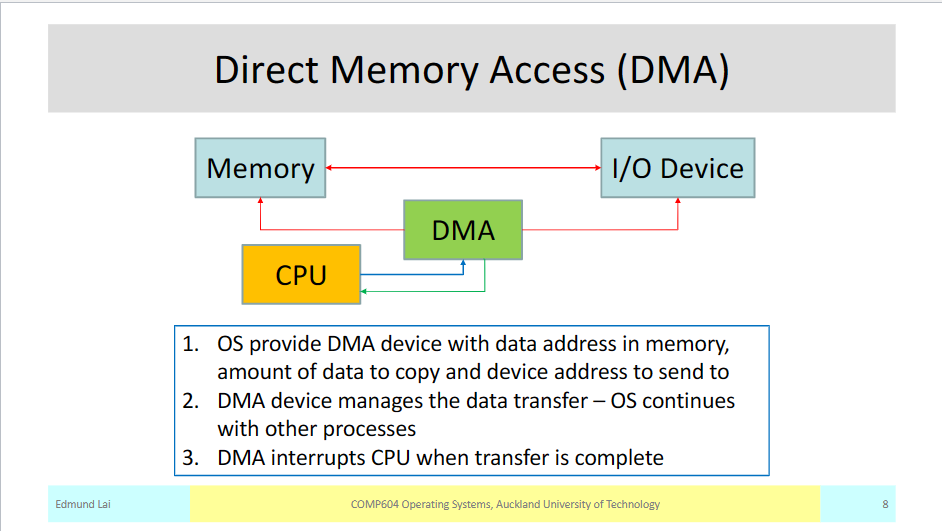
Direct Memory Access (DMA) allows certain devices to transfer data directly to or from memory without CPU intervention.
DMA reduces CPU overhead and improves I/O performance.
Overall, input/output operations and their management are critical aspects of operating systems. Efficient handling of I/O can significantly impact system performance and user experience.
→Longer detailed version below:
Input/Output in Operating Systems
Input/Output (I/O) refers to the communication between a computer system and external devices, such as keyboards, mice, printers, and disks. The operating system plays a crucial role in managing and controlling I/O operations to ensure efficient and reliable data transfer.
I/O devices can be classified into two categories: block devices and character devices. Block devices read and write data in fixed-sized blocks, while character devices handle data in individual characters or bytes.
I/O Operations
I/O operations involve transferring data between the computer's memory and external devices. Input operations transfer data from external devices to the computer's memory, while output operations transfer data from the computer's memory to external devices.
I/O operations can be synchronous or asynchronous. Synchronous I/O blocks the execution of a program until the operation is completed, while asynchronous I/O allows the program to continue executing while the I/O operation is in progress. Asynchronous I/O is particularly useful for handling time-consuming operations, as it allows the program to perform other tasks concurrently.
Device Drivers
Device drivers are software components that facilitate communication between the operating system and specific I/O devices. They provide an abstraction layer, allowing the operating system to interact with devices using a standardized interface. Device drivers handle device-specific operations, such as initializing the device, managing data transfer, and handling interrupts.
Device drivers are essential for ensuring compatibility between the operating system and various hardware devices. They enable the operating system to control and utilize the functionalities offered by different I/O devices effectively.
I/O Scheduling
I/O scheduling algorithms determine the order in which I/O requests are serviced, aiming to optimize system performance. Different algorithms prioritize requests based on factors such as seek time and throughput.
First-Come, First-Served (FCFS) is a simple scheduling algorithm that services I/O requests in the order they arrive. Shortest Seek Time First (SSTF) prioritizes requests based on the distance between the current position of the read/write head and the location of the requested data. SCAN is another popular algorithm that moves the read/write head in one direction, servicing requests in that direction until it reaches the end, and then reverses its direction.
These scheduling algorithms aim to minimize the seek time, which is the time taken to position the read/write head, and maximize throughput, which is the rate at which data can be transferred between the device and the computer's memory.
Buffering and Caching
Buffering and caching are two techniques used in operating systems to improve the performance and efficiency of data access.
Buffering
Buffering is the process of temporarily storing data in a buffer before it is processed or transferred to its destination.
It helps to smooth out the differences in data transfer rates between different components of a system.
In the context of I/O operations, buffering is used to reduce the number of I/O operations by grouping data together.
It improves performance by reducing the overhead of frequent I/O operations and minimizing the waiting time for data transfer.
Buffering can be implemented at different levels, such as the operating system level, device driver level, or application level.
Caching
Caching is the process of storing frequently accessed data in a cache memory for faster retrieval.
It is used to reduce the latency of accessing data from slower storage devices, such as hard drives or network storage.
Caching exploits the principle of locality, which states that recently accessed data is likely to be accessed again in the near future.
When a request for data is made, the system first checks if the data is available in the cache. If so, it is retrieved from the cache instead of the slower storage device.
Caching can be implemented at different levels, such as CPU cache, disk cache, or network cache.
It improves performance by reducing the time required to access data and reducing the load on slower storage devices.
Differences between Buffering and Caching
Buffering is used to smooth out data transfer rates and reduce the number of I/O operations, while caching is used to improve data access latency and reduce the load on slower storage devices.
Buffering is typically used for temporary storage of data during processing or transfer, while caching is used for storing frequently accessed data for faster retrieval.
Buffering is more concerned with optimizing data transfer and reducing overhead, while caching is more concerned with improving data access speed and reducing latency.
Overall, buffering and caching are important techniques in operating systems that help improve performance and efficiency by optimizing data transfer and reducing access latency.
Interrupts and DMA
Interrupts
Interrupts are signals sent by hardware or software to the processor to temporarily suspend the current execution and handle a specific event.
They allow the system to respond to time-sensitive events or external devices without wasting processor cycles.
Types of interrupts:
Hardware interrupts: Generated by external devices like keyboard, mouse, or network card.
Software interrupts: Generated by software to request a specific service from the operating system.
Interrupt handling process:
The interrupt signal is received by the processor.
The current execution is suspended, and the processor saves the current state.
The interrupt handler routine is executed to handle the specific event.
After the interrupt is handled, the processor restores the saved state and resumes the previous execution.
Direct Memory Access (DMA)
DMA is a technique that allows certain devices to transfer data directly to or from memory without involving the processor.
It reduces the burden on the CPU and improves overall system performance.
DMA controller manages the data transfer between devices and memory.
DMA transfer process:
The device sends a request to the DMA controller to initiate a data transfer.
The DMA controller gains control of the system bus and transfers data directly between the device and memory.
Once the transfer is complete, the DMA controller releases the bus and notifies the device.
Advantages of DMA:
Reduced CPU involvement in data transfer, freeing up the processor for other tasks.
Faster data transfer rates compared to programmed I/O.
Efficient utilization of system resources.
Protecting the System from Malfunctioning or Malicious Application Programs
Use a combination of preventive measures and security mechanisms to protect the system:
Implement strong access controls: Restrict access to sensitive resources based on user privileges and roles.
Employ secure coding practices: Develop applications with security in mind, following secure coding guidelines and best practices.
Regularly update and patch software: Keep the operating system and applications up to date with the latest security patches to address vulnerabilities.
Use firewalls and network security: Implement firewalls to filter incoming and outgoing network traffic, and use intrusion detection systems to identify and prevent malicious activities.
Deploy antivirus and anti-malware software: Install and regularly update antivirus and anti-malware software
Key Information:
Input/Output (I/O) is the process of transferring data between a computer system and its external devices.
I/O devices can be categorized as either block devices (e.g., hard drives) or character devices (e.g., keyboards).
I/O operations can be synchronous (blocking) or asynchronous (non-blocking).
Buffering is used to improve I/O performance by temporarily storing data in memory.
Device drivers are software components that facilitate communication between the operating system and I/O devices.
Interrupts are used to handle I/O events and allow the CPU to perform other tasks while waiting for I/O operations to complete.
Direct Memory Access (DMA) enables data transfer between devices and memory without CPU intervention.
I/O scheduling algorithms determine the order in which I/O requests are serviced to optimize performance.
File systems provide a way to organize and store data on storage devices, enabling efficient I/O operations.
I/O performance can be measured using metrics such as throughput, response time, and utilization.