Codio Unit 1: Using Objects and Methods
1.1 Intro to Algorithms, Programming, and Compilers
1.2 Variables and data Types (unfinished)
Binary
Binary uses 1s and 0s to represent data. Bits (binary digits) - 1s and 0s, foundational to computing. 8 bits → Byte
Everything we know is stored as buts or bytes to represent things digitally.
Primitive Data Types
Data Type | Memory Allotment | Description |
int | 4 bytes (32 bits) | stores whole numbers, pos., neg., or zero. |
double | 8 bytes (64 bits) | stores pos or neg num including floating point values. 8 Bytes range → ‘really small’ to ‘really big’ |
boolean | 1 byte (8 bits) | Either true(1) or false(0). |
Data type: set of values and corresponding set of operations on those values
A data type is a set of values and a corresponding set of operations on those values.
A primitive data type used in this course defines the set of values and corresponding operations on those values for numbers and Boolean values.
A reference type is used to define objects that are not primitive types.
An
intvalue is an integer.A
doublevalue is a real number.A
booleanvalue is eithertrueorfalse.
Variables and Data Types
A variable is a storage location that holds a value, which can change while the program is running.
Initialization - Assigning a value to a variable. Have to declare data type, identifier, then assign a value to a primitive data type.
int x = 5;
System.out.println(x);
double y = 3.3;
System.out.println(y);
boolean yes = true;
System.out.println(yes);
1.3 Expressions and Outputs
System.out.println() moves the cursor to a new line after the information has been displayed, while System.out.print() does not.
A literal is the code representation of a fixed value.
A string literal is a sequence of characters enclosed in double quotes.
Escape sequences are special sequences of characters that can be included in a string.
→Put special characters like “ or \ after a \ to include in a string and output.
Ex:
He said, “I love programming!”
Then added, “It’s fun to use ‘\’ in strings.”
System.out.println("\nHe said, \"I love programming!\"\nThen added, \"It's fun to use '\\' in strings.\"");To force a newline, use the \n escape sequence.
Arithmetic Expressions
Arithmetic expressions, which consist of numeric values, variables, and operators, include expressions of type int and double.
Addition: +
Subtraction: -
Multiplication: *
Division: /
Remainder: %
An arithmetic operation that uses two int values will evaluate to an int value. An arithmetic operation that uses at least one double value will evaluate to a double value.
Integer and Real Number Division
Integer division - JAVA DOESN’T ROUND. When int /int equals in a decimal number. The decimals are chopped off. Quotinnt is taken.
Real Number division - If at least one variable is a double Then the result will be a double. even if .0
Remainder Division
The remainder operator, %, is used to compute the remainder when one number a is divided by another number b
12 % 7 = 5 ⇒ 12 divided by 7 is 1 with a remainder of 5
If a number % 2 = 0, then the number is even. If a number % 2 = 1, then the number is odd.
Compound Expressions
Compound expressions are expressions that combine multiple operators to create an expression.
x + y * z
a * (b + c) / 4
Use PEMDAS
Operators with the same precedence are evaluated from left to right.
1.4 Assignment Statements and Input
Assignment Statements
Every variable must be assigned a value before it can be used in an expression. A variable is initialized the first time it is assigned a value.
Reference types can be assigned a new object or null if there is no object. The literal null is a special value used to indicate that a reference is not associated with any object.
The assignment statement is used to initialize a variable to its initial value or to change the value stored in the variable.
The assignment operator
=allows a program to initialize or change the value stored in a variable.The value of the expression on the right is stored in the variable on the left.
An assignment statement includes a variable on the left side, the assignment operator =, and the value to be assigned to the variable on the right side.
Input
To get user input from keyboard, use Scanner class by calling on java.util package by having before everything else in the code.
import java.util.Scanner;you must instantiate a Scanner object in order to call Scanner methods.
kb is a reference type data. reference → not primitive
Scanner kb = new Scanner(System.in);Now, kb (abbreviation for keyboard) is an object reference for a Scanner object and can be used to call methods of the Scanner class.
Methods of the Scanner class:
Method | Purpose |
| Returns the next integer |
| Returns the next double |
| Returns the next boolean |
| Returns the next single string (stops at whitespace) |
| Returns the next line as a string (stops at new line) |
| Void method that tells the program you are no longer using the scanner |
To use Scanner class:
create an object that behaves like a variable, then prompt user for input, read input, store input in object. Now the input is usable. Close Scanner after use.
Scanner Method Calls
The call to the nextInt() method is returning an integer, which is then being assigned to the variable x. The ‘dot operator’ is the syntax used to indicate that an object is about to call a method.
Once a Scanner object is created, you can use multiple method calls.

1.5 Casting and Range of Variables
Casting
The casting operators (double) and (int) can be use to convert the int and double variables to and from each other.
int has lower range than double.
into → double (widening) - can be directly assigned without using casting
double→ int (narrowing) - cannot be assigned directly, decimal points will be truncated(chopped off)
ex1
double x = 7.8;
int y = (int) x;
y = 7
ex2 Which of the following correctly casts the int variable x to a double?
ans: double y = x;
because the double is bigger than the int. The int x variable can fit inside the double y variable.
Rounding
Values of type double can be rounded to the nearest integer by
(int)(x + 0.5) for positive numbers
or
(int)(x - 0.5) for negative numbers
/
Ranges if Variables
If an expression would evaluate to an int value outside of the allowed range, an integer overflow occurs. The result is an int value in the allowed range, but not necessarily the value expected.
An integer overflow error occurs when an expression evaluates to an
intvalue outside of the allowed range.A round-off error occurs if an expression would evaluate to a
doublethat is more precise than can be stored in the allotted amount of memory.
The result of a round-off error will be rounded to the representable value. To avoid rounding errors that naturally occur, useintvalues.
1.6 Compound Assignment operators
+=, -=, *=, /=, and %= can be used in place of assignment operators. The operation then assigns the result to the variable on the left, using the value on the right.
x += 4 → x = x + 4
x -= 4 → x = x - 4
x *= 4 → x = x * 4
x /= 4 →x = x / 4
x %= 4 → x = x % 4
int sum = 0;
int i = 1;
sum = sum + i; //or sum +=1; much faster
i++;
sum = sum + i;
i++;
sum = sum + i;
i++;
You cannot combine compound assignment with normal assignment statements.
int sum += 2; //this will result in a syntax error
Some other common mistakes:
sum += sum + 2 // this will add the value of sum + 2 to sum
               // instead of just adding 2 to sum.
1.7 Application Programming Interface (API) and Libraries
The Java programming language comes with built-in classes and documentation for the available methods in the API.
APIs and libraries simplify complex programming tasks. Useful for performing task in which the code already exists→available for everyone to use in API.
Libraries are collections of classes.
An application programming interface (API) specification informs the programmer how to use those classes.

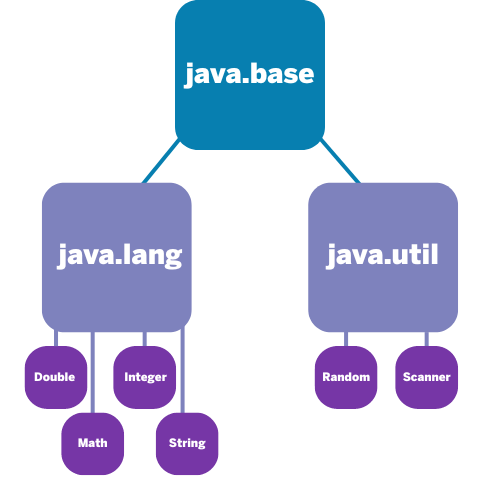
Docs + API specifications are essential to understand attributes and behaviors of an object in a class.
A class defines a specific reference type. Classes in the APIs and libraries are grouped into packages. Existing classes and class libraries can be utilized to create objects.
Math, String, Integer, Scanner, and Random are classes in APIs.
Attributes and Behaviors
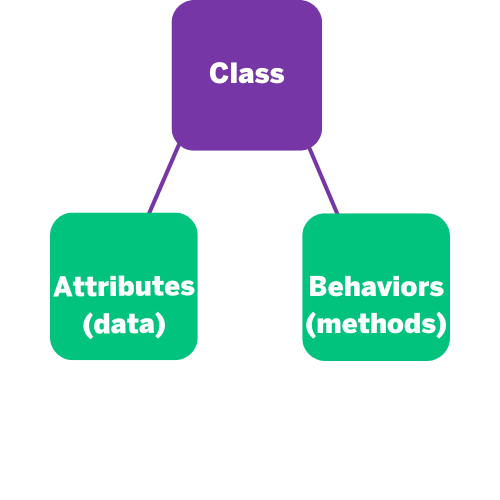
Attributes: Refer to the data related to the class and are stored in variables. Attributes are designated as fields in the API. There is a section called “Field Summary,” which lists the attributes for a class.
Behaviors: Refer to what instances of the class can do (or what can be done with them) and are defined by methods. Methods for a class are listed under the “Method Summary” section of a class description.
1.8 Documentation with Comments
Important for code to be easily readable. Comments are ignored by the compiler.
Readability - self-commenting identifiers, Class names, object names, method names, and variables should all have descriptive identifiers.
Code Comments
/* */, which generates a block of comments.//, which generates a comment on one line./** */, which are Javadoc comments and used to create API documentation.
Precondition and Postcondition
Precondition- a condition that must be true prior to the execution of a method to behave as expected. The method itself can’t check if preconditions are satisfied.
/* Constructor for the Person class.
   Takes two parameters, a String and an int,
   for the name and age, respectively.

   **Precondition: nm is a non-empty String**
*/

public Person( String nm, int age)
{
    name = nm;// assign PIV name the value of nm
    age = 0;  // assign PIV age the value 0
}
Postcondition - condition that muts always be true after the execution of a method. Describes ourcome of the execution in terms of what is being returned/current value of the attributes of an object.
/* Constructor for the Person class.
   Takes two parameters, a String and an int,
   for the name and age, respectively.

   Precondition: nm is a non-empty String   **Postcondition:  age is a positive integer, >= 0
*/

public Person( String nm, int age)
{
    name = nm; // assign PIV name the value of nm
    age = 0; // assign PIV age the value 0
}
Comments are written for both the original programmer and other programmers to understand the code and its functionality but are ignored by the compiler and are not executed when the program is run.
A precondition is a condition that must be true just prior to the execution of a method in order for it to behave as expected.
A postcondition is a condition that must always be true after the execution of a method.
Comments are written for both the original programmer and other programmers to understand the code and its functionality but are ignored by the compiler and are not executed when the program is run.
A precondition is a condition that must be true just prior to the execution of a method in order for it to behave as expected.
A postcondition is a condition that must always be true after the execution of a method.
1.9 Method signatures
There are methods associated with each class. Methods define behaviors or what instances of the class can do.
A method is a named block of code that only runs when it is called. A block of code is any section of code that is enclosed in braces.
Procedural abstraction allows a programmer to use a method by knowing what the method does, even if they do not know how the method was written.
API for Scanner nextInt() method → int nextInt() Scans the next token of the input as an int.
Method signatures
When a method is created, the method signature contains the name of the method and paranthesis. If the method needs info to perform task, inside the paranthesis is for the parameters needed for the method.
public void sampleMethod(int a, double b)the method signature is sampleMethod(int, double)
A parameter is a variable declared in the header of a method or constructor and can be used inside the body of the method.
public void sampleMethod()
then the method signature is:sampleMethod()
Method Calls
Void Method | Does not have return variables Not called as part of an expression |
Non-void method | Executes code and returns a variable The return value is the same type as the return type in the header To use the return value when calling a method, it must be stored in a variable or used as part of an expression. |
Void Method Example
In the right panel is a program with two methods. sampleMethod1 is a void method due to the keyword void in the method heading. sampleMethod1 has two parameters a and b defined in the method signature. This method displays the product of a and b.
public static void sampleMethod1(int a, double b)
{
    System.out.println(a*b);
}
Non-void Method Example
sampleMethod2 is a non-void method, with a return data type double in the method signature. sampleMethod2 has two parameters a and b defined in the method signature. This method calculates and returns the product of a and b.
Notice the keyword return in the body of the method. This keyword is required of a non-void method, as it returns a value to the calling method.
public static double sampleMethod2(int a, double b)
{
    return (a*b);
}
Method Calls
For a method to be executed, the method must be called or invoked.
public static void main(String[] args)
{
    sampleMethod1(5, 3.62);
    System.out.println(sampleMethod2(5, 3.62));
}
when a method has parameters, it muts have arguments (calue passed into a method when method is called)
arguments muts be compatible in num and order +types identified in parameter.
In order to call the sampleMethod1 method, an integer value and a double value must be passed, in that order, as arguments.
Method heading:public void sampleMethod1(int a, double b)
Method call:sampleMethod1(5, 3.26);
A void method does not have a return value and is therefore not called as part of an expression.
A non-void method returns a value that is the same type as the return type in the header.
An argument is a value that is passed into a method when the method is called.
Call By value
initializes the parameters w/ copies of the arguments.
Makes a copy but you keep the original.
public class ChangeValue
{
    public static void main(String[] args)
    {
        int originalValue = 5;
        changeValue(originalValue);
        System.out.println("Original value: " + originalValue);
    }

    public static void changeValue(int value)
    {
        value = 10;
    }
}
value changes a lot but original value doesn’t change.
its also sequential

Overloaded Methods
diff versions of Systemout.println
Method Heading | Description |
|---|---|
| This prints a newline character and doesn’t take any arguments. |
| This prints a boolean value (true or false). |
| This prints an integer value. |
| This prints a double-precision floating-point number. |
all of these are designed to hand;e specific type of arguments, allows to print difftypes of data w/ same method name. Java is very powerful because it chooses correct method based on argument.
1.10 Calling Class methods
Class Methods are associated with he class, not instances of the class.
→can be called without creating an object of the class.
class methods=static methods
public class Greeting {
    public static void sayHello() {
        System.out.println("Hello, world!");
    }
}
Class methods are useful in several scenarios:
When the method doesn’t need to access instance-specific data
For utility functions that perform operations on given parameters
class→defines structure and behavior that objects of that type have. House blueprint, rooms, windows, and functions.
insance as an object→ object created based on class blueprint. A specific blueprint of a house, address, color, and residents, and all.
instantation→process of creating a new instance(object) from a class.
// Class with a static method
public class Utils {
    public static void printMessage() {
        System.out.println("This is a message from the Utils class!"); //The printMessage method is declared as static, so it belongs to the Utils class itself.
    }
}

// Main class
public class MainApp {
    public static void main(String[] args) {
        // Calling the static method from the Utils class
        Utils.printMessage();
    } //In the main method of the MainApp class, the static method is called using the class name: Utils.printMessage();.
}
1.11 Math Class
static int abs(int x)returns the absolute value of anintvalue.static double abs(double x)returns the absolute value of adoublevalue.static double pow(double base, double exponent)returns the value of the first parameter raised to the power of the second parameter.static double sqrt(double x)returns the nonnegative square root of adoublevalue.static double random()returns adoublevalue greater than or equal to0.0and less than1.0.
they’re all static → invoked using Math class.
they are also non-void methods → return a value of the data type on the method declaration.
int max(int a, int b)returns the greater of the twointvalues.int min(int a, int b)returns the smaller of the twointvalues.
Math.sqrt returns double, Math.abs returns int. Math.pow returns double. based on what the general rule about complexity or whatever is.
Which of the following expressions will return the value 8?
Math.pow(2, 3)
Math.sqrt(64)
Math.abs(-8)
Math.random() * 8
The correct answer is Math.abs(-8). This method returns the absolute value of -8, which is 8.
Math.pow(2, 3)returns 2^3 which is 8, but as adouble, 8.0.Math.sqrt(64)returns the square root of 64, which is 8, but also as adouble, 8.0.Math.random() * 8returns a randomdoublebetween 0 and 8, not necessarily 8.
if input is double, the return type will be double also. vice versa.
Math.random
static double random() - Returns a double value greater than or equal to 0.0 and less than 1.0
Math.random() has no parameters. Using Math.random() as is generates a double value greater than or equal to 0.0 and less than 1.0.
For example, if you want to generate double values between 10.0 and 50.0 (inclusive):
double range = 50.0 - 10.0 + 1;
double rand = Math.random() * range + 10.0;
System.out.println(rand);
To generate random integers between 100 and 200, inclusive:
int range = 200 - 100 + 1;
int rand = (int) (Math.random() * range) + 100;
System.out.println(rand);
ex:
Explain what the range of values would be for
randfor the following statement.
int range = 200 - 100 + 1;
int rand = (int)Math.random() * range + 100;
Without using parentheses, the casting will be performed on Math.random() by itself, which generates a double value >= 0.0 and < 1.0. When this value is cast to an int, the decimal places will be truncated, and the result will be 0. Then, 100 would be added so rand would be assigned the value of 100 every time this statement executes.
1.12 Objects: Instances of Classes
An object is a specific instance of a class with defined attributes and behaviors.
Attributes refer to the data related to the class and are stored in variables.
Behaviors refer to what instances of the class can do (or what can be done with it) and are defined by methods.
An object is a specific instance of a class with defined attributes.
A class is the formal implementation, or blueprint, of the attributes and behaviors of an object.
An object is a specific instance of a class with defined attributes and behaviors.
Attributes refer to the data related to the class and are stored in variables.
Behaviors refer to what instances of the class can do (or what can be done with it) and are defined by methods.
Attributes, stored as variables, and behaviors, defined by methods, are defined in a class.
Object References
int x=4;
int y=5;
x and y are primitive data types with the variable identifier and rhe value stored in one data block.
A variable of a reference type holds the object reference, the memory address of that object.
String message = "Hello, world!";
Multiple variables can refer to the same object reference.
String str1 = "Hello";
String str2 = str1;
1.13 Object Creation and Storage
ClassName objectName = new ClassName();A constructor argument is a value that is passed into a constructor when the constructor is called.
The arguments passed to a constructor must be compatible in order and number with the types identified in the parameter list in the constructor signature.
When calling constructors, arguments are passed using call by value.
Call by value initializes the parameters with copies of the arguments.
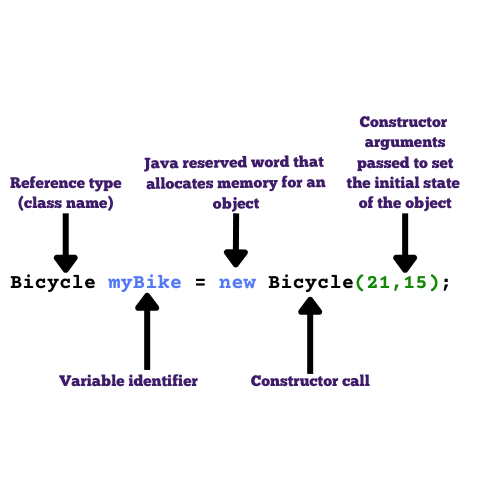
// this statement calls the constructor with 3 parameters
Bicycle myBike = new Bicycle(21, 15, "disc");
The attributes are initialized with the argument values passed to the constructor call:numberOfGears = 21speed = 15brakes = “disc”
Object References
A variable of a reference type holds an object reference, which can be thought of as the memory address of that object.
Object references behave very similarly to a variable.
The data that is stored in an object reference is not a copy of the reference itself, but it is actually a memory address location of the object.
Null is used when there is no object being referenced/the object doesn’t exist yet.
Which of the following correctly instantiates a
Bicycleobject namedmountainBikewith 18 gears, a speed of 12, and “hydraulic” brakes?
→ The correct answer is Bicycle mountainBike = new Bicycle(18, 12, "hydraulic");. This correctly declares a Bicycle variable, uses the new keyword to instantiate an object, and passes the required arguments to the constructor.
A constructor is a special method of a class that initializes an object of that type.
A constructor signature consists of the constructor’s name, which is the same as the class name, and the ordered list of parameter types.
A constructor argument is a value that is passed into a construuctor whent eh constructor is called.
1.14 Calling Instance Methods
Adder Class
1.15 String Manipulation
String manipulation is a very common task in computer science.
A
Stringobject represents a sequence of characters and can be created by using a string literal.Java has a built-in
Stringclass with many useful methods available.The
Stringclass is part of thejava.langpackage. Classes in thejava.langpackage are available by default.Stringobjects can be created by using string literals or by calling theStringclass constructor.
A string literal is any text enclosed in quotes(““).
can be instantiated or created using new statements using String class constructor.
String str = new String("Password123!");String objects can be concatenated or joined together, using + or +=. results in new Object
String object has index values from 0 to length -1.
attempting to access indices outside → StringIndecOutOfBoundsException
String Methods
.length() →returns num of characters in a String object as an int value
.substring(int from, int to)→ returns substring beginning at index from ending at indext to -1. creates new string with new substring value.
substring(int from) → starting from to the end of string. creates new string is instantiated.
.indexOf() → returns intex of where the given string parameter begins.
.equals() → returns true uf the calling object is equal to other, returns false otherwise.
.compareTo() →
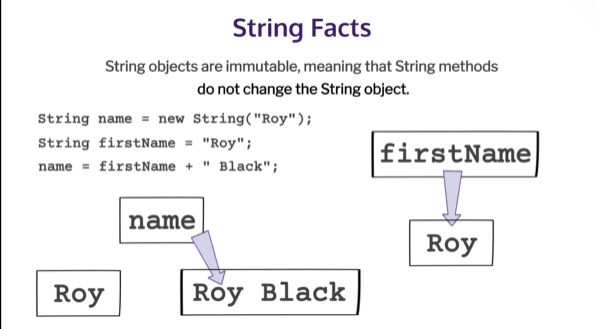
String Immutability
A string object’s attributes cannot be changed. mthdos don’t change the content of the stirng object.
Method | Description |
|---|---|
| Returns the number of characters in a |
| Returns the substring beginning at index from and ending at index to - 1 |
| Returns substring(from, length()) |
| Returns the index of the first occurrence of |
| Returns |
| Returns a value < 0 if |