CompTIA 220 1101
Li Ion - Lithium Ion Batteries
Li Po-Lithium Ion Polymer Battery
SODIMM- Small Outline Dual Inline Memory Module
SSD (Laptop) - 2.5 inch form factors for laptops
HDD (Laptop) -2.5 inch form factor
HDD (Desktop) -3.5 inch form factor
M.2 Interface
Migrating from HDD to SSD, either download an OS to the SSD and then move the data to the SSD from the HDD.
Clone the HDD by creating an image of the hard drive
Drive to drive image
Features of MINI PCI EXPRESS
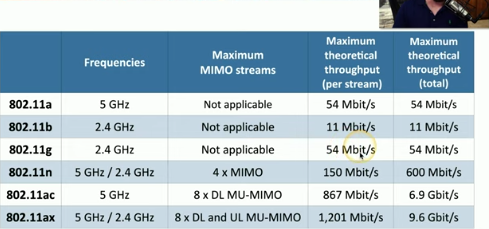
802.11 standard allows for LAN access and internet access.
Bluetooth- personal area network, short range.
Biometrics, ex windows hello face or windows hello fingerprint.
NFC: Near Field Communication, ex paying with card can also be used for authentication
LCD DISPLAYS:
LCD: Liquid Crystal Display ( Light shines through liquid crystals) (they use low power and are lightweight) LCD’s can never truly achieve black hues because of their backlight.
TYPES of LCD’s
Twisted Nematic TN LCD
-Fast Response times (gaming)
-Original LCD technology
-Poor viewing angles -color shifts
IPS (In Plane Switching) LCD
-Excellent color representation
-More expensive than TN
Vertical Alignment (VA LCD)
-Good compromise between TN and IPS
-Good color representation
-slower response times than TN
OLED (Organic Light Emitting Diode
-Organic compound emits light when receiving electric current
-Thinner and Lighter
-Mobile Devices
Laptop cameras and microphones as well as wireless antennas are found near the top for better signal capture.
Newer devices use LED backlights, while older devices commonly use CCFL- Cold Cathode Fluorescent Lamp backlight
Inverters are used on old laptops that need to power the CCFL by turning DC into AC current.
Digitizer: converts touch or analog signals into digital signals the computer can use as well as peripherals.
Connecting Mobile Devices:
USB’s
USB-C: Can use 2.0/3.0/3.1/4 signals
Type A:
Mini B
Micro B
APPLE:
Lighting: 8 pin digital signals
Higher power output, and can be inserted either way.
Serial Interfaces:
DB-9 also called DE-9: Used for RS-232 signals /Recommended Standard 232/1969 standard.
Cellular Standards:
2G network standards: GSM and CDMA. GSM stands for Global system for Mobile Communications, AT&T and T-Mobile, Originally from the EU, 90% of market, using sim cards, used multiplexing, multiple communications over small periods of time.
CDMA stands for Code Division Multiple Access, they had poor data support, Verizon and Sprint, multiple communications each call uses a different code, codes filtered the call on the receiving side.
3G- 1998 added speed, allowed GPS, TV, and Video on demand.
4G and LTE- Long Term Evolution, 4G allowed GSM and CDMA providers to converge and allowed faster speeds up to 150 Mbit/S. LTE -A allowed up to 300 Mbit/S
5G- 2020 allowed 10 Gigabits per second 100-900Mbit/S
PRL-Preferred Roaming List (CDMA networks, Verizon, and Sprint)
First Step in Pairing Process: Turn on Bluetooth/ discoverable mode.
2nd Step: Select discovered device
3rd step enter or confirm pin
MDM- Mobile Device Management allows for management of mobile devices.
Moving Data:
USING A TRUCK ANALOGY
-The road is the netwok topology, ex: ethernet, DSL, and cable system.
-The truck is the IP or Internet Protocol ( We designed the roads for this truck)
-Inside the truck is the boxes or DATA - Boxes of TCP and UDP
-Inside the boxes are more things- Application Information
(Memorize Port Numbers, Laptop Form Types and Desktop form types, and PROTOCOLS)
TCP-Trasmission Control Protocol- standard for communication that enables devices to exchange data over a network.
TCP and UDP
OSI LAYER 4 -Transport Layer
Multiplexing - UDP and TCP
TCP is a connection oriented protocol. It is a reliable form of delivery becase it can check if data was received, recovery from errors, and can manage out of order messages or retransmission. It can also control flow or how fast/much data is sent.
UDP is connectionless, no formal open or close to the connection, it is often called unreliable delivery, no error recovery, no reordering of data or retransmissions. UDP also has no flow control, sender determines amount of data sent.
UDP is commonly used with real time communication, an example being calling. (DHCP and TFTP use UDP) DHCP which automatically assigns IP addresses to devices, and TFTP sharing of files. It is up to the application to ensure that data is recieved.
TCP is connection oriented and common applications that use TCP are HTTPS and SSH (HTTPS stands for Hypertext Transfer Protocol Secure) and SSH stands for Secure Shell. If data is lost TCP is responsible for delivering this data.
Port number determines what application willl be receiving the data
Non ephemeral ports - permanent port numbers ports 0-1023
Ephemeral ports- temporary port numbers 1024-65535
port numbers - numbers associated with a service.
Ports: 0 -65535
Dest port is well known ports tcp/udp service depends on application (real time data or not)
WELL KNOW PORTS:
FTP: tcp/20(active mode data) and tcp/21(control) - transfers files between system needs authentication.
SSH-tcp/22 looks like Telnet
Telnet (telecommunication network protocol)- tcp/23 not as secure as SSH
SMTP (Simple Mail Transfer Protocol) -TCP/25 server to server email transfer, used to send mail from a devices mail server. TO RECEIVE MAIL IMAP or POP3 is used
DNS- (domain name system) - UDP/53 converts names to IP addresses
DHCP (Dynamic Host Configuration Protocol)- UDP/67 and UDP/68 requires a DHCP server DYNAMIC/POOLED real time assignment. DHCP can also be reserved ex by the MAC address in the DHCP server
HTTP and HTTPS: HTTP TCP/80 and HTTPS TCP/443
POP3/ IMAP- Used to receive emails from an email server- POP3 uses tcp/110 it offers Basic mail transfer functionality. IMAP4 uses tcp/143 which includes management of email inbox from multiple clients.
SMB- Protocol used by Microsoft Windows aka CIFS (common internet file system). On older systems it uses NetBIOS which is udp/137 name service, and tcp/139 session service. ON MODERN SYSTEMS it uses tcp/445 direct SMB connection.
SNMP- Simple network management protocol-
Gathers statistics from network devices queries: udp/161. Traps use udp/162. Has 3 versions.
LDAP- Lightweight Directory Access Protocol- uses tcp/389 it is used to store and retrieve information in a network directory.
RDP- Remote Desktop Protocol- used to share a desktop from a remote location it uses tcp/3389
Network Devices: Many devices and components some of these functions are well combined ex routers/switch/firewall.
Routers: Routes traffic between ip subnets, makes forwarding decisions based on IP address. Routers inside of switches re sometimes called layer 3 switches> takes place at the layer 3 of the OSI model so layer 3 devices.
Often connects divers, LAN, WAN, copper, fiber connections.
SWITCHES: Bridging done in hardware, application specific integrated circuit (ASIC)
Forwards traffic based on data link address.
May provide power over Ethernet
Multilayer switch- includes routing functionality /layer 3 switch
Unmanaged Switch, plug and play, it is often used for homes or small businesses - fixed config, no VLANs, commonly has no SNMP functionality. less expensive.
Managed Switches- more expensive allows for configuration, ex VLAN support, traffic prioritization, port mirroring, and redundancy support via STP (Spanning Tree Protocol), additionally external management SNMP.
ACCESS POINT- bridge NOT A ROUTER, makes forwarding decisions based on MAC address.
Firewalls: Filters traffic by port number: OSI layer 4 (TCP/UDP) can encrypt in/out network traffic, protects traffic between sites.
DIMM (Dual Inline Memory Module) - connectors are different on each side, 64 bit data width
DDR: 2 time the data transfer as SDR
Parity Memory - adds an additional parity bit, wont always detect errors, and can’t correct errors. EVEN PARITY: parity must be an even number in data collection (0 and 1) ex 111, what is the parity bit? 1. because then it would be an even number. if so then validated
Error Correcting Code (ECC) - Detects errors and corrects on the fly
PORTS:
20/21 – File Transfer Protocol (FTP)
22 – Secure Shell (SSH)
23 – Telnet
25 – Simple Mail Transfer Protocol (SMTP) -
53 – Domain Name System (DNS) -
67/68 – Dynamic Host Configuration Protocol (DHCP) -
80 – Hypertext Transfer Protocol (HTTP) -
110 – Post Office Protocol 3 (POP3) -
137/139 – Network Basic Input/ Output System (NetBIOS)/ NetBIOS over TCP/IP (NetBT)
- 143 – Internet Mail Access Protocol (IMAP)
- 161/162 – Simple Network Management Protocol (SNMP) -
389 – Lightweight Directory Access Protocol (LDAP) -
443 – Hypertext Transfer Protocol Secure (HTTPS) -
445 – Server Message Block (SMB)/Common Internet File System (CIFS) -
3389 – Remote Desktop Protocol (RDP) •
TCP vs. UDP - Connectionless M DHCP M Trivial File Transfer Protocol (TFTP) - Connection-oriented M HTTPS M SSH