Computer Science
What i don’t know
Problem Solving
Sorting & searching algorithms
Bubble sort - Compares adjacent items of an unsorted list and switches the items place so the the list end up sorted in either ascending or descending order
Merge sort - Divides the list in half, continuously until list size =1 (recursion). Then, compared adjacently to sort list
Binary search - A search algorithm that finds the position of a target value within a sorted array by repeatedly dividing the search interval in half and eliminating the half unfit to hold the target value.
Linear search - Goes through the list item by item until match is found or the entire list has been searched, making it a simple but inefficient method for unsorted lists.
Linear search vs Binary search
Linear search is less efficient than binary search, particularly for large datasets, as the target item = x could be at the very end of the list.
Binary search needs the list to be sorted first unlike linear search.
Programming
Develop code
Type coercion - Changing data type into another.
String
String traversal - Loop through each character in a string.
Concatenation - Joining 2 or more items together
Data Structures
Array
Record - Elements stored are different data types but related like name, age, F/M which is string, integer, Boolean. Each element is “Field”.
Multidimensional arrays - Each item at an index is a diff array. Has columns & rows
Input/output
Validation
Range check - Ensures data entered within a specific range
Presence check - Ensure value has been entered
Look-up check - Checks if entered value is of a predefined set of values
length check - Length of value entered fits a specific range
Subprograms
Function - Always returns a value to the main program
Procedure - Doesn’t return value to the main program
Built-in function - Provided in programming software’s to save time and perform common tasks
Testing & Evaluation
Errors
Run-time error - Occur during program execution. The hardest to spot
Logical error - The code works however, the desired output isn’t being executed. Error in logic
Syntax error - Problem in user code when grammar rules of programming are broken.
Integrated Development Environment (IDE) - A package that helps programmers develop a code.
IDE (Integrated development environment - helps programmers develop a program code through syntax highlighting etc.
Data
Binary
Binary shift - When binary number moves to the left or right by a specific amount based on multiplication or division.
Logic shift - same as binary shift blank spaces replaced with zero
Arithmetic shift -
Used with signed numbers in 2’s complementary form.
Left shift is identical to Logic Shift but, left most bit doesn’t move or change (MSB).
Right shift all bits moved right and blank spaces replaced with copies of MSB.
Data representation
ASCII (American Standard Code for Information Interchange)
Originally 7-bits so 128 characters can be stored (upper case, lower case, symbols, punctuation etc.)
Extended ASCII 8-bits 256 codes.
Many different versions of extended ASCII available
Unicode
Standardized
Solution to Many diff ext. ASCII.
represented using 2 or 4 bytes.
Can represent code in all known languages.
Colour depth - Number of bits used to represent colour of each pixel. 1-bit is 21 or 2 etc.
Data & storage compression
File sizes
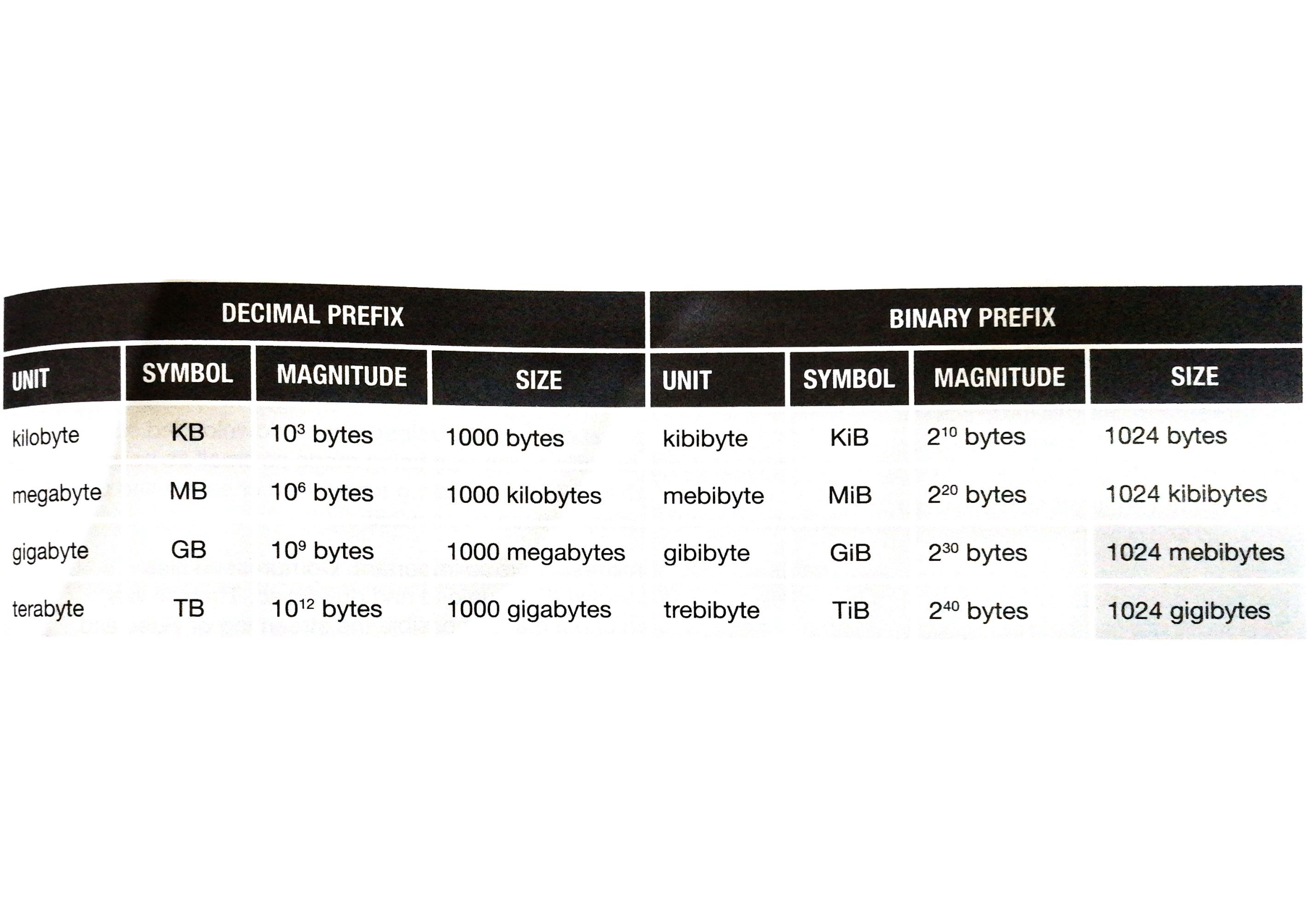
Computers
Machine & computational models
Sequential computers - Follow instructions in an algorithm step by step in order from start to finish
Parallel computers - Task distributed among 2 or more processors.
Multi-agent computer -
Separate tasks processed by different systems to perform particular function.
Each agent is independent.
Hardware
RAM -
Volatile (looses data when powered off)
Measured in gigabytes
ROM -
Non-Volatile
Stores permanent data called firmware
CPU saving data
CPU tells bus to tell memory where to save data & what data to save
CPU reading data
CPU must specify memory location using memory address (a unique number that identifies a storage location)
Cache memory - Small memory used to communicate between 2 devices with different speeds, usually CPU & RAM.
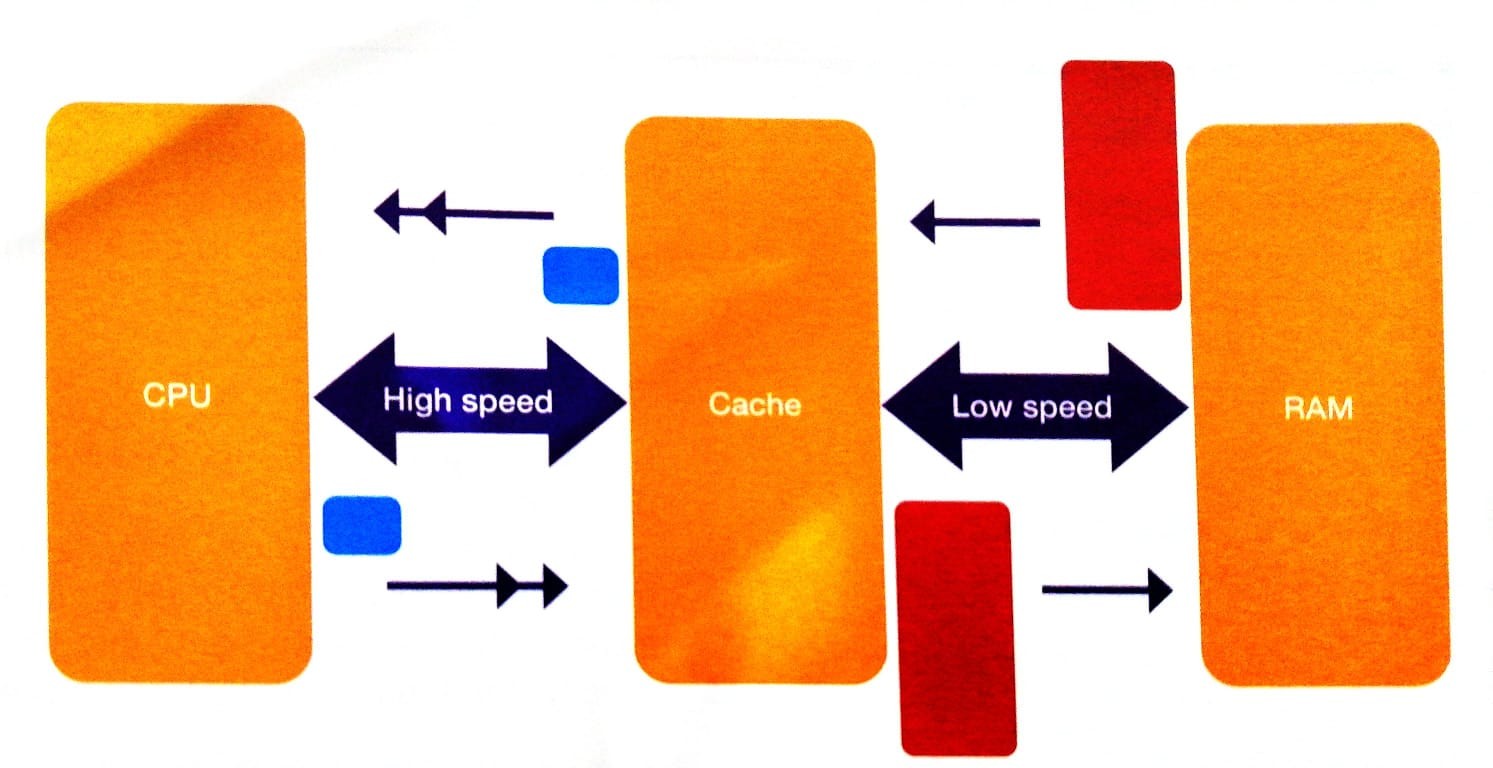
Virtual memory - When computers RAM is full instead of closing programs the “memory manager” of the operating system swaps out unused programs to the hard disk in a pretend memory and swap in the needed program to free area.
Disadvantages -
Read/write speed of hard disk much slower than RAM
Significant drop in performance
Disk thrashing occurs when hard disk and RAM continuously swap data.
Fetch-Decode-execute
Accumulator - holds results of calculations performed by ALU.
Registers - memory locations, relatively small number of them.
Control unit - Controls steps of the cycle synchronised by an electric clock
Bus;
Address bus - Carries memory address between CPU & memory to identify memory location
Data bus - Carries value to be read/written to memory
Control bus - carries signals that determine whether to read/write data & when to do so
Bus width - number of wires that make up a bus
PC sends current instruction to MAR and holds next instruction to be executed. That address is sent along address bus and waits for signal from control bus. That signal sent from control unit to main memory and that data fetched is sent to MDR via data bus. Copy of instruction sent to CIR which is then executed by CPU.
Factors affecting processor performance
Clock speed
Number pf processors
Size of cache
Secondary storage -
Magnetic (Hard disk)-
North & South poles represent 1 & 0.
Do not require power.
Consist of stack of disks called “platters” with magnetic coating.
Data recorded along circular tracks
arm moves across to be above right track
Surface like magnet cause tiny current
Translate to 1&0
Optical (DVD, CD)-
Made of several layers
Data written along single track moves from center out in spiral.
2 lasers, one to read, one to write.
When writing -
laser heats surface creating non-reflective “pits”, lowering the surface compared to “lands”.
Takes time.
When reading -
laser reflects differently detected by light sensor
Spiral track on outside is longer so rotation speed decrease to ensure data detected in constant speed
Solid state/flash (flash drive) -
Uses chips called “NAND”, special transistors that can trap electrons in pools.
Full pool is 0
Empty pool is 1
Faster since alot of tiny NANDS can be stored in small area.
Control signal (CS) identify which bit is to be read out.
If empty pool transistor turns on and 1 read out.
If not transistor off and 0 read out.
When written, higher voltage applied pulling e-n into pools.
Erasing also needs higher voltage.
Programming languages
Instruction set - A list of all possible commands the CPU knows
Machine code - Binary code represent each instruction in IS.
Translator - Converts source code to machine code
Source code - high-level text programmers write
Assembler - Translate mnemonic(each instruction in instruction set) of assembly language to machine code to carry out for micro processor.
Assembly language - Low-level language
Emulator - Hardware or software that allows computer system to act like another.
Translators
Interpreter -
Translates line by line
No object code file
Find errors when they happen
Slower than compiler coz of translating source code will running.
Can only be run if the coding program is also available on device
Compiler -
Translates whole code at once
Saves high-level language as machine code or object code file. Coz need to be executed/run
Cannot produce object code unless whole program correct
Report errors initially
Hard to debug
Easier to prevent code from being altered.
Can be run cross platform
Communication & the internet
Networks
Client server network - network with at least one server to provide services to client computers. The process;
A client will make a connection to the server using servers IP address.
Once connection made, client will make server request to the server.
If request is valid, the server will send requested data to the client using clients IP address.
Peer-to-peer network - A network that doesn’t have any dedicated servers.
Each computer can act as both a client & a server.
Each computer can also request services
Network security
Importance
Confidentiality - ensure only intended audience is able to access data in network - encryption
Correctness - network useless unless its correct - data must not be allowed to be changed
Availability - network useless if data cannot be accessed when needed - complex systems will likely fail here
Authentication & validation
Authentication - Verify identity of subject
Validation - Check if input is correct or acceptable
Ways to secure network
Access control - controls if a user will gain access to particular files - along with whether they gain read & write access or read only access
Firewall - Monitors & controls data moving from one network to another
Protocols
A protocol is a set of rules that dictate how data is transmitted between computers.
A protocol may include;
How each computer should act
How to acknowledge that data is received
Routing info
How to assemble data at destination
How speed of sender and receiver can be synchronised
Email protocols
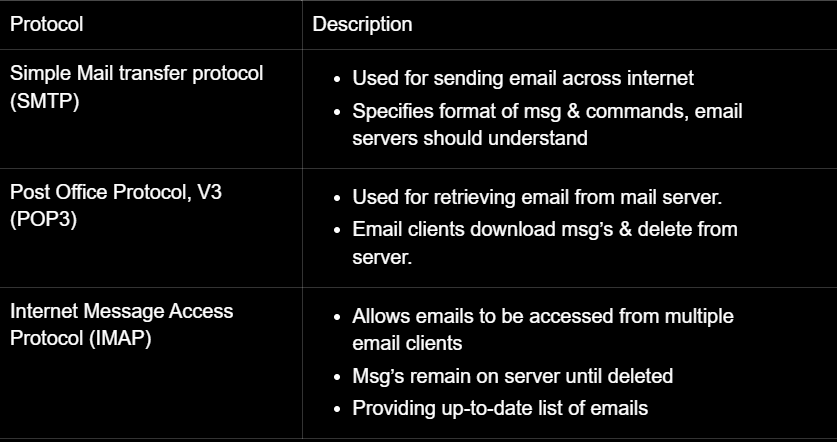
Network protocol
Ethernet - Family of protocols used in wired Local Area Networks (LANs), covering physical aspects like cable types and connectors, as well as logical aspects like error checking and data transmission speed.
Wifi - technology that lets you connect to the internet wirelessly. It uses a set of rules created by the Wi-Fi Alliance to make sure all Wi-Fi devices can talk to each other.
Transmission Control Protocol/Internet Protocol (TCP/IP) - set of protocols governing how data is transmitted over networks.
IP - Sends data to right address
TCP - Works with data packets
Protocols of network layers
Layer
Description
Application layer
Allows applications like web browsers and email clients to communicate over a network.
Transport layer
Manages host-to-host communication, dividing data into packets and ensuring safe arrival.
Manages data flow so data doesn’t overload receiver.
Internet layer
Routes data packets using IP address
Network layer
Transmits data through local networks like Ethernet.
Protocols in application layer
Protocol
Description
File Transfer Protocol (FTP)
Rules for how files are transmitted between computers.
Hypertext Transfer Protocol (HTTP)
Used for sending requests and responses between a web browser and a web server.
Secure HTTP (HTTPS)
Enables secure communication between a client and server through encryption.
Simple Mail Transfer Protocol (SMTP)
Protocol for sending email messages from a client to a server.
Post Office Protocol (POP)
Used by a client to retrieve emails from a mail server; emails are typically downloaded.
Internet Message Access Protocol (IMAP)
Allows emails to be read and managed on the message server without requiring download, suitable for users with multiple devices.
Mobile networks
2G
3G
4G
5G
First digital communication
Enabled texting
Increased data transmission speed
Gave wireless access to internet
Enabled video calls, downloading & streaming
Higher speeds
Made mobile games popular
Downloading is faster
Larger capacity so bigger number of users can be supported at the same time
Smarter, faster, more efficient
lower latency(delay in data travelling)
The internet and the world wide web
How the internet works
Domain names - used to identify one or more IP addresses
Internet service provider (ISP) - Allows access to internet
Domain name server (DNS) - translates domain names to IP addresses.
If one DNS doesn’t know the corresponding IP address it will send it to another DNS and so on.
When a internet connected computer wants to send data to another computer.
The data is split into packets
Each packet has a header that contains the sender’s address, destination address, current packet number and total number of packets
Each packet is sent to your ISP(Internet service provider)
ISP will hv a router. The router will inspect the packet header and decide where to send the packets
Once the packet reaches the destination the packets need to be rearranged correctly as they might have arrived in the wrong order using TCP.
This is done using the packet header information.
Accessing the WWW
The WWW is accessed using web browsers
Web browser - Allows user to view websites using the internet
The web browser converts the data received from web server to human-readable format.
How the WWW works
The user enters URL of the page they want to visit.
The computer uses DNS to find the IP address of the required web server.
Web browser connects to the web server using the IP address.
Web page transferred from one computer to another using HTTP or HTTPS
data is sent in HTML format
The bigger picture
Computer & the legal impact of technology
Intellectual property (IP) - Unique product of human mind
Copyrights & patents
Patent - Protects the idea or design of an invention
Licensing - States that even if a user has purchased it, they don’t own.
creative commons - organization that provides license for any creative piece of intellectual property
open source license - available freely in the internet; the code can edited by anyone
Proprietary software - closed source and thus, users are not allowed to modify it.
Current & emerging trends
DNA computing
Instead of traditional computer chips, DNA computing uses molecules of DNA to process information.
It works by using chemical reactions inside DNA to solve complex problems.
Very powerful because it can do many calculations at the same time (parallel processing).
Scientists hope this could be useful for medicine & solving big problems faster than normal computers.
Quantum computing
They use quantum bit (qubits) instead of normal computer bits.
Qubits can exist multiple states at once (superposition).
Can process info much faster.
Qubits are connected in a way that changing one instantly affects the others (entanglement).
Nanotechnology
Building tiny machines & circuits at the atomic and molecular level.
This means making smaller, faster processors and memory devices.
Working on nano sized transistors that can make computers incredibly powerful.
Creates better battery life, display and medical treatments.