Editing Assignment
The cut is the most basic way to move shot to shot
Cutaway- when an editor cuts away from the main action
Walter Murch- Rule of six (a list of prioritised criteria when deciding on each cut)
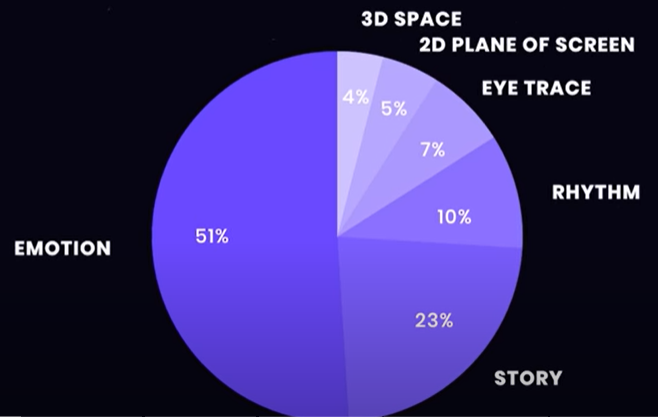
Pace of a scene affects emotion, style and tone.
e.g. longer shots for mournful and contemplative scenes, rapid cutting for rapid action scenes
Deciding what to cut to in equally important
e.g. use a cutaway to show what is on a character’s mind/ cut to what a character is looking at
EYELINE MATCH
When an editor cuts to an object of a character’s attention
If the character notices something, we cut to what they see
The character’s eyes motivate the cut
2nd shot is often a POV/ from the character’s general perspective
Builds intrigue by waiting to reveal what they see/ by not showing it at all
A common form is the ‘shot reverse shot’- when we cut between a shot of subject A and a shot of B in a reverse angle (often a similar angle/composition)
Most common in conversation scenes to maintain scene geography and clarity
Insert shots are also prompted by eyeline matches (a shot of a specific prop or detail within a scene)
An example of simple, direct visual language
Great way to connect the dots between what the character sees/thinks/feels
Can also create/release tension
CROSS CUTTING
Cuts between two or more scenes happening in different locations
Creates an ironic juxtaposition
Combine multi-layered action effectively
Create parallels between separate scenes, weave planes of action in one
EYE TRACE
Is when an editor cuts between two or more shots that focus on the same area of the frame
Allows the viewers eyes and attention to stay focused without having to scan the frame after each cut
Can also be used through blocking and camera movement guiding a viewers eye within a shot
Ideal for action scenes (move quickly)
Composition and editing of these scenes helps the reader process the chaotic action
SPLIT EDIT
a transition from one shot to another in film or video in which transition of the audio and video happen at different times; this is either a L-cut or J-cut
J-cut
When audio from a shot begins to play before we see it
L-cut
The audio from a shot plays after we’ve cut away
Used during dialogue scenes
More natural conversation- controls the rhythm as well as catching reaction shots of something listening
INTELLECTUAL MONTAGE
Puts seemingly unrelated images together to create a certain feeling or idea
-editing two shots together to connect them to an intellectual concept
Makes a cut more noticeable this montage makes use of the ‘Kuleshoy effect’
- this refers to creating meaning out of a cinematic juxtaposition
The two separate scenes combine to create a single idea
eg. Lucy delivering a briefcase and cuts to a mouse trap signifying she is walking into one
We are asked to make these connections ourselves
Using ‘IM’ can reiterate the larger themes in the film
This experimental technique is a great way to evoke emotion and meaning out of shots which wouldn’t individually have them
CUT ON ACTION
Refers to cutting during a character’s or objects movement
Seamless transition, can be used for simple actions like taking a drink
The smoother cuts feel natural to the audience
…often found in fight scenes as it lends itself to fast-paced rhythm and quick movement
… a very common cut in action fighting sequences is to cut on impact gives each punch or kick extra force
2ND VIDEO- transitions
THE CUT
Instant switch or transition from one shot to another or one scene to the next
Most common way to transition between scenes
THE FADE
When a shot dissolves to or from a solid colour
(usually black or white)
Utilises a gradual transition
BLACK
Is a common way to open a film
It eases the audience into the beginning of the story.
A fade TO black can give a gradual sense of closure at the end or deliberately pause momentum (which gives the audience a moment to breathe or reflect on what just transpired)
WHITE
Less common
Commonly used to represent a character entering a dream or dying.
Can also leave an ending up for interpretation
A fade in or out of a scene can also be a stylistic choice (also called dip to black)
THE DISSOLVE
a gradual transition from one image to another, with the first image beginning to disappear as the second image gradually appears.
Transitions directly into another shot
Used to suggest a longer passage of time between scenes or within the same scene
Or as a way to signal a memory/dream
Some filmmakers use this to create a hybrid moment between the two scenes.
When the two shots dissolve with one another it creates a third shot in which both shots are shown within the frame simultaneously (superimposition)
THE MATCH CUT
Is any transition, audio or visual that uses elements from the previous scene to batch similar elements in the next
e.g. shapes, compositions, colours, movement or sound
Connects the two shots instantly, this connection can subconsciously make the audience draw on similarities/ differences between the scenes
Can also bridge time and space e.g. a character young and then older
THE IRIS
a technique used in silent film and television sometimes to emphasize a detail of a scene above all others, more commonly to end or open a scene.
The film camera’s iris is slowly opened/closed
Used to be made manually
In modern cinemas it is now a stylistic choice
Focuses on a single emotion/idea
THE WIPE
is when shot A is replaced by shot B when it moves from a specific direction (L,R,U or D or diagonal)
Wipes can come from various shapes e.g. a star or clock
Old-fashioned like the iris but ideal for vintage styles
Nowadays used for comical and comedic purposes
THE PASSING
or pass-by effect
Has a moving character or object to transition into the next scene or has the camera itself move to the next object
Often paired with strategic sound design so the momentum between scenes never skips a beat
More seamless than ‘the wipe’ as their used to hide the cut. Used to create a hyper-stylized aesthetic
THE WHIP PAN
or swish pan
adds energy to transitions
quick horizontal camera rotation that blurs the image
commonly used mid-scene but also scene transition- can be highly beneficial to sustain momentum from the previous scene
THE SMASH CUT
Is a sharp and abrupt cut from one scene to another using high contrast in both visuals and audio e.g. quiet and loud, chaotic and still
Typically used to shock/jot the audience
Can also be used for comedic effect as the transition between two contrasting scenes is a great way to punctuate a moment
J CUT AND L CUT
A J-cut or pre-lap is when the audio of the next scene proceeds the image (audio can still be heard from scene B while still seeing scene A)
The L-cut is a film editing transition that sees the audio from one scene or shot overlap onto the visuals from the next.