CH.10 | PLC MATH INSTRUCTIONS
INTRODUCTION
Uses add, subtract, multiply, and divide to calculate the sum, difference, product, and quotient of the content of registers in two PLC counter instructions.
Usual interval to update the results of PLC arithmetic instructions is one scan period.
10.1 ADDITION
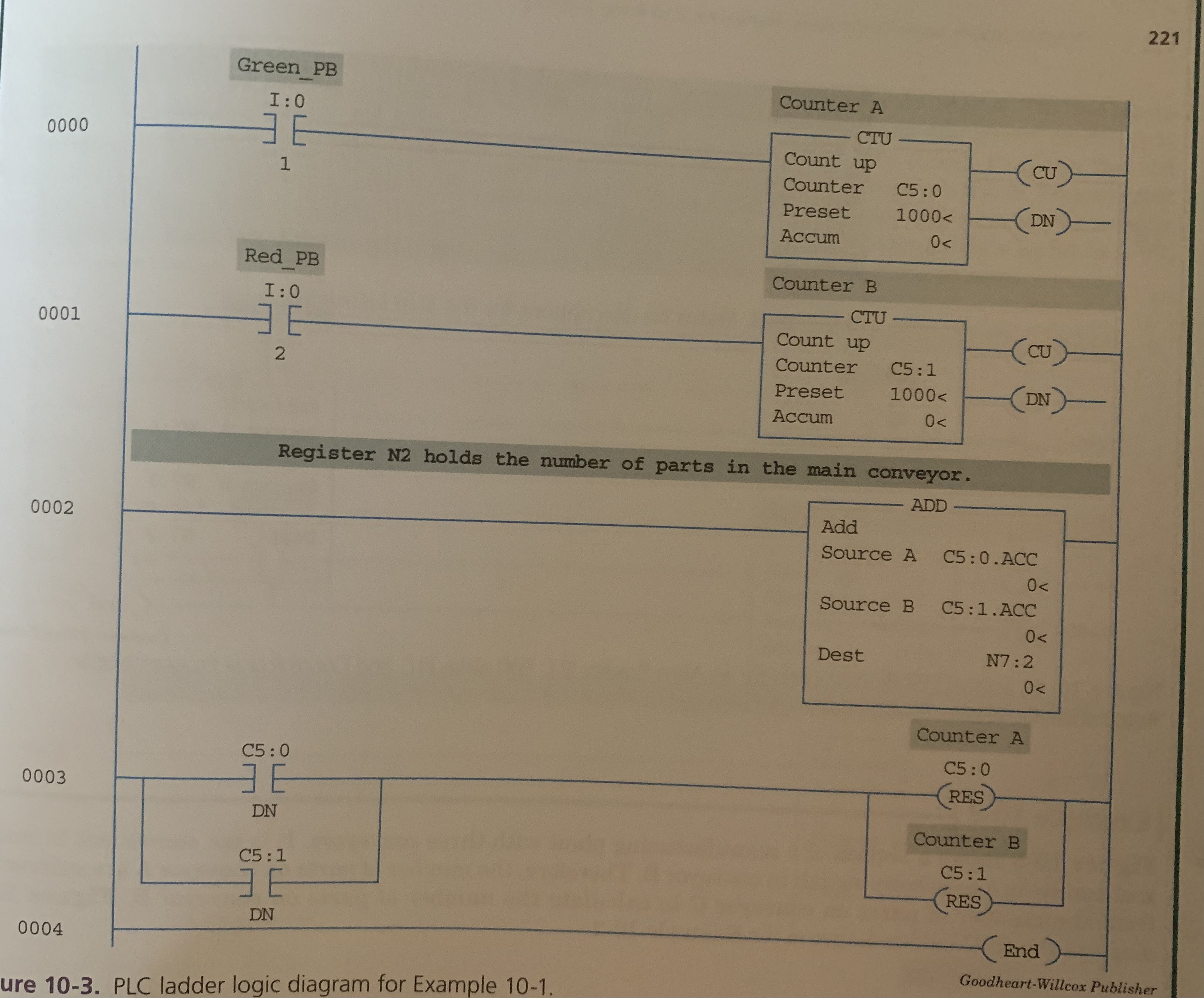
When counted parts on two separate conveyors are placed onto a single conveyor to be counted.
ADD (ADD) Instruction
calculates the sum of two operands (Source A and Source B)
Contains three operands
Two hold source data (Source A and B)
Both can be registers or
One source is a register and other is a number
Third is destination which holds the SUM of A and B.
MUST BE A REGISTER
Description of Bits in the processor status file (S2)
Carry (C)
S2:0/0
Set when carry is generated. Otherwise clear.
Overflow (O)
S2:0/1
Set when result is too large to fit in the destination register.
Zero (Z)
S2:0/2
Set when the result of math/logic or move instruction is zero.
Sign (S)
S2:0/3
Set when the result of math/logic or move instruction is a negative number.
10.2 SUBTRACTION
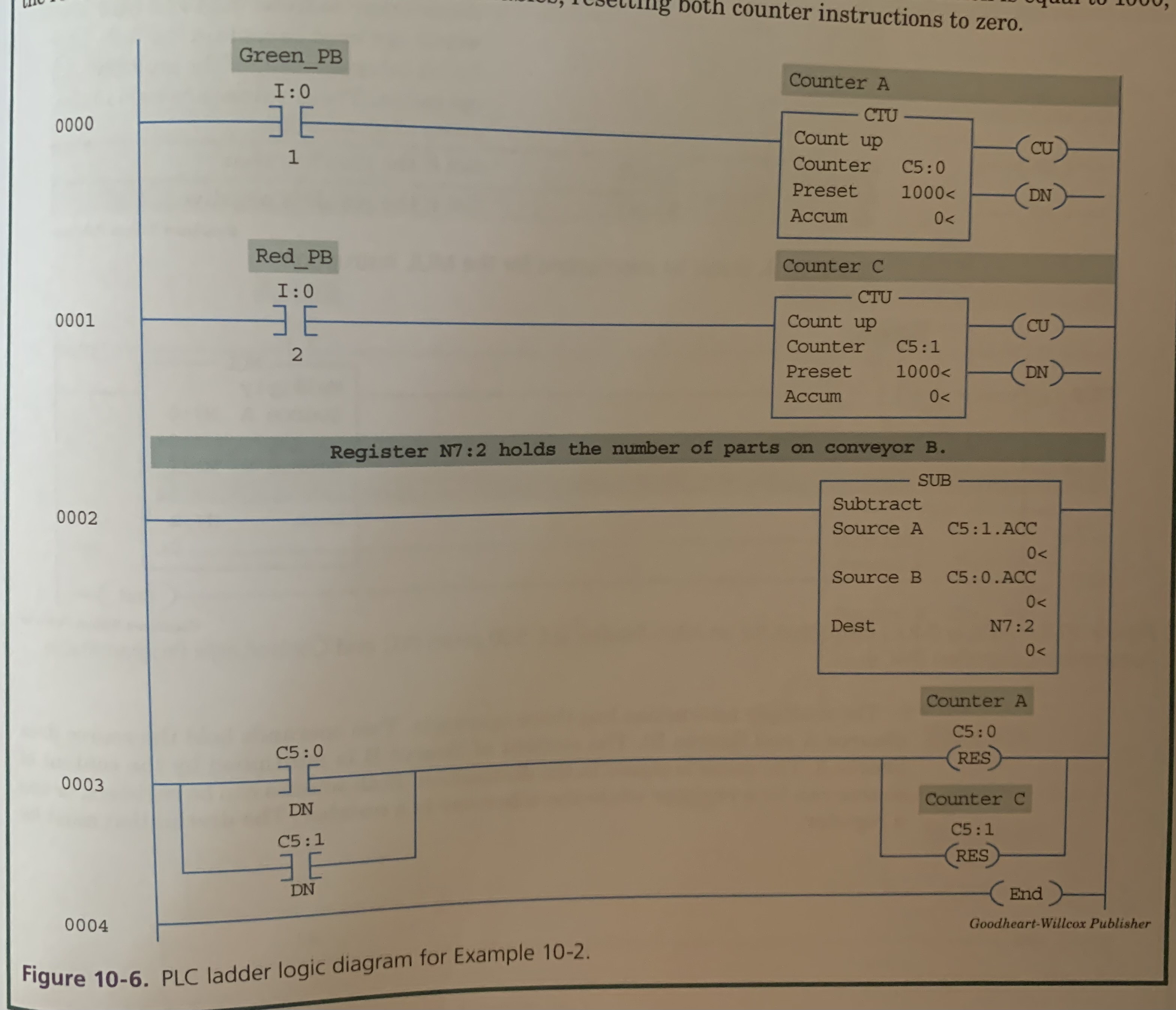
Factory has three conveyors: A, B, and C.
A and B merge into C
You cant place a sensor on A, but need to know how many A contains.
Sensors are placed on B and C then used the Subtract Instruction.
Subtract (SUB) Instruction
Calculates the difference between two sources.
Contains three operands
Two hold source data (Source A and B)
Both can be registers or
One source is a register and other is a number
Third is destination which holds the DIFFERENCE of A and B.
MUST BE A REGISTER
Status Bit descriptions for SUB instruction
Carry (C) - Set if borrow is generated. Otherwise clear.
Overflow (O) - Set when result underflows.
Zero (Z) - Set when the result is zero.
Sign (S) - Set when the result is negative.
10.3 MULTIPLICATION
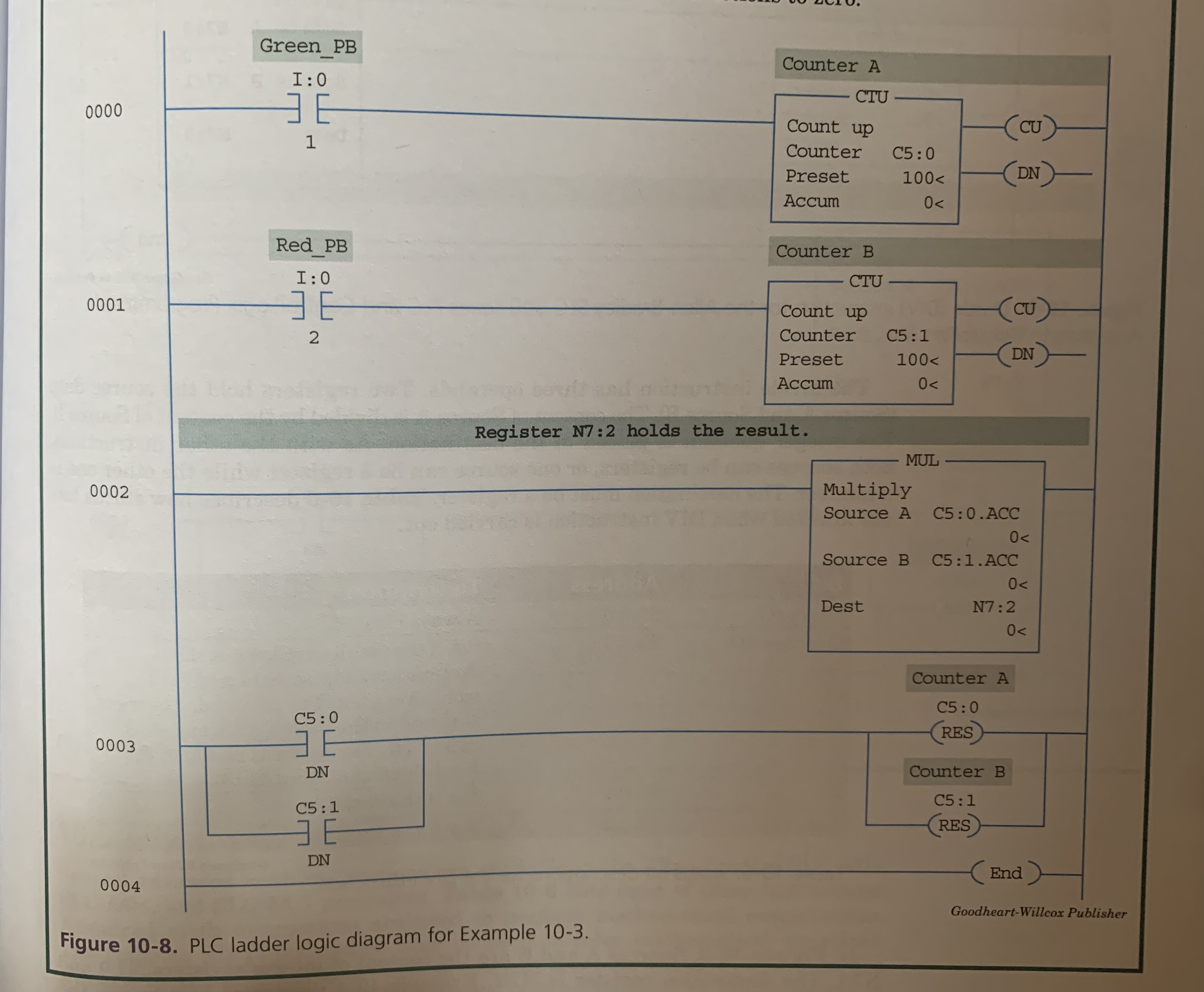
When multiple parts are packed in containers,
the number of parts per container
the number of containers
and the multiply instruction
gives you the TOTAL number of parts.
Multiply (MUL) Instruction
Calculates the product of two sources (Source A and Source B)
Contains three operands
Two hold source data (Source A and B)
Both can be registers or
One source is a register and other is a number
Third is destination which holds the PRODUCT of A and B.
MUST BE A REGISTER
Status Bit descriptions for MUL instruction
Carry (C) - Always clear
Overflow (O) - Set when result overflows. S:13 and S:14 words are used to contain the full 32 bit (Double Word) integer result. Used in the event of an overflow.
Zero (Z) - Set when the result is zero.
Sign (S) - Set when the result is negative.
10.4 DIVISION
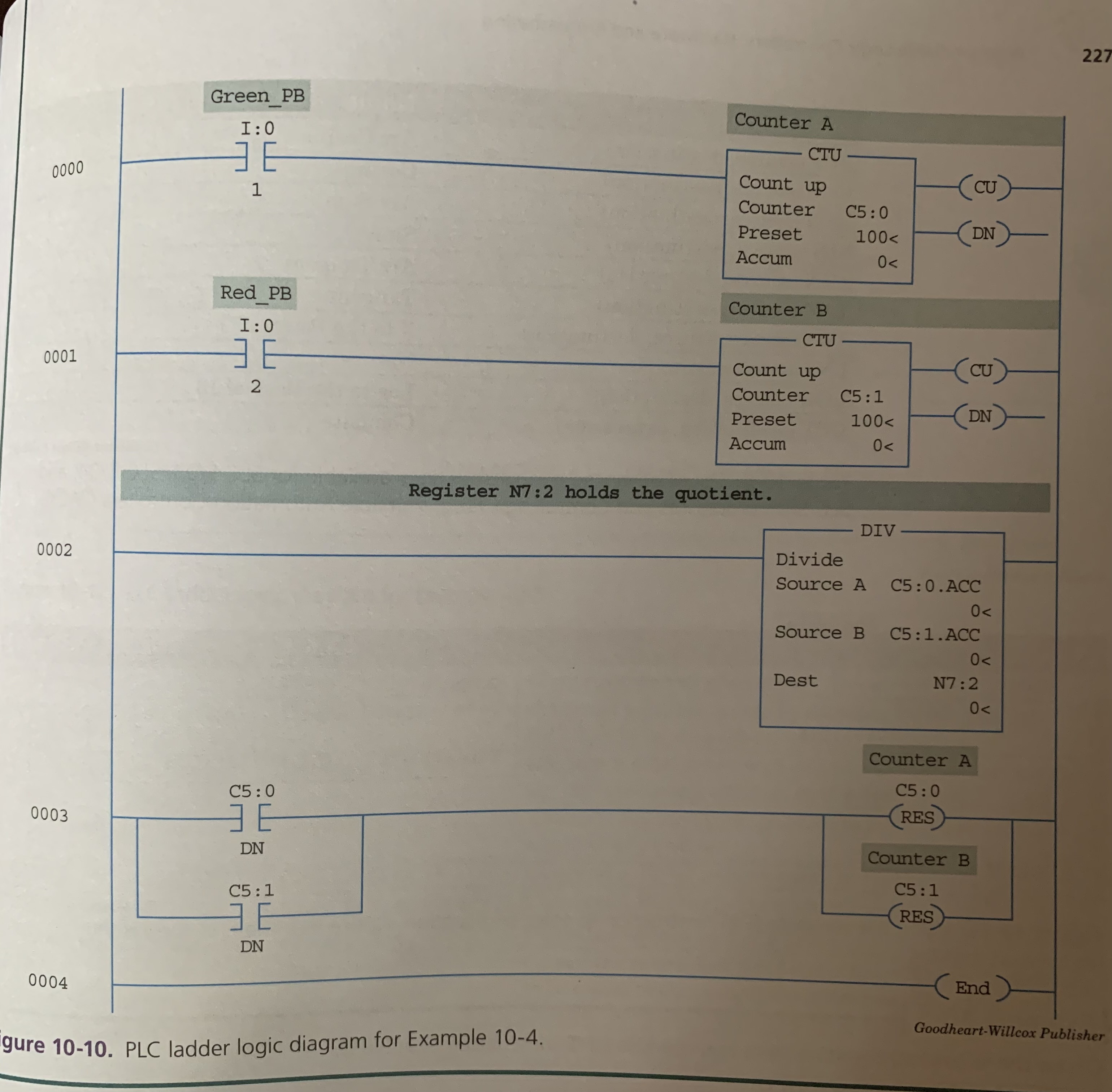
Assume a machine is counting inches of steel that pass by
But needs to calculate length in feet or yards before engraving.
DIVIDE instruction is used.
Divide (DIV) Instruction
Calculates the integer value that results from dividing two sources (Source A and Source B)
Contains three operands
Two hold source data (Source A and B)
Both can be registers or
One source is a register and other is a number
Third is destination which holds the Quotient of A and B.
MUST BE A REGISTER
Status Bit descriptions for DIV instruction
Carry (C) - Always clear
Overflow (O) - Set when result overflows. S:13 and S:14 words are used. The unrounded quotient is placed in the most significant word (S:14). The remainder is placed in the least significant word (S:13).
Zero (Z) - Set when the result is zero.
Sign (S) - Set when the result is negative.
10.5 ADVANCED MATH INSTRUCTIONS
Use the Compute (CPT) Instruction to perform advanced math equations.
ACS (Source, Destination) - Arc Cosine
COS (Source, Destination) - Cosine
ASN (Source, Destination) - Arc Sine
SIN (Source, Destination) - Sine
ATN (Source, Destination) - Arc Tangent
TAN (Source, Destination) - Tangent
XPY (Source, Source, Destination) - X to the Power of Y
LN (Source, Destination) - Natural Log
LOG (Source, Destination) - Log to the base of 10
CPT (Destination, Expression) - Compute
Other Common Math Instructions
CLR (Register) - Clear
Clears the memory location
DDV (Source, Destination) - Double Divide
Performs a double divide by dividing 32-bit data in S:13 & S:14 by a 16-bit source.
DCD (Source, Destination) - Decode 4 to 1 of 16
Decodes a 4-bit number (0-15) in the source and turns the corresponding bit(s) on in the destination.
NEG (Source, Destination) - Negate
Reverses the sign from positive to negative or from negative to positive
TOD (Source, Destination) - Convert to BCD
Converts a 16-bit integer value to BCD (Binary Coded Decimal)
FRD (Source, Destination) - From BCD to Binary
Converts a BCD value to a binary value
SQR (Source, Destination) - Square Root
Finds the square root of a value
COP - Copy Data
Causes the entire data file, pointed to by the source address, to be copied to the destination addresses. The number of locations moved is determined by the length value.
FILL - Fill Data
Contents of the source register or a constant value is copied to the destination register in an ascending order until the value entered in the length variable is zero.
SCL - Scale Data
Multiplied by the rate value. The rounded result is added to the offset value and placed in the destination.