Execution Plans for Data Modifications
Execution Plans for Data Modifications
Overview
Execution plans are generated for data modification queries like INSERT, UPDATE, DELETE, and MERGE, guiding the execution engine for data changes.
These plans are valuable for understanding processes such as IDENTITY column resolution during INSERTs and referential constraint management during DELETEs.
They can be used to tune data modification queries similarly to SELECT queries.
INSERT Plans
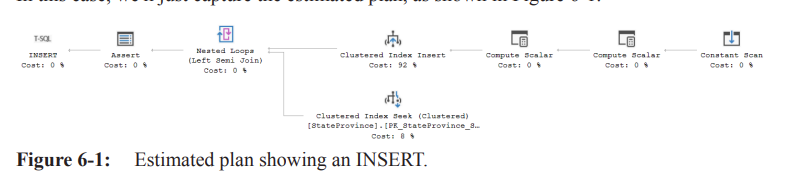
INSERT queries target a single table, but their execution plans can be complex due to IDENTITY columns, computed columns, and referential integrity checks.
You can capture either estimated plans or actual execution plans, and estimated plans do not actually modify the data.
Listing 6-1 shows a simple INSERT query example:
INSERT INTO Person.Address (
    AddressLine1,
    AddressLine2,
    City,
    StateProvinceID,
    PostalCode,
    rowguid,
    ModifiedDate
)
VALUES (
    N'1313 Mockingbird Lane',
    N'Basement',
    N'Springfield',
    79,
    N'02134',
    NEWID(),
    GETDATE()
);
INSERT Operator
The optimizer may classify the plan as trivial and perform simple parameterization, replacing hard-coded values with parameters to promote plan reuse, as shown in Listing 6-2:
(@1 nvarchar(4000),@2 nvarchar(4000),@3 nvarchar(4000),@4 int,@5 nvarchar(4000))
INSERT INTO [Person].[Address]
(
    [AddressLine1],
    [AddressLine2],
    [City],
    [StateProvinceID],
    [PostalCode],
    [rowguid],
    [ModifiedDate]
)
VALUES
(
    @1,
    @2,
    @3,
    @4,
    @5,
    newid(),
    getdate()
)
Constant Scan Operator

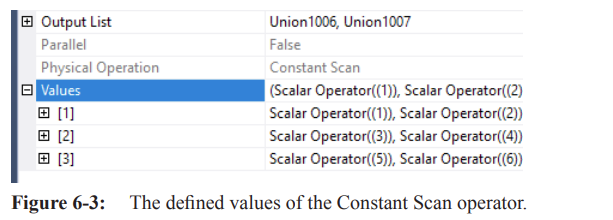
The Constant Scan operator introduces rows from an internal table of constants, derived from the operator's properties (Values properties).
It generates one or more rows with one or more columns and has multiple roles within an execution plan.
The Output List and Values properties reveal the columns returned and row values generated.
In some cases, a Constant Scan returns an empty row as a placeholder for information to be added by other operators like Compute Scalar.
Compute Scalar Operator
Sometimes, in a plan, you will see that a Constant Scan returns an empty row, essentially a place holder for information that will be added by other operators within the plan, such as a Compute Scalar
The first Compute Scalar operator reads rows from the Constant Scan and calls a
getidentityfunction to generate an IDENTITY value.Example Expression:
[Expr1002] = Scalar Operator(getidentity((373576369),(11),NULL))
The getidentity function takes objectid, databaseid, and an unknown third parameter
This operation occurs before INSERT and integrity checks, which explains why IDENTITY value gaps occur even when INSERTs fail.
The second Compute Scalar operator adds columns for parameterized values, a new uniqueidentifier (guid) value, and the date/time from the
GETDATEfunction.
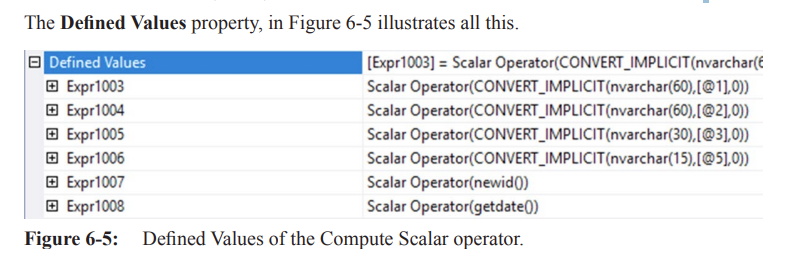
Hard-coded strings are converted to variables with a data type of nvarchar(4000).
Column values are converted from their inferred data type to the corresponding column data type in the table.
Clustered Index Insert Operator
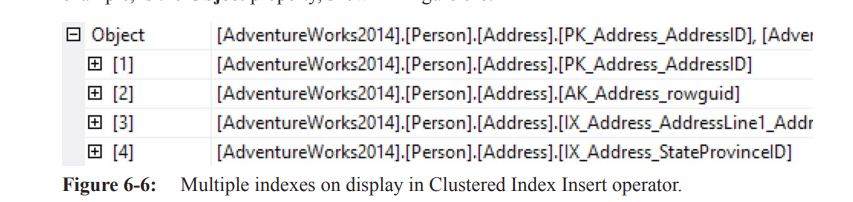
The Clustered Index Insert operator represents the insertion of data into the clustered index.
It may account for a significant portion of the estimated cost of the pla.
The Object property indicates the indexes affected by the insert.
Additional nonclustered indexes can be modified by adding them to the object list of the clustered index modification operator, or through their own operators (per-index plan).
Filtered indexes and indexed/materialized view are always modified from within their own operators.
Parameters in ScalarOperator
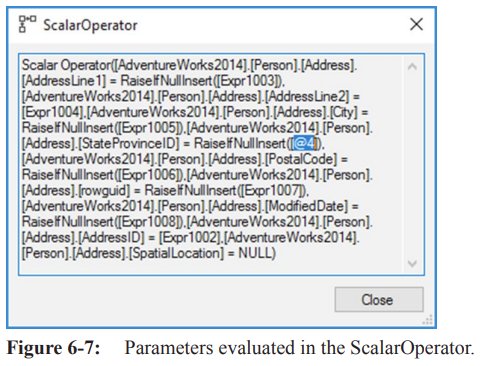
Parameters created and formatted are visible in the
ScalarOperatorproperty, within thePredicateproperty.Individual properties of the operator contain this data, but they are not easily readable.
Example: The
@4value ofStateProvinceIDis highlighted, showing it reads this variable directly.Other columns are set using expressions (e.g., Expr1003) generated earlier in the
Compute Scalaroperator.
Output List Property
The
Output Listproperty showsPerson.Address.StateProvinceId.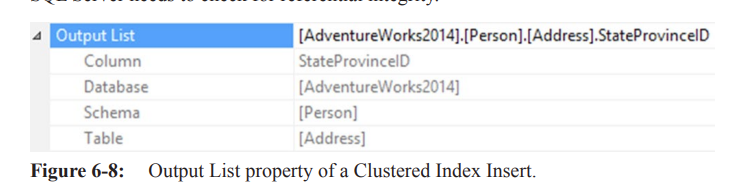
SQL Server checks for referential integrity because this column is a FOREIGN KEY.
Nested Loops Join Operator
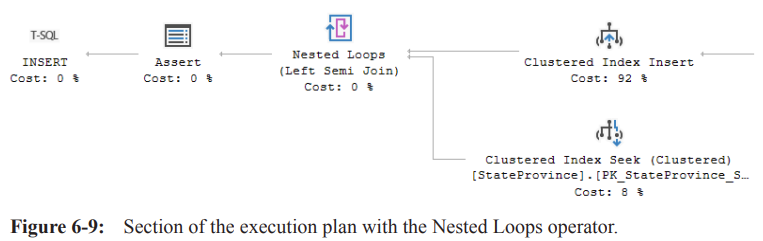
The Nested Loops join operator receives the inserted row with the
StateProvinceID.It calls a
Clustered Index Seekto read the PRIMARY KEY column of the parent table.This checks if the value being inserted exists in that column.
The Nested Loops operator is a Left Semi Join, meaning it looks for only one match.
The output is a new expression tested by the
Assertoperator.
Assert Operator

The Assert operator verifies that certain conditions are met.
It lists these conditions in the
Predicateproperty, returning NULL if all are met.Non-NULL values cause a rollback. The error message depends on the value.
Example: The Assert operator checks that
Expr1012is not NULL.This confirms the
Person.Address.StateProvinceIdfield matched data in thePerson.StateProvincetable, serving as the referential check.
Plans for UPDATEs
UPDATE queries work against one table at a time.
The impact on the execution plan depends on the table structure and columns updated.
The execution plan can be as significant as that of an INSERT query.
Example UPDATE query:
sql UPDATE Person.Address SET City = 'Munro', ModifiedDate = GETDATE() WHERE City = 'Monroe';
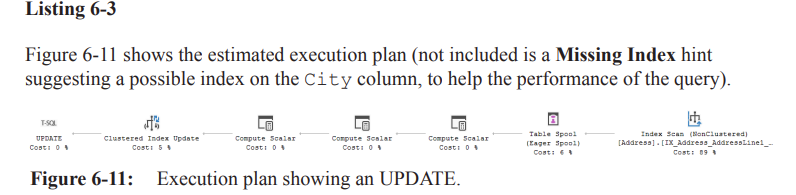
The execution plan went through FULL optimization and terminated early due to finding a "Good Enough Plan".
Index Scan Operator
The first operator is an
Index Scanon the table, scanning all rows in the index.It returns rows WHERE
[City] = 'Monroe'(see the Predicate property).The optimizer estimates 4.6 rows returned, suggesting a possible index on the City column.
Whether to create the index depends on the query's importance and frequency.
Table Spool (Eager Spool) Operator

The
Table Spooloperator stores incoming data in a worktable for reuse, perhaps several times within an execution planThe Eager Spool requests all rows from its child operator before passing on the first row.
This makes it a blocking operator, which the optimizer usually avoids.
It prevents the Halloween Problem by ensuring already updated data isn't seen again.
The spool reads all rows to be updated and stores them in its worktable. By using only that worktable to drive the rest of the query, we are guaranteedto not see already updated data again.
Compute Scalar Operators (Upcoming for Updates)
Compute Scalar operators evaluate expressions and produce a computed scalar value (e.g.,
GETDATE()function).They create values like Expr1012, derived from Expr1006.
These computations ensure the data is updated correctly, or may be artifacts of execution plan generation.
Compute Scalar operators have low cost, so the optimizer might not remove unnecessary computations.
Clustered Index Update Operator

The
Clustered Index Updateoperator reads input data, identifies rows to update, and updates them.It updates the clustered index and any nonclustered indexes with the City column as a key.
It updates rows passed in from an Index Scan, or finds rows to update based on a Predicate.
Example:
CREATE TABLE dbo.Mytable
(
    id INT IDENTITY(1, 1) PRIMARY KEY CLUSTERED,
    val VARCHAR(50)
);

INSERT dbo.Mytable
(val)
VALUES
('whoop' -- val
    );

UPDATE dbo.Mytable
SET val = 'WHOOP'
WHERE id = 1;
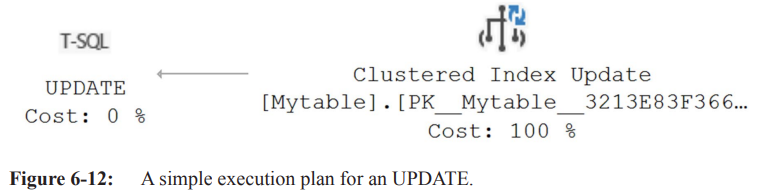
The execution plan for the UPDATE is simple because the
Clustered Index Updateoperator performs all the work.Rows are filtered and updated in place, as seen in the Seek Predicate property.
Plans for DELETEs
DELETE query execution plans can vary.
Simple DELETE Plan
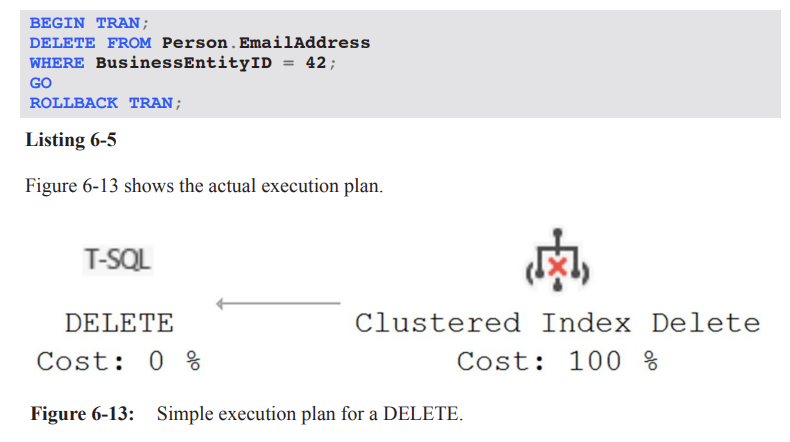
The
Clustered Index Deleteoperator defines and deletes rows in the clustered index that need deletion.Not all DELETE plans are this simple, especially if referential integrity validation is needed.
The DELETE operator shows a TRIVIAL plan and simple parameterization for plan reuse.
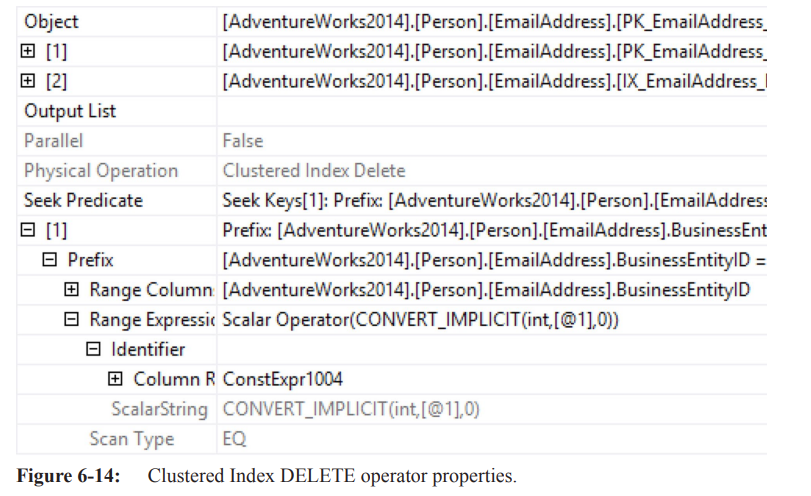
The Object property shows that more than just the clustered index gets modified in simple execution plan.
The Seek Predicate operator finds rows to be deleted.
Simple parameterization has occurred, comparing against
@1(a parameter) instead of the actual value (42).
Per-Index DELETE Plan
In contrast to "narrow" plans where nonclustered indexes are modified in the same operator as the clustered index, a "wide" or "per-index" plan modifies each nonclustered index separately.
Example: Creating a materialized view and deleting data to demonstrate a wide DELETE plan.
CREATE OR ALTER VIEW dbo.TransactionHistoryView
WITH SCHEMABINDING
AS
SELECT COUNT_BIG(*) AS ProductCount,
       th.ProductID
FROM Production.TransactionHistory AS th
GROUP BY th.ProductID
GO

CREATE UNIQUE CLUSTERED INDEX TransactionHistoryCount
ON dbo.TransactionHistoryView(ProductID)
GO

BEGIN TRAN;
DELETE FROM Production.TransactionHistory
WHERE ProductID = 711;
ROLLBACK TRAN;
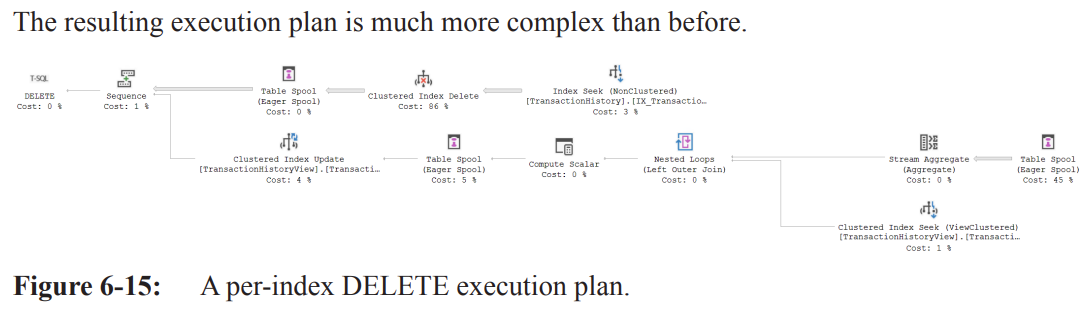
The resulting execution plan is more complex.
Plan Analysis
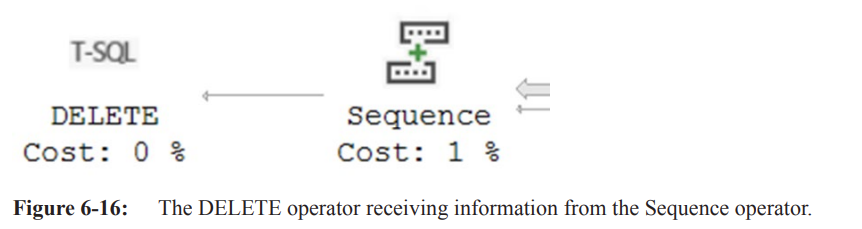
Sequence Operator:
Takes multiple inputs and processes them in order from top to bottom. the inputs are related objects in which data must be modified and the operations must be performed in the correct sequence to ensure data integrity and consistency.
Used in UPDATE or DELETE operations where different database objects must be modified in a specific sequence.
Each input typically represents a different object.
Only the bottom (final) input is passed on, making it a partially blocking operator.
All processing for one input must complete before the next starts.
Top Input to Sequence Operator:
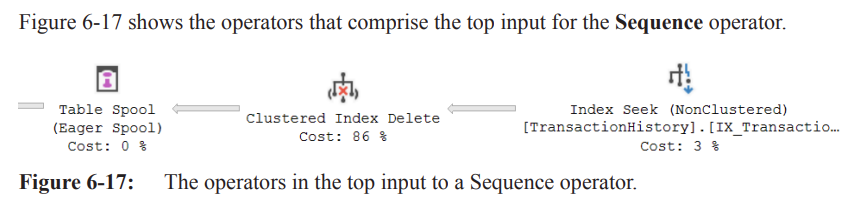
Starts with an Index Seek operation against the
IX_TransactionHistory_ProductIDnonclustered index.Outputs
TransactionIDvalues matching theProductIDof 711.The listing of returned
TransactionIDvalues then goes to the Clustered Index Delete operation
Clustered Index Delete
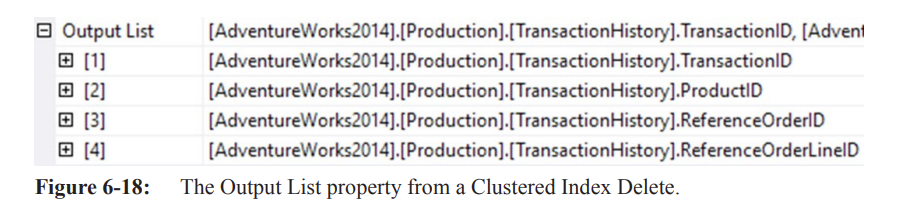
Removes data from the clustered index.
Outputs the
ProductIDcolumn for later use.The ouptut is then loaded into a Table Spool/Eager Spool for later user
Table Spool (Eager Spool):
Temporary storage for later use in the plan.
An Eager Spool collects all information from preceding operators before passing on any rows.
All rows matching
ProductID = 711are deleted before the rest of the plan continues, implying it's a blocking operator.
Bottom Input to Sequence Operator
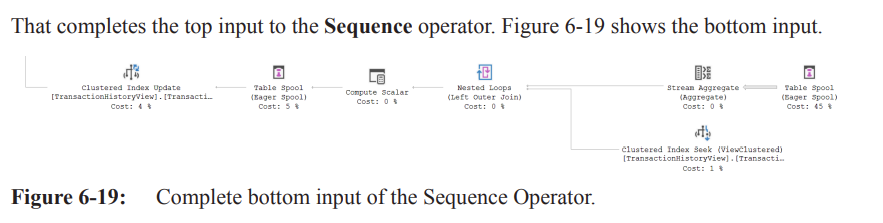
Starts with another Table Spool operator reusing data from the top input's Clustered Index Delete operator.
The Primary Node ID indicates that data from the Table Spool in the top input is being reused.
Stream Aggregate Operator:
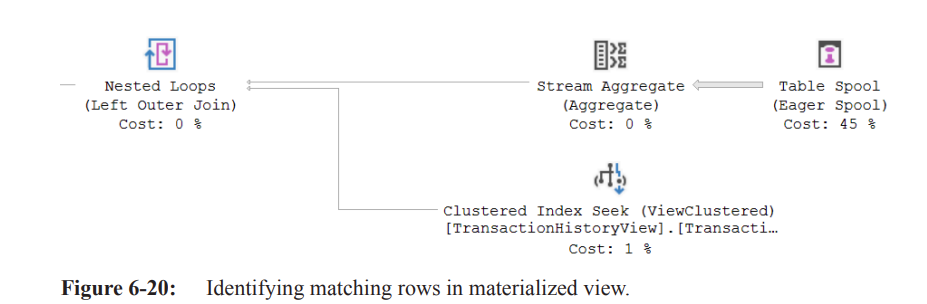
Aggregates the deleted values from the clustered index to match the data in the materialized view.
Nested Loops Join:
Adds corresponding data as currently stored in the materialized view.
Compute Scalar:
Computes the new value for the materialized view by subtracting the number of deleted rows by
ProductIDfrom the originally stored data.
Table Spool Operator:
Protects against the Halloween Problem.
Clustered Index Update:
Modifies the data in the materialized view itself.
The optimizer decides whether to maintain indexes in random order or use a Table Spool, sort the rows, and then maintain the indexes with pre-ordered data.
The same options apply to INSERT, UPDATE, and MERGE plans.

Plans for MERGE Queries
The MERGE query (introduced in SQL Server 2008) modifies data in a single query instead of separate queries for INSERTs, UPDATEs, and DELETEs (also known as "upsert").
Simplest application: UPDATE if key values exist; INSERT if they don't.
DECLARE @BusinessEntityId INT = 42,
    @AccountNumber NVARCHAR(15) = N'SSHI',
    @Name NVARCHAR(50) = N'Shotz Beer',
    @CreditRating TINYINT = 2,
    @PreferredVendorStatus BIT = 0,
    @ActiveFlag BIT = 1,
    @PurchasingWebServiceURL NVARCHAR(1024) = N'http:// shotzbeer.com',
    @ModifiedDate DATETIME = GETDATE();

BEGIN TRANSACTION;

MERGE Purchasing.Vendor AS v
USING (
    SELECT @BusinessEntityId,
        @AccountNumber,
        @Name,
        @CreditRating,
        @PreferredVendorStatus,
        @ActiveFlag,
        @PurchasingWebServiceURL,
        @ModifiedDate
) AS vn
(BusinessEntityId, AccountNumber, NAME, CreditRating, PreferredVendorStatus, ActiveFlag, PurchasingWebServiceURL, ModifiedDate)
ON (v.AccountNumber = vn.AccountNumber)

WHEN MATCHED THEN
    UPDATE SET
        v.Name = vn.NAME,
        v.CreditRating = vn.CreditRating,
        v.PreferredVendorStatus = vn.PreferredVendorStatus,
        v.ActiveFlag = vn.ActiveFlag,
        v.PurchasingWebServiceURL = vn.PurchasingWebServiceURL,
        v.ModifiedDate = vn.ModifiedDate

WHEN NOT MATCHED THEN
    INSERT (BusinessEntityID,
        AccountNumber,
        Name,
        CreditRating,
        PreferredVendorStatus,
        ActiveFlag,
        PurchasingWebServiceURL,
        ModifiedDate)
    VALUES (vn.BusinessEntityId, vn.AccountNumber, vn.NAME, vn.CreditRating, vn.PreferredVendorStatus, vn.ActiveFlag,
        vn.PurchasingWebServiceURL, vn.ModifiedDate);

ROLLBACK TRANSACTION;
This query uses the alternate key (
AccountNumber) on thePurchasing.Vendortable to perform a MERGE.If the supplied value matches a key value, the query runs an UPDATE; otherwise, it performs an INSERT.

Plan Analysis
Constant Scan:
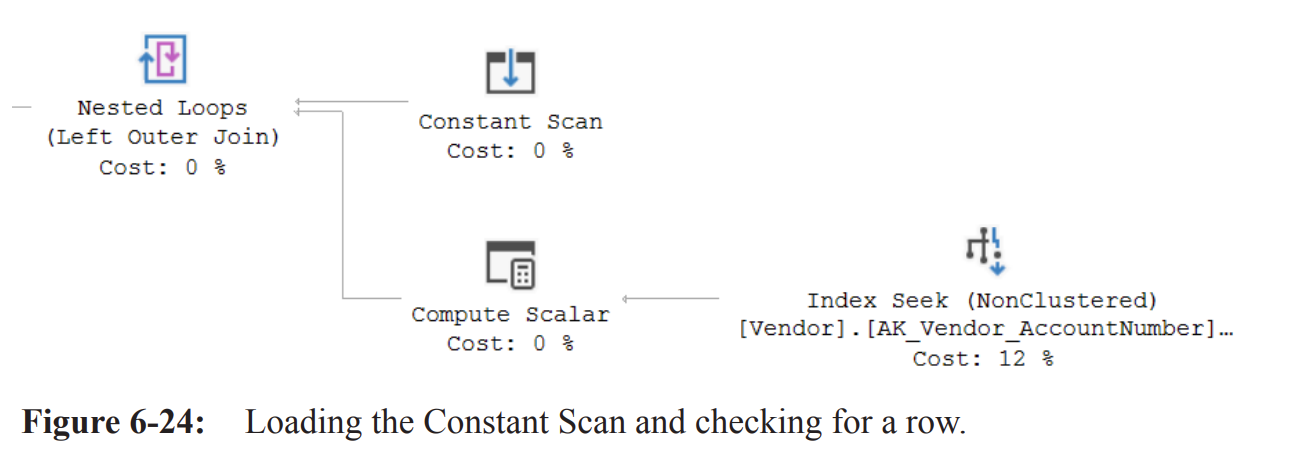
Generates one empty row as a placeholder for data.
Ensures that all operators have information to work with, even if it's an empty set.
Nested Loops Operator:
Uses the empty row from the Constant Scan to drive a single execution of its inner input.
The Index Seek against the
Vendor.AK_Vendor_AccountNumbernonclustered index retrieves any rows to be updated.The Properties for the data flow between the Index Seek and the first Compute Scalar reveals zero rows returned.
Compute Scalar Operator Properties
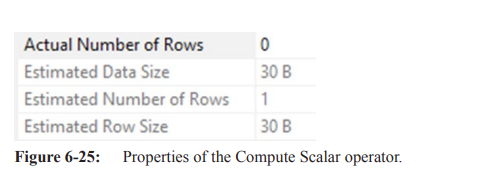
For every row received, the Compute Scalar operator creates a value
TrgPrb1001and sets it to 1.The Nested Loops operator combines the empty column from the Constant Scan with the data (if any) from the Compute Scalar using a Left Outer Join.
If no data is returned by the Compute Scalar, it returns a row with NULL values.
The value 1 is passed into
TrgPrb1001if the Index Seek finds a row, or NULL if it doesn't.This is used later in the plan to determine if any rows exist for UPDATE or DELETE.
Compute Scalar Calculations
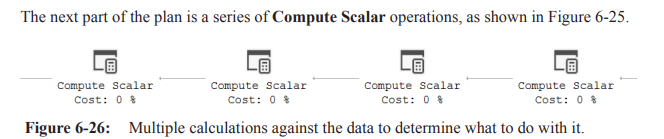
The first Compute Scalar operator performs the following calculation:
[Action1003] = Scalar Operator(ForceOrder(CASE WHEN [TrgPrb1001] IS NOT NULL THEN (1) ELSE (4) END))
This Compute Scalar operator creates a new value, called
Action1003.If
TrgPrb1001is null, the value ofAction1003is set to "4".Values for
Action1003orExpr1005may vary based on SQL Server version and updates.This reflects minor changes within the optimizer and the order in which it initializes expressions.
Variable Values and Calculations
The next Compute Scalar operator loads all the variable values into the row and performs calculations:
  [Expr1004] = Scalar Operator([@ActiveFlag])
  [Expr1005] = Scalar Operator([@PurchasingWebServiceURL])
  [Expr1006] = Scalar Operator([@PreferredVendorStatus])
  [Expr1007] = Scalar Operator([@CreditRating])
  [Expr1008] = Scalar Operator(CASE WHEN [Action1003]=(4) THEN [@BusinessEntityId] ELSE [AdventureWorks2014].[Purchasing].[Vendor].[BusinessEntityID] as [v].[BusinessEntityID] END)
  [Expr1009] = Scalar Operator([@ModifiedDate])
  [Expr1010] = Scalar Operator([@Name])
  [Expr1011] = Scalar Operator(CASE WHEN [Action1003]=(4) THEN [@AccountNumber] ELSE [AdventureWorks2014].[Purchasing].[Vendor].[AccountNumber] as [v].[AccountNumber] END)
Logic Explanation
TrgPrb1001determines if the row existed in the table.If the row existed,
Action1003would have been set to 1.In the provided scenario,
Action1003is set to 4 (indicating a need for an INSERT).Expr1011 evaluates Action1003 and chooses the variable
@AccountNumbersince an INSERT is needed.Expr1008 uses the same logic for the BusinessEntityId value.
The result is that all expressions hold the correct value for either INSERT or UPDATE, based on
Action1003.
Action Validation
The next Compute Scalar operator validates
Action1003and sets a new value,Expr1023:
[Expr1023] = Scalar Operator(CASE WHEN [Action1003] = (1) THEN (0) ELSE [Action1003] END)
Since
Action1003is set to 4,Expr1023will also be set to 4.
Final Compute Scalar
The final Compute Scalar operator appears to set two values equal to themselves.
This may be an internal process within the optimizer.
Clustered Index Merge
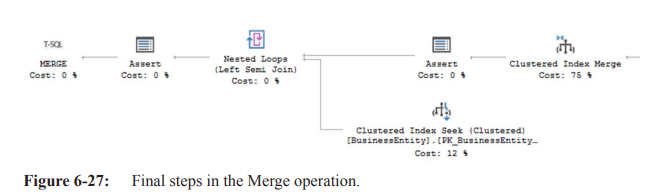
The Clustered Index Merge receives all information added to the data stream by the operators.
It determines if the action is an INSERT, UPDATE, or DELETE, and performs that action.
The
Action Columnproperty of the operator shows the value ofAction1003.In this case, the action is either an INSERT or UPDATE.
Predicate Values
The Predicate property of the operator contains information about the action to be performed.
Cost Estimation
The optimizer estimates that the Merge operation will account for 75% of the cost of the execution plan.
The high cost is due to the work required to modify two indexes.
Constraint Validation
An Assert operator runs a check against a constraint in the database to validate that the data is within a certain range.
Referential Integrity
The data passes to the Nested Loops operator, which retrieves values used for validation that the BusinessEntityId referential integrity is intact.
This is done through a Clustered Index Seek against the BusinessEntity table.
This action is only performed for INSERT operations, as determined by the value of
Action1003.The Nested Loops operator has a Pass Through function, which skips invoking the inner input in other cases.
Final Validation
Information gathered by the join passes to another Assert operator, which validates the referential integrity, assuming it was an INSERT action.
The query is then completed.
Reusable Execution Plans
Prior to the MERGE query, different procedures or queries within an IF clause may have been used for each process.
This resulted in multiple execution plans in the cache.
With the Merge operator, changing a simple value (e.g.,
@AccountNumber) will now UPDATE the data using the same execution plan.This creates a single reusable plan for all supported data manipulation operations.
Summary
Data modification queries can be read in the same way as SELECT queries.
Use properties and estimated costs to understand how and why the optimizer implemented the plan.