Isolation and Privilege Separation in Operating Systems
Privilege Separation in Applications
To achieve effective privilege separation, various strategies must be implemented:
Modularize Monolithic Applications: Modularization allows different components of an application, such as user interfaces, business logic, and data access layers, to be handled independently. This separation can enhance fault tolerance and facilitate deployment across different environments, potentially isolating them in separate directories or containers, thereby reducing the risk of attacks that compromise the entire application.
Chroot: The chroot system call is a pivotal mechanism that changes the apparent root directory for the current running process, effectively isolating it from other filesystem areas. This isolation ensures that processes only have access to a predefined portion of the filesystem, limiting the exposure of critical system files and enhancing overall security.
Privilege Escalation: Certain modules or functionalities may necessitate elevated privileges for executing sensitive operations. This can be accomplished through mechanisms such as setuid binaries that run with the file owner's privileges, or by utilizing sudo, enabling users to perform a single command with elevated permissions while minimizing potential security risks associated with broader access.
Privilege Dropping: After performing operations requiring elevated privileges, it is crucial to revert back to the lowest possible privilege level. This principle minimizes the attack surface, ensuring that processes operate with only the necessary permissions needed for their execution, and reduces the likelihood of exploiting potential vulnerabilities.
Importance of Isolation
Controlled Communication: While isolation is vital for security, complete separation often proves impractical due to the need for inter-process communication. Controlled communication channels, therefore, become essential to enable secure exchanges of information between processes while still maintaining a degree of isolation.
Error Containment: Effective isolation contributes to robust systems where errors experienced by one process do not directly compromise others. This enhancement of fault tolerance is critical, enabling systems to continue functioning smoothly even in the face of individual component failures.
Isolation Mechanisms
Levels of Isolation:
Isolation can be realized at various layers, allowing for tailored security measures:
Kernel Level: The core component of the operating system is responsible for resource management and enforcing isolation policies among processes. The kernel's state directly affects the security and operation of the entire system.
Application Level: Isolation at this layer can be achieved through technologies such as containers and virtual machines (VMs), which create distinct virtual environments for applications to function without interfering with each other.
Kernel Isolation
Functionality and Role:
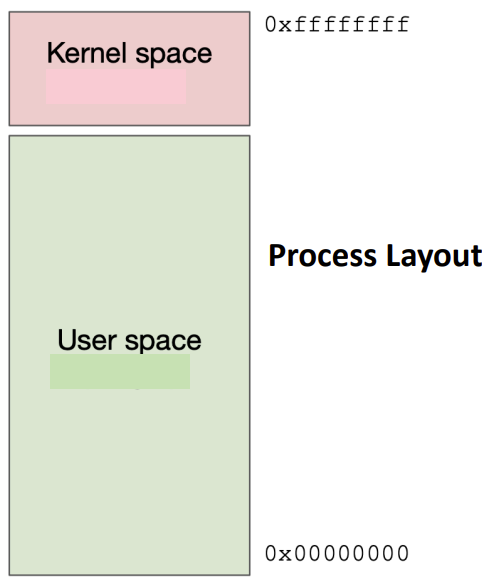
The primary role of the kernel extends beyond simple resource management. It maintains security by separating and controlling access between various running processes. This separation is multifaceted, involving several critical mechanisms:Memory Isolation: Each user process operates within its own virtual address space. This practice prevents unauthorized access to the memory of other processes, safeguarding sensitive information. For instance, in a 32-bit architecture, roughly 1GB is typically set aside for kernel memory, effectively insulating it from interference by user processes. User process cannot access the kernel process directly. Kernel space (typically high memory addresses around 0xffffffff) is separated from user space (low addresses around 0x00000000)
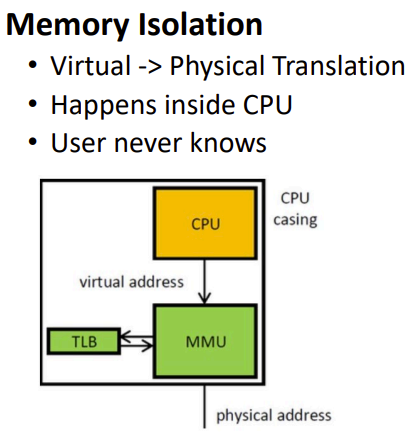
Virtual → Physical Translation
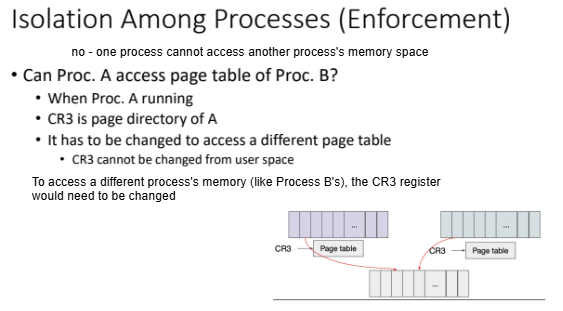
Each process has its own page table. Page table reside in the kernel. Cannot write directly to physical memory or not access to other process memory.
Instruction Isolation:
Restricted instructions in user space • SET CR3, SET CS etc. restricted
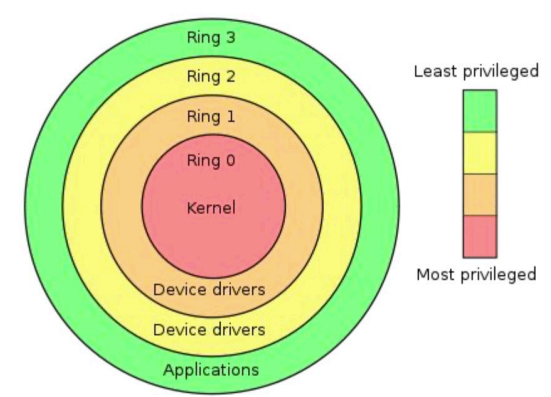
Ring 0 (Highest Privilege): Kernel
This is the most privileged level where the operating system kernel runs.
Code running in Ring 0 can execute any instruction and access any memory location.
It can control hardware, modify system settings, and manage other processes.
Only trusted code is allowed to run here (typically just the core OS kernel)
Ring 3 (Lowest Privilege): User Application
This is where normal user applications and processes run
Even processes run by the root/administrator user (uid 0) still execute in Ring 3
These processes have limited access to hardware and system resources
They must request access to privileged operations through system calls, which act as controlled gateways managed by the kernel that enforce security and stability.
When you're logged in as a root/admin user, your processes still run in Ring 3. This means a root user (or malware running as root) can attack and access other user resources. But they cannot directly attack or modify the operating system kernel itself.
Hardware-Based Isolation Mechanisms:
The CPL (Current Privilege Level) register in the CPU controls which ring code is executing in
CPL=0 means code is running in kernel mode (Ring 0)
CPL=3 means code is running in user mode (Ring 3)
Privilege transitions only occur through controlled interrupts and system calls
Protection Mechanisms:
Data Isolation: Ring 3 processes cannot read or write kernel memory. Virtually Separate kernel and user space. Physical separation with U flag.
Code Isolation: Ring 3 processes cannot execute privileged instructions
This creates a strict boundary between the trusted kernel code and potentially malicious or buggy user applications.
Process Management and Security:
Kernel isolation is enforced through mechanisms like the Control Register 3 (CR3), which points to page tables that store memory access permissions. Only processes running in kernel mode can modify these registers, ensuring that user-space applications lack the ability to manipulate memory protections directly.Safe Transitions Between Privilege Levels (Controlled Interaction):
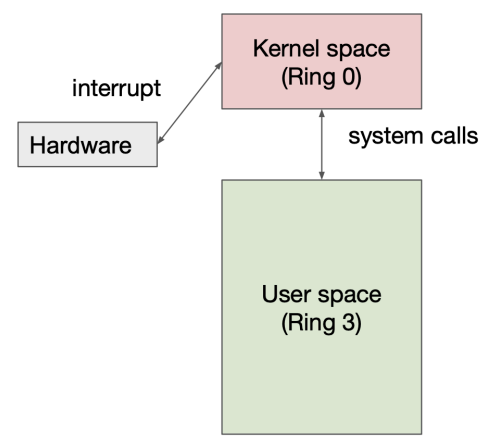
For user processes needing kernel services, safe transition mechanisms are essential (Safe change of privilege level):Interrupts: These mechanisms, exemplified by the INT instruction, stop normal executions and facilitate transitions into kernel space while preserving the integrity of the running system.
System Calls (Software): Controlled entry points into the kernel from user space serve to define how processes may request services, ensuring secure and orderly execution of operations.
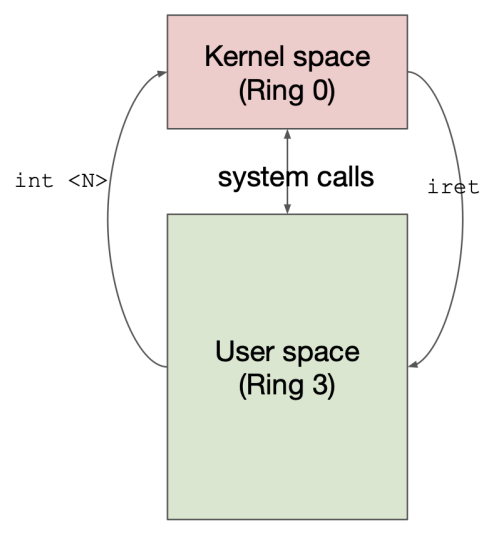
Need safe transition
INT N command
Control to IDT[N] (kernel space)
IDT stands for interrupt descriptor table
SET CPL
IRET
SET CPL
Return to user space
Examples of Secure Transitions:
System Call (INT 0x80):
Uses IDT entry with DPL 3 (accessible from user mode)
Points to a specific kernel address (0xfff0000a)
Safely transitions from Ring 3 to kernel code
Page Fault (INT 0xe):
Uses IDT entry with DPL 0 (only accessible from kernel mode)
Points to kernel address 0xfff0001a
Executes with kernel privileges
Isolation Among Processes
The kernel enforces process isolation diligently by maintaining individual virtual address spaces for each active process. This separation ensures that even if two processes utilize the same virtual address space values (e.g., 0xdeadbeef), their physical memory addresses remain distinct unless specifically shared through shared memory mechanisms. During context switches, the kernel updates the CR3 register to refer to the currently active process's page table, effectively ensuring robust process isolation by refreshing the Translation Lookaside Buffer (TLB).

Application Isolation – Virtual Machines
Concept Overview:
Established by Popek and Goldberg in 1974, virtual machines (VMs) facilitate the simulation of hardware resources for guest operating systems. A Virtual Machine Monitor (VMM) operates directly on the hardware to oversee and manage these virtualized resources effectively. Each guest operating system interacts with this simulated hardware, perceiving it as real, thus achieving a high degree of isolation between processes.To VMM : Guest OS is a user program. Guest OS has its own virtual memory space To guest OS : It sees the Hw simulation as real. Virtual Hw executes guest OS.
Protection Requirement:
The VMM protects itself from the guest operating systems
Guest operating systems are contained within their simulated environments
This ensures that potentially malicious or compromised guest systems cannot affect the hypervisor or other VMs
Illusion Requirement:
The guest OS should not be able to detect that it's running in a virtual environment
No checks or diagnostics within the guest OS should reveal the virtualization
This is often called "transparency" in virtualization technology
Performance Requirement:
Virtualization should introduce minimal overhead
VMs should run efficiently despite the additional layerof abstraction, ensuring that applications within each virtual machine experience performance comparable to that of running directly on the physical hardware.
Two more security principles • Defense in-depth • Small TCB
Trap and Emulate Approach (This is a fundamental virtualization technique):
The VMM runs in Ring 0, while the Guest OS/ processes operate in Ring 3, systematically enforcing privilege separation. It manages instructions issued by guest operating systems, and upon encountering privileged instructions, exceptions are raised and handled by the VMM to ensure valid execution as per isolation protocols.Guest OS believes it has full control over its environment, it's actually running in a restricted sandbox with the VMM mediating all privileged operations.
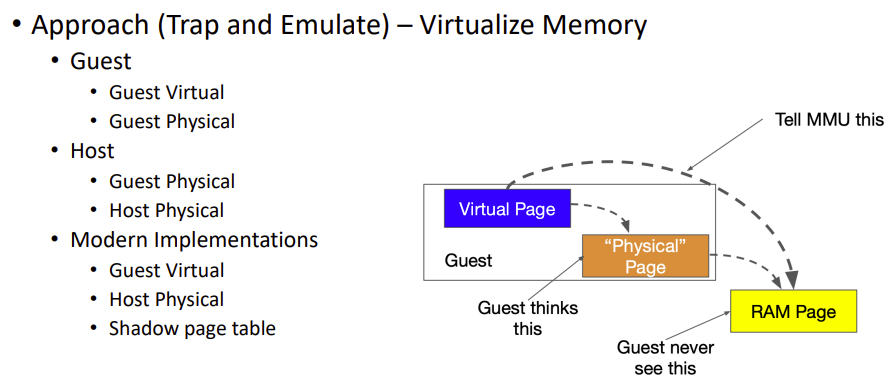
Shadow Page Tables:
The hypervisor maintains a set of "shadow" page tables for each guest OS processThese are the real page tables that the hardware MMU (Memory Management Unit) actually uses. They map the guest's virtual memory addresses to actual physical memory. Guest operating systems are not aware of these shadow page tables
Guests believe they're directly managing their own page tables. In reality, the VMM intercepts all page table modifications and updates the shadow tables accordingly.
Application Isolation – Containers
Containers strive to provide levels of isolation comparable to VMs, yet often deliver enhanced performance by virtualizing operating system resources rather than hardware. Containers deploy several technologies aimed at isolation, such as:
Virtualize and Isolate Kernel Resources: This includes having distinct namespace environments where processes operate separately, allowing for isolation of resources. For example, a process in namespace X will not be the same as one in namespace Y.
Limit Resources for Each Container: Implementing control groups (cgroups) allows for setting limits on resources, such as CPU, RAM, and I/O, for groups of processes within a container. This ensures efficient use and allocation of system resources.
Limit Kernel Access for Each Container (System Call Filter): Restricting which system calls are accessible to containers is achieved through a list of allowed or prohibited calls. This reduces the Trusted Computing Base (TCB) by minimizing the attack surface, making the environment more secure. A system call filter can be passed to the kernel, allowing processes to add their filters accordingly.
Namespace + cgroups + seccomp = LXC
LXC + Management Tools = Docker
Container Building Blocks:
Namespaces: Linux kernel feature that isolates system resources (processes, network, filesystems) so that a container sees only its own resources
cgroups (Control Groups): Limits and allocates resources (CPU, memory, I/O) to specific processes
seccomp (Secure Computing): Restricts which system calls a process can make, limiting what a container can do
LXC (Linux Containers):
The combination of these three technologies (namespaces + cgroups + seccomp)
A more lightweight virtualization method than full VMs
Shares the host kernel rather than virtualizing the entire hardware stack
Docker:
LXC plus additional management tools and features
Provides simplified workflows for building, distributing and running containers
Adds layers like image management, networking tools, and container orchestration