Software design and development
Development methodologies
6 phases of the software design process
Phase | Explanation |
Analysis | identify what the program is meant to do when given a problem |
Design | set out the functionality and interface of the program by using pseudocode, flowcharts, structure diagrams, wireframe |
Implementation | write out the code/program |
Testing | check that the program does not have errors/bugs and works as expected |
Documentation | gather the documents produced from each stage of the development process |
Evaluation- | check if the program is fit for purpose, efficient, robust and readable |
The software development phase is iterative because you can revisit and edit any one of the stages.
Analysis
The functional requirements of a program are the inputs, processes and outputs.
Input- data entered into the computer
Processes- what does the computer do with the information
Output- the result of the process being returned to the user. It can be displayed to a screen, sent to a printer, played through speakers as audio.
For example:
A program asks the user to enter length of one side of a square. The program should then calculate and display the area of the square.
Input- length of one side
Processes- calculating the area
Output- area of square
Design
Data type | Example |
Character (not often used) | ‘a’ , ‘b’ |
String (words) | “hello” |
Integer (whole numbers) | ‘1’ ‘21’ |
Float/Real (decimal numbers) | ‘1.2’ ‘23.6’ |
Boolean (yes/no) | True/False |
The only data structure you can be asked is a 1-D Array.
Example: [‘hello’, ‘world’] is one 1-D array of type string.
Flowcharts
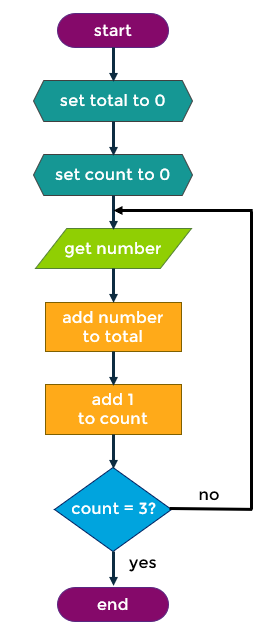
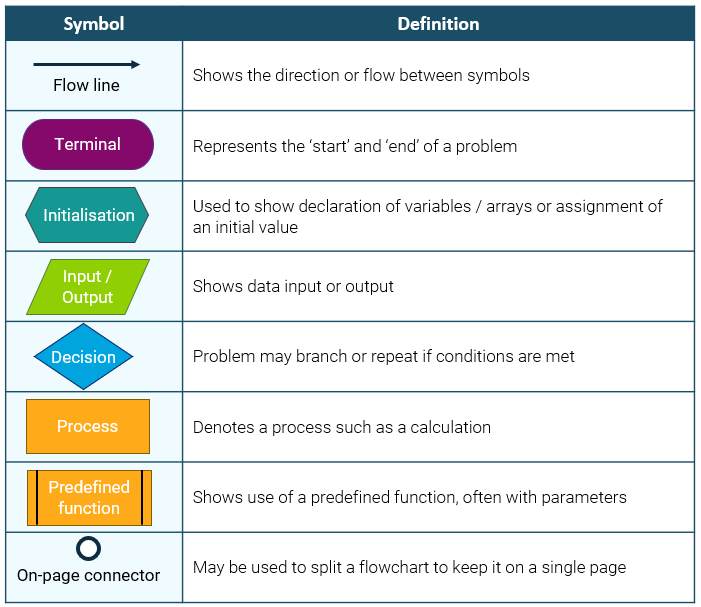
A flowchart is a graphic way of designing the steps of the program. They use symbols and short descriptions to represent each step.
Structure diagrams
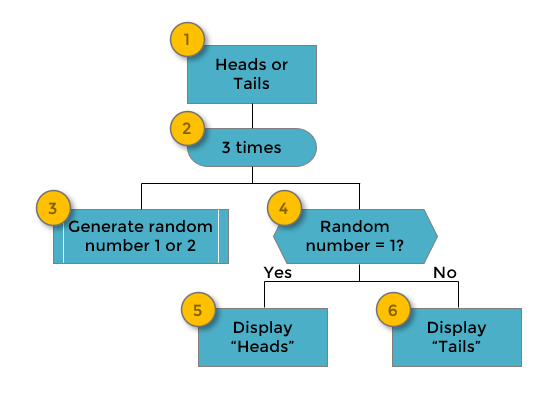
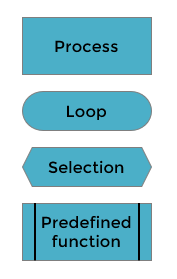
A structure diagram is a graphic way of showing the steps needed for the program.
They are read top-left-right-bottom.
Pseudocode
Pseudocode is a way of designing the steps of a program using phrases similar to program code lines.
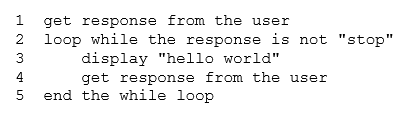
Example:
A program is required to repeatedly display 'Hello World' until the user enters 'stop'. Use pseudocode to design this program.
User interfaces
-Write out each question
-Add an entry box
-Make sure to remember an entry/input button
Implementation (Constructs)
-String concatenation is joining multiple strings together using ‘+’. [print(“hello” + “world”)]
-Three logical operators are: AND, OR, NOT
-A fixed loop uses “for count in range ()”
-A conditional loop uses “While”
Predefined functions
-Round — Average=round(Average,2)
-Length — Characters=len(password)
-Random — import random at the start — seat=random.randint(1,50)
Implementation (Standard Algorithms)
Running Total
-Set total equal to zero at the very start of the program.
-Will always be within a loop
-Total = Total + variable
Input validation
-Always used within a conditional loop
-Ask user to input
-While x is not equal to y:
warn user
ask user to reenter
Traversing an array
-Always declare the array at the start of the program (variable = [0.0])
-Array name.append(variable)
-Remember to use [count]
Testing
Data testing
Type | Definition |
Normal | Lies within the accepted range of inputs |
Extreme | Lies at the lowest and highest accepted range of inputs |
Exceptional | Lies outside the accpeted range of inputs |
Errors
Type | Definition |
Syntax | Misspelled word or something wrong in the program code which will cause it to crash |
Logic | Will not crash but provides an unexpected outcome, greater than or less than signs in the wrong place. |
Execution | Something impossible has been attempted and will cause the program to crash, dividing 5 by 0. |
A way to test if your program is correct is to compare the expected output to the actual output.
Evaluation
A program is fit for purpose if it meets the functional and purpose requirements.
A program can be made more efficient by things like using loop, arrays, elif, and more complex conditions.
A program is robust if it can handle a wide variety of inputs without crashing. (Input validation)
A program can improve its readability by using meaningful variable names, internal commentary, indentation and white space.