Week 3 - Python Functions and Arduino
Functions
A function is a block of code, or program that runs on demand (when called).
For more complex programs we need to split these into smaller tasks
we want to write many short programs that perform different tasks
call the program on demand
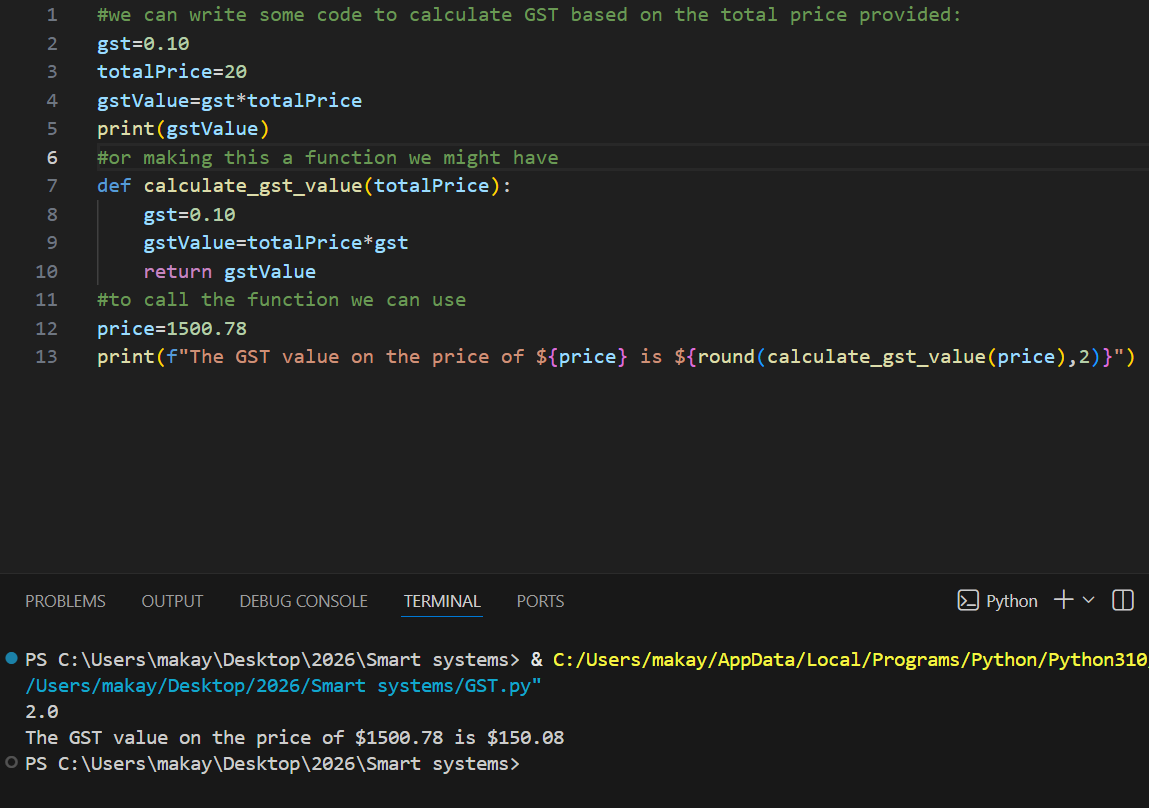
An example of a function is:
round(15.13456,2)
Things from math library
print
int
etc
Functions are defined using def and can have optional parameters (input)
They return a single value to whatever called it using the return statement.
When naming functions it is best practice is to use underscores and lowercase letters such as calculate_gst_values.
Syntax: return data and def function_name(optionalParameters)
Example: Calculating GST
Function names
We name functions using the lower case with underscore format
i.e. get_total_number_of_items
Give the function a descriptive, short and meaningful name
Variables inside functions
If you want to use a variable in the function from outside, you should either
Use a parameter to pass the required value in
Use global(variableName) to tell python that you don’t want to make a new variable, and instead use the variable that exists outside the function
Placement within the file
We place functions at the top of the file
Functions do not run unless called upon
Menus
A menu is a text-console based options that the user can navigate using the keyboard via text input.
Step 1: Planning
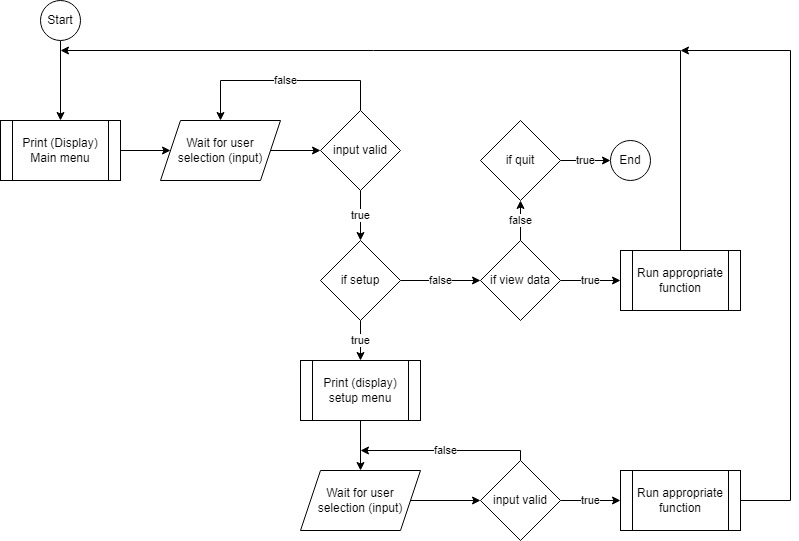
We would like to have a menu that gives you two choices - setup and view data
In the ‘setup’ view, we want to be able to modify two variables at will
In the ‘view data’ view we want to be able to just see the current value for each of these variables.
Main menuSetup
Update variable 1
Update variable 2
View Data
Display variable 1 and 2 values
We also want the user to be able to go back to the main menu at any point
Step 2: Flowchart
Step 3:Code
# Variables
value1 = 0
value2 = 10

# Functions
def display_main_menu():
    # Display menu
    print("Main Menu")
    print("-------------------------")
    print("1: Setup")
    print("2: View Data")
    print("0: Quit")
    # variable to hold choice (starting value is invalid)
    choice = -1
    # Wait for input
    while True:
        try:
            choice = int(input("Option: "))
            if choice == 1 or choice == 2 or choice == 0:
                break;
            else:
                print("Error: Invalid option")
        except ValueError:
            print("Error: Only numbers are accepted")
    # Process choice
    if choice == 1:
        display_setup_menu()
    elif choice == 2:
        display_view_menu()
    elif choice == 0:
        end_program()

def display_setup_menu():
    # Display menu
    print("")
    print("Setup")
    print("-------------------------")
    print("1: Update Value 1")
    print("2: Update Value 2")
    # variable to hold choice (starting value is invalid)
    choice = -1
    # Wait for input
    while True:
        try:
            choice = int(input("Option: "))
            if choice == 1 or choice == 2:
                break;
            else:
                print("Error: Invalid option")
        except ValueError:
            print("Error: Only numbers are accepted")
    # Process choice
    if choice == 1:
        update_value1()
    elif choice == 2:
        update_value2()

def display_view_menu():
    # Display menu
    print("")
    print("View Data")
    print("-------------------------")
    # Display variables
    print("Value 1: " + str(value1))
    print("Value 2: " + str(value2))
    print("Press enter to return to the main menu")
    input()
    display_main_menu()

def end_program():
    print("")
    print("Program ending ...")

def update_value1():
    global value1
    print("")
    print("Value 1: " + str(value1))
    value1 = input("Enter new value for value1: ")
    print("Value 1 updated to: " + str(value1))
    print("")
    display_main_menu() # making this loop back to the main menu

def update_value2():
    global value2
    print("")
    print("Value 2: " + str(value2))
    value2 = input("Enter new value for value2: ")
    print("Value 2 updated to: " + str(value2))
    print("")
    display_main_menu() # making this loop back to the main menu

# Start Program
display_main_menu()# Variables
value1 = 0
value2 = 10

# Functions
def display_main_menu():
    # Display menu
    print("Main Menu")
    print("-------------------------")
    print("1: Setup")
    print("2: View Data")
    print("0: Quit")
    # variable to hold choice (starting value is invalid)
    choice = -1
    # Wait for input
    while True:
        try:
            choice = int(input("Option: "))
            if choice == 1 or choice == 2 or choice == 0:
                break;
            else:
                print("Error: Invalid option")
        except ValueError:
            print("Error: Only numbers are accepted")
    # Process choice
    if choice == 1:
        display_setup_menu()
    elif choice == 2:
        display_view_menu()
    elif choice == 0:
        end_program()

def display_setup_menu():
    # Display menu
    print("")
    print("Setup")
    print("-------------------------")
    print("1: Update Value 1")
    print("2: Update Value 2")
    # variable to hold choice (starting value is invalid)
    choice = -1
    # Wait for input
    while True:
        try:
            choice = int(input("Option: "))
            if choice == 1 or choice == 2:
                break;
            else:
                print("Error: Invalid option")
        except ValueError:
            print("Error: Only numbers are accepted")
    # Process choice
    if choice == 1:
        update_value1()
    elif choice == 2:
        update_value2()

def display_view_menu():
    # Display menu
    print("")
    print("View Data")
    print("-------------------------")
    # Display variables
    print("Value 1: " + str(value1))
    print("Value 2: " + str(value2))
    print("Press enter to return to the main menu")
    input()
    display_main_menu()

def end_program():
    print("")
    print("Program ending ...")

def update_value1():
    global value1
    print("")
    print("Value 1: " + str(value1))
    value1 = input("Enter new value for value1: ")
    print("Value 1 updated to: " + str(value1))
    print("")
    display_main_menu() # making this loop back to the main menu

def update_value2():
    global value2
    print("")
    print("Value 2: " + str(value2))
    value2 = input("Enter new value for value2: ")
    print("Value 2 updated to: " + str(value2))
    print("")
    display_main_menu() # making this loop back to the main menu

# Start Program
display_main_menu()
Algorithms
What are algorithms?
An algorithm is a list of step by step instructions which are well defined and code independent that can be followed in order to solve problem or get a task done.
Each step in the algorithm must be very simple, such that a computer can understand exactly what it needs to do.
Well defined means that it isn’t written in a way that can lead to assumptions - each step is small, simple and not possible to misconstrue.
Code independent means that it isn’t written in a way that uses coding syntax or leaning towards the use of specific language for implementation.
Technically, you’ve already been writing algorithms with the pseudo-coding and logical thinking exercises in class thus far.
We use algorithms in everyday life.
Sorting a list of products into some order
Extracting information from a document
Conducting research on the Internet
Control behaviour of an elevator
Elevators have a priority - if they are travelling upwards it will continue to travel in its current direction and answer call requests in that direction until it is empty
the computer system doesn’t know what an elevator is all it does it follow control logic specified as an algorithm
the simpliest algorithm might have the elevator go up if there is a request above otherwise go down if there are no requests above and open the doors at a floor if there is a request for it.
This would be a bad approach because bottom floors will never be reached
It is better to keep going in the direction the elevator last moved and only change direction once reaching the top or bottom floor or when there are no more requests in the current direction
The logic can get complicated quickly and will achieve different results
Selecting an Algorithm
There are many different algorithms to solve the same problem.
Depending on the algorithm and the problem context, you have different trade-offs that you must decide upon":
Result Quality
Result quality as a metric is used to allow us to focus accurately on some key aspects of the results
For example in a pathfinding algorithm, this might be finding a route based on: the least number of turns, the shortest overall distance travelled, or how to avoid toll roads
Types of operations performed
Some algorithms take advantage of hardware performance characteristics.
Storage requirements
Some algorithms sacrifice lean storage requirements to gain a performance boost. Algorithms can require that the data is held in-memory (in RAM) or some may be able to dynamically use data held in-memory and on disk.
Maintainability
Sometimes we pick algorithms for their readability and based on how easy it is to understand and upgrade or modify later on
Stable results
In the case of a sorting algorithm it is said to be stable if elements with equal value do not have their relative order changed by the sort
Actual runtime
How fast can the algorithm run
Time Complexity
Time complexity is dependent on the size of the input that the algorithm is run on
Complexity is usually represented as the function of input size N
Constant Time O(1) - runtime is constant
Logarithmic Time O(Log N) - runtime increases proportionally to the log of the input size N
Linear Time O(N) - runtime increases directly proportional to the input size N
Quadratic Time O(N2) - runtime increases proportionally to the square of the input size N
Search Algorithms
There are two basic search algorithms that you need to be familiar with. These are:
Sequential/Serial Search
Binary Search
Sequential Search
Sequential search is a simple algorithm that basically searches a provided list for either
all instances of an item
the first instance of an item
The goal is to look through all the data held to identify if the item being searched for is found.
Algorithm
# Sequential Search
data1 = ["milk","apple","shrimp","avocados","butter","almonds","tortillas","sausage","clams","monkfish","cashew","scallops","butter","cranberries","chili","beans"]
data2 = [913,162,308,365,672,198,45,716,760,754,456,260,634,250,45,995,628,875,23,757,651]
searchWord = "butter"
searchNum = 45

# Find first match
# Returns -1 if not found
def sequential_search(data, key):
    try:
        return data.index(key) #
    except ValueError:
        return -1

print(f"Searching for... {searchWord}")
print(f"Index: {sequential_search(data1, searchWord)}")

# Find all matches
# Returns [] if not found
def sequential_search_all(data, key):
    result = []
    for index in range(0,len(data)):
        # using range to generate indexes instead
        if data[index] == key:
            result.append(index)
    return result

print(f"Searching for all hits of... {searchWord}")
print(f"Found at: {sequential_search_all(data1, searchWord)}")
Binary Search
The binary search algorithm uses a different approach to sequential search - it uses what we call a ‘divide and conquer’ methodology to searching for items in a list.
This means that instead of searching from the start to the end of the list (i.e. looking at every single item), we try to reduce the number of items that you need to observe or compare to, by dividing the range of items in the list into smaller ‘chunks’.
The binary search algorithm is similar to the hot and cold guessing game.
In this we need to ensure that the list of items being searched is sorted in ascending order.
Algorithm
Begin by specifying a search ‘key’ of position in the middle of the list
If the item is smaller than the item at this key, update the range by reducing the maximum position to this item
If the item is larger than the item at this key, update the range by increasing the minimum position to this item
If the item is found, end search
If the max position is not greater than the min position, end search (item not found)
Else, calculate the middle position of the ‘new’ range of items and repeat from step 1 using this key
import math
# Binary Search
data = [913,162,308,365,672,198,716,760,754,456,260,634,250,45,995,628,875,23,757,651]
# List must be sorted
data.sort()
searchValue = 308

def binary_search(data, key):
    # Initial parameters
    minIndex = 0
    maxIndex = len(data)-1
    while maxIndex >= minIndex:
        midIndex = math.floor(minIndex + (maxIndex - minIndex) / 2)
        if key == data[midIndex]:
            return midIndex
        elif key > data[midIndex]:
            minIndex = midIndex + 1
        elif key < data[midIndex]:
            maxIndex = midIndex - 1
    return -1


print(f"Searching for ... {searchValue}")
print(f"Index: {binary_search(data, searchValue)}")
Sort Algorithms
Next we will discuss the three common sort algorithms:
Bubble Sort
Insertion Sort
Selection Sort
Note that these are not the ‘best’ algorithms available to you, and in fact most programming languages have their own built-in sort algorithms implement some kind of hybrid heap or merge/insertion based sorting (advanced content).
Bubble Sort
Bubble sort is an algorithm that works by repeatedly swapping the adjacent elements if they are in the wrong order. This algorithm is not used for large data sets as its average and worst case time complexity is quite bad.
Algorithms
Process each item in the list
Compare each pair of items (i.e. item at i, i+1) where i is the current item.
If the item at i is larger than the item at i+1, swap the item positions
If there are swaps made, repeat step 1
# Bubble Sort
data = [913,162,308,365,672,198,716,760,754,456,260,634,250,45,995,628,875,23,757,651]

def bubble_sort(data):
    swaps = True
    while swaps:
        swaps = False # reset swaps at the start
        for index in range(len(data) - 1):
            if data[index] > data[index+1]:
                tmp = data[index]
                data[index] = data[index+1]
                data[index+1] = tmp
                swaps = True # change swaps to true if any swaps were made
    return data

print(f"Sorted data: {bubble_sort(data)}")
Insertion Sort
Insertion sort is a simple sorting algorithm that works similar to the way you sort playing cards in your hands. The array is virtually split into a sorted and an unsorted part. Values from the unsorted part are picked and placed at the correct position in the sorted part.
Algorithm
Process each item in the list
Compare the current item to the item before it
“Swap” positions with the item on the left, if the current item is smaller than the item on the left.
Move the greater items one position up (to the right) to make space
Insert the item into the correct position
Continue Step 1 for each item in the list
# Insertion Sort
data = [913,162,308,365,672,198,716,760,754,456,260,634,250,45,995,628,875,23,757,651]

def insertion_sort(data):
    for i in range(1, len(data)):
        item = data[i]
        # move item into its correct position by comparison
        j = i - 1
        while j >= 0 and item < data[j]:
            data[j + 1] = data[j]
            j -= 1
        data[j + 1] = item
    return data

print(f"Sorted data: {insertion_sort(data)}")
Selection Sort
The selection sort algorithm sorts an array by repeatedly finding the minimum element (considering ascending order) from unsorted part and putting it at the beginning. The algorithm maintains two subarrays in a given array.
The subarray which is already sorted.
Remaining subarray which is unsorted.
Algorithm
Consider the entire list of items. Split this into two ‘smaller’ lists, where the left side is ‘sorted’ and the right side contains the ‘unsorted’ items.
For n iterations (where n is the length of the list),
Identify the smallest item in the unsorted list (presuming ascending order)
‘Select’ this item and move it to the sorted part of the list
‘Move’ is done by ‘swapping’ the item with the one at position i, where i is the current iteration count.
# Selection Sort
data = [913,162,308,365,672,198,716,760,754,456,260,634,250,45,995,628,875,23,757,651]

def selection_sort(data):
    for i in range(len(data)):
        minIndex = i
        # find smallest value in i -> end of list
        for j in range(i+1, len(data)):
            if data[minIndex] > data[j]:
                # new smallest item
                minIndex = j
        # move smallest into correct position at i by swapping
        tmp = data[i]
        data[i] = data[minIndex]
        data[minIndex] = tmp
    return data

print(f"Sorted data: {selection_sort(data)}")
Arduino
If you loose it you have to pay for it
On the bottom right there are two pins called D1/TX and D0/RX and do not use these pins you can use D2 to D13
Analog pins are A0 to A5
Digital Pins
Read or Write a voltage state in digital logic
HIGH = 5V
LOW = 0V
Can be used in other modes such as SONAR
Analog Pins
Read a voltage state in analogue logic
0-1023 analogue states representing 0-5V
We use a package called pymata4 in Python (you’ll install this in the lab this week)
This talks to the Arduino via the FirmataExpress library (which you’ll flash onto an Arduino in lab)
Your computer is thus able to execute python on the Arduino itself via USB
Pymata4
Initialisation
Import pymata 4 package
Typing from pymata4 import pymata4
Initialise board
board = pymata4.Pymata4()
This opens up communications with the Arduino via Pymata4
Configure Pin Mode
In order to communicate with the pins on the Arduino you must configure the mode of the pins you want to use
Set pin mode
board.set_pin_mode_digital_output(5)
Configures digital pin 5 to be used for digital output → you can now write a voltage value to the pin
Required Logic (read, write, etc)
Now you can run any logic you need for your program, including reading and writing pin states
Writing a voltage pin state digitially
Sets the voltage state of digital pin 5 to 1 (High = 5V)
Possible values are 1 or 0 (Low=0V)
Read voltage value from the pin digitally
Reads the current value on digital pin 5
This returns a list containing the voltage level (0/1) and the timestamp of the pin read
Shutdown
When done with the program, you need to close the communications channel over serial properly
This is done via a board shutdown command to stop the Arduino from talking to the computer. If you don’t do so it will continue to think its talking to the computer (although your PC is going to ignore it)
Board shutdown
Type board.shutdown()
Workshop
If return isn’t written at the end of the function then it will return none when called upon.
the global value inside the function will always override the value outside the function when the function is being executed.