How to
TrID go install Win32 and TrIDDefs.TRD package, 2289KB
go to folder and use cmd in the search bar of it it opens termail
type trid and drag file into termail
file hash
Get-Filehash -Algorithm SHA256 filepath
Converting JSON to XML (Delimiter-Separated Values)
Example JSON:
{
  "a": 201,
  "b": "201",
  "c": [2, 0, "1", false],
  "d": { "object": ["201"] },
  "HasSomethingExtra": true
}
Root Element: Wrap everything in a root tag (e.g.,
<root>).Primitive Values: Directly map JSON keys to XML tags:
<a>201</a>(number)<b>201</b>(string)
Arrays: Use nested
<item>tags for arrays (e.g.,<c>array).Nested Objects: Preserve structure with nested tags (e.g.,
<d>and<object>).Booleans: Convert
true/falseto lowercase strings in XML.
Final XML (CSV):
<root>
  <a>201</a>
  <b>201</b>
  <c>
    <item>2</item>
    <item>0</item>
    <item>1</item>
    <item>false</item>
  </c>
  <d>
    <object>
      <item>201</item>
    </object>
  </d>
  <HasSomethingExtra>true</HasSomethingExtra>
</root>
Converting XML to DSV
Step-by-Step Explanation
1. Analyze the XML Structure
Primitive Values:
<a>,<b>,<HasSomethingExtra>(direct text values).Arrays/Nested Elements:
<c>contains multiple<item>tags.<d>has a nested<object>with its own<item>.
2. Define DSV Headers
Flatten nested arrays into distinct columns:
c_items: Combined values of<c>’s<item>elements.d_object_items: Combined values of<d>/<object>’s<item>elements.
Other fields:
a,b,HasSomethingExtra.
3. Extract Data
Primitive Values:
a:201(integer-like string).b:201(string).HasSomethingExtra:true(boolean-like string).
Arrays:
<c>’s items:["2", "0", "1", "false"]→ joined with|.<d>/<object>’s items:["201"]→ joined with|.Output
a,b,c_items,d_object_items,HasSomethingExtra
201,201,2|0|1|false,201,true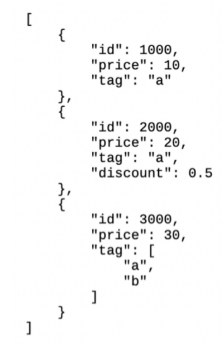
<root>
    <item>
        <id>1000</id>
        <price>10</price>
        <tag>"a"</tag>
    </item>
    <item>
        <id>2000</id>
        <price>20</price>
        <tag>"a"</tag>
        <discount>0.5</discount>
    </item>
    <item>
        <id>3000</id>
        <price>30</price>
        <tag>
            <tagItem>"a"</tagItem>
            <tagItem>"b"</tagItem>
        </tag>
    </item>
</root>