CpE311 - Operating System
Operating System
a collection of software that manages computer hardware resources and provides common services for computer programs.
acts as an interface between a computer user and the computer hardware.
a low-level software which is categorized as a system software and supports a computer’s basic functions.
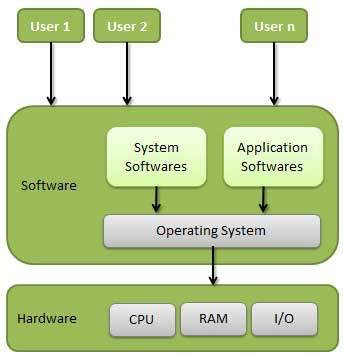
Computer System consists of the following components:
- Computer Users
- users who use the overall computer systems
- Application Software
- the softwares which users use directly to perform different activities.
- System Software
- the softwares which are more complex in nature and they are more near to computer hardware.
- usually written in low-level languages like Assembly language.
- Operating Software
- governs and maintain the Interco operation of the components of a computer system.
- Language Translator
- transform program languages into a form that can be interpreted compiled, and executed by a computer.
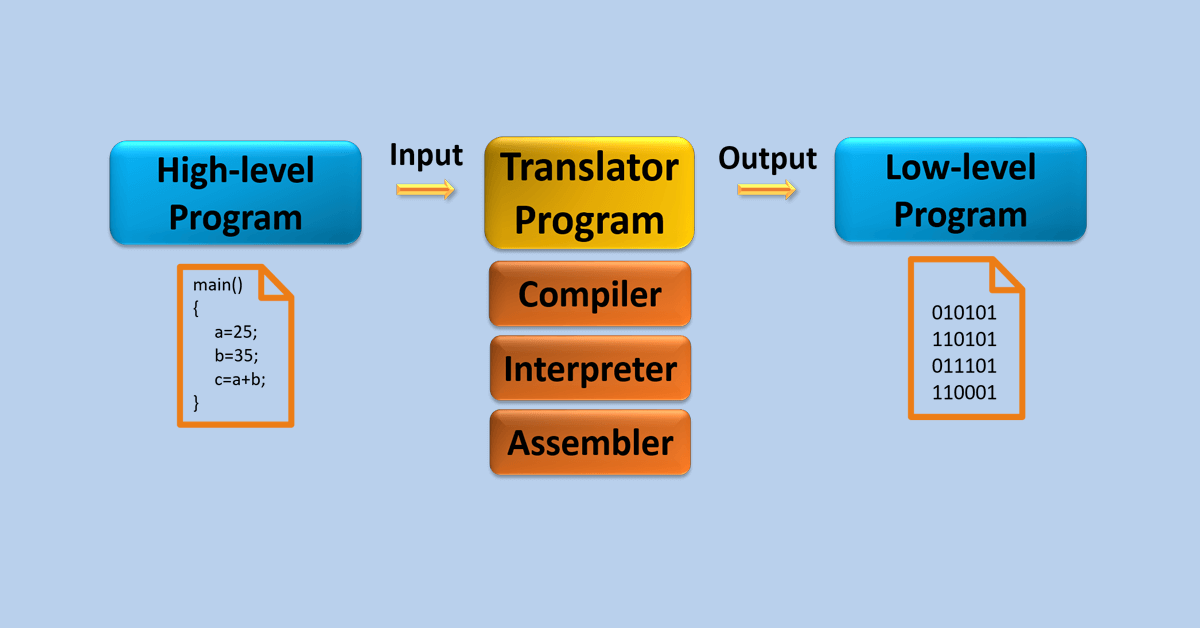
- Assembler
- convert Assembly language into machine level languages.
- Compiler
- convert high-level language into machine level language in one go.
- Interpreter
- convert high-level language into machine level language line by line.
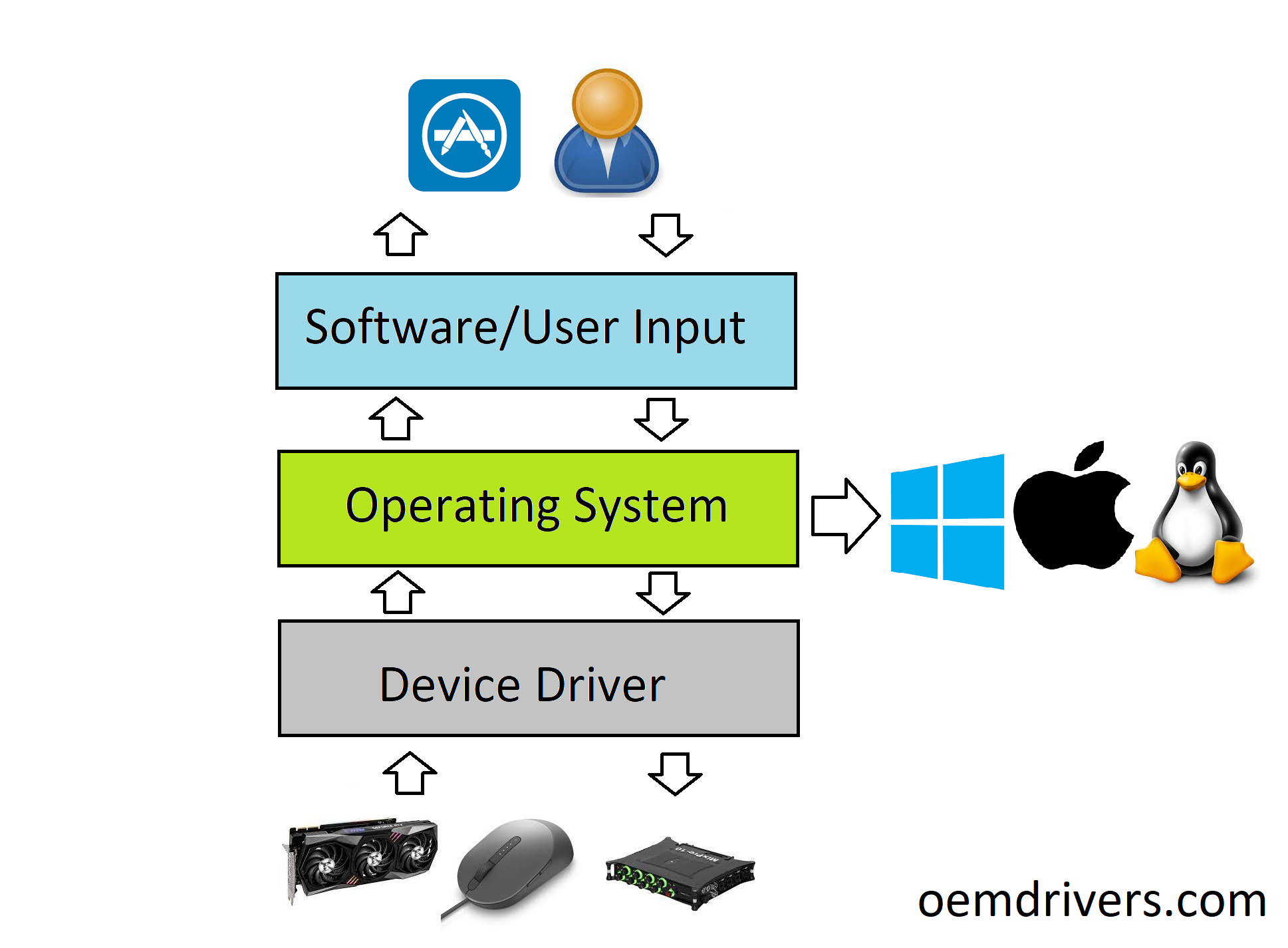
- Device Drivers
- acts as interface between the various input/output devices and the users or the operating system
- Firmware
- a software that provides basic machine instructions that allow the hardware to function and communicate with other software running on a device.
- provides low-level control for a device’s hardware.
- Utility Software
- designed to help analyze, configure, optimize or maintain a computer.
- used to support the computer infrastructure.
- functions:
- Data Synchronization
- Disk Compression
- Uninstall Manager
- File Synchronization
- Data Compression
- Registry Cleaner
- Computer Hardware
- the physical components that a computer systems requires to function.
- encompasses everything within a circuit board that operates within a PC or laptop.
Kinds of Operating Systems
- Windows
- one of the most popular and commercial operating systems developed and marketed by Microsoft.
- Linux
- a Unix based and the most loved operating system first released on September 17, 1991 ^^by^^ Linus Torvalds
- most of them are available free of charges though you can have their enterprise versions by paying a nominal license fee.
- MacOS
- a kind of Unix operating system developed and marketed by Apple Inc. since 2001.
- iOS
- a mobile operating system created and developed by Apple Inc. exclusively ^^for^^ its mobile devices.
- Android
- a mobile operating system based on a modified version of the Linux kernel and other open-source for touchscreen mobile devices.
Operating System - Function
- Process Management
- I/O Device Management
- File Management
- Network Management
- Main Memory Management
- Secondary Storage Management
- Security Management
- Command Interpreter System
- Control over System Performance
- Job Accounting
- Error Detection and Correction
- Coordination between other software and users
Operating System Evaluation:
- Standard Research Institute developed the oN-Line System (NLS) in the late 1960s, which was the first operating system that resembled the desktop operating system we use today.
- Microsoft bought QDOS (Quick and Dirty Operating System) in the 1981 and branded it as Microsoft Operating System (MS-DOS). As of 1994, Microsoft had stopped supporting MS-DOS.
- Unix was developed in the mid-1960s by the Massachusetts Institute Technology, AT&T Bell Labs, and General Electric as a joint effort. Initially it was named MULTICS, which stands for Multiplexed Operating and Computing System.
- FreeBSD is also a popular Unix derivative, originating from the BSD project at Berkeley. All modern Macintosh computers run a modified version of FreeBSD (OS X).
- Windows 9 5 is a consumer-oriented graphical user interface-based operating system built on top of MS-DOS. It was released on August 24, 1995 by Microsift as part of its Windows 9x family of operating systems.
- Solaris is a proprietary Unix operating system originally developed by Sun Microsystems in 1991. After the Sun acquisition by Oracle in 2010 it was renamed Oracle Solaris.
Architecture
Operating System Generations
- 0th Generation
- refer to the period of development of computing when Charles Babbage invented the Analytical Engine and later John Atanasoff created a computer in 1940.
- the hardware computer technology of this period was electronic vacuum tubes.
- there was no operating system available for this generation computer and computer programs were written in machine language.
- computers in this generation were inefficient and dependent on the varying competencies of the individual programmer as operators.
- First Generation (1951-1956)
- marked as the beginning of commercial computing including the introduction of Eckert and Mauchly’s UNIVAC I in early 1951, and a bit later, the IBM 701.
- System Operation was performed with the help of expert operators and without the benefit of an operating system for a time though programs began to be written in higher level, procedure-oriented languages, and thus the operator’s routine expanded.
- later mono-programmed operating systems was developed, which eliminated some of the human invention in running job and provided programmers with a number of desirable functions
- these systems still continued to operate under the control of a human operator who used to follow a number of steps to execute a program.
- programming language like FORTRAN was developed by John W. Backus in 1956.
- Second Generation (1956-1964)
- was most notably characterized by transistors replacing vacuum tubes as the hardware component technology.
- first operating system GMOS was developed by the IBM computer.
- GMOS was based on single stream batch processing system for it collects all similar jobs in groups or batches and then submits the jobs in a machine.
- operating system is cleaned after completing one job and then continues to read and initiates the next job in punch card.
- researchers began to experiment with multiprogramming and multiprocessing in their computing services called the time-sharing system.
- noteworthy example is the Compatible Time Sharing System (CTSS) developed at MIT during the early 1960s.
- Third Generation (1964-1979)
- officially began in April 1964 with IBM’s announcement of its system/360 family of computers.
- hardware technology began to use integrated circuits (ICs) which yielded significant advances in both speed and economy.
- operating system development continued with the introduction and widespread adoption of multiprogramming.
- the idea of taking fuller advantage of the computer’s data channel I/O capabilities continued to develop
- another progress which leads to developing of personal computers in fourth generation is a new development of minicomputers with DEC PDP-1.
- this generation was an exciting time for the development both computer hardware and the accompanying operating system.
- Fourth Generation (1979-Present)
- characterized by the appearance of the personal computer and the workstation
- the component technology of the third generation was replaced by very large-scale integration (VLSI)
- many operating systems which we are using today like Windows, Linux, MacOS, etc. developed in this generation.
Important functions of an Operating system
- Memory Management
- the management of Primary Memory or Main Memory (a large array of words or bytes where each word or byte has its own address) (provides a fast storage that can be accessed directly by the CPU)
- for the program to be executed, it must be in the main memory.
- An Operating System does the following activities for memory management:
- Keeps tracks of primary memory
- in multiprogramming, the Operating System decides which process will get memory when and how much.
- allocates the memory when a process requests it to do it so.
- de-allocates the memory when a process no longer needs it or has been terminated.
- Processor Management
- Process Scheduling (in multiprogramming environment, the Operating System decides which process gets the processor when and for how much time)
- An Operating System does the following activities for processor management:
- keeps tracks of processor and status of process.
- Traffic Controller (the program responsible for this task)
- allocates the processor (CPU) to a process
- de-allocates processor when a process is no longer required
- Device Management
- an Operating System maneges device communication via their respective drivers.
- it does the following activities for device management:
- I/O controller (keeps tracts of all devices)
- decides which process gets the device when and for how much time
- allocates the device in the efficient way
- de-allocates devices
- File Management
- file system (normally organized into directories for easy navigation and usage.
- directories may contain files and other directions
- an Operating System does the following activities for the management:
- file system (keeps track of information, location, uses, status, etc.)
- decides who gets the resources
- allocates the resources
- de-allocates the resources
- Network Management
- Security
- means of password and similar other techniques
- prevents unauthorized access to programs and data
- Control over system performance
- recording delays between requests for a service and response from the system
- Job Accounting
- keeping track of time and resources used by various jobs and users
- Error detecting aids
- production dumps, traces, error messages, and other debugging and error detecting aids
- Coordination between other software and users
- coordination and assignment of compliers, interpreters, assemblers and other software to the various users of the computer systems
Computer System Environment
- Traditional Computing
- Stand-alone general-purpose machines
- single desktop computer is used for a single user for local application, without connecting to LAN or WAN
- most systems connected to the internet using web portals
- the users can share printers, scanners, and other peripherals
- Mobile Computing
- human-computer interaction
- computer is expected to be transported during normal usage
- allows for the transmission of data, voice, and video
- involves mobile communication, mobile hardware, and mobile software
- Client Server Computing
- there are two types of computers networked together to accomplish the application processing
- the server is usually a large computer that contains the database and many of the application programs
- client computers (are usually PC-type computers networked to the server and work with the server in such a way that the network appears to be one integrated system for users
- Peer to Peer Computing
- architecture contains nodes that are equal participants in data sharing
- all tasks are equally divided between all the nodes
- the nodes interact with each other as required as share resources
- Distributed Computing
- a model in which components of a software system are shared among multiple computers or nodes
- though the software components may be spread out across multiple computers in multiple locations, they’re run as one system
- is done to improve efficiency and performance
- Grid Computing
- the use of widely distributed computer resources to reach a common goal
- can be thought of as a distributed system with non-interactive workloads that involve many files
- Cloud Computing
- the delivery of different services through the internet
- resources include tools and applications like data storage, servers, databases, networking, and software
- Real Time Embedded
- are computer systems that monitor, respond to, or control an external environment
- connected to the computer system through sensors, actuators, and other input-output interfaces
- may consists of physical or biological objects of any form and structure
- often humans are part of the connected external world, but a wide range of other natural and artificial objects, as well as animals, are also possible
Opern-Sorce Operating Systems
those available in source-code format rather than as compiled binary code
with the source code of OS, a student can modify the OS then compile and run code to try out those changes
excellent learning tool
Mobile Operating System
operating systems for smartphones, tablets, smartwatches, and other mobile devices
Popular OS for mobile devices
- Android
- Linux based OS by Google is the most popular mobile OS currently, almost 85% of mobile devices use it
- Windows Phone 7
- the latest mobile OS developed by Microsoft
- Apple iOS
- OS developed by Apple exclusively for its own mobile devices
- Blackberry OS
- OS used by all blackberry mobile devices
Process Management
Process
- defined as an entity which represents the basic unit of work to be implemented in the system
- a program in execution
- must progress in sequential fashion
Program
- a piece of code which may be a single line or millions of lines.
Computer Program
- usually written by a computer programmer in a programming language.
- a collection of instructions that performs a specific task when executed by a computer.
Algorithm
- a part of a computer program that performs