MM1 I Introduction to Relational Algebra
Relational Algebra (Introduced by Edgar F. Codd)
is a theory that uses algebraic structures with well-founded semantics for modeling data, and defining queries on it.
provides a theoretical foundation for relational databases
stores tabular data represented as relations.
performed recursively on a relation and intermediate results are also considered relations.
Purpose:
Define operators that transform one or more input relations to an output relation.
Operators:
Unary Operators - accept as input a single relation
Binary Operators - accept as input two relations
Fundamental Operations of Relational Algebra
Projection (π - pi)
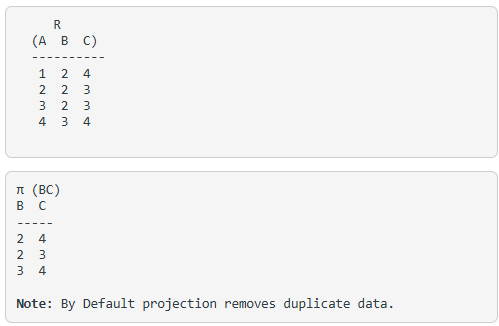
used to project required column data from a relation.
eliminates all attributes of the input relation but those mentioned in the projection list or extracts the values of specified attributes to eliminate duplicate values.
projection method defines a relation that contains a vertical subset of Relation.
an operator that helps you to keep specific columns from a relation and discards the other columns.
CustomerID | CustomerName | Status |
1 | Active | |
2 | Amazon | Active |
3 | Apple | Inactive |
4 | Alibaba | Active |
Projection of CustomerName:
Π CustomerName, Status (Customers)Another Example:
Selection Operator (σ - sigma)
used for selecting a subset of the tuples according to a given selection condition.
used as an expression to choose tuples which meet the selection condition.
for the above relation
σ (c>3)R
will select the tuples which have c more than 3.
Note: selection operator only selects the required tuples but does not display them. For displaying, data projection operator is used.
σp(r)
σ is the predicate
r stands for relation which is the name of the table
p is prepositional logic
Example 1
σ topic = "Database" (Tutorials)
Output – Selects tuples from Tutorials where topic = ‘Database’.
Example 2
σ topic = "Database" and author = "guru99"( Tutorials)
Output – Selects tuples from Tutorials where the topic is ‘Database’ and ‘author’ is guru99.
Example 3
σ sales > 50000 (Customers)
Output – Selects tuples from Customers where sales is greater than 50000
Another Example:
σsubject = "database"(Books)
Output − Selects tuples from books where subject is 'database'.
σsubject = "database" and price = "450"(Books)
Output − Selects tuples from books where subject is 'database' and 'price' is 450.
σsubject = "database" and price = "450" or year > "2010"(Books)
Output − Selects tuples from books where subject is 'database' and 'price' is 450 or those books published after 2010.
Union Operation (U)
includes all tuples that are in tables A or in B. It also eliminates duplicate tuples.
So, set A UNION set B would be expressed as:
The result <- A ∪ B
For a union operation to be valid, the following conditions must hold –
R and S must be the same number of attributes.
Attribute domains need to be compatible.
Duplicate tuples should be automatically removed.
Example
Consider the following tables.
Table A | Table B | ||
column 1 | column 2 | column 1 | column 2 |
1 | 1 | 1 | 1 |
1 | 2 | 1 | 3 |
A ∪ B gives
Table A ∪ B | |
column 1 | column 2 |
1 | 1 |
1 | 2 |
1 | 3 |
Example 2:
∏ author (Books) ∪ ∏ Author (Articles)Output − Projects the names of the authors who have either written a book or an article or both.
Cartesian Product (X)
an operation used to merge columns from two relations.
Cross Product or Cross Join is when it is followed by other operations.
Example – Cartesian product
σ column 2 = ‘1’ (A X B)
Output – The above example shows all rows from relation A and B whose column 2 has value 1
σ column 2 = ‘1’ (A X B) | |
column 1 | column 2 |
1 | 1 |
1 | 1 |
Another Example
A                                  B
    (Name   Age  Sex )                (Id   Course)
    ------------------                -------------
    Ram    14   M                      1     DS
    Sona   15   F                      2     DBMS
    kim    20   M
   A X B
  Name   Age   Sex   Id   Course
---------------------------------
  Ram    14    M      1    DS
  Ram    14    M      2    DBMS
  Sona   15    F      1    DS
  Sona   15    F      2    DBMS
  Kim    20    M      1    DS
  Kim    20    M      2    DBMS

Note: if A has ‘n’ tuples and B has ‘m’ tuples then A X B will have ‘n*m’ tuples.
Join Operations (⋈)
a cartesian product followed by a selection criterion.
allows joining variously related tuples from different relations.
Types of Join
Inner Joins:
Theta join
only those tuples that satisfy the matching criteria are included, while the rest are excluded.
Example
A ⋈θ BTheta join can use any conditions in the selection criteria.
For example:
A ⋈ A.column 2 > B.column 2 (B)A ⋈ A.column 2 > B.column 2 (B)
column 1
column 2
1
2
EQUI join
When a theta join uses only equivalence condition, it becomes a equi join.
For example:
A ⋈ A.column 2 = B.column 2 (B)A ⋈ A.column 2 = B.column 2 (B)
column 1column 2
1
1
EQUI join is the most difficult operations to implement efficiently using SQL in an RDBMS and one reason why RDBMS have essential performance problems.
Natural join (⋈)
Natural join can only be performed if there is a common attribute (column) between the relations. The name and type of the attribute must be same.
Example
C
Num
Square
2
4
3
9
D
Num
Cube
2
8
3
27
Consider the following two tables
C ⋈ DC ⋈ D
Num
Square
Cube
2
4
8
3
9
27
Outer Joins:
Left Outer Join (A B)
Right Outer Join
Full Outer Join