Data Representations: EOY9 Computer Science Revision
Binary to decimal
0s and 1s are called binary digits, or bits. All characters are represented using sequences of bits.
Binary digits are like letters (they are the symbols that computers ‘write’ with).
Computers use two symbols because they are built out of switches which turn on and off.
A sequence of binary digits represents a number.
Example: 11010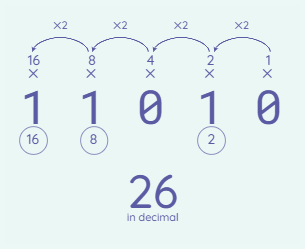
Write multipliers over the bits. Start from right to left. You will put the powers of 2 above each bit. In the above example, the first 0 on the right will have 1 on top, the 1 next to it will have 2, the 0 next to it will have a 4, etc.
Since 0s mean ‘off’ and 1s mean ‘on’, when adding the numbers together, you will not count up the 0s.Only add up the numbers on top of the 1s.
16 + 8 + 2 = 26
11010 = 26 in decimal
Example:11111Since there are no 0s in the above example, we will add up all the powers of 2 together.
16 + 8 + 4 + 2 + 1 = 31
11111 = 31 in decimal
Example: 13 in decimalTo convert a decimal into binary digits, you need to select which multipliers you will use to form the sequence of bits:
You first start with the leftmost bit and move from left to right. Since 16 is larger than 13, you will not need 16 and you can put a 0 (off) underneath it. 8 is less than 13 so it can be used in the sum. Put a 1 (on) under the 8. 13 - 8 = 5 so you now how 5 left. 4 is less than 5 so it can be used in the sum. Put a 1 (on) under the 4. 5 - 4 = 1 so we now have 1 left. 2 is larger than 1, so it cannot be used. Put a 0 (off) under the 2. We are now left with 1, so put a 1 (on) underneath it.
01101 = 13 in decimal

Example: Decimal 22Do I need to select the multiplier 16 to use in the sum of 22? It is smaller than 22, so yes. Put a 1 (on) under the 16.
22 - 16 = 6 so we have 6 left.
Do I need 8 to use in the sum of 6? It is larger than 8, so no. Put a 0 (off) under the 8.
Do I need to select the 4 to assemble the sum of 6? It is less than 6, so yes. Put a 1 (on) under the 4.
6 - 4 = 2 so we have 2 left.
Do I use 2 for the sum of 2? Yes, so put a 1 (on) under the 2.
2 - 2 = 0 so we have nothing else to add. This means we can put a 0 (off) under the remaining multipliers (in this case, 1)
—
10110 = 22 in decimal
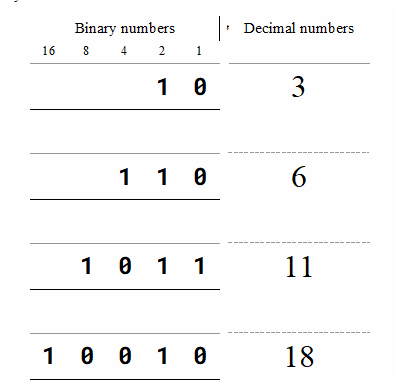
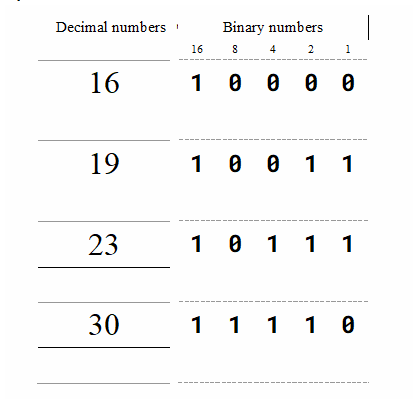
Further examples:
Sequences and Conversion
1 - bit sequence: With one bit, you can only have two sequences
2 - bit sequence: With 8 bits, you can form 4 sequences
3 - bit sequence: With 24 bits, you can form 8 sequences

Byte: a group of eight binary digits. For example, this is 1 byte: 00101101. It is very common to group binary digits into chunks of eight. Remember, a bit is 1 binary digit (not the same as byte).
Divide the number of bits by 8 to convert into bytes and multiply the number of bytes by 8 to convert to bits.
All pieces of information are represented as sequences of binary digits, including text and numbers.
Kilobytes (KB) means thousands of bytes. Kilobits (Kb) means thousands of bits.
Megabytes (MB) means millions of bytes. Megabits (Mb) means millions of bits.
Gigabytes (GB) means billions of bytes. Gigabits (Gb) means billions of bits.
Terabytes (TB) means trillions of bytes. Terabits (Tb) means trillions of bits.
Example: 24 million binary digits = 3MB because 24 divided by 8 is 3 so
there are 3 million bytes.
Example: 2 GB means 16 billion binary digits because 2 times 8 is 16.Example: There are 1 trillion bytes in 1 terabyte. There are 8 trillion
bits in a terabyte.Example: A memory card had 16GB and the size of each individual picture is approximately 4MB. 16GB expressed in MB is 16000, as you multiply by 1000Why Binary?
0s and 1s are binary digits (bits) and there are only 2 of them. Binary digits are symbols, just like letters and words.
101 has 2 binary digits and is an example of a 3-bit sequence. In total there, can be 8 possible 2-bit sequences as 2³ is 8.
With every additional bit, the number of possible bit sequences doubles.
ASCII (American Standard Code for Information Interchange) uses sequences of 7 bits to represent characters.
Building binary systems are simpler for the computer as you can build a binary system using circuits of interconnected switches.
Electronic devices are built using circuits of interconnected switches that control the flow of electricity. 0 represents an off switch and 1 represents an on switch.