ZYBooks SQL
CHAPTER 5.1
IN operator
The IN operator is used in a WHERE clause to determine if a value matches one of several values.
CountryCode | Language | IsOfficial | Percentage |
ABW | Dutch | T | 5.3 |
AFG | Balochi | F | 0.9 |
AGO | Kongo | F | 13.2 |
ALB | Albanian | T | 97.9 |
AND | Catalan | T | 32.3 |
SELECT *
FROM CountryLanguage
WHERE Language IN ('Dutch', 'Kongo', 'Albanian');
Results
ABW Dutch T 5.3
AGO Kongo F 13.2
ALB Albanian T 97.9
BETWEEN operator
The BETWEEN operator provides an alternative way to determine if a value is between two other values. The operator is written value BETWEEN minValue AND maxValue and is equivalent to value >= minValue AND value <= maxValue
RESULTS
SELECT Name
FROM Employee
WHERE HireDate >= '2000-01-01' AND HireDate <= '2020-01-01';
SELECT Name
FROM Employee
WHERE HireDate BETWEEN '2000-01-01' AND '2020-01-01';
LIKE operator
The LIKE operator, when used in a WHERE clause, matches text against a pattern using the two wildcard characters % and _.
% matches any number of characters. Ex: LIKE 'L%t' matches "Lt", "Lot", "Lift", and "Lol cat".
matches exactly one character. Ex: LIKE 'Lt' matches "Lot" and "Lit" but not "Lt" and "Loot".
The LIKE operator performs case-insensitive pattern matching by default or case-sensitive pattern matching if followed by the BINARY keyword. Ex: LIKE BINARY 'L%t' matches 'Left' but not 'left'.
DISTINCT clause
The DISTINCT clause is used with a SELECT statement to return only unique or 'distinct' values. Ex: The first SELECT statement in the figure below results in two 'Spanish' rows, but the second SELECT statement returns only unique languages, resulting in only one 'Spanish' row.
CountryCode | Language | IsOfficial | Percentage |
ABW | Spanish | F | 7.4 |
AFG | Balochi | F | 0.9 |
ARG | Spanish | T | 96.8 |
BLZ | Spanish | F | 31.6 |
BRA | Portuguese | T | 97.5 |
RESULTS
SELECT Language
FROM CountryLanguage
WHERE IsOfficial = 'F';
Spanish
Balochi
Spanish
SELECT DISTINCT Language
FROM CountryLanguage
WHERE IsOfficial = 'F';
Spanish
Balochi
ORDER BY clause
A SELECT statement selects rows from a table with no guarantee the data will come back in a certain order. The ORDER BY clause orders selected rows by one or more columns in ascending (alphabetic or increasing) order. The DESC keyword with the ORDER BY clause orders rows in descending order.
CountryCode | Language | IsOfficial | Percentage |
FSM | Woleai | F | 3.7 |
FSM | Yap | F | 5.8 |
GAB | Fang | F | 35.8 |
GAB | Mbete | F | 13.8 |
RESULTS
-- Order by Language (ascending)
SELECT *
FROM CountryLanguage
ORDER BY Language;
GAB Fang F 35.8
GAB Mbete F 13.8
FSM Woleai F 3.7
FSM Yap F 5.8
-- Order by Language (descending)
SELECT *
FROM CountryLanguage
ORDER BY Language DESC;
FSM Yap F 5.8
FSM Woleai F 3.7
GAB Mbete F 13.8
GAB Fang F 35.8
-- Order by CountryCode, then
-- Language (ascending)
SELECT *
FROM CountryLanguage
ORDER BY CountryCode, Language;
FSM Woleai F 3.7
FSM Yap F 5.8
GAB Fang F 35.8
GAB Mbete F 13.8
Numeric functions
A function operates on an expression enclosed in parentheses, called an argument, and returns a value. Usually, the argument is a simple expression, such as a column name or fixed value. Some functions have several arguments, separated by commas, and a few have no arguments at all.
Function | Description | Example |
ABS(n) | Returns the absolute value of n | SELECT ABS(-5); returns 5 |
LOG(n) | Returns the natural logarithm of n | SELECT LOG(10); returns 2.302585092994046 |
POW(x, y) | Returns x to the power of y | SELECT POW(2, 3); returns 8 |
RAND() | Returns a random number between 0 (inclusive) and 1 (exclusive) | SELECT RAND(); returns 0.11831825703225868 |
ROUND(n, d) | Returns n rounded to d decimal places | SELECT ROUND(16.25, 1); returns 16.3 |
SQRT(n) | Returns the square root of n | SELECT SQRT(25); returns 5 |
String functions
String functions manipulate string values. SQL string functions are similar to string functions in programming languages like Java and Python.
Table 5.2.2: Common string functions.
Function | Description | Example |
CONCAT(s1, s2, ...) | Returns the string that results from concatenating the string arguments | SELECT CONCAT('Dis', 'en', 'gage'); returns 'Disengage' |
LOWER(s) | Returns the lowercase s | SELECT LOWER('MySQL'); returns 'mysql' |
REPLACE(s, from, to) | Returns the string s with all occurrences of from replaced with to | SELECT REPLACE('This and that', 'and', 'or'); returns 'This or that' |
SUBSTRING(s, pos, len) | Returns the substring from s that starts at position pos and has length len | SELECT SUBSTRING('Boomerang', 1, 4); returns 'Boom' |
TRIM(s) | Returns the string s without leading and trailing spaces | SELECT TRIM(' test '); returns 'test' |
UPPER(s) | Returns the uppercase s | SELECT UPPER('mysql'); returns 'MYSQL' |
Date and time functions
Date and time functions operate on DATE, TIME, and DATETIME data types.
Table 5.2.3: Common date and time functions.
Function | Description | Example |
CURDATE() CURTIME() NOW() | Returns the current date, time, or date and time in 'YYYY-MM-DD', 'HH:MM:SS', or 'YYYY-MM-DD HH:MM:SS' format | SELECT CURDATE(); returns '2019-01-25' SELECT CURTIME(); returns '21:05:44' SELECT NOW(); returns '2019-01-25 21:05:44' |
DATE(expr) TIME(expr) | Extracts the date or time from a date or datetime expression expr | SELECT DATE('2013-03-25 22:11:45'); returns '2013-03-25' SELECT TIME('2013-03-25 22:11:45'); returns '22:11:45' |
DAY(d) MONTH(d) YEAR(d) | Returns the day, month, or year from date d | SELECT DAY('2016-10-25'); returns 25 SELECT MONTH('2016-10-25'); returns 10 SELECT YEAR('2016-10-25'); returns 2016 |
HOUR(t) MINUTE(t) SECOND(t) | Returns the hour, minute, or second from time t | SELECT HOUR('22:11:45'); returns 22 SELECT MINUTE('22:11:45'); returns 11 SELECT SECOND('22:11:45'); returns 45 |
DATEDIFF(expr1, expr2) TIMEDIFF(expr1, expr2) | Returns expr1 - expr2 in number of days or time values, given expr1 and expr2 are date, time, or datetime values | SELECT DATEDIFF('2013-03-10', '2013-03-04'); returns 6 SELECT TIMEDIFF('10:00:00', '09:45:30'); returns 00:14:30 |
Aggregate functions
An aggregate function processes values from a set of rows and returns a summary value. Common aggregate functions are:
COUNT() counts the number of rows in the set.
MIN() finds the minimum value in the set.
MAX() finds the maximum value in the set.
SUM() sums all the values in the set.
AVG() computes the arithmetic mean of all the values in the set
GROUP BY clause
Aggregate functions are commonly used with the GROUP BY clause.
The GROUP BY clause consists of the GROUP BY keyword and one or more columns. Each simple or composite value of the column(s) becomes a group. The query computes the aggregate function separately, and returns one row, for each group.
The GROUP BY clause appears between the WHERE clause, if any, and the ORDER BY clause.
HAVING clause
The HAVING clause is used with the GROUP BY clause to filter group results. The optional HAVING clause follows the GROUP BY clause and precedes the optional ORDER BY clause.
Aggregate functions and NULL values
Aggregate functions ignore NULL values. Ex: SUM(Salary) adds all non-NULL salaries and ignores rows containing a NULL salary.
Joins
In relational databases, reports are commonly generated from data in multiple tables. Multi-table reports are written with join statements.
A join is a SELECT statement that combines data from two tables, known as the left table and right table, into a single result. The tables are combined by comparing columns from the left and right tables, usually with the = operator. The columns must have comparable data types.
Prefixes and aliases
Occasionally, join tables contain columns with the same name. When duplicate column names appear in a query, the names must be distinguished with a prefix. The prefix is the table name followed by a period.
Use of a prefix makes column names more complex. To simplify queries or result tables, a column name can be replaced with an alias. The alias follows the column name, separated by an optional AS keyword.
Inner and full joins
A join clause determines how a join query handles unmatched rows. Two common join clauses are:
INNER JOIN selects only matching left and right table rows.
FULL JOIN selects all left and right table rows, regardless of match.
In a FULL JOIN result table, unmatched left table rows appear with NULL values in right table columns, and vice versa.
The join clause appears between a FROM clause and an ON clause:
The FROM clause specifies the left table.
The INNER JOIN or FULL JOIN clause specifies the right table.
The ON clause specifies the join columns.
An optional WHERE clause follows the ON clause.
Left and right joins
In some cases, the database user wants to see unmatched rows from either the left or right table, but not both. To enable these cases, relational databases support left and right joins:
LEFT JOIN selects all left table rows, but only matching right table rows.
RIGHT JOIN selects all right table rows, but only matching left table rows.
An outer join is any join that selects unmatched rows, including left, right, and full joins.
MySQL supports both LEFT JOIN and RIGHT JOIN.
Alternative join queries
Inner joins can be written without the JOIN keyword. Outer joins can be written with a UNION keyword instead of a JOIN keyword. UNION combines the results of two SELECT clauses into one result table:
For a left join, one SELECT returns matching rows and another returns unmatched left table rows.
For a right join, one SELECT returns matching rows and another returns unmatched right table rows.
For a full join, three SELECT clauses are necessary. One SELECT returns matching rows, another returns unmatched left table rows, and a third returns unmatched right table rows. The three results are merged with two UNION keywords.
SELECT FacultyName, DepartmentName
FROM Faculty, Department
WHERE Faculty.Code = Department.Code
UNION
SELECT NULL, DepartmentName
FROM Department
WHERE Department.Code NOT IN
   (SELECT Code FROM Faculty WHERE Code IS NOT NULL);
The right table is Department. The first SELECT clause returns matching rows. The second SELECT clause returns unmatched Department rows. The UNION keyword merges matched and unmatched rows into one result table. Since Code is the primary key of Department,
OR Department.Code IS NULLis unnecessary in the second WHERE clause.
SELECT FacultyName, DepartmentName FROM Faculty, Department WHERE Faculty.Code = Department.Code;The query only returns rows for which faculty and department codes match. The inner join is written without a UNION keyword.
SELECT FacultyName, DepartmentNameFROM Faculty, Department
WHERE Faculty.Code = Department.Code
UNION
SELECT FacultyName, NULL
FROM Faculty
WHERE Faculty.Code IS NULL;
The left table is Faculty. The first SELECT clause returns matching rows. The second SELECT clause returns unmatched Faculty rows. The UNION keyword merges matched and unmatched rows into one result table. Since Faculty.Code is a foreign key,
OR Faculty.Code NOT IN (SELECT Code FROM Department WHERE CODE IS NOT NULL)is unnecessary in the second WHERE clause.
SELECT FacultyName, DepartmentName
FROM Faculty, Department
WHERE Faculty.Code = Department.Code
UNION
SELECT FacultyName, NULL
FROM Faculty
WHERE  Faculty.Code IS NULL
UNION
SELECT NULL, DepartmentName
FROM Department
WHERE Department.Code NOT IN
   (SELECT Code FROM Faculty WHERE CODE IS NOT NULL);
The first SELECT clause returns matching rows, the second returns unmatched Faculty rows, and the third returns unmatched Department rows. The UNION keyword merges matched and unmatched rows into one result table. Since Department.Code is a primary key and Faculty.Code is a foreign key, the second and third WHERE clauses are simplified.
Equijoins
An equijoin compares columns of two tables with the = operator. Most joins are equijoins. A non-equijoin compares columns with an operator other than =, such as < and >.
Figure 5.5.1: Non-equijoin example.
Buyer | |
Name | MaxPrice |
|---|---|
Lisa Ellison | 600000 |
Sam Snead | 900000 |
Jiho Chen | 500000 |
Maria Rodriguez | 800000 |
Property | |
Address | Price |
|---|---|
23 Maple Street | 700000 |
4 Oak Street | 850000 |
59 Alvarado Avenue | 1299000 |
800 Richards Road | 1000000 |
SELECT Name, Address
FROM Buyer
LEFT JOIN Property
ON Price < MaxPrice;
Result | |
Name | Address |
|---|---|
Lisa Ellison | NULL |
Sam Snead | 23 Maple Street |
Sam Snead | 4 Oak Street |
Jiho Chen | NULL |
Maria Rodriguez | 23 Maple Street |
Self-joins
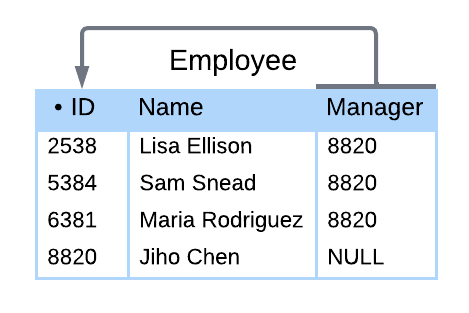
A self-join joins a table to itself. A self-join can compare any columns of a table, as long as the columns have comparable data types. If a foreign key and the referenced primary key are in the same table, a self-join commonly compares those key columns. In a self-join, aliases are necessary to distinguish left and right tables.
In the figure below, A is the left table's alias, and B is the right table's alias. A.Name is the Name column of the left table, representing the employee. B.Name is the Name column of the right table, representing the employee's manager. The result shows employees along with each employee's manager.
Figure 5.5.2: Self-join example.
SELECT A.Name, B.Name
FROM Employee A
INNER JOIN Employee B
ON B.ID = A.Manager;
Result | |
A.Name | B.Name |
|---|---|
Lisa Ellison | Jiho Chen |
Sam Snead | Jiho Chen |
Maria Rodriguez | Jiho Chen |
Cross-joins
A cross-join combines two tables without comparing columns. A cross-join uses a CROSS JOIN clause without an ON clause. As a result, all possible combinations of rows from both tables appear in the result.
In the figure below, all configurations of iPhone models and storage appear, along with total price.
Figure 5.5.3: Cross-join example.
IPhone | |
Model | Price |
|---|---|
X | 1100 |
XR | 800 |
Storage | |
Gigabytes | Price |
|---|---|
64 | 0 |
128 | 100 |
256 | 200 |
SELECT Model, Gigabytes, IPhone.Price + Storage.Price
FROM IPhone
CROSS JOIN Storage;
Result | ||
Model | Gigabytes | IPhone.Price + Storage.Price |
|---|---|---|
X | 64 | 1100 |
XR | 64 | 800 |
X | 128 | 1200 |
XR | 128 | 900 |
X | 256 | 1300 |
XR | 256 | 1000 |
Subqueries
A subquery, sometimes called a nested query or inner query, is a query within another SQL query. The subquery is typically used in a SELECT statement's WHERE clause to return data to the outer query and restrict the selected results. The subquery is placed inside parentheses ().
Correlated subqueries
A subquery is correlated when the subquery's WHERE clause references a column from the outer query. In a correlated subquery, the rows selected depend on what row is currently being examined by the outer query.
If a column name in the correlated subquery is identical to a column name in the outer query, the TableName.ColumnName differentiates the columns. Ex: City.CountryCode refers to the City table's CountryCode column .
An alias can also help differentiate the columns. An alias is a temporary name assigned to a column or table. The AS keyword follows a column or table name to create an alias. Ex: SELECT Name AS N FROM Country AS C creates the alias N for the Name column and alias C for the Country table. The AS keyword is optional and may be omitted. Ex: SELECT Name N FROM Country C.
EXISTS operator
Correlated subqueries commonly use the EXISTS operator, which returns TRUE if a subquery selects at least one row and FALSE if no rows are selected. The NOT EXISTS operator returns TRUE if a subquery selects no rows and FALSE if at least one row is selected
Flattening subqueries
Many subqueries can be rewritten as a join. Most databases optimize a subquery and outer query separately, whereas joins are optimized in one pass. So joins are usually faster and preferred when performance is a concern.
Replacing a subquery with an equivalent join is called flattening a query. The criteria for flattening subqueries are complex and depend on the SQL implementation in each database system. Most subqueries that follow IN or EXISTS, or return a single value, can be flattened. Most subqueries that follow NOT EXISTS or contain a GROUP BY clause cannot be flattened.
The following steps are a first pass at flattening a query:
Retain the outer query SELECT, FROM, GROUP BY, HAVING, and ORDER BY clauses.
Add INNER JOIN clauses for each subquery table.
Move comparisons between subquery and outer query columns to ON clauses.
Add a WHERE clause with the remaining expressions in the subquery and outer query WHERE clauses.
If necessary, remove duplicate rows with SELECT DISTINCT.
Self-joins
A self-join joins a table to itself. A self-join can compare any columns of a table, as long as the columns have comparable data types. If a foreign key and the referenced primary key are in the same table, a self-join commonly compares those key columns. In a self-join, aliases are necessary to distinguish left and right tables.
In the figure below, A is the left table's alias, and B is the right table's alias. A.Name is the Name column of the left table, representing the employee. B.Name is the Name column of the right table, representing the employee's manager. The result shows employees along with each employee's manager.
Figure 5.5.2: Self-join example.
SELECT A.Name, B.Name
FROM Employee A
INNER JOIN Employee B
ON B.ID = A.Manager;
Result | |
A.Name | B.Name |
|---|---|
Lisa Ellison | Jiho Chen |
Sam Snead | Jiho Chen |
Maria Rodriguez | Jiho Chen |