Python Module 4 Quiz Notes

Question 1
def fun(): is the correct answer because it follows the exact syntax required to define a function in Python.
Why it is correct:
defis the keyword used to start a function definition.funis the name of the function.()(empty parentheses) indicates that the function takes no parameters (parameterless).:(colon) is required at the end to signal the start of the function's code block.
Question 2
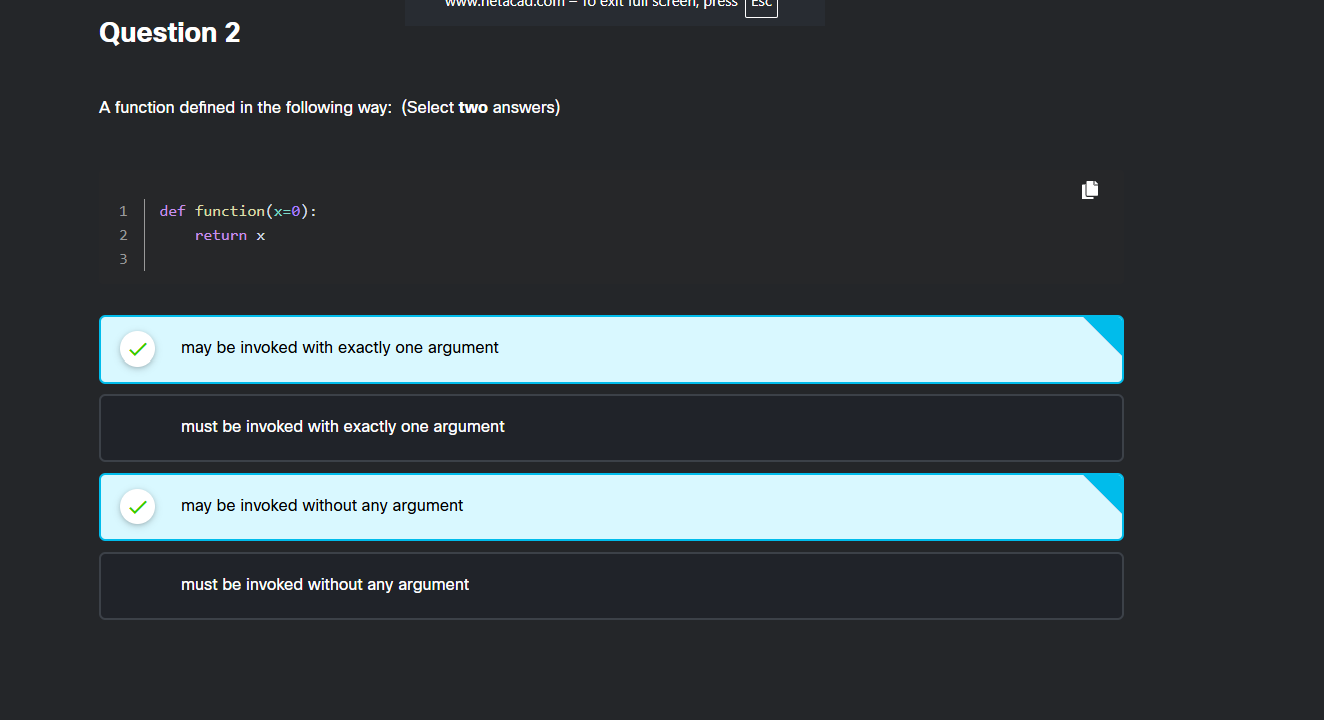
The correct choices are "may be invoked with exactly one argument" and "may be invoked without any argument" because the function defines an optional parameter with a default value.
Why these answers are correct
Default parameter: The code
x=0sets a default value forx.Flexible invocation: This makes providing an argument optional.
With an argument: You can call it with one value (e.g.,
function(5)).Without an argument: You can call it completely empty (e.g.,
function()).

Question 3
comes with Python, and is an integral part of Python
Why this is correct:
Built-in functions (like
print(),len(), orinput()) are always available in Python's standard environment.They do not require any
importstatements to be used.
Question 4
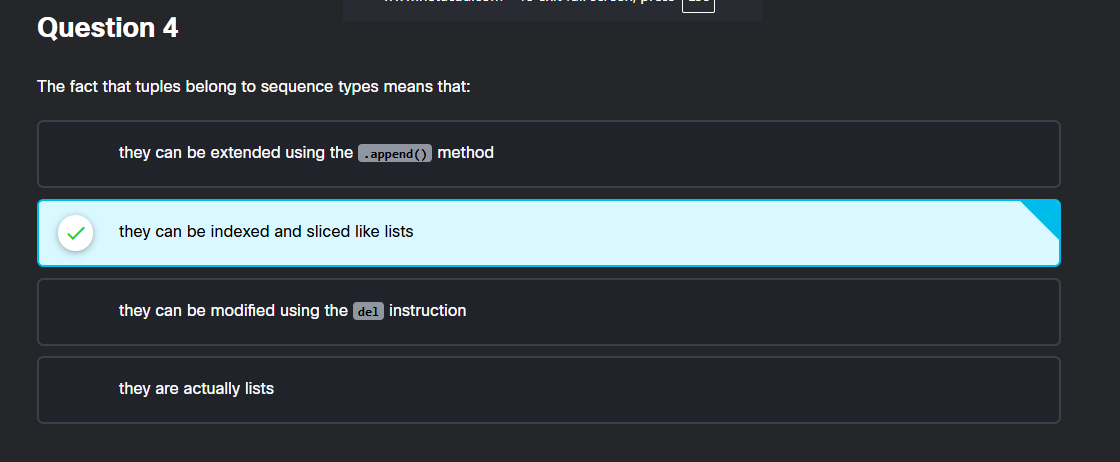
In Python, a "sequence type" means the data is stored in a specific, ordered order.
Because items have a set position, you can always:
Index them: Look up a specific item by its position number (e.g.,
my_tuple[0]).Slice them: Cut out a specific section of items (e.g.,
my_tuple[1:3]).
Since both lists and tuples are sequence types, they share these exact same features.

Question 5
The output of the code is 6.
Here is how the function calculates it step-by-step:
f(3) returns
3 + f(2)f(2) returns
2 + f(1)f(1) returns
1 + f(0)f(0) returns
0because \(x = 0\) stops the recursion.
Adding the numbers back up the chain:
f(1) becomes \(1 + 0 = 1\)
f(2) becomes \(2 + 1 = 3\)
f(3) becomes \(3 + 3 = 6\)

Question 6
The final output of the code snippet is 4.
Here is how the code executes step-by-step:
Initialize the variable
xwith a value of 2.Calculate the expression
x + 1to get 3.Pass the value 3 into the function
fun.Add 1 to the value inside the function.
Return the updated value, which is now 4.
Assign the returned value 4 back to
x.Print the value of
xto display 4

Question 7
The correct code to insert is print(k[0]).
Here is the step-by-step explanation:
Dictionary Creation: The first loop creates a dictionary where each value is a tuple containing a single letter, like
{'a': ('a',), 'b': ('b',), 'c': ('c',)}.Looping Through Keys: The second loop goes through these items one by one. In each step,
kstores the tuple value (for example,k = ('a',)).Extracting the Value: To print just the letter without the tuple brackets and comma, you must access its first element.
Zero-Based Indexing: Python sequences start counting at
0. Therefore,k[0]extracts the string from the tuple to print it cleanly.

Question 8
The code fails because the function expects two inputs, but only receives one.
Here is the simple breakdown:
The Setup: The function is defined as
func(a, b). It explicitly demands two variables (aandb) to do its job.The Mistake: On line 5, the code calls
func(2), passing only a single number.The Crash: Python does not know what value to give to
b, so it stops and throws aTypeError: missing 1 required positional argument: 'b'.
Question 9
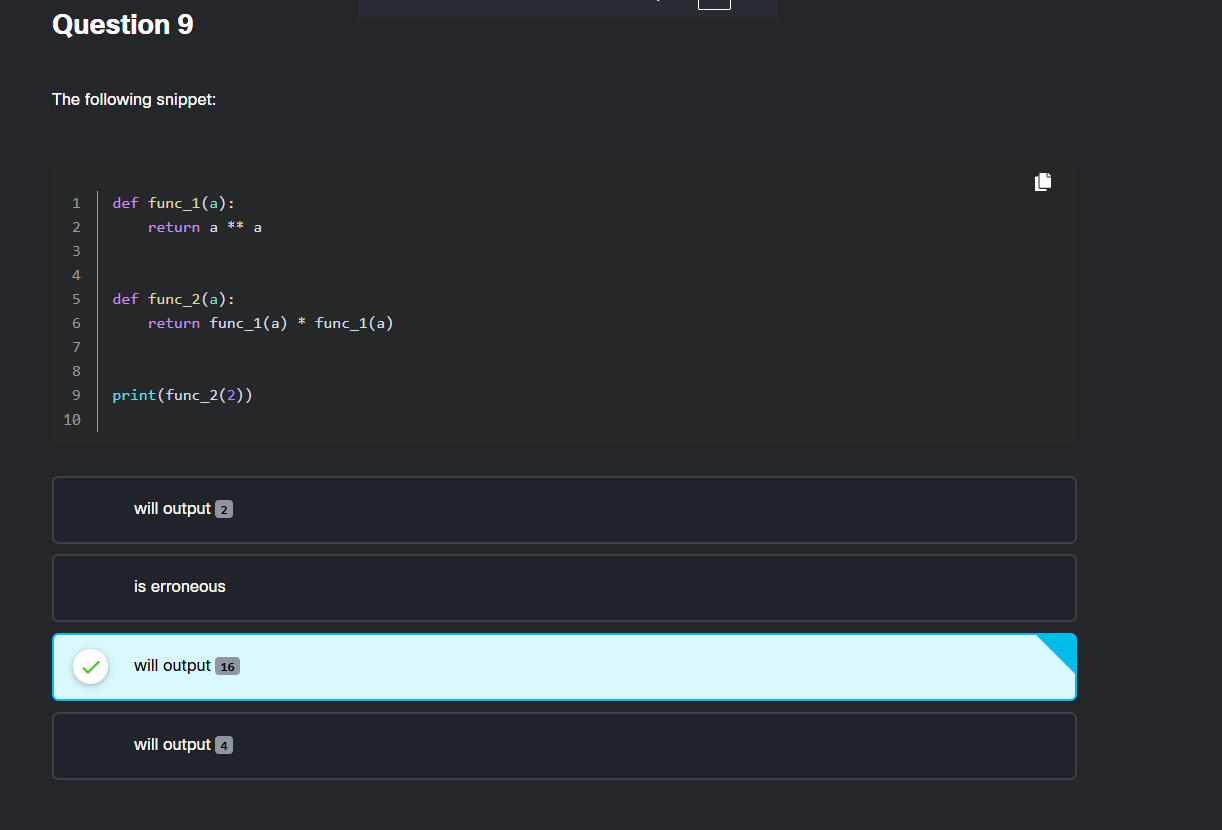
The code outputs 16.
Here is how the calculation works step-by-step:
Step 1: The program calls
func_2(2).Step 2:
func_2needs to calculatefunc_1(2) * func_1(2).Step 3:
func_1(2)computes \(2^{2}\) (2 to the power of 2).Step 4: This gives 4.
Step 5:
func_2multiplies the results: \(4 \times 4\).Final Result: This equals 16.
Question 10
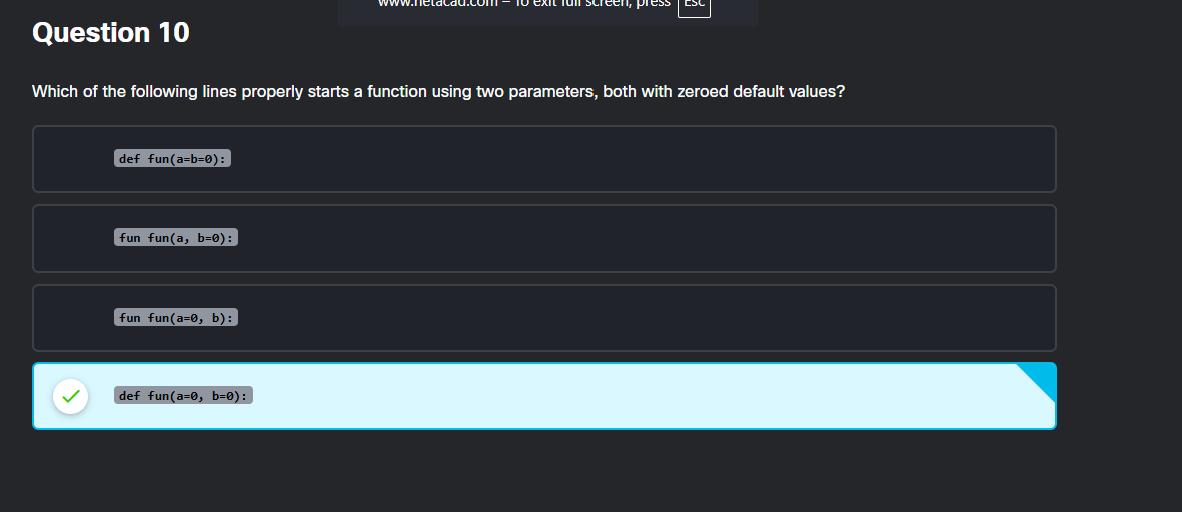
def fun(a=0, b=0): is the correct line to start the function because it perfectly follows Python's syntax rules:
Step 1: Start with
def– Python requires thedefkeyword to define any function.Step 2: Name the parameters – Two distinct parameter names (like
aandb) must be separated by a comma inside the parentheses.Step 3: Set zero default values – Each individual parameter must be explicitly assigned a zero (
=0) to have that default value.Step 4: End with a colon – A colon (
:) is strictly required at the end of a function definition header line.

Question 11
The two correct statements about Python's None value are explained simply below:
The
Nonevalue can be assigned to variables:
You can assignNoneto any variable (e.g.,x = None). This is commonly used to initialize a variable when you don't have a value for it yet.The
Nonevalue can be compared with variables:
You can check if a variable holds aNonevalue using comparison operators (e.g.,if x is None:orif x == None:). This is a standard way to see if a variable is empty or hasn't been set.
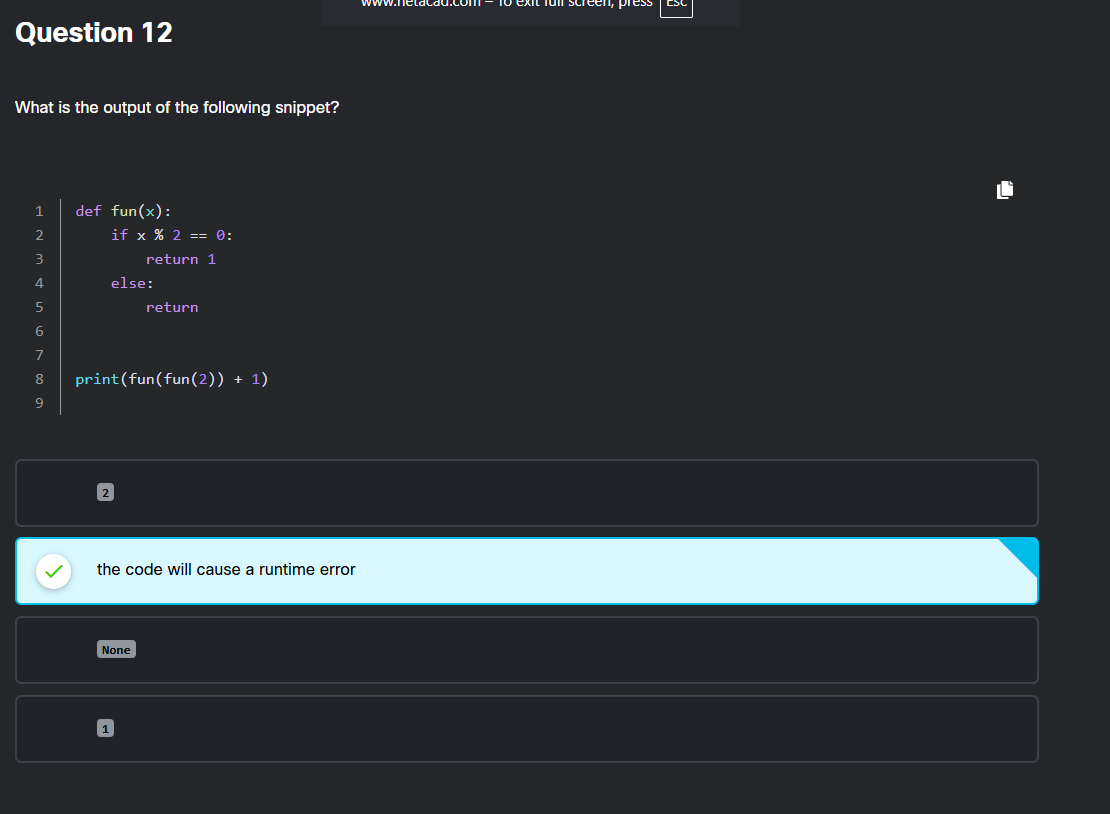
Question 12
The code will cause a runtime error because it attempts to add an integer to None.
Here is exactly how the code executes step-by-step:
fun(2)is evaluated first:2 % 2 == 0is true, so the function hitsreturn 1.fun(2)results in1.
The outer function call becomes
fun(1):1 % 2 == 0is false, so it moves to theelseblock.The statement
return(with nothing after it) automatically returnsNonein Python.
The final calculation is
None + 1:Python cannot add an integer to a
NoneTypeobject.This triggers a
TypeError, which is a runtime error.
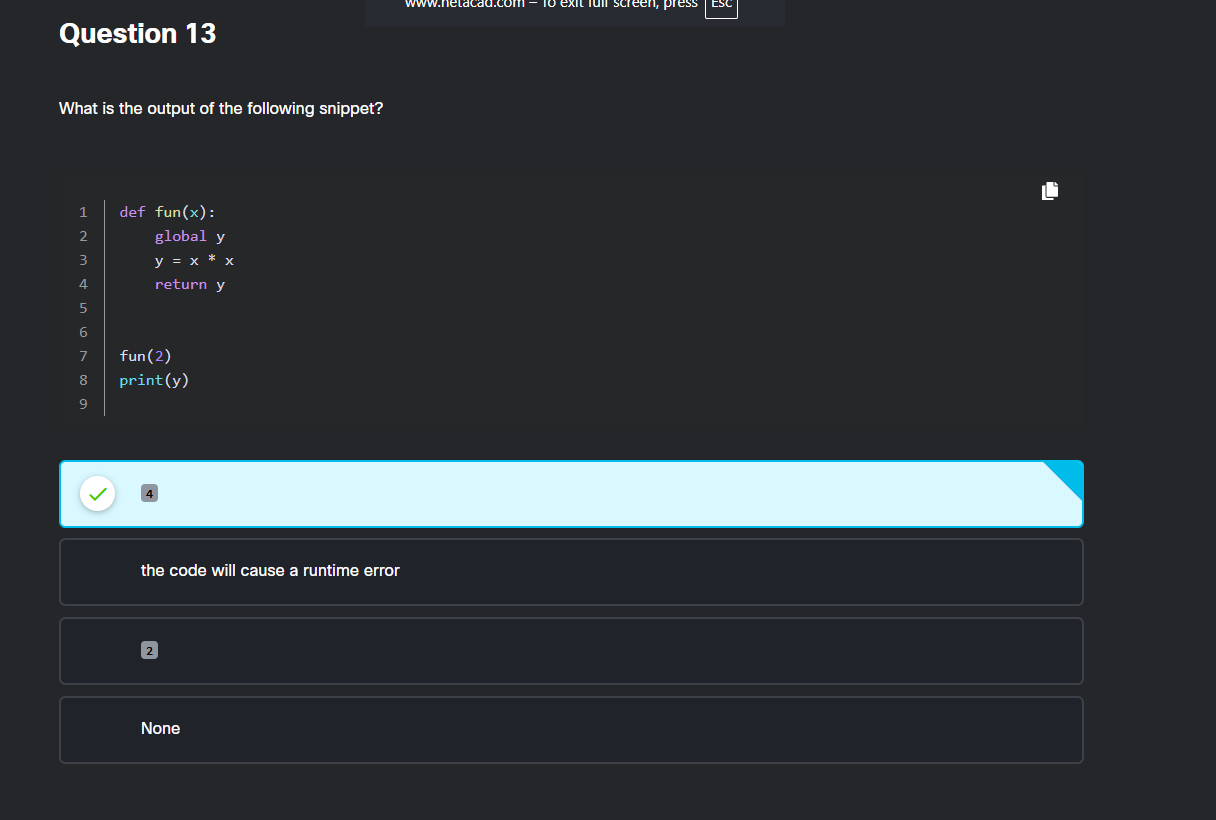
Question 13
The output of the code snippet is 4.
Code Step Breakdown
Function Call:
fun(2)executes the function withx = 2.Global Scope:
global ymakesyavailable outside the function.Math Operation:
y = 2 * 2calculates the value 4.Print Output:
print(y)displays the final global value 4.
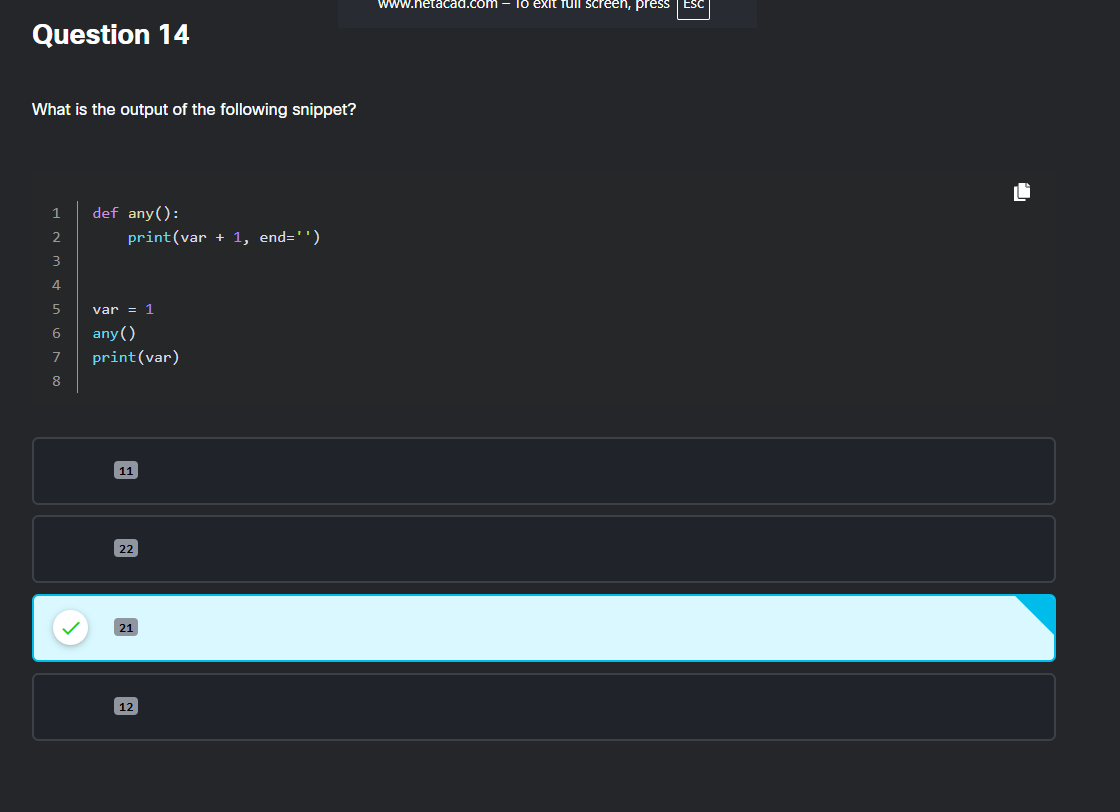
Question 14
The output of the code snippet is 21.
Simple Explanation
var = 1: Sets a global variablevarto1.any(): Calls the function, which printsvar + 1(1 + 1 = 2). Theend=''part keeps the cursor on the same line.print(var): Prints the original global value ofvar(1) right next to the2without a space.
Combining both prints results in 21.
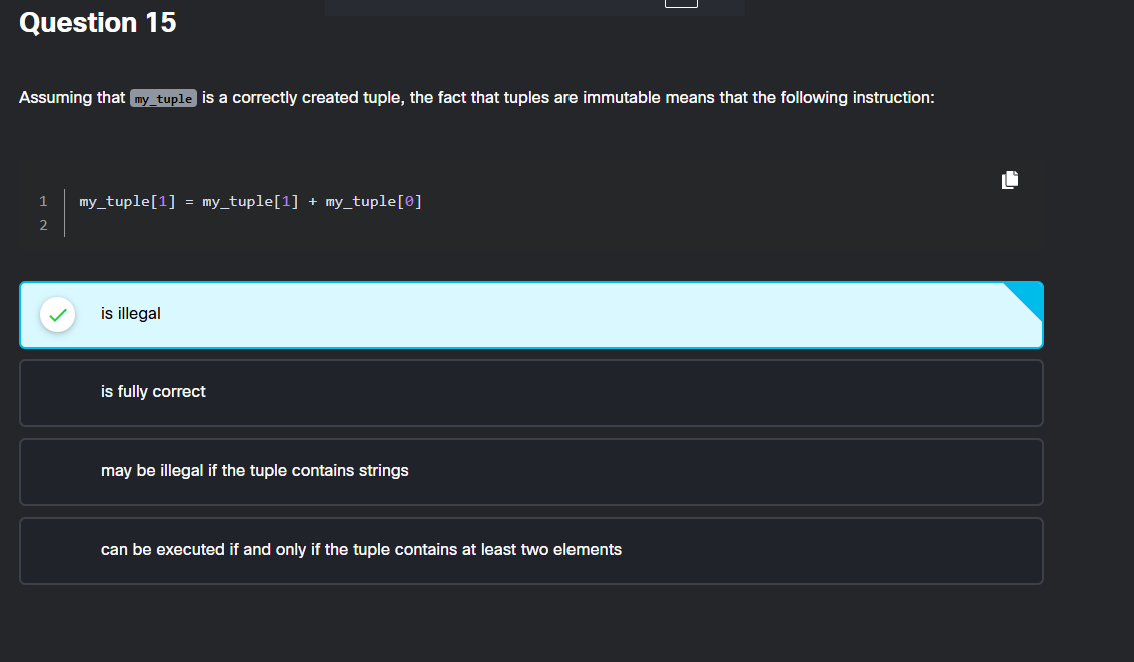
Question 15
Here is a simple breakdown of why that instruction is illegal:
Tuples cannot be changed: In Python, tuples are "immutable," meaning you cannot modify their contents after creation.
The code tries to overwrite data: The instruction
my_tuple[1] = ...attempts to assign a new value to an existing spot inside the tuple.Python blocks it: Because you cannot modify a tuple, Python stops the program and throws a
TypeError.
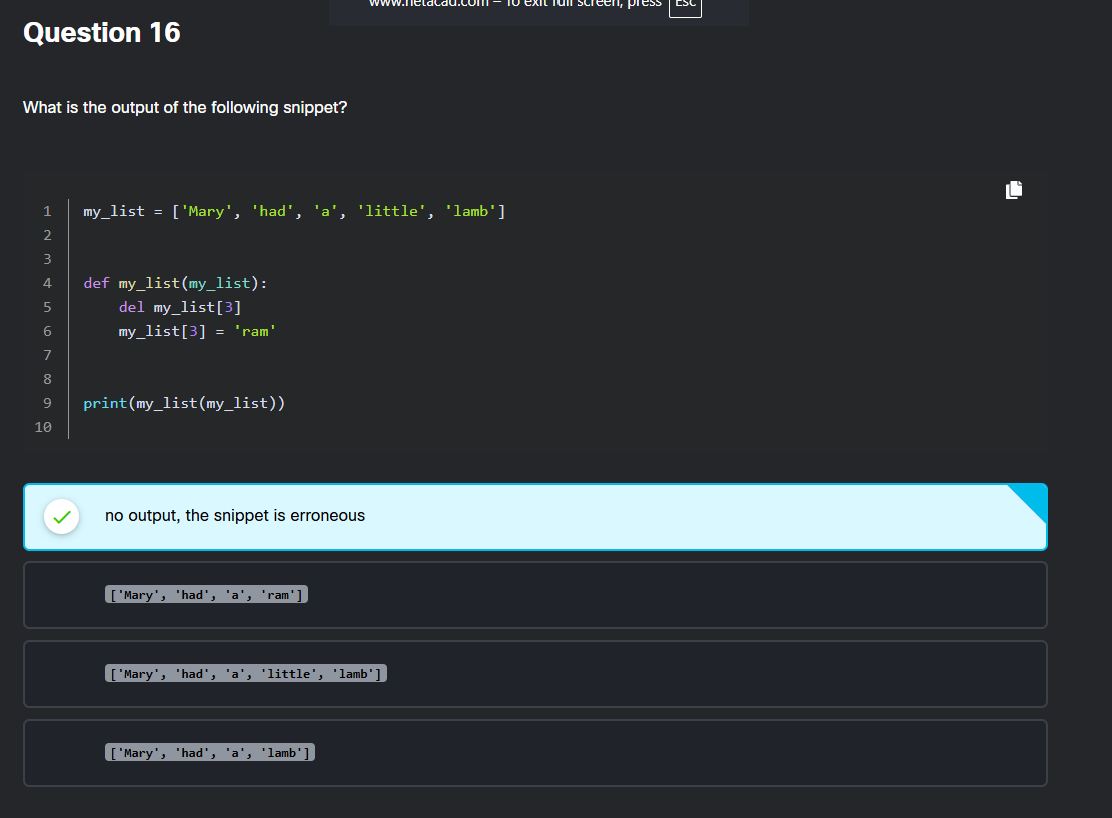
Question 16
The code causes a runtime error and produces no output because the function definition overwrites the original list variable name.
Step-by-Step Breakdown
Line 1 (List Creation): A global list is created and stored in the variable
my_list.Line 4 (Function Definition): Defining
def my_list(my_list):overwrites (shadows) the global variable name. Now,my_listrefers to the function itself, not the list of words.Line 9 (Function Call): The code attempts to call
my_list(my_list), which passes the function object into itself as an argument.Line 5 (The Crash): Inside the function,
del my_list[3]tries to delete an item from the function object instead of a list, causing aTypeErrorcrash before anything can print.

Question 17
Here is a simple, step-by-step breakdown of how the code runs:
Step 1: Match the Variables
Whenfun(0, z=1, y=3)is called, Python assigns the numbers to the function parameters:x = 0(assigned by position)y = 3(assigned by name)z = 1(assigned by name)
Step 2: Do the Math
The function evaluates the equationx + y * 2 + z * 3:Substitute the numbers:
0 + (3 * 2) + (1 * 3)Multiply first:
0 + 6 + 3Add them up: 9
Conclusion
The correct output printed by the code is 9.

Question 18
The correct output of the code snippet is 4.
Step-by-Step Breakdown
Function Definition:
funhas default valuesinp=2andout=3.Function Call: The code calls
fun(out=2).Assigning Values:
outbecomes2.Default Fallback:
inpuses its default value of2.Multiplication: The function multiplies
2 * 2.Final Output: The
print()function displays the result, 4.

Questions 19
Here is a simple breakdown of how the code works:
1. Setup
dictionarycontains 3 pairs:'one'\(\rightarrow \)'two','three'\(\rightarrow \)'one', and'two'\(\rightarrow \)'three'.vstarts asdictionary['one'], which is'two'.range(len(dictionary))means the loop runs exactly 3 times.
2. The Loop (3 Steps)
Iteration 1:
v = dictionary['two']\(\rightarrow \)vbecomes'three'Iteration 2:
v = dictionary['three']\(\rightarrow \)vbecomes'one'Iteration 3:
v = dictionary['one']\(\rightarrow \)vbecomes'two'
3. Output
print(v)prints the final value, which istwo.
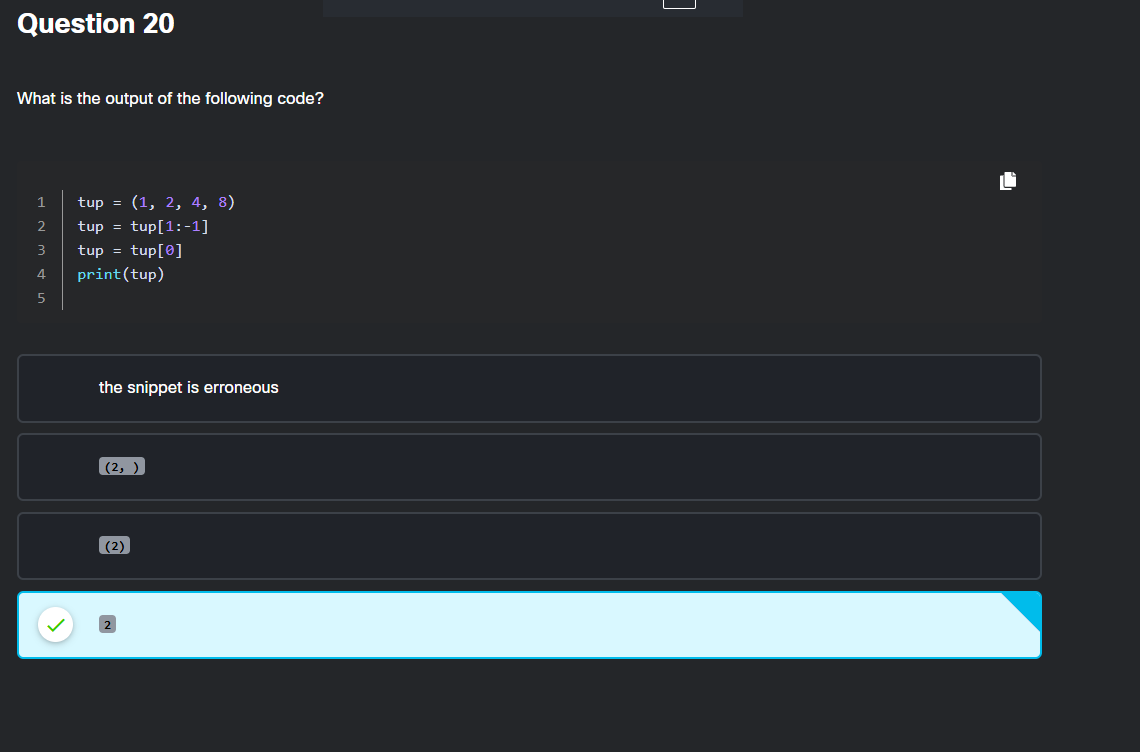
Question 20
The output of the code is 2.
Here is the step-by-step breakdown:
Step 1:
tup = (1, 2, 4, 8)creates a tuple containing four numbers.Step 2:
tup = tup[1:-1]slices the tuple from index 1 up to (but excluding) the last element. This leaves(2, 4).Step 3:
tup = tup[0]extracts the first element of the new tuple, which is2.Step 4:
print(tup)displays the final value, which is2.

Question 21
Here is a simple breakdown of the two correct statements:
1. Why the except block runs after an error
Step 1: Python always runs the code inside the
tryblock first.Step 2: If something goes wrong, Python stops running the
tryblock immediately.Step 3: It jumps straight to the
exceptblock to handle the error safely.
2. Why risky code goes in the try block
Step 1: Put code that might fail (like loading a missing file or dividing by zero) inside a
tryblock.Step 2: If that risky code fails, the
exceptblock catches it.Step 3: This keeps your entire program from crashing.

Question 22
Here is the breakdown of why this output occurs, step by step:
Step 1: Input is text – The
input()function always saves the user's entry as a string (text), not a number.Step 2: Division fails – Line 3 tries to divide the text by itself (
value/value), which is mathematically impossible for strings.Step 3: Error is raised – Python cannot perform division on text, so it automatically triggers a
TypeError.Step 4: Message is printed – The
except TypeError:block catches this specific error and printsVery very bad input....