Input and Output Notes
Input & Output Overview
Definition of I/O:
Anything connected to a computer for input or output purposes.
Examples include keyboard, mouse, touch screen, printer, hard disk, USB.
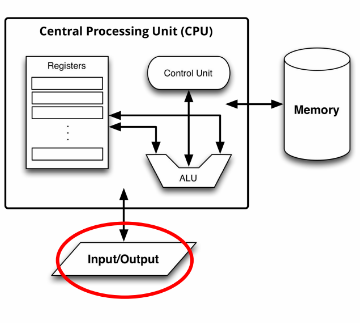
Von Neumann Architecture Recap:
Fundamental computer architecture where the CPU, memory, and I/O operations are interconnected.
Early Input/Output Methods
Limited I/O in Early Computers:
Early computers utilized very basic input/output methods:
Punched paper tape or cards
Teleprinters
Key Historical Devices:
Discussed examples:
Teleprinters were essential for early communication and data input.
Modern Input/Output Devices
Examples of Input Devices:
Keyboard, mouse, touch pad, touch screen
Microphones, cameras
Gestures, accelerometers, barometers
GPS, LIDAR
Examples of Output Devices:
Screens, printers, audio systems
Vibration motors, smart home appliances
Robots, network devices (WiFi, 4G/5G, Ethernet, Bluetooth)
Storage Devices:
Hard disks, SSDs, SD cards.
Modern I/O Interfaces
Connection Types:
Modern I/O devices are often connected via interfaces.
Standardised connectors and protocols
These can be either internal or external.
Examples of Interfaces:
USB, PCIe, HDMI.
Importance of Standardization:
Ensures compatibility and robustness across various devices.
Characteristics of I/O Interfaces
Reasons for Different Standards:
I/O interfaces need to balance multiple factors such as:
Convenience: Simple and durable connectors (e.g., USB plug).
Speed:
Different devices have varying speed requirements (e.g.,
graphics cards require high data rates while keyboards need low).
Cost:
Cheaper interfaces for low-cost devices (e.g., $5 USB drive)
Can invest more in higher-cost devices (e.g., $1,000 graphics card).
Compatibility:
Ensures external devices can work with multiple computers over time.
Summary of I/O
Importance of I/O Devices:
Computers cannot function without input/output devices.
Most modern devices connect via standard interfaces, facilitating communication between I/O devices and the CPU.
Conclusion
Key Takeaways:
Understanding how I/O interfaces evolved from basic methods to the sophisticated systems in today’s computers is essential for grasping computer functionality.