Two-Way Between-Subjects ANOVA & One-Way Within-Subjects ANOVA
Definition (#f7aeae)
Important (#edcae9)
Extra (#fffe9d)
2-way between subjects ANOVA:
Overview:
Compares the means of 3 or more independent groups.
Helps determine if at least 1 group mean is significantly different.
Has 2 IV’s.
Each participant is in only 1 group (between-subjects design).
Used to avoid doing multiple t-tests which increase Type I error.
Ex: Comparing depression scores of students from Year 1, 2, and 3.
Example:
A researcher wants to study the effects of therapy type (CBT vs. Psychoanalysis) and gender (male vs. female) on anxiety levels.
Each participant is assigned to one therapy type and represents one gender group.
The test checks for individual effects and interactions.
Assumptions:
Independence of observations.
Normally distributed DV within each group.
Homogeneity of variances (Levene’s test).
DV is measured at interval or ratio level.
Sample sizes should ideally be balanced across groups.
Analysis:
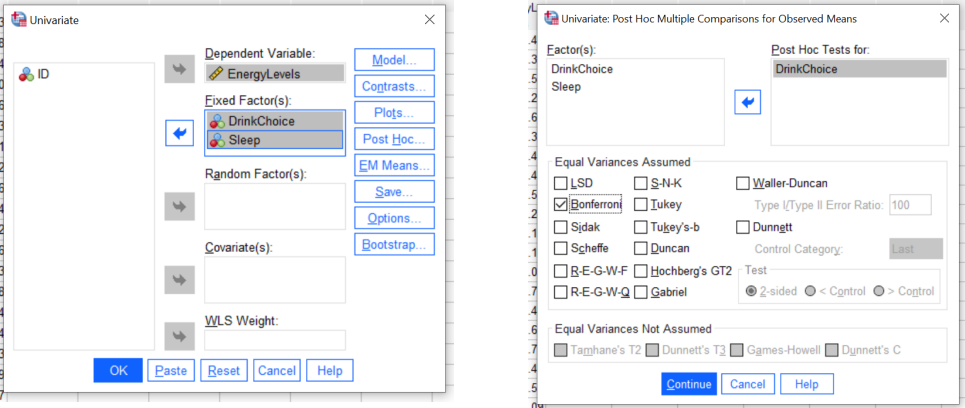
Analyze → General Linear Model → Univariate.
Put DV in “dependent variable” → Put IVs in “fixed factor” → Click “Post hoc”.
Put any IVs which have more than 3 groups in “Post hic tests for” → Put in Tick “Bonferroni”.
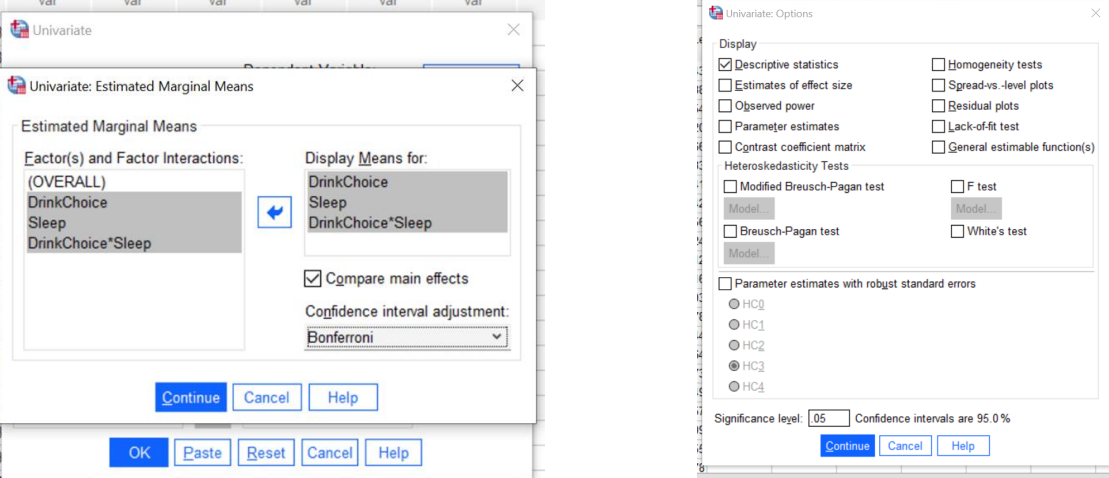
Click “EM Means” → Put in IVs and interaction variable → Click “Options”. Tick “Descriptive.
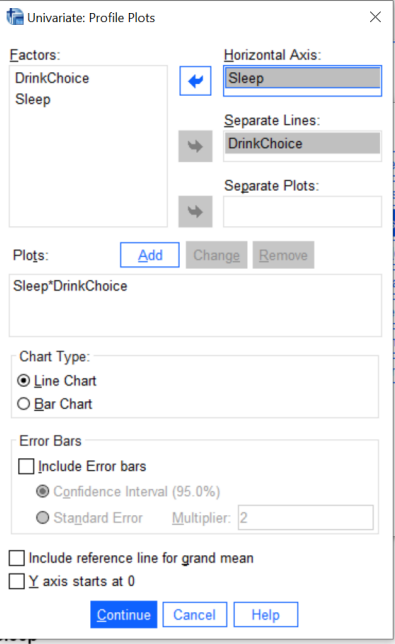
Click “Plots” → Put IV’s in Horizontal Axis and Separate Lines → Click “Add”.
Chart type should be line chart. Click “Continue” → Click “OK”.
Interpretation:
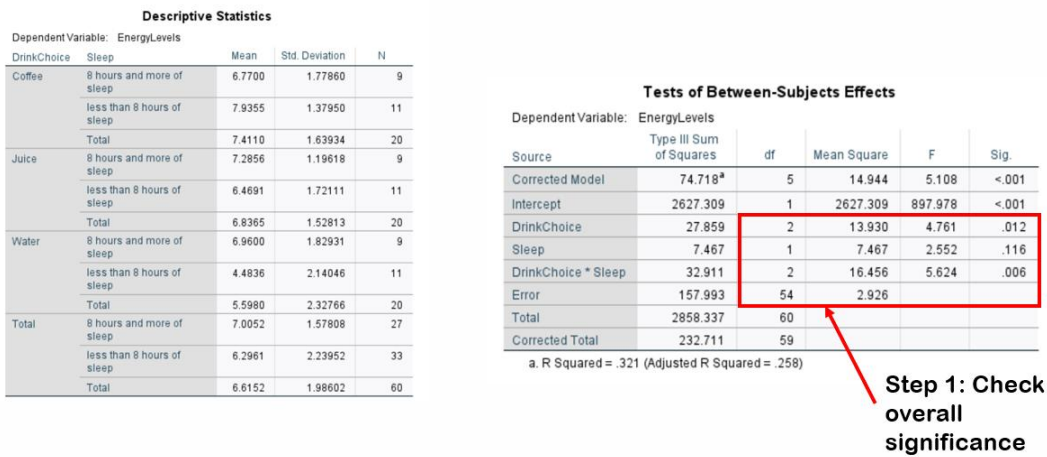
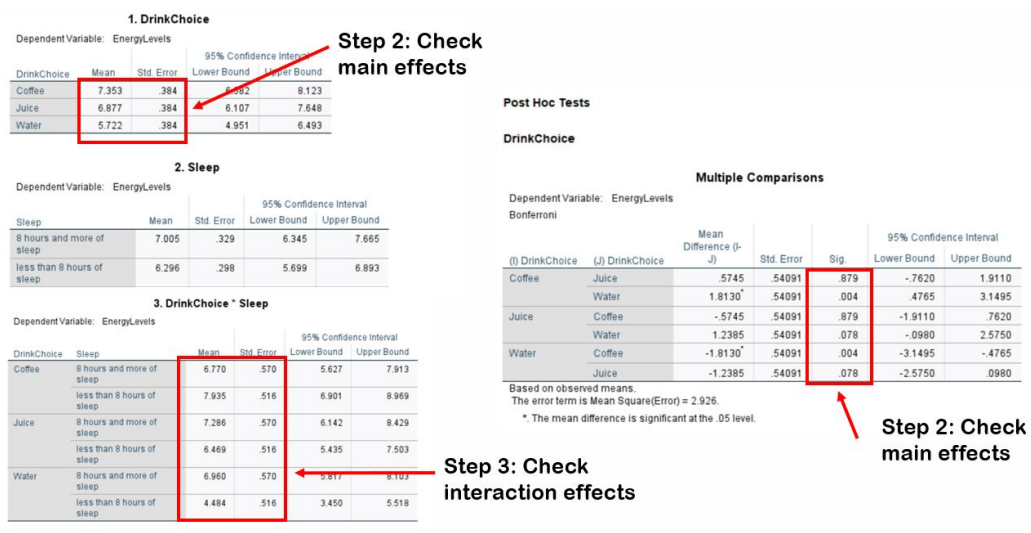
See “sig” for each IV and interaction.
If sig (p) < .05 for IV, there is a significant difference between groups/main effect.
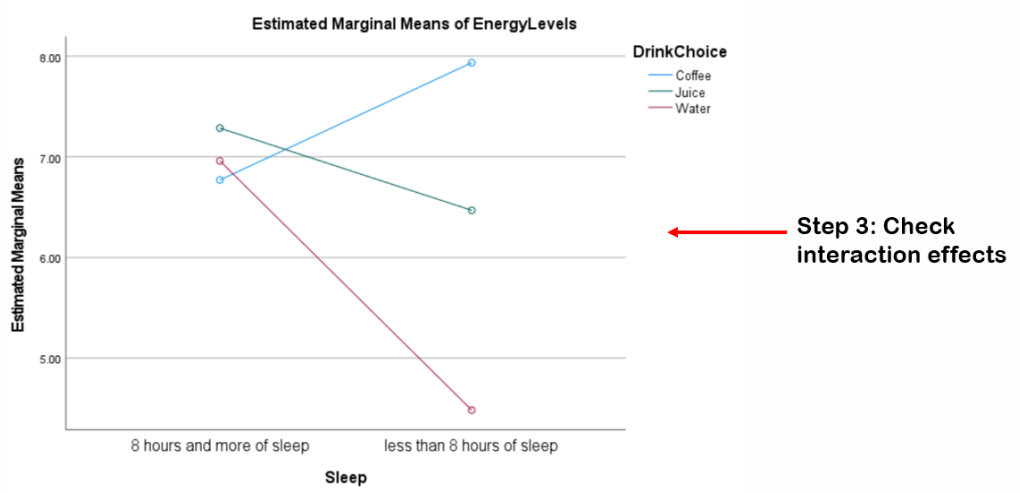
If sig (p) < .05 for interaction, there is a significant interaction effect between IVs.
Test of Between Subject table.
Only if there is significant main effect.
See “sig” in Multiple Comparisons table (post hoc test).
Groups are analysed as pairs. See which pairs are significantly different and which are not.
See the mean for the significant groups to determine which group had higher score.
Estimated Marginal Means, Multiple Comparisons, Descriptive Statistics table.
Only if there is significant interaction effect.
See the mean for interactions, and the intersections in the plot.
Estimated Marginal Means table, Plot
Template:
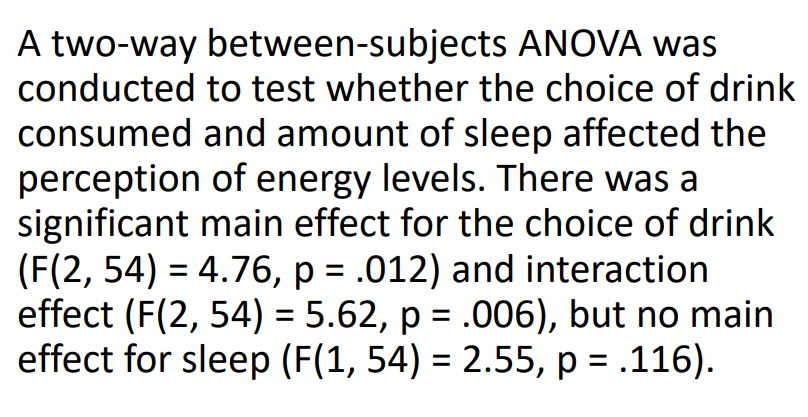
What test you ran and what variables were plugged in.
Is there a main effect and interaction effect.
Report the “equation” above with the values for main effect and interaction effects.
Interpretation:
If significant: Which groups were different and which weren’t, how did they interact.
If not significant: Groups had similar scores, no interaction.



Within-subjects ANOVA:
Overview:
Used when the same participants are measured across multiple conditions or time points.
Used to account for the variance between conditions while controlling for individual differences because all participants are measured repeatedly.
Compares the means of 3 or more conditions or groups within the same participants to determine if there are significant differences between them.
Ex: A study on the effect of three types of study methods (individual, group, online) on test scores where the same participants use all three methods.
General assumptions:
Sphericity: The variances of the differences between all possible pairs of conditions are equal.
If violated, correction methods like Greenhouse Geisser are applied.
Normality: The distribution of the DV for each condition is approximately normal.
No extreme outliers: No scores that are excessively far from the rest of the data.
Interval or Ratio Data: The DV should be continuous (interval or ratio level).
F Ratio for Within-Subjects ANOVA:
The F ratio is calculated as the explained variance (variance between conditions) divided by the unexplained variance (error or residual variance).
𝐹=Between -Group Variance/Within-Group Variance.
Explained variance: Measures how much of the variance in the dependent variable is explained by the condition.
Unexplained variance (Error): Variability in the dependent variable that is not explained by the condition but is due to individual differences or other factors.
A larger F value indicates that the between-condition variance is much greater than the error variance, suggesting significant effects.
Degree of Freedom for Within-Subjects ANOVA:
Degrees of Freedom Between Groups (df_between):
df_between = k−1
Where k is the number of conditions.
Degrees of Freedom Within Groups (df_within):
df_within = N−k
N = Total number of participants (since each participant is measured repeatedly across all conditions).
Degrees of Freedom Error (df_error):
df_error = (N−1)(k−1)
This is used when there is an interaction between the factors (for repeated measures).
Analysis:
Analyze → General Linear Model→ Repeated Measures.
Type IV in “within-subject factor name”.
Type the number of levels/conditions in “number of levels” → Click “Add” → Click “Define”.
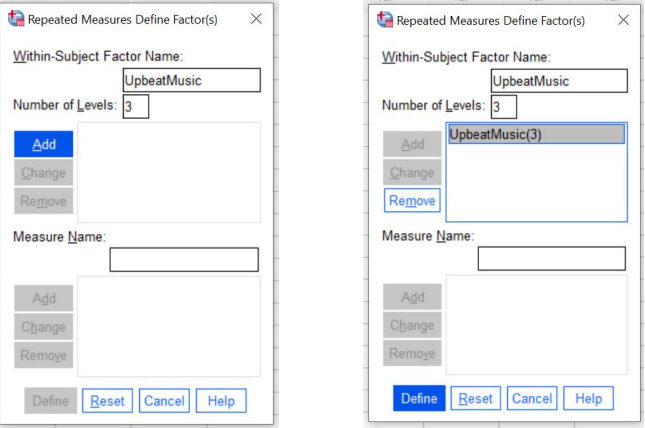
Put the variables in “within-subject variables”
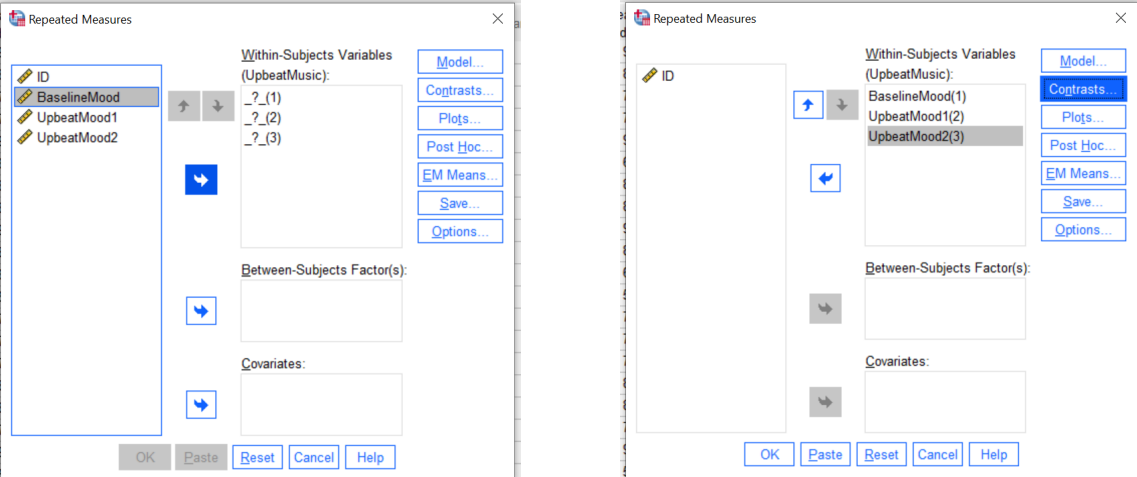
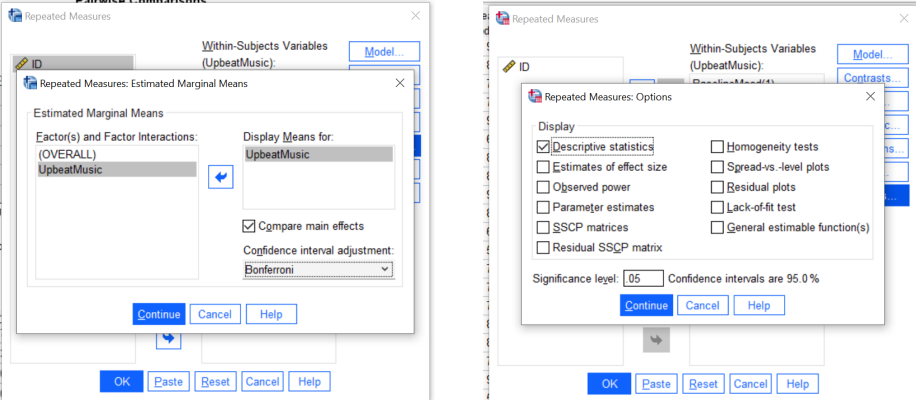
Click “EM Means” → Put the IV in the “Display Means for” → Click “Continue”.
Click “Options” → Tick “Descriptive Statistics” → Click “Continue” → Click “OK”.
Interpretation:
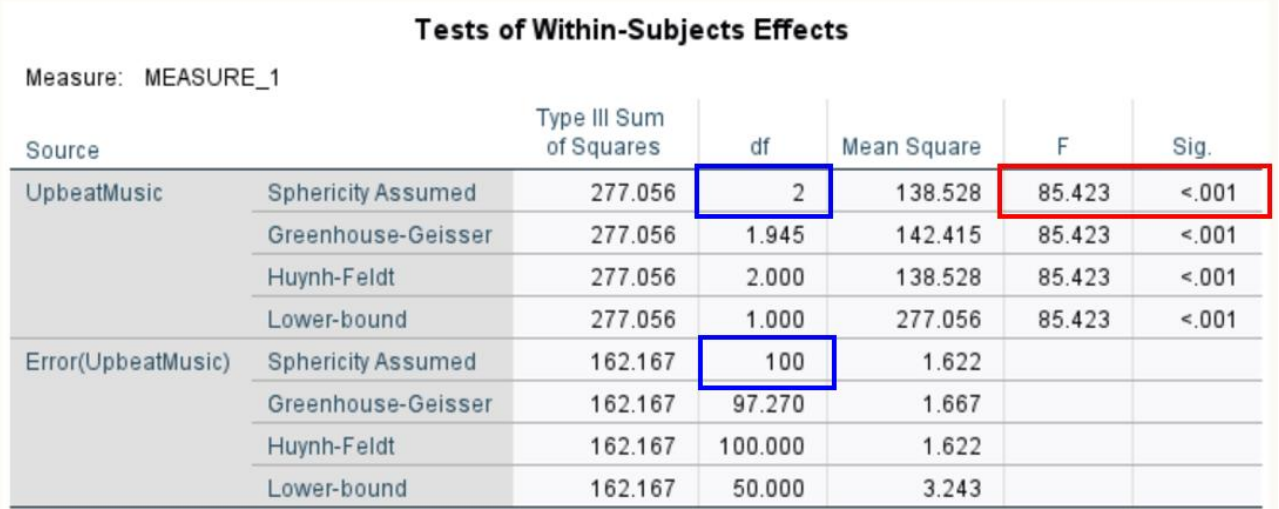
The first part has the IV, see the row with Sphericity Assumed:
If sig (p) <.05, there is a significant change between the conditions.
If sig (p) >.05, there is no significant change between conditions. (Tests of Within-Subject Effects table).
Only if there is significant change:
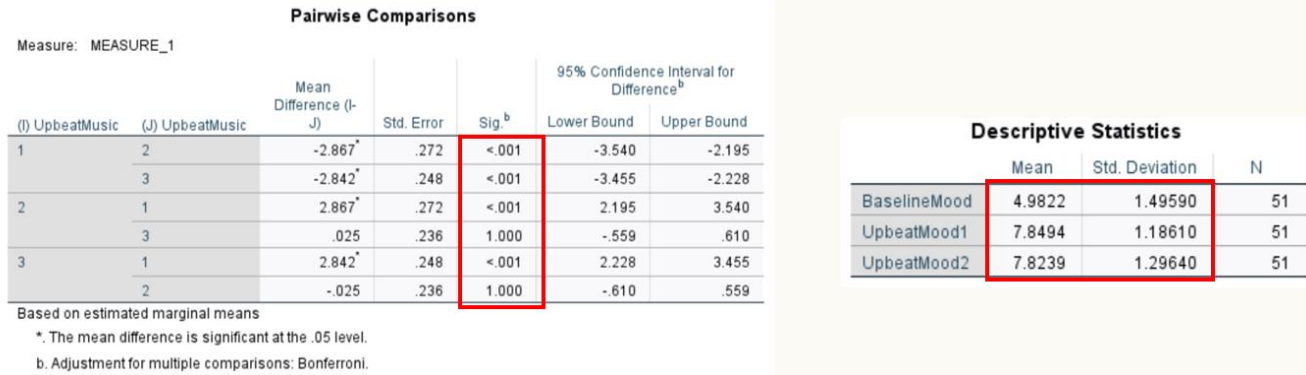
See sig” (post hoc test).
Conditions are analysed as pairs.
See which pairs significantly change and which don’t (Pairwise Comparison table).
Only for conditions which have significant changes:
Look at Mean of each condition to see which condition is higher and lower (Descriptive Statistics).
Template:
What test you ran and what variables were plugged in.
Is there a significant difference between group.
Report the “equation” above with the values.
Interpretation:
If significant: Which conditions had changes.
If not significant: Similar scores across conditions.

