CS102: Searching Algorithms
Linear Search
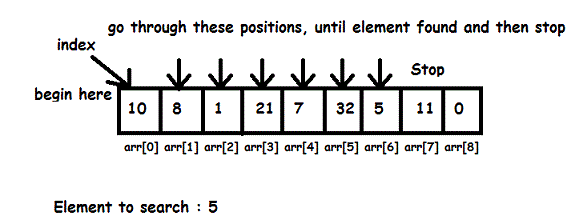
CoPilot Explanation:
How It Works:
Linear search involves checking each element of a collection (like an array or list) sequentially until the target element is found or the entire collection has been traversed. It doesn't require the data to be sorted.
Steps:
Start at the beginning of the array.
Compare each element with the target value.
If a match is found, return the index (or relevant information).
If no match is found after checking all elements, return an indication that the value isn't present (e.g.,
-1).
Advantages:
Easy to implement and understand.
Works on unsorted data.
Disadvantages:
Inefficient for large datasets; time complexity is O(n), where
nis the size of the array.
Example Code in C++:
#include <iostream>

using namespace std;

int linearSearch(int arr[], int size, int target) {
    for (int i = 0; i < size; i++) {
        if (arr[i] == target) {
            return i; // Return the index where the target is found
        }
    }
    return -1; // Return -1 if the target is not found
}

int main() {
    int arr[] = {4, 2, 9, 7, 5};
    int size = sizeof(arr) / sizeof(arr[0]);
    int target = 7;
    int result = linearSearch(arr, size, target);

    if (result != -1) {
        cout << "Element found at index " << result << endl;
    } else {
        cout << "Element not found in the array." << endl;
    }

    return 0;
}
My Explanation:
Example: Linear Search
// Linear Search in C++
#include <iostream>

using namespace std;

int search(int array[], int n, int x) {
  // Going through array sequencially
  for (int i = 0; i < n; i++)
    if (array[i] == x)
      return i;
  return -1;
}

int main() {
  int array[] = {2, 4, 0, 1, 9};
  int x = 1;
  int n = sizeof(array) / sizeof(array[0]);
  int result = search(array, n, x);
  (result == -1) ? cout << "Element not found" : cout << "Element
found at index: " << result;
}
Binary Search
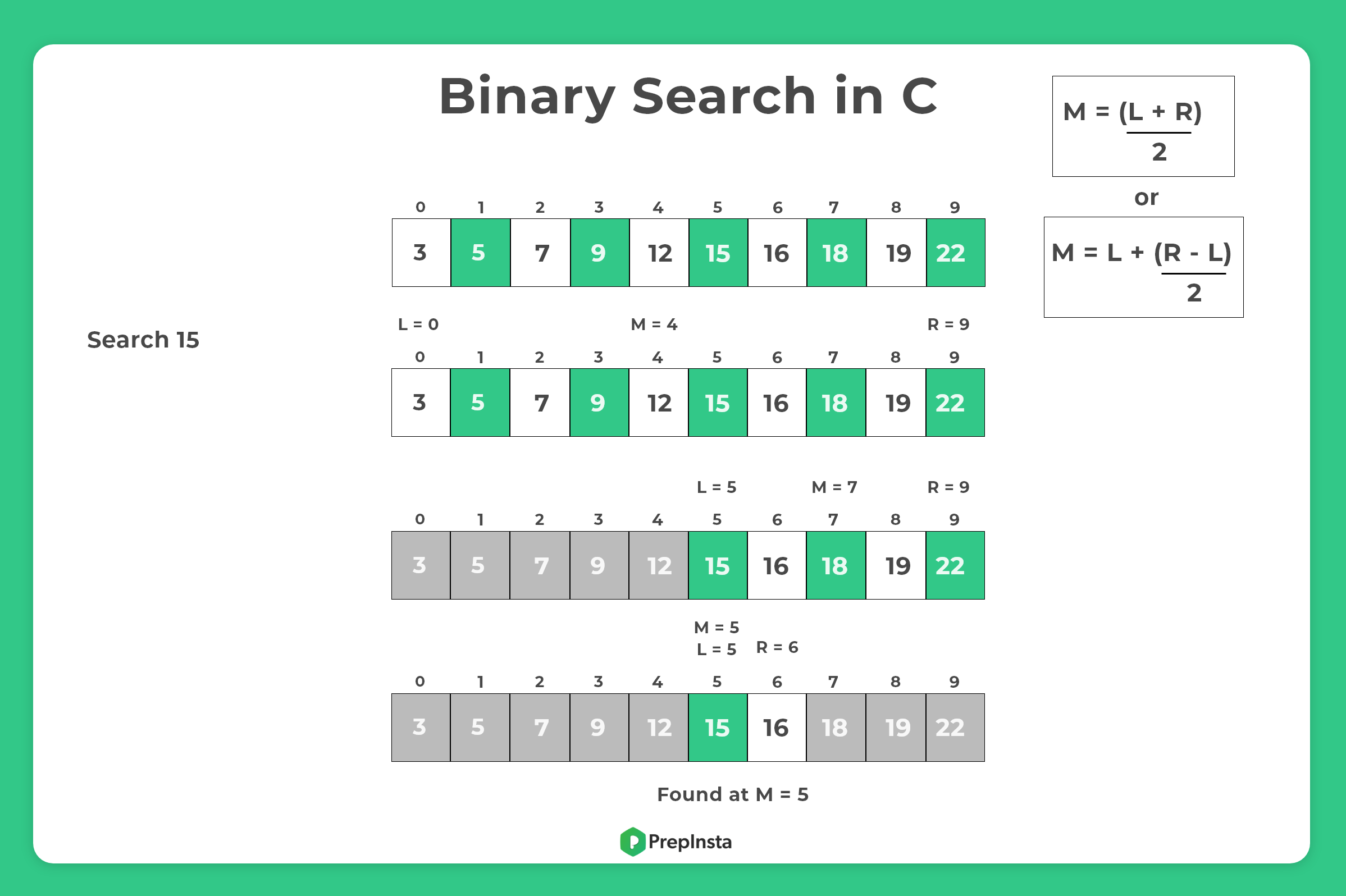
CoPilot Explanation:
Binary search is an efficient searching algorithm often used for sorted datasets. Its key idea is to repeatedly divide the search space in half to narrow down the location of the target element.
How It Works:
Binary search starts by comparing the target value to the middle element of the sorted collection. Depending on whether the target is greater or less than the middle element, the algorithm decides to focus either on the left half or the right half of the collection. This process continues recursively or iteratively until the target is found or the search space is exhausted.
Steps:
Ensure the array or collection is sorted.
Set two pointers: one at the beginning (
low) and one at the end (high) of the array.Calculate the middle index:
mid = (low + high) / 2.Compare the element at
midwith the target:If they match, return the
midindex.If the target is smaller, narrow the search to the left half (
high = mid - 1).If the target is larger, narrow the search to the right half (
low = mid + 1).
Repeat until the target is found or the
lowpointer exceeds thehighpointer.
Advantages:
Fast for large datasets: Time complexity is O(log n), where
nis the size of the array.Efficient for sorted data: Requires no additional data structures.
Disadvantages:
The array must be sorted; if it's not, you need to sort it first, which adds overhead.
Example Code in C++:
#include <iostream>

using namespace std;

\int binarySearch(int arr[], int size, int target) {
    int low = 0;
    int high = size - 1;
    while (low <= high) {
        int mid = low + (high - low) / 2; // Calculate the middle index safely
        if (arr[mid] == target) {
            return mid; // Element found, return the index
        } else if (arr[mid] < target) {
            low = mid + 1; // Focus on the right half
        } else {
            high = mid - 1; // Focus on the left half
        }
    }
    return -1; // Element not found
}

int main() {
    int arr[] = {2, 4, 6, 8, 10, 12, 14};
    int size = sizeof(arr) / sizeof(arr[0]);
    int target = 10;
    int result = binarySearch(arr, size, target);

    if (result != -1) {
        cout << "Element found at index " << result << endl;
    } else {
        cout << "Element not found in the array." << endl;
    }

    return 0;
}