5 Access Control in Larger Networks
Access Rights
Access rights determine what users are allowed to do (read, write/change, execute).
These rights can vary based on user groups, attributes, or roles.
Example: "All Monash students are allowed to access this website."
One method of defining access rights is through Access Control Lists (ACLs).
ACLs list who (individual user, role, set of attributes) is allowed to do what.
ACLs do not scale well.
In a company with 1000 staff managing 200 applications, 2 million entries would be needed and maintained across a network.
Ticket or Token-Based Access Control
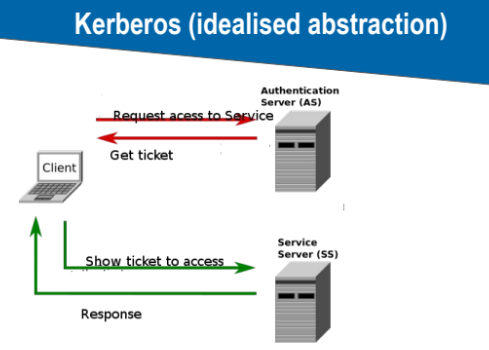
A central server checks authenticity and issues tickets.
A ticket contains identity information and can also restrict capabilities (i.e., what the user is allowed to do).
Examples: Kerberos, Microsoft Active Directory
The goal is to make access control manageable and usable.
Kerberos (Idealised Abstraction)
Single Sign-On
Benefits:
Log in once and access many services (e.g., Monash University).
Very convenient and high usability.
Drawbacks:
Single point of failure.
Needs secure implementation and high-level control.
Usually one of the first targets for network intruders.
Main Goal of Access Control
Limit the damage that can be done by users or groups of users.
Privilege escalation is a common goal for attacks.
There are many ways access control can fail.
Circumventing Access Control
Methods:
Weaknesses in software, interfaces, protocols.
Physical attacks (remove hard disk, access internal buses, etc.).
Race conditions, feature interaction problems.
Connecting unauthorized devices (USB).
Social engineering.
Additional Security Mechanisms
Hard disk encryption.
Backups.
Security updates.
Reduce the number of services / reduce complexity.
Trusted Computing (special security hardware).
Disconnect critical devices.