Lecture 16 Network Mgt, CDN, Load Balancing, CMS
Network Management
Definition: The overarching function of network management is to ensure efficient resource availability and consumption for users.
Tools: Network management tools include various hardware and software aimed at assisting network administrators.
Key Functions of Network Management
Network Administration:
Tracking resources such as switches, routers, and servers.
Performance monitoring and software updates.
Network Operation:
Ensures overall network performance is optimal.
Tasks include monitoring activities and proactively resolving issues.
Network Maintenance:
Upgrades and fixes of network resources.
Involves collaborative work with network administrators.
E.g., replacing network gear like routers and switches
Network Provisioning:
Configuring resources to support services (e.g., accommodating more users).
Managed vs. Unmanaged Devices
Managed Devices:
Offer configurability, management, and monitoring capabilities.
Higher initial cost but potential long-term savings.
Capable of reporting operational issues.
Standards and Protocols
SNMP (Simple Network Management Protocol):
The most commonly used protocol for managing network devices, utilizing software agents on managed devices.
Data management is done via the Management Information Base (MIB).
Designing for Network Performance
Allows manager to monitor performance and configuration on devices on network
system management software
application management software
Performance Management
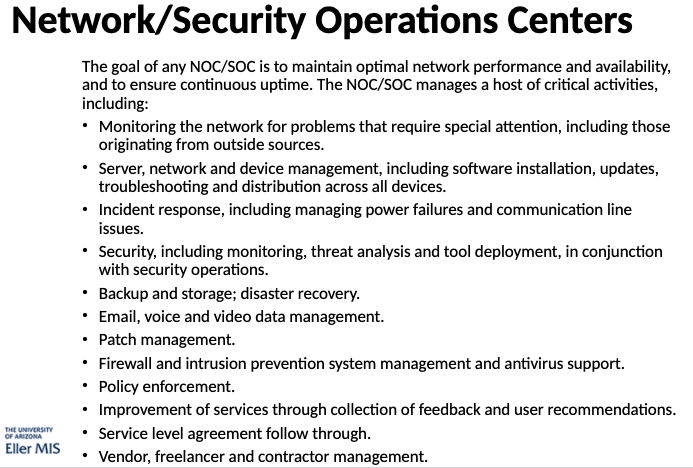
Orgs use network operation centers (NOCs) to monitor networks using network management software
NOCs are a centralized location where IT teams monitor performance and health
SOC and NOC serve as the first line of defense against network attacks
Cloud Based Based Network Operations Center
Provides central dashboard for making connection between branch offices, data centers, and VPC,s
Network policies automate network management and security tasks
helps monitor network health, security, and performance
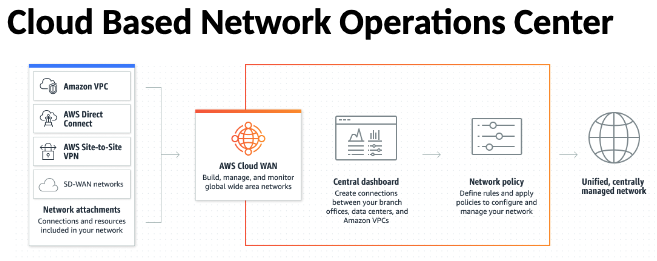
Link data centers, branch offices, and cloud resources to extend WAN to the cloud
Load Balancing
Definition: Load balancing efficiently distributes incoming network traffic across a group of backend servers.
Importance: Essential for modern high-traffic websites.
Importance: modern computing sometimes requires adding more servers
Role of Load Balancer:
Acts as a ‘traffic cop’ for server requests.
Routes client request across all servers
Maximizes utilization without overburdening a single server.
Automatically redirects traffic in case of server failure.
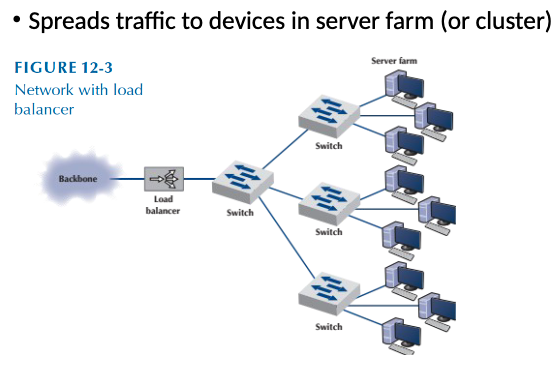
L4 and L7 switches can inspect TCP session state or HTTP session state
Perform mapping of requests to back end servers based on dynamically changing membership info
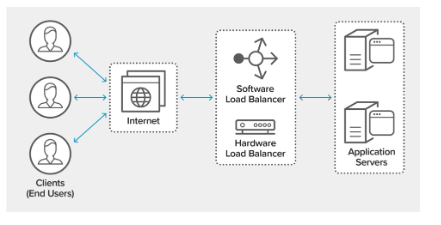
Load Balancer Functions
Distributes client requests/network load across multiple servers.
Ensures high availability by routing only to online servers.
Flexible architecture to add or remove servers based on demand.
Load Balancing Algorithms
Round Robin: Sequentially assigns requests to servers.
Least Connections: New requests directed to server with least active connections. Computing capacity is factored into determining least conn
Least Time: Chooses based on fastest response and fewest connections.
IP Hash: Based on key defined Uses client IP for request distribution.
Random with Two Choices: Randomly picks two servers and sends the request to one determined by least connections.
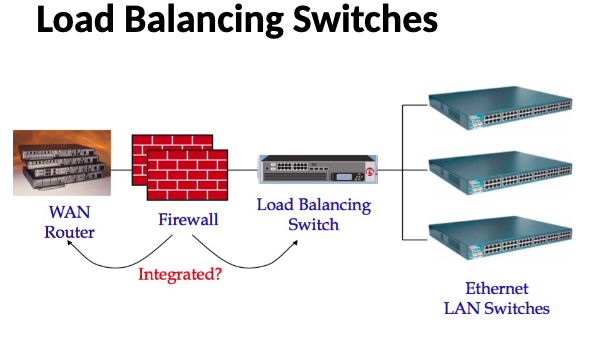
Amazon Elastic Load Balancer(ELB)
distributes incoming application traffic across multiple targets, such as Amazon EC2 instances, containers, IP addresses, and Lamba function
handle varying load of app traffic in single availability zone or across multiple availability zone
Content Delivery Networks (CDNs)
Definition: A network of servers designed to deliver content rapidly and reliably.
Supplemental: Top global CND provides have spent billions to expand their massive infrastructure underneath growth of the Web
Supplemental: Layer in the internet ecosystem, content owners pay CDN operators to deliver content to end users
Supplemental: CDN pays ISP’s, carriers, and network operators for hosting it’s servers in data centers
Purpose: Offload web traffic, reduce latency, and provide scalability.
Market Impact: CDNs accounted for 80% of internet traffic by 2024.
Caching in CDNs
Goal: Minimize data transfer by storing copies of data to reduce repeated requests.
Keeps copies of data
Examples:
Web browsers cache recent items.
Web proxies save bandwidth by caching URLs.
save bandwith/ time when multiple people locally access same remote url
DNS resolvers cache resource records
Network file systems cache read/written data
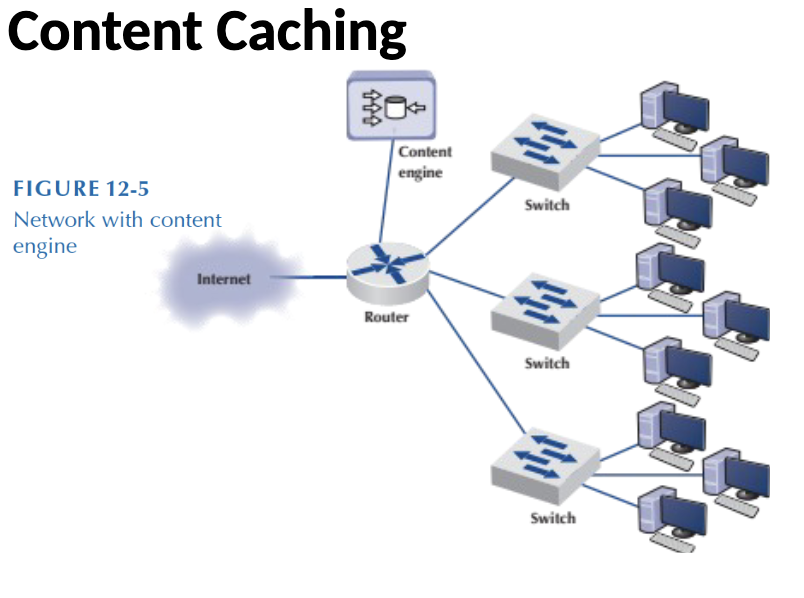
How Caching Works
To improve speed and connectivity, CDN will place servers at exchange points between different networks
IXP’s are primary locations where IP’s connect to provide access to traffic on different networks
CND provider can reduce costs and transit times in high speed data delivery
Benefits of CDN
Reduced load time and latency.
Enhanced availability and reliability through load balancing and failover strategies.
Strategic placement in high-traffic locations aids in quick content delivery.
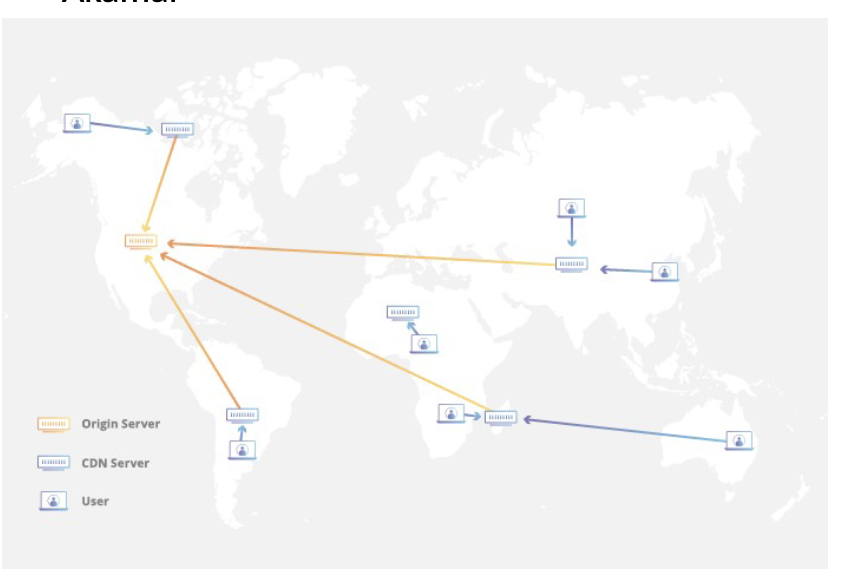
Reliability and Redundancy
Load balancing distributes network traffic evenly across several servers
intelligent failover provides uninterrupted service even if one or more of the CDN servers go offline due to hardware malfunctions
analyst routing transfers traffic to another available data center ensuring that no users loses access to the website
CDN Operations
Often make up 90% of web traffic
multimedia eliminates consistency problems
Content is cached at edge servers close to users.
Edge servers reduce the distance data travels, which improves load times significantly.
Without CDN
Amount of latency is increased by the total distance and time it takes each router to process the request
Once request is processes and responds, it sends info back through a similar sequence of routers
Measurement is recognized as RTT “round trip time”
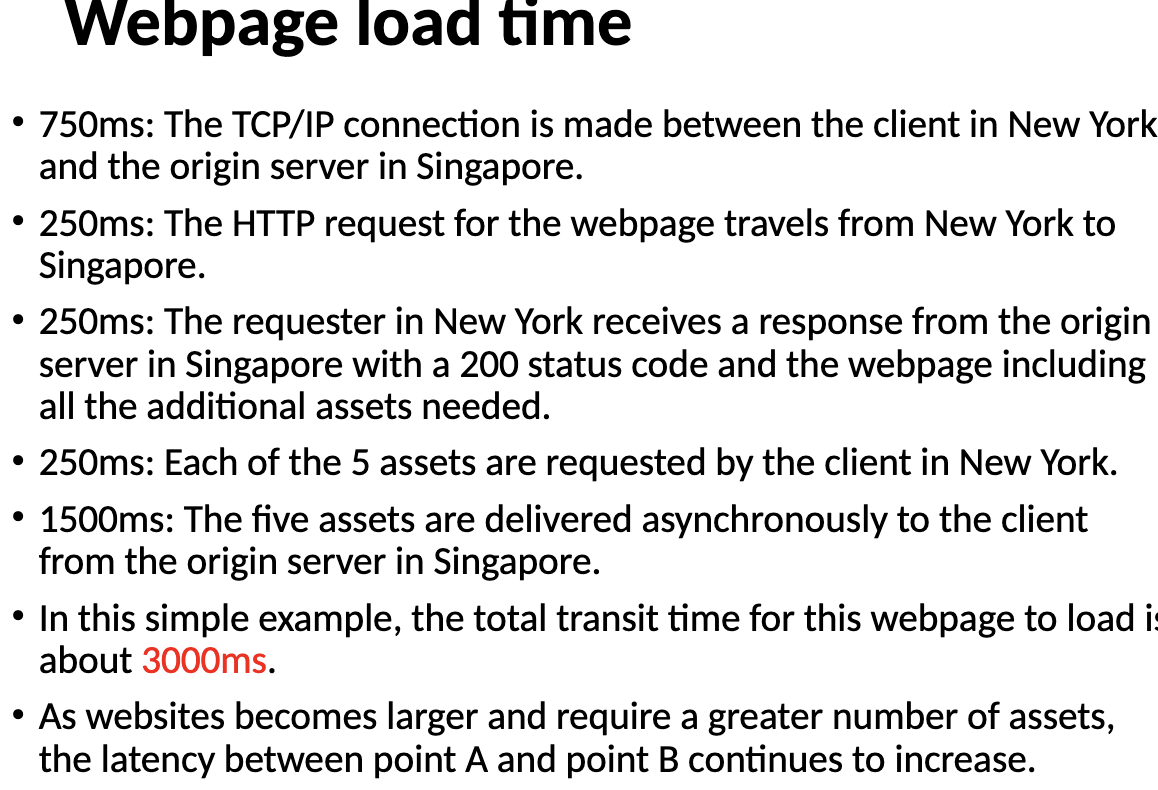
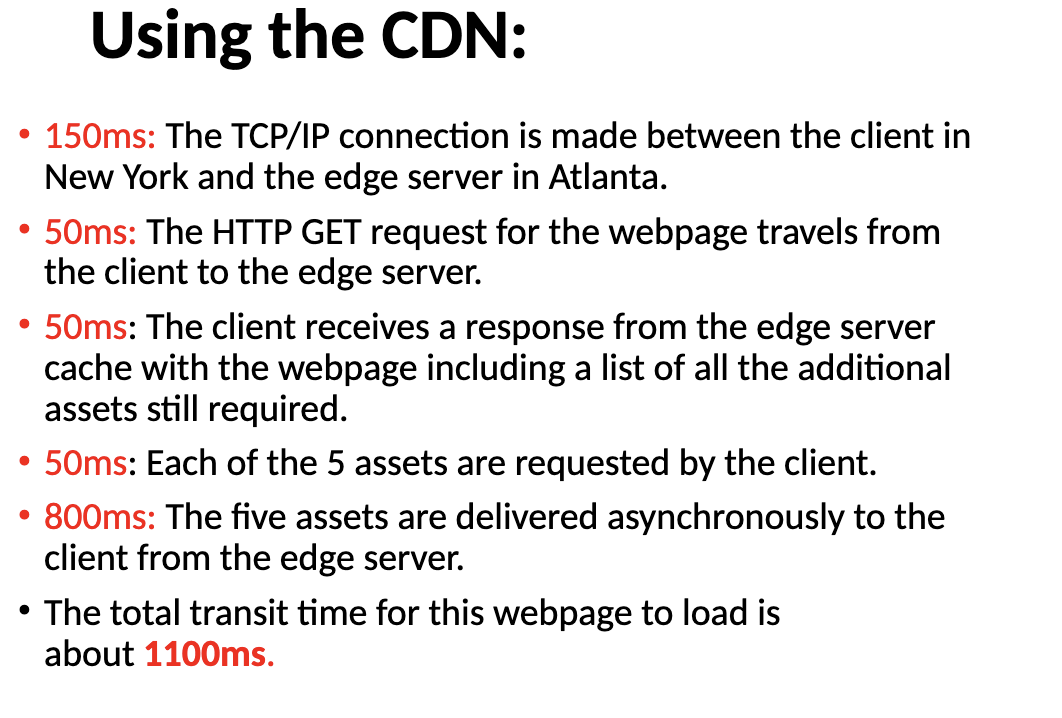
Performance Comparison
reduction is distance between the client and content creates a 1900ms improvement in latency for static content, representing a 2 second improvement in load time
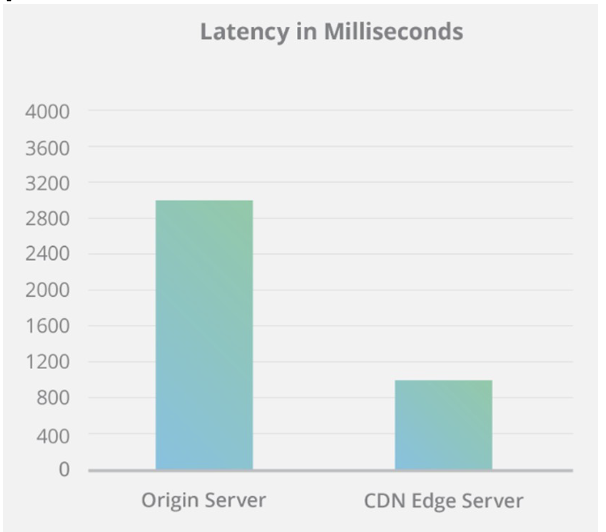
CDN Loading Content
Improves latency by pulling static content files from origin into distributed CDN network called caching
After TCP handshake, client makes http request to CDN network
If not cached CND will download content from the origin by making request between origin server and edge server
4 Steps during CDN caching
When user request’s a webpage, the user request is routed to CDN’s nearest edge server
edge server makes a request to the origin server for the content user requested
the origin responds to the edge servers request
the edge server responds to the client
CDN Edge Server
computer that exists at the logical extreme or ‘edge’ of a network
edge server often serves as connection between separate networks
primary purpose of CDN edge server is to store content as close as possible to requesting client machine
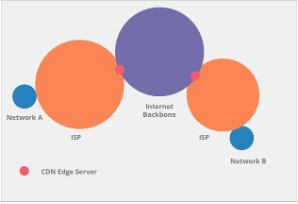
Differences between Edge Server and Origin Server
Origin Server
receives internet traffic when not using CDN
Each internet request must return to physical location of origin server
creates increase in load times thus increasing server from requesting client machine
Edge Server
store cached content in strategic locations to take load off servers
Reduce time for web resource to load
Moving images, HTML, Javascript, as close to requesting client machine
Content Management Systems (CMS)
Definition: Software for creating, managing, and modifying digital content.
Types:
Enterprise Content Management (ECM): Supports multiple users focused on document management, asset management, and records.
Web Content Management (WCM): Facilitates collaborative authoring for websites. May include text, embed graphics, photos, video, audio, maps
Installation Types
On-Premises: Installed on local servers (e.g., WordPress.org, Drupal).
Approach usually taken by businesses that want flexibility
Cloud-Based: Managed by vendors (e.g., WordPress.com, SquareSpace).
Cannot be modified for the customer
Core Features of CMS
Indexing, Search, and Retrieval: Index all data for Easy access to content via search functions and to search by attributes
Format Management: Converts various documents into web-friendly formats. E.g., HTML, PDF
Revision Control: Tracks and manages changes made to content.
Publishing Functionality: Users can create or modify content through templates and wizards.
Additional Features
SEO-friendly URLs.
Integrated help systems and discussion boards.
Group-based permission systems for content access control.
Easy wizzard based install and versioning procedures
Content hierarchy with unlimited depth and size
minimal server requirements
Support for multiple languages and minimal server requirements.
integrated audit logs
Next Steps
Prepare for Python for Networking Part 1 in the next lecture.