CSC520 Chapter 2 Summary: Operating-System Structures
Operating System Services
Provide an environment for program execution by managing resources and offering services to users and programs.
Functions helpful to the user:
User interface (UI): Allows users to interact with the OS. Includes:
Command Line Interface (CLI): Users interact by typing commands.
Graphical User Interface (GUI): Uses icons, buttons, and menus for interaction.
Batch interface: Executes commands from a script without user interaction.
Program execution: Loads and runs programs, allocating necessary resources such as memory and CPU time.
I/O operations: Manages input/output operations between the program and hardware devices.
File-system manipulation: Provides services for creating, deleting, searching, and managing files and directories.
Communications: Enables information exchange between processes or systems via shared memory or message passing. This includes networking capabilities.
Error detection: Detects hardware and software errors, taking appropriate actions to ensure system stability.
Functions ensuring efficient system operation:
Resource allocation: Allocates system resources such as CPU time, memory, and I/O devices to different users or jobs to optimize system performance.
Accounting: Tracks the usage of system resources by users and applications for performance analysis and billing purposes.
Protection and security: Controls access to system resources, provides user authentication, and protects against unauthorized access and malware.
User Operating System Interface
Allows users to interact with the OS, providing various methods for issuing commands and receiving feedback.
Command-Line Interface (CLI):
Direct command entry: Users type commands that are directly interpreted by the OS.
Implemented in kernel or by system program (shells): Shells like Bash or PowerShell provide a command-line interface.
Graphical User Interface (GUI):
Icons, buttons, menus: Visual elements for easier interaction.
Mouse, keyboard interaction: Input devices to control the GUI.
Touchscreen Interfaces:
Gestures, virtual keyboard, voice commands: Modern interfaces for mobile devices and touch-enabled systems.
System Calls
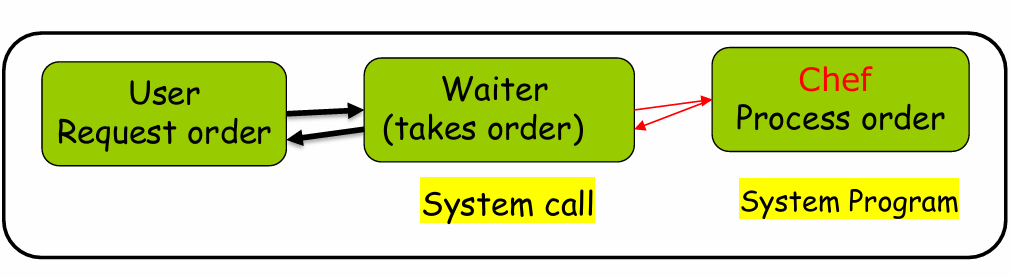
Programming interface to OS services, allowing user-level programs to request services from the OS kernel.
written in a high-level language (C or C++)
Accessed via Application Programming Interface (API): Standard libraries that provide access to system calls.
Common APIs: Win32 API, POSIX API, Java API.
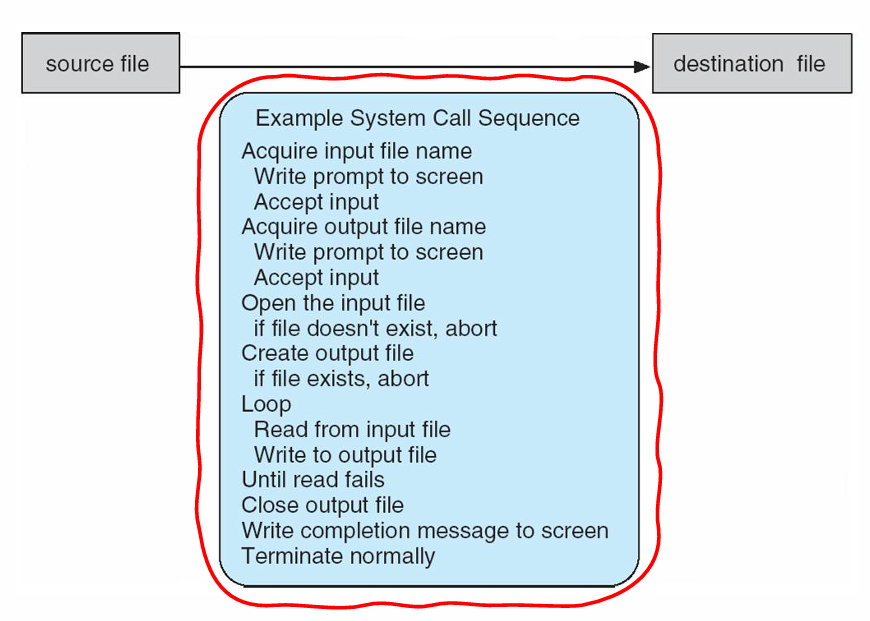
System call implementation:
Each call has a number, table indexed: System calls are identified by unique numbers.
Invokes system call in OS kernel and returns status: Transfers control to the OS kernel to execute the requested service.
Programmer’s View: Only needs to follow the API
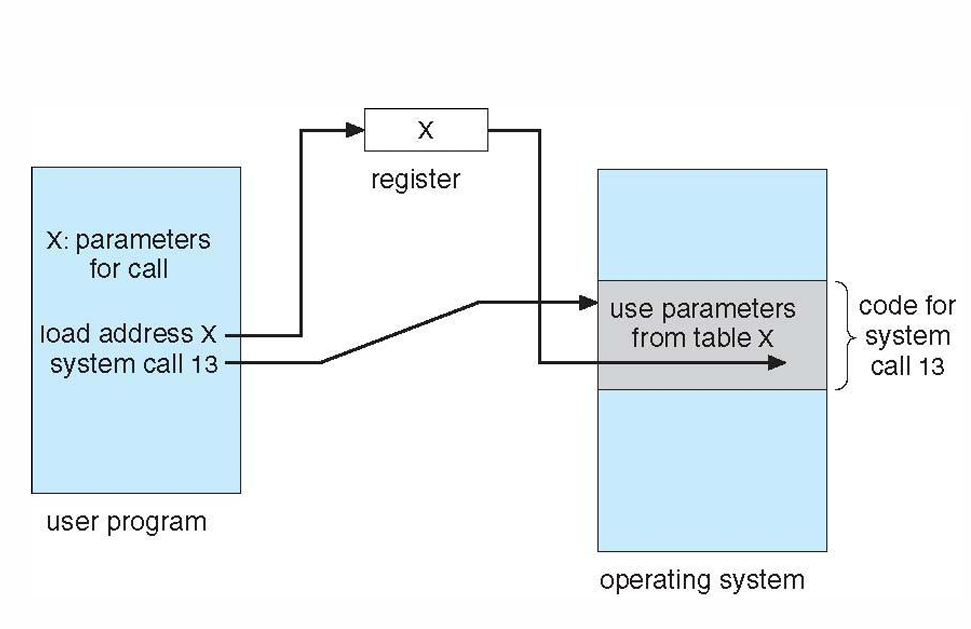
System Call Parameter Passing:
Register passing: Parameters are passed in CPU registers.
Block/Memory Table passing: Parameters are placed in a memory block, and the address of the block is passed to the system call.
Stack Passing: Parameters are pushed onto the stack before the system call.
Types of System Calls
Process control: Creating, terminating processes, managing process attributes.
File management: Creating, deleting files, reading, writing, and manipulating file attributes.
Device management: Requesting, releasing, and controlling devices.
Information maintenance: Getting and setting system time and date, querying system properties.
Communications: Sending and receiving messages between processes or systems.
Protection: Controlling access to resources, setting permissions, and managing security policies.
System Programs
Provide a convenient environment for program development and execution, often acting as utilities to enhance OS functionality.
Types: File manipulation, status information, file modification, programming language support, program loading/execution, communications, background services, application programs.
Operating System Design and Implementation
Goals:
User goals: The OS should be convenient, easy to learn, reliable, safe, and fast.
System goals: The OS should be easy to design, implement, maintain, flexible, reliable, error-free, and efficient.
Policy vs. Mechanism: Separate what will be done (policy) from how to do it (mechanism) to allow flexibility.
Implementation: OS are typically implemented using a mix of languages (C, C++, assembly).
Emulation: Running an OS on non-native hardware or within another OS environment.
Operating System Structure
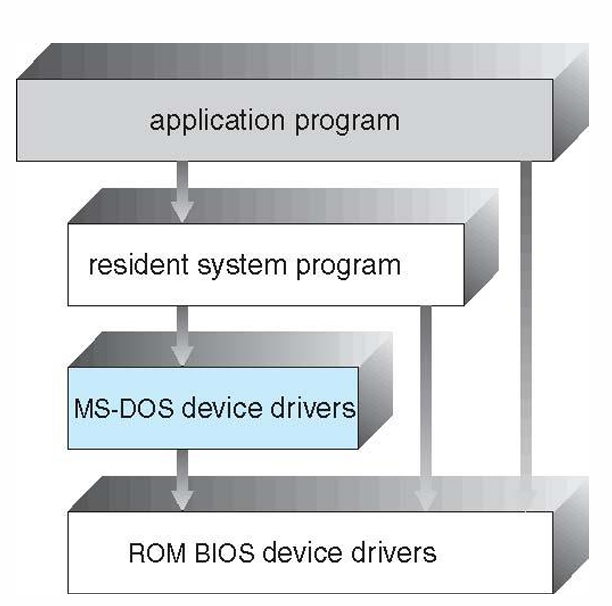
Simple structure: MS-DOS (least space, not modular).
Non-Simple structure: UNIX (two parts: systems programs, kernel).
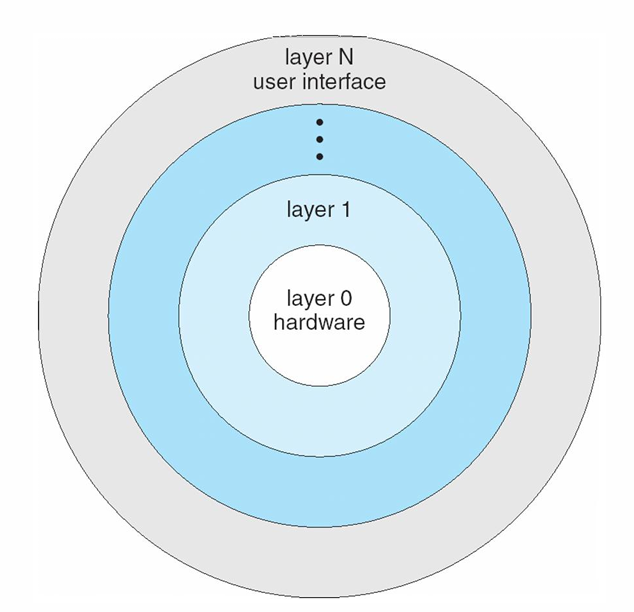
Layered approach: Layers are built on top of lower layers, providing modularity.
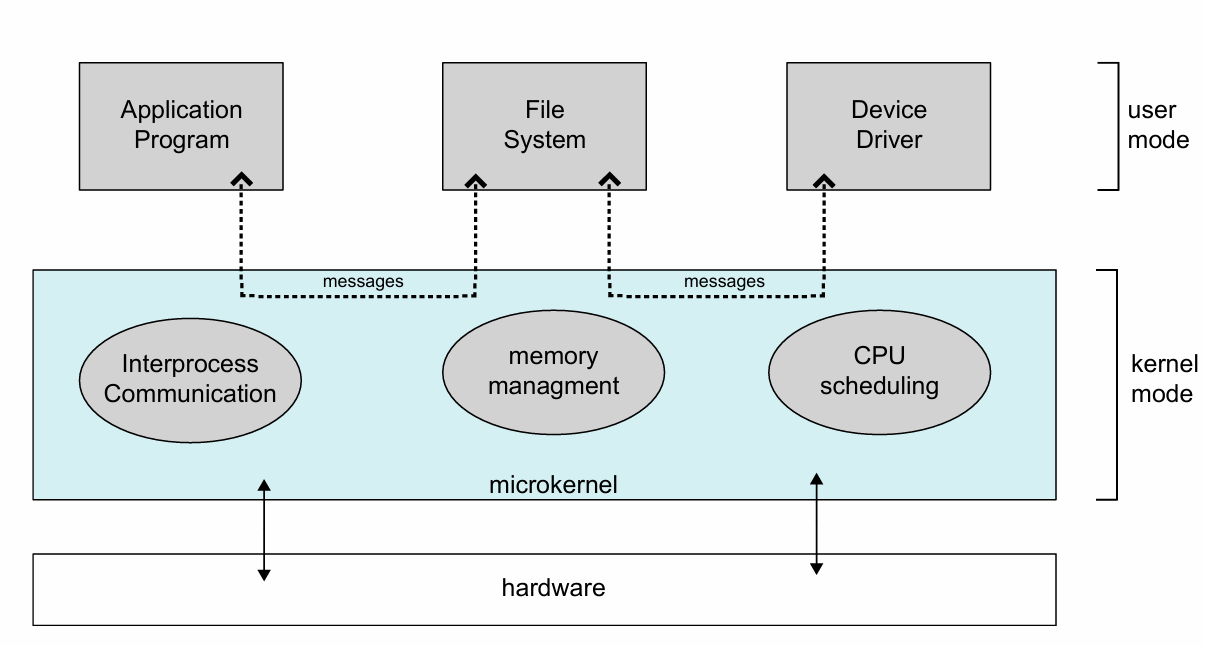
Microkernel: Moves kernel components to user space (e.g., Mach).
Benefits: extensible, portable, reliable, secure.
Detriments: performance overhead due to increased communication between user and kernel space.
Operating-System Debugging
Debugging: identifying and resolving errors (bugs) that affect system stability, performance, or security
Method | Description | Use Case |
|---|---|---|
Log Files | Records errors, warnings, and system events | Diagnosing service failures. |
Core Dump | Snapshot of a crashed process’s memory | Debugging application crashes (e.g., segmentation faults). |
Crash Dump | Captures kernel memory after an OS failure | Analyzing kernel panics/hardware issues. |
Tracing | Logs system activities in real-time | Tracking system calls or scheduler behavior. |
Profiling | Samples CPU instructions to find bottlenecks | Optimizing performance (e.g., CPU usage). |