WEEK 1: INTRO TO AIS
Learning Objectives
Part 1: Hardware and Software
Describe types of computer hardware and software:
IT hardware components: processors, input, output, storage & data communication devices
Different types of computer software
Part 2: Internet and Accounting
Understand basic internet concepts and significance of XBRL in accounting
Part 3: Data and Information
Distinguish between data and information and their characteristics
Explain how to assess the value of information and decisions made by organizations
Components of Computer Hardware
Categories
Input Devices
Devices that can capture data from the source
Source documents, data transcription (keyboard, POS devices)
Bar code readers, MICR, OCR, plastic cards
Examples
Keyboard for data entry
POS systems for sales transactions
Barcode scanners for inventory management
MICR for banking data processing
OCR for document scanning
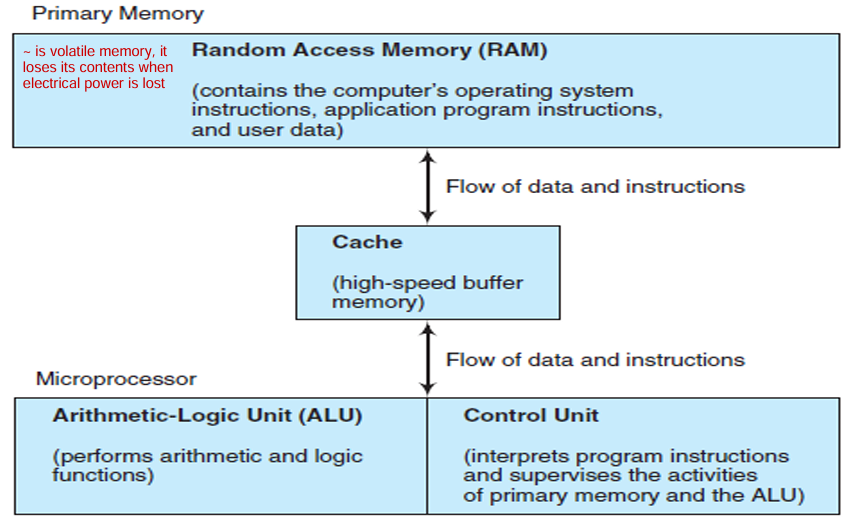
Processing Devices
Devices that are meant to do calculation & computation
Central Processing Unit (CPU), Primary Memory (RAM), Microprocessors
Output Devices
Printers, video output, multimedia systems
Storage Devices
Importance of Secondary Storage
Stores data on permanent media that maintains their accuracy & integrity, yet permits access
Types include:
Hard drives, CD-ROMs, DVDs, and USB drives
Secondary storage: Hard disks, CDs, DVDs, Flash memory
Data Communications & Networks
Communication technologies:
Examples
Fibre to the Home (FTTH): High-speed connection for residences and businesses
Digital Subscriber Line (DSL): Uses existing phone lines, cheaper but slower than fiber
Local Area Network (LAN): Advantages include communication facilitation, equipment sharing, file sharing, cost saving
Wide Area Network (WAN): Uses satellites to share data
Client/Server Computing
Distributed processing between servers and clients
Servers share resources like databases to clients
Wireless Communications
Wi-Fi and Wireless application protocol (WAP) for mobile access
Radio frequency identification (RFID) for inventory tracking
Software Overview
Types
Operating Systems
Programs that allow devices to run itself & run application software
Manage hardware & software
Support graphical user interfaces (GUIs)
Example: Windows 8, Mac OS, Android
Application Software
Support specific tasks (e.g., spreadsheets, accounting)
Programming Languages
Used to develop application software (e.g., C++, Java)
The Internet and World Wide Web
Concepts
Internet: Collection of local & wide-area networks that are connected via the Internet backbone; uses Internet Protocol (IP) addresses for data transmission
World Wide Web: Is the system we use to access the Internet
Web Browser: used to view graphic files on the Internet
Hypertext Markup Language (HTML): an editing language used to create web pages
Hypertext Transfer Protocol (HTTP): used to transfer web pages from one device to another
Accounting on the Internet - XBRL
Definition
XBRL (eXtensible Business Reporting Language): A subset of XML for business reporting
Uses tagged data for standardized reporting, facilitating data exchange and analysis
XML (eXtensible Markup Language): similar to HTML but different because the tags are extensible <….> & they describe the data rather than indicating their display
Benefits of XBRL
Streamlined financial reporting
Reduced data entry & errors via standardized formats
Improved efficiency in information exchange
Drawbacks of XBRL
Initial transition costs and labor-intensive tagging, which also increases associated costs
Learning curve for users to adopt standards
In some countries there are no current requirement for XBRL filings (e.g., Malaysia)
AIS and Business Processes
Data & Information
Data is facts; information is organized data
Value of information = Benefits (e.g. improved decision making) - Cost (e.g. time used to get information)
7 characteristics of useful information:
Relevant
Reliable
Complete
Timely: provided in time to make the decision
Understandable
Verifiable: Two independent people can produce the same conclusion
Accessible
Key Concepts
Transaction data is used to create financial statements called transaction processing
The flow of information between internal and external parties in an AIS involves a give-get exchange grouped into business processes or transaction cycles
Identifying transaction types between organizations and external entities:
Revenue cycle (e.g. give goods — get cash), Expenditure, Production, Payroll, Financing cycles
Definition of Accounting Information System (AIS)
Collects, records, stores, and processes data for decision-making
Components include:
Users, processes, technology,
Controls for data security
How AIS Adds Value
Enhances product/service quality while reducing costs
Improves operational efficiencies & its supply chain and supports decision-making
Improves internal control structure
Sharing knowledge
Value Chain in AIS
Links activities that add value to the customer:
Primary Activities: Directly add value (logistics, operations, marketing, service)
Support Activities: Enable primary activities to be effective (HR, technology, infrastructure)
Supply chain, an extended system that includes the organizations value chain, suppliers, distributors and customers.
Summary of Learning Outcomes
Hardware and software components
Basic internet concepts and the role of XBRL in accounting
Distinctions between data and information, organizational decision-making, and AIS value addition.