Module 1: Understanding Digital Forensics
An Overview of Digital Forensics (1 of 2)
Definition: Digital forensics involves the application of computer science and investigative procedures for legal purposes. It entails the analysis of digital evidence after the following steps:
Obtaining proper search authority
Ensuring chain of custody
Validation using mathematics
Utilizing validated tools
Ensuring repeatability in findings
Reporting findings
Possible expert presentation
ISO Standard: In October 2012, an ISO standard for digital forensics was ratified, defining necessary personnel and methods for acquiring and preserving digital evidence.
An Overview of Digital Forensics (2 of 2)
Legal Framework:
The Federal Rules of Evidence (FRE) ensures uniformity in federal proceedings, ratified into law in 1973. Many state rules align with the FRE.
The Fourth Amendment to the U.S. Constitution protects individuals from unreasonable search and seizure. It may not require separate search warrants for digital evidence.
All U.S. jurisdictions have established case law governing the admissibility of evidence derived from computers and digital devices.
Digital Forensics and Other Related Disciplines (1 of 3)
Investigation of digital devices encompasses:
Securely collecting data
Examining suspect data to derive details such as origin and content
Presenting findings in court
Applying legal standards to digital practices
Difference from Data Recovery:
Digital forensics differs from data recovery as data recovery focuses on retrieving known information deleted by accident or lost due to technical failures. In data recovery, the investigator is aware of what to look for; in digital forensics, the investigation seeks unknown elements.
Digital Forensics and Other Related Disciplines (2 of 3)
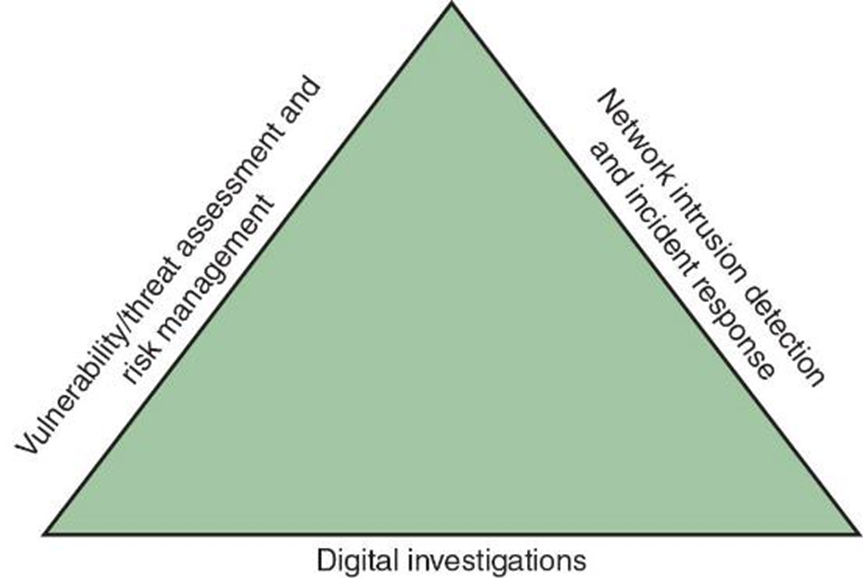
Investigations Triad: Digital forensics professionals often operate within teams, referred to as the investigations triad, involving collaboration and shared responsibilities.
Digital Forensics and Other Related Disciplines (3 of 3)
Vulnerability/Threat Assessment and Risk Management:
Tests and verifies the integrity of stand-alone workstations and network servers.
Network Intrusion Detection and Incident Response:
Implementing tools to detect intruder attacks by monitoring firewall logs.
Digital Investigations:
Managing investigations and conducting forensic analysis on systems suspected of containing relevant evidence.
A Brief History of Digital Forensics Tools
1990s Development:
International Association of Computer Investigative Specialists (IACIS) introduced training programs for digital forensics software.
The IRS established search-warrant programs.
ASR Data developed the Expert Witness software for Macintosh.
ILook is maintained by the IRS Criminal Investigation Division, and AccessData Forensic Toolkit (FTK) has gained recognition as a prominent commercial product.
Understanding Case Law
Challenges of Keeping Up with Technology: Current laws often fail to match the rapid pace of technological advancements, necessitating reliance on case law when statutes are insufficient.
Case Law Utilization: Legal counsel often references prior similar cases to resolve ambiguities in contemporary legal matters regarding digital evidence.
Examiners must stay updated on current court decisions regarding electronic search and seizure practices.
Developing Digital Forensics Resources
Knowledge Expansion Tips:
Acquire familiarity with Linux, macOS, and current Windows platforms.
Maintain networking with computing, network, and investigative professionals.
Join user groups such as the Computer Technology Investigators Network (CTIN) for discussing digital forensics challenges.
Consult external experts for diversification in knowledge and tools.
Preparing for Digital Investigations
Public vs Private Sector:
Public-sector investigations pertain to government entities engaging in criminal inquiries.
The Fourth Amendment restricts government search and seizure.
The Department of Justice (DOJ) regularly updates guidelines on digital searches.
Private-sector investigations primarily focus on policy violations rather than criminal acts.
Understanding Public-Sector Investigations (1 of 2)
Legal Foundations for Investigators:
Understanding laws surrounding computer-related crimes is pivotal, including knowledge of:
Standard legal processes
Search and seizure regulations
Criminal case development
Criminal inquiries usually initiate from a discovery of evidence or a witness alerting law enforcement to potential unlawfulness.
Understanding Public-Sector Investigations (2 of 2)
Roles in Public Investigations:
Digital Evidence First Responder (DEFR): Arrives at incident scenes, assessing circumstances to secure and preserve evidence.
Digital Evidence Specialist (DES): Analyzes data gathered and determines when additional specialists are necessary.
Affidavit: A sworn written declaration concerning allegation details, pivotal in substantiating legal claims. Must include supporting exhibits.
Understanding Private-Sector Investigations (1 of 5)
Scope of Private Sector Investigations:
Focuses on internal compliance issues and legal disputes such as wrongful termination claims.
Common private sector-related crimes include:
Email harassment
Discrimination claims
White-collar crimes, including data falsification, embezzlement, sabotage, and industrial espionage.
Understanding Private-Sector Investigations (2 of 5)
Policies in Private Investigations:
Essential company policies govern computer and network usage termed as Acceptable Use Policy.
An established line of authority defines:
Who can initiate investigations
Who can possess evidence
Who can access evidence
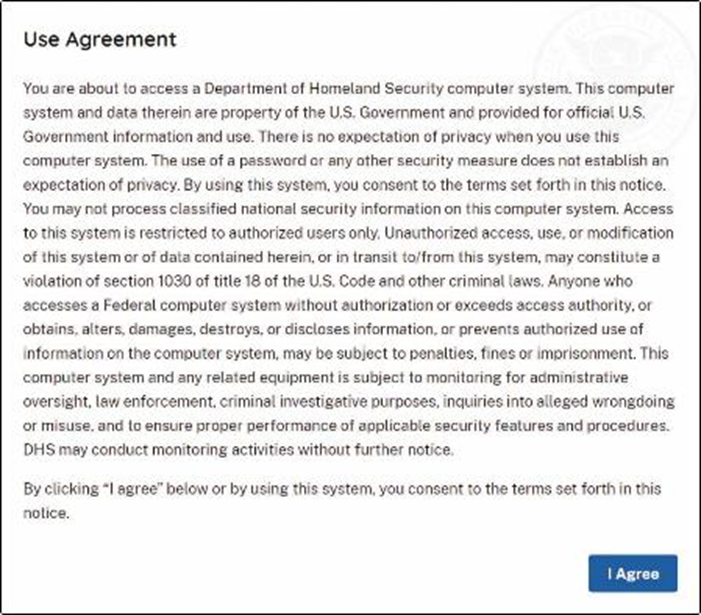
Businesses can preempt litigation by utilizing warning banners displayed on computer screens.
Understanding Private-Sector Investigations (3 of 5)
Warning Banner Example:
Understanding Private-Sector Investigations (4 of 5)
Authorized Requesters:
Organizations should specify who has the authority to commence investigations.
Evidence searches during private investigations look to substantiate possible rules breaches or asset attacks:
Common investigations include asset misuse, email misconduct, and internet abuse.
A private-sector investigator’s objective is to mitigate company risk.
Understanding Private-Sector Investigations (5 of 5)
Personal vs Company Property Clarification:
Distinguishing between personal and company property becomes complex with personal devices like smartphones or laptops.
The Bring Your Own Device (BYOD) policy indicates that any personal device connected to the company network is subject to corporate regulations.
Knowledge Check Activity 1-1
Statement: Digital forensics differs from data recovery because ___.
A. digital forensics is dealing with the unknown
B. in data recovery, you typically know what you are looking for
C. digital forensics may be conducted in criminal or civil cases
D. data recovery is easier
Correct Answer: B - In data recovery, the investigator has a definitive known quantity to seek.
Maintaining Professional Conduct
Key Elements of Professional Conduct:
Incorporates ethics, morals, and behavioral standards.
Investigators must always demonstrate the highest professional behaviors, applies by:
Maintaining objectivity in investigations
Preserving credibility through confidentiality
Continuous education and training is imperative to remain updated on evolving technology in hardware, software, networking, and forensic tools.
Maintaining a Digital Forensics Investigation
Investigator's Role: To gather evidence supporting the claim that a suspect committed a crime or violated policies.
Essential tasks include:
Investigating suspect's instruments to retrieve data.
Preserving evidence through replication onto separate systems.
Chain of Custody: The documentation of evidence handling from discovery until court presentation.
Five Steps of an Investigation
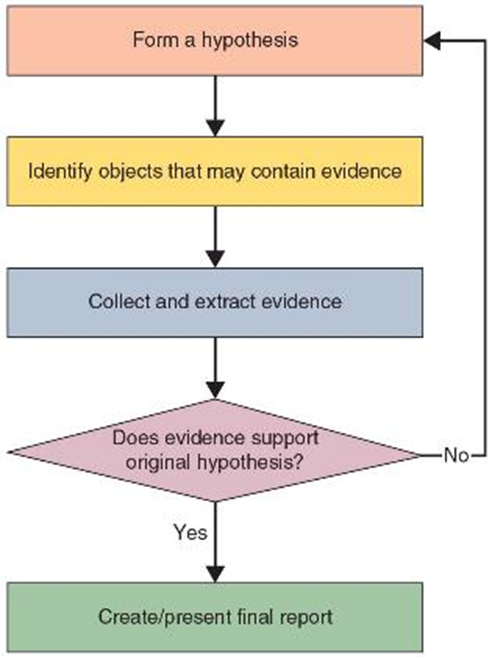
Methodology: Investigations involve a logical sequence of processes outlined in Figure 1-9
An Overview of a Computer Crime
Critical Functions: Computers can hold key information essential for law enforcement to:
Establish chains of events leading to criminal acts.
Collect evidence useful for securing convictions.
Procedures must be observed by law enforcement during evidence acquisition.
A preliminary assessment helps identify potential challenges followed by commencement of investigation and data retrieval.
Taking a Systematic Approach (1 of 7)
Problem-Solving Steps:
Make an initial assessment based on the case type.
Draft a preliminary design or approach for the case.
Develop a detailed checklist for tasks.
Identify the necessary resources for the investigation.
Acquire and duplicate the evidence drive.
Thoroughly identify potential risks involved.
Taking a Systematic Approach (2 of 7)
Continued approach strategies include:
Mitigation of identified risks.
Testing the investigation design.
Analyzing and recovering the digital evidence.
Investigating the retrieved data.
Producing the final case report.
Critiquing the case outcomes and processes.
Taking a Systematic Approach (3 of 7)
Case Assessment Metrics: Outline case specifics involving:
Current situation
Nature of the case
Detailed specifics
Type of evidence involved
Known disk format
Evidence location
From details, determine specific case requirements that need to be fulfilled.
Taking a Systematic Approach (4 of 7)
Investigation Plan Development: Must comprise the following activities:
Acquire evidence in accordance with legal standards.
Complete necessary evidence forms establishing chain of custody.
Secure transport of evidence to forensic labs.
Safeguard evidence in certified secure containers.
Prepare the forensic workstation for analysis.
Remove evidence from the secure container following protocol.
Taking a Systematic Approach (5 of 7)
Subsequent Activities in Investigation Plans:
Create a forensic duplicate of the evidence obtained.
Return original evidence to secure containers post-analysis.
Process copied evidence using forensic software tools for examination and intelligence extraction.
Taking a Systematic Approach (6 of 7)
Evidence Security Protocols:
Utilize evidence bags for secure cataloging.
Employ computer-safe materials such as antistatic bags.
Securely pack evidence in protective containers.
Seal containers with evidence tape, marking it with initials for verification.
Procedures for Private-Sector High-Tech Investigations
Employee Termination Investigations: Focus on cases related to the misuse of corporate assets during employment termination.
Common instances include workplace harassment issues.
Companies must enforce appropriate policies to maintain order.
Internet Abuse Investigations
Recommended steps for handling internet abuse cases include:
Employ standard forensic approaches.
Use appropriate tools for extracting webpage URL data.
Collaborate with network firewall administrators for logs.
Compare findings against proxy server logs for consistency.
Continue thorough analysis of disk drives for further evidence.
Email Abuse Investigations
Methodical approach for managing email investigations includes=
Application of standard forensic techniques for computer-based emails.
Acquisition of electronic copies from the suspect’s and victim's email folders, especially on servers.
Search through web-based emails employing relevant keywords for intelligence extraction.
Closely examine message header data from emails critical to the investigative scope.
Attorney-Client Privilege Investigations (1 of 2)
Confidentiality Considerations: When working under attorney-client privilege, findings must remain confidential.
Case procedures involve:
Requesting a directive memo from the attorney for investigation initiation.
Gathering a list of keywords relevant to the investigation.
Commencing analysis and investigation processes.
Creating dual bit-stream images from disk drives for verification purposes.
Hash signature comparisons between original and replicated disk data.
Attorney-Client Privilege Investigations (2 of 2)
Methodical Evidence Examination:
Systematic scrutiny of all disk drive areas for data recovery.
Execute keyword searches in both allocated and unallocated disk spaces.
For Windows OS environments, exploit specialty tools for Registry analysis.
Identify and utilize suitable applications for binary data extractions (e.g., CAD files).
Use tools designed for unallocated data recovery to extract nonstandard data.
Industrial Espionage Investigations
Investigation Steps:
Assemble investigation personnel and brief them on protocols.
Collect required resources for the ongoing investigation.
Establish surveillance at critical locations.
Collect additional evidence discreetly as needed.
Document logs from networks and email servers regularly.
Maintain consistent reporting to management and legal teams.
Review investigation scope and methodologies with management and legal counsel for clarity.
Interviews and Interrogations in High-Tech Investigations
Interview vs. Interrogation:
An interview collects information from witnesses or suspects.
An interrogation aims to elicit confessions from suspects.
Successful interrogations demand that investigators:
Remain patient throughout the process.
Rephrase questions for specificity.
Demonstrate tenacity in obtaining useful facts.
Understanding Data Recovery Workstations and Software
Forensic Workstation Description:
A specialized computer configured with necessary hardware and software for forensic analysis.
Write-Blocker Devices:
These devices prevent alterations to evidence drives during analysis – available as hardware or software options.
Development on Windows products is improving the ease of conducting disk forensics.
Setting Up Your Workstation for Digital Forensics (1 of 2)
Basic Requirements include:
Windows 10 or later installed on the workstation.
Functioning write-blocker device.
Digital forensics acquisition tool.
Analysis tool designed for digital forensics.
Target drive for evidence duplication.
Extra PATA or SATA ports, and USB ports for connections.
Setting Up Your Workstation for Digital Forensics (2 of 2)
Additional Useful Equipment:
Network Interface Card (NIC).
Extra USB ports and FireWire (400/800) ports.
SCSI cards.
Disk and text editing tools.
Graphics viewer and other specialized visual tools.
Conducting an Investigation
Resource Gathering: As per the investigation plan, the following are required:
Original storage media holding evidence.
Evidence custody forms to document evidence handling.
Secure evidence containers for storage.
Bit-stream imaging tools for evidence duplication.
Forensic workstations for evidence copying and examination.
Secured evidence lockers, cabinets, or safes.
Gathering the Evidence
Procedure Steps Include:
Conduct an interview with the IT manager.
Ensure completion of evidence forms, obtaining necessary signatures from responsible parties.
Use evidence bags for storing and transporting evidence securely.
Transfer evidence to the designated forensic lab.
Fulfill the evidence custody forms accurately.
Secure evidence by locking the storage container.
Understanding Bit-Stream Copies
Bit-Stream Copy:
A bit-by-bit duplication of the original storage medium, contrasting with standard backup copies that typically omit certain data types (e.g., deleted files).
A bit-stream image refers to the file encompassing the bit-stream copy of all disk data.
It is crucial to ensure the target disk matches in specifications and models to the original storage medium.
Analyzing Your Digital Evidence (1 of 4)
Analytical Role: The responsibility is to recover data effectively from digital evidence. Deleted data may remain until overwritten with new information.
Tool Use: Forensic tools like Autopsy are vital in retrieving deleted files for evidence purposes.
Analyzing Your Digital Evidence (2 of 4)
Visual Reference of Autopsy software and its features

Analyzing Your Digital Evidence (3 of 4)
Final Report Production:
The generation of a report encapsulating all actions taken and identifying all findings is essential for documentation.
Findings must be repeatable, meaning the investigative steps should produce the same results upon re-analysis.
Use of templates is advisable to structure the report, ensuring it contains conclusive evidence.
Autopsy reports should be attached to substantiate the analysis.
Analyzing Your Digital Evidence (4 of 4)
Report Generation Example
Critiquing the Case
Self-Reflection Questions for Improvement:
How can performance be enhanced in future cases?
Were the outcomes as anticipated? What unexpected results arose?
Was documentation comprehensive?
What feedback was provided by the requesting party?
Were any new problems uncovered during the investigation? If so, what are they?
Did new investigative techniques emerge during this case or prior research?
Knowledge Check Activity 1-2
Question: Digital forensics workstations must have _. (Choose all that apply.)
A. a data-acquisition tool
B. a write-blocker
C. FireWire capabilities
D. an SCSI card
Correct Answer: A and B – A data-acquisition tool and a write-blocker are crucial components of a digital forensics workstation.
Self Assessment
Inquiry: Explain the five steps in planning an investigation. Identify three best practices for conducting internal corporate investigations.
Summary (1 of 2)
Session Takeaways: Participants should now be able to:
Describe the digital forensics field.
Explain preparation for computer investigations, highlighting differences between public and private sectors.
Recognize the significance of professional conduct.
Outline the processes for systematic digital forensics investigations and private-sector investigations.
Summary (2 of 2)
Continued takeaways include:
Explain requirements for data recovery workstations.
Summarize investigation conduct, including evaluation of case methods.