Spatial Regression Flashcards
Labs and Course Overview
Labs are considered comprehensive sources of information. There's a mention of switching labs to Sweden and a potential bonus for the class. The lecturer acknowledges regular attendees and confirms a test.
Lecture Overview and Expectations
Today's lecture is described as the most challenging of the course, with direct relevance to upcoming labs. Students are encouraged to ask questions during and after the lecture to ensure understanding. The content will become less intense later in the semester. The lecture and lab materials are made available in advance, though slight adjustments may occur.
Spatial Regression Introduction
The lecture will cover spatial regression, briefly mentioned in a previous lecture. Topics include:
Refresher on regression
Basics of spatial regression: definition, function, types, and selection criteria
Local Morans I: introduction and lab application
ArcGIS capabilities comparable to GeoDa, specifically regression.
Regression Fundamentals
Regression involves explaining a phenomenon using explanatory variables. For example, understanding variations in asthma cases based on various factors. Variable selection can be based on additional information or experimentation.
An example equation is given:
This suggests that income has a greater negative impact on crime rates compared to house value.
Limitations of Ordinary Least Squares (OLS) Regression
OLS regression assumes no spatial interaction or dependence in the data, which contradicts real-world observations where spatial correlation is common.
Examples of spatial correlation:
Flu outbreaks
Localized cancer clusters potentially linked to environmental factors like nuclear leaks or pollution
Plant species distribution
Chemical spills affecting neighboring areas
The Problem with Ignoring Spatial Dependencies
Ignoring spatial dependencies can lead to:
Inaccurate models
Overestimation of variable impacts
Inflated R-squared values due to overcounted data from spatially correlated neighboring areas
Weakened model performance and usability
Spatial Regression as an Alternative
Spatial regression addresses the limitations of OLS by:
Checking the relationship between a variable of interest (e.g., crime) and its determinants.
Accounting for local clustering and spatial dependency.
Improving model accuracy by including spatial dependency in the model.
Assumptions of Regression
Key regression assumptions include:
Linearity
No outliers (or careful consideration of outliers)
Stationarity (consistent relationships across different areas)
No multicollinearity (independent variables should explain unique variance)
Normally distributed errors (residuals forming a bell curve without skewness)
No spatially correlated residuals
Residuals and Spatial Correlation
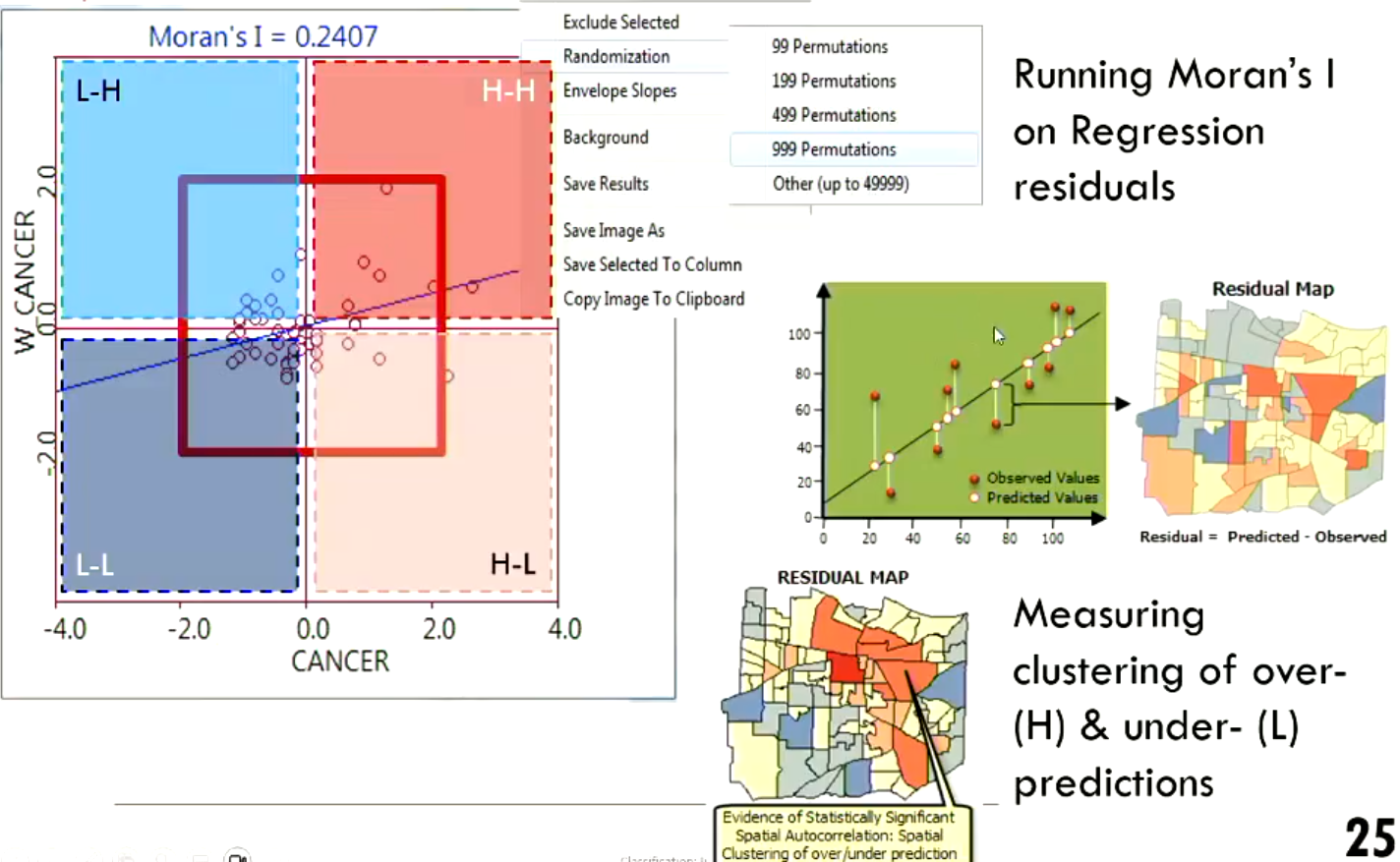
The residual or error in regression is the difference between predicted and observed values. For example, if a model predicts 10 crimes in an area but only 5 are observed, the model overestimates by 5.
It's problematic when these over- and under-predictions cluster together spatially. Residuals or errors should ideally be randomly distributed.
Consequences of Violated Assumptions
Violating OLS assumptions, particularly spatial correlation, can lead to:
Incorrect coefficients
Exaggerated R-squared values
Invalid assumptions and inferences
Potential issues in professional settings where regression models inform decisions (e.g., toll road construction, environmental policies).
Importance of Understanding Spatial Correlation
It's crucial to understand spatial correlation to avoid:
Creating inaccurate models that can lead to flawed decisions.
Misleading statistics, whether intentional or unintentional.
Being unaware of how data manipulation or exclusion of participants can affect results.
Detecting Spatial Dependence in OLS
To determine if data is suitable for OLS, one must:
Use software like GeoDa capable of diagnosing violations of OLS assumptions.
Define neighboring areas using a weights table.
Examine OLS diagnostics for spatial dependence.
Using GeoDa for OLS and Spatial Regression
In GeoDa, the process involves:
Inputting data and specifying the dependent and independent variables.
Defining the weights table (e.g., rook, queen contiguity) to inform the software about neighboring areas.
Running OLS regression and examining the Lagrange Multiplier test results.
Using the Lagrange Multiplier test to decide between a spatial error model or a spatial lag model.
Software Options: GeoDa and ArcGIS
GeoDa: Can perform OLS, spatial lag, and spatial error regression.
ArcGIS: Offers OLS and Geographically Weighted Regression (GWR) as an alternative to spatial regression.
Lagrange Multiplier Test and Model Selection
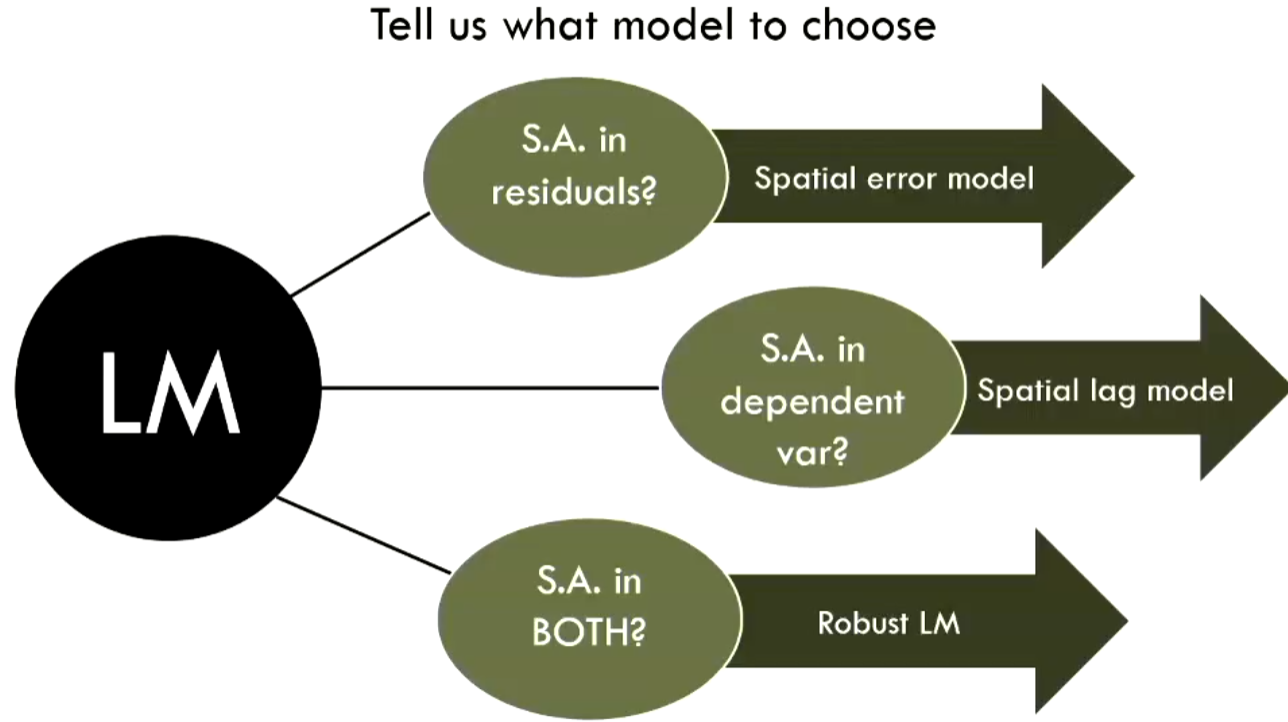
The Lagrange multiplier results guide the selection of the appropriate spatial regression model:
Spatial Error Model: Used when there is spatial correlation in the residuals.
Spatial Lag Model: Used when there is spatial correlation in the dependent variable.
Understanding Spatial Lag
Spatial lag refers to the value of the neighbors. For example, spatially lagged crime is the crime rate in the surrounding neighboring areas.
Spatial Error Regression Explained
Spatial error regression accounts for error terms that are correlated across neighboring areas. For instance, if areas and are neighbors, and a standard regression model over-predicts crime in both areas, spatial error regression adjusts for this spatial pattern in the errors.
Spatial Lag Regression Explained
Spatial lag regression incorporates the dependent variable values from neighboring areas as an additional predictor. In essence, it examines how including information from neighboring areas improves the model fit beyond what OLS can achieve with only independent variables.
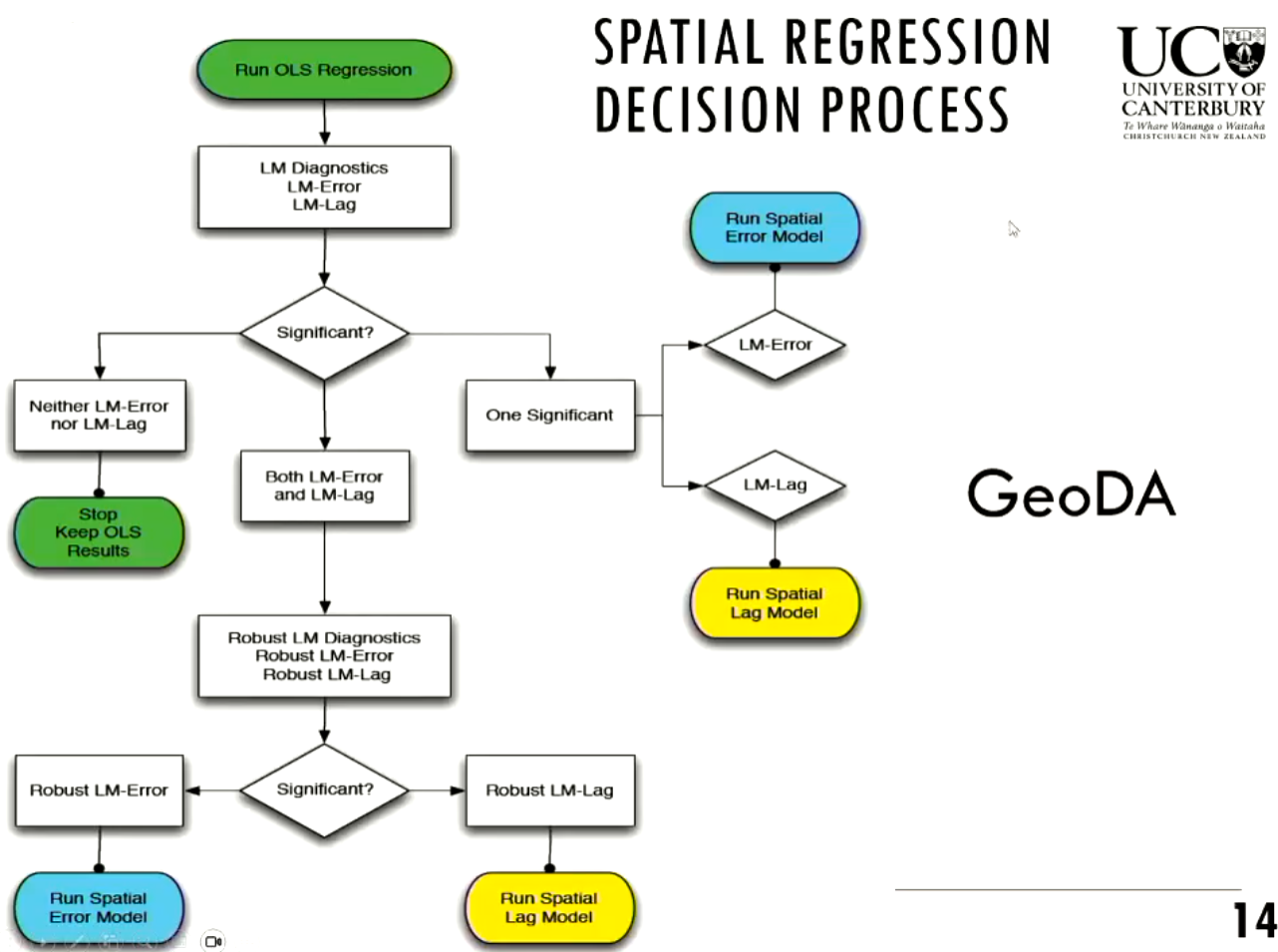
Decision Process for Model Selection
The decision process involves assessing the significance of Lagrange Multiplier diagnostics:
Look at the Lagrange Multiplier (LM) test results.
If there is spatial correlation in the residuals, consider the Spatial Error Model.
If there is spatial correlation in the dependent variable, consider the Spatial Lag Model.
If both are significant, use the robust versions of the LM tests to decide between the Spatial Error or Spatial Lag Model.
Example: House Ownership in Manhattan
An example is presented using Manhattan census data to model house ownership. The goal is to identify factors that contribute to people buying a house.
Data and Variables
The dataset includes variables such as:
Median income
Percentage of Asian persons
House ownership (dependent variable)
Percentage of non-Hispanic whites
Percentage of non-Hispanic blacks
Education levels
Unemployment rates
Poverty rates
Percentage of foreign-born individuals
Implementing OLS in GeoDa
The steps include:
Creating a weights table to define neighbors.
Running OLS regression in GeoDa.
Specifying house ownership as the dependent variable and the other listed variables as independent variables.
Interpreting OLS Results
Key outputs to examine include:
R-squared and Adjusted R-squared: Adjusted R-squared is more trustworthy as it penalizes the use of more variables. It explains the proportion of variance in house ownership accounted for by the model. (higher number the better)
Akaike Information Criterion (AIC): Used to compare models. Lower AIC indicates a better model. (lower number better)
Sigma Square- the smaller the better
log likelihood- the larger (or less negative) values the better.
Multicollinearity Check
The multicollinearity condition number should be below 20. If it's higher, it indicates that two or more explanatory variables may be explaining the same variance, and one should be removed.
Lagrange Multiplier Diagnostics
The Lagrange Multiplier (LM) diagnostics are used to detect spatial dependence. A significant Moran's I for error indicates spatial correlation in the residuals.
The LM diagnostics help determine whether to use a spatial lag or spatial error model:
Spatial Lag: Models dependency in the dependent variable.
Spatial Error: Models dependency in the error terms.
Comparing Models: OLS, Spatial Lag, and Spatial Error
In the example:
OLS showed an adjusted R-squared of 0.48.
Spatial Lag increased the R-squared to 0.526 and reduced the AIC.
Spatial Error further increased the R-squared to 0.53 and reduced the AIC further.
However, the likelihood ratio test may indicate remaining spatial dependency even after running a spatial regression model.
Mathematical Representation: Spatial Lag and Error Models
Spatial Lag Model includes a weighted ownership variable:
where is the dependent variable, is the spatial weights matrix, represents the independent variables, and \[Beta] are their coefficients.
Spatial Error Model includes \
ewline Lambda, which accounts for spatially correlated errors:
Flow Chart Decision-Making
The flow chart guides the selection of the appropriate model based on the significance of the LM diagnostics and their robust versions.
Issues and Limitations of the Analysis
The R-squared might not be great due to the choice of variables or unobservable factors.
Despite the limitations, there is an improvement of R-squared with spatial regression compared to OLS.
Sigma square represents the variance of the error. Smaller values are better.
Likelihood: Larger or less negative values are better.
Local Indicators of Spatial Association (LISA)
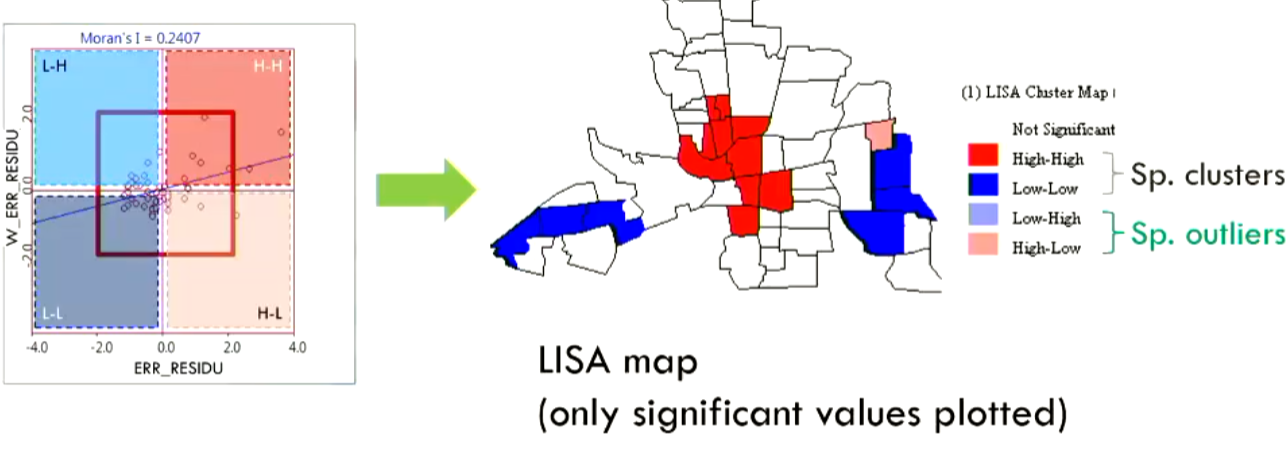
LISA is used to identify clusters of high and low values. It includes:
High-High: Neighborhoods with high values surrounded by high values.
Low-Low: Areas with low values surrounded by low values.
High-Low: Areas with high values surrounded by low values.
Using LISA in GeoDa
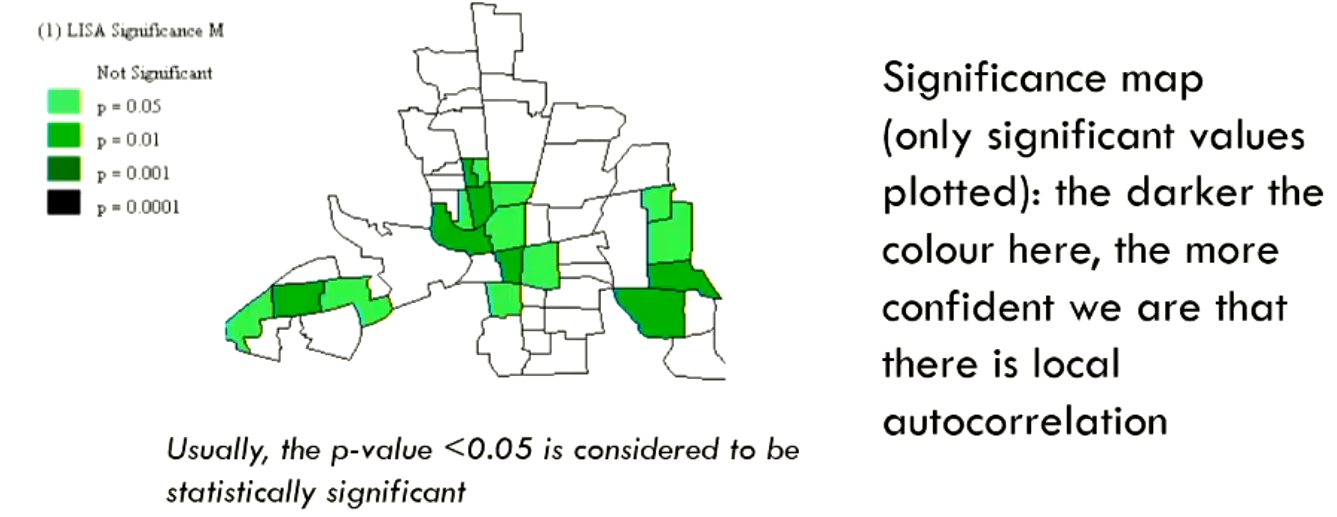
LISA can be run in GeoDa to produce maps showing:
Areas of clustering (high-high, low-low).
P-values for these clusters, indicating their significance.
Benefits of LISA
LISA maps help visualize where spatial clusters occur and their statistical significance.
Transition to ArcGIS
Next section transitions to using ArcGIS for regression analysis.
Emergency Calls in a US Shot
An example uses emergency call data in a U.S. area. Each point represents a call. The data can be projected on a map to visualize call density by area.
Using ArcGIS Tools
ArcGIS offers tools like scatter plots to explore relationships between variables.
OLS Regression in ArcGIS
Running OLS in ArcGIS involves:
Selecting the dependent variable (number of emergency calls).
Choosing explanatory variables (population, number of jobs, low education, distance to urban center).
Interpreting ArcGIS Results
Key outputs include:
Variables and Coefficients: Indicates the relationship between each variable and number of emergency calls.
Probabilities: Indicates the significance of each variable.
R-squared: Indicates the proportion of variance in emergency calls explained by the model.
Spatial Correlation Tool in ArcGIS
ArcGIS provides a warning to use the spatial correlation tool to check for spatial autocorrelation in the residuals. Unlike GeoDa, this step is not automated. The Moran's I tool is used on the residuals map.
Geographically Weighted Regression (GWR)
GWR creates a separate regression equation for each area, showing local model performance.
Benefits of GWR
GWR can improve model fit and provide localized insights, even when OLS does not show significant spatial autocorrelation.
The AIC will decrease and the R-squared becomes better.
Interpreting GWR Results
The software can:
Print local R-squared values, showing model performance per area.
Plot residuals and run Moran's I on them.
Print individual coefficient changes over the area, i.e can identify a area where the job variable are actually high and important for the models.
Advantages of ArcGIS
ArcGIS allows the cooperation of independent variable coefficients into model builders.
Chicago Unemployment Lab
The lab focuses on identifying factors contributing to unemployment in Chicago.
Lab Activities
The lab involves:
Selecting variables from census data to explain unemployment.
Running regression in GeoDa.
Interpreting and comparing results.
Running LISA maps on the residuals.
Creating a custom model with selected variables.
Running Error or Lag: How-to
The Error or Lag models are possible to create in the regression panel.
Overall Summary
The lecture provides a comprehensive overview of regression, spatial regression, and their implementation in GeoDa and ArcGIS.