CSS
CSS → Cascading Style Sheets
Saves time and controls multiple web pages at once.
Used to format layout of webpage.
can change colour, font, size of text
spacing between elements
where elements are positioned and so on…
Changing the style of a parent element will cause all children elements to change as well!
So if we changed the root element style to colour blue, everything else would be blue in the page. → cascading
Using CSS
CSS can be added to HTML docs in 3 ways:
1 - Inline → use style attribute inside HTML elements
2 - Internal → use <style element in <head> section
3 - External → use <link> element to link to an external CSS file
Inline CSS
Used to apply unique style to single HTML element.
Inline uses style attribute of a HTML element
e.g.

Internal CSS
Used to define style for single HTML page.
defined in <head> section with <style> element.
Stops you from writing out the style of content each time you create a new element in the body.
e.g.
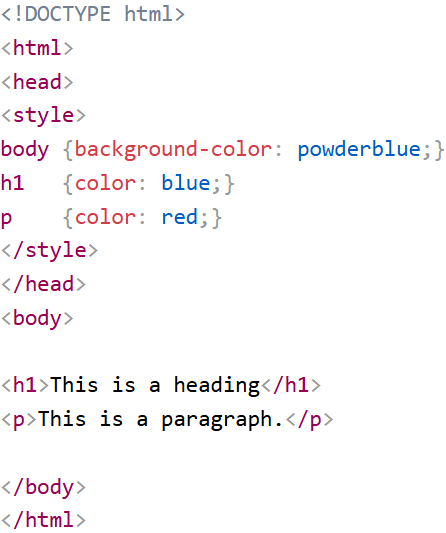
Here, the body, heading 1, and paragraphs have been set specific styles (in this case, colour of text).
External CSS
Used to defines style for many HTML pages.
To use this, add link to it in the <head> section of each HTML page.
e.g.
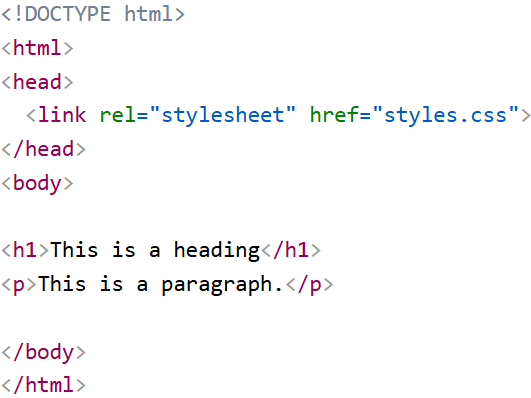
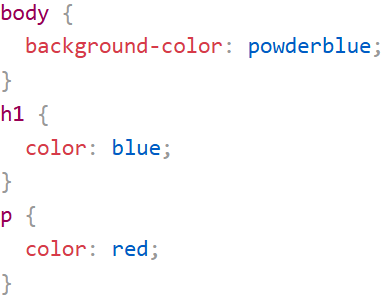
The external style sheet can be written in any text editor. The file must not contain any HTML code, and must be saved with a .css extension.
Here is an example of styles.css file:
CSS Border
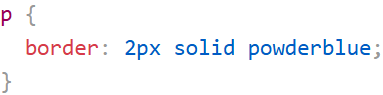
defined border of HTML element
ORDER: thickness (pixels) | type of line (Solid,) | Colour
e.g.
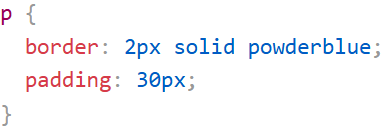
CSS Padding
defines space between text and border
e.g.
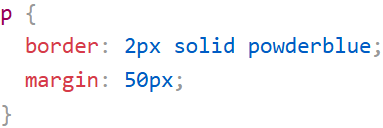
CSS Margin
defines space outside border
e.g.
How to Link to External CSS:
Style sheets can be referenced with a full URL or with a path relative to current web page.
1 -

2 -

3 -
