Week 03: Big Picture
How does the OS give each provides the illusion of its own CPU?
Limited direct execution by system calls → timer interrupts
Direct Execution:
OS loads program → jump to main() → program runs freely
OS:
Create entry for process list
Allocate memory for program
Load program into memory
Set up stack with argc/argv
Clear registers
Execute Call main()
Free memory of process
Remove from process list
Program:
run main()
execute return from main()
Big Problems (2):
Restricted Operations: How can the OS make sure the program doesn’t do anything we don’t want it to do, while still running efficiently?
Switching btwn processes: how does the OS stop the process from running and switch to another process
Limited Direct Execution:
Introduce the user and kernel mode so OS can maintain control over hardware access and protect system integrity by operating in a less privileged environment.
User Mode: restricted instructions, limited memory access
Kernel Mode: Full privilege
Trap Mechanism: Automatic mode switch on syscall
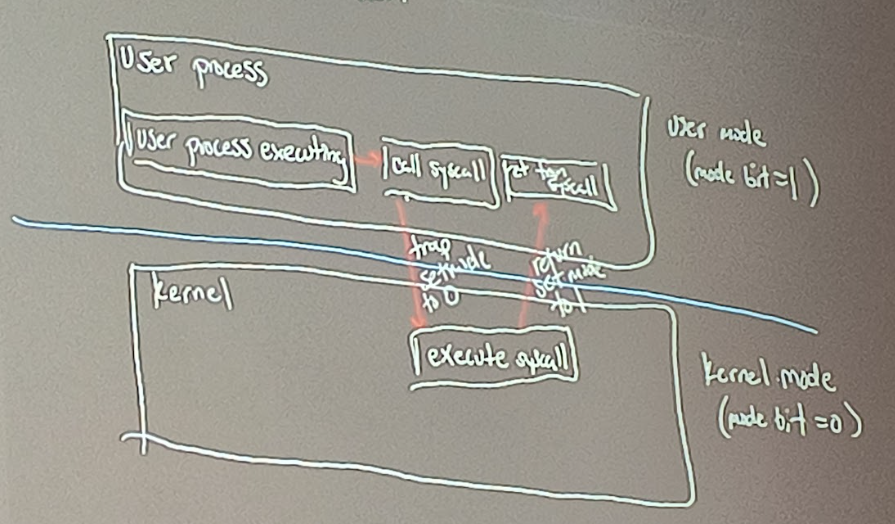
System Call Mechanism:
User: Set args in register; place syscall number (ABI, Application Binary Interface)
Hardware: Save PC/mode
User Vector: Save registers to trapframe; switch to kernel stack
User trap: read scause; dispatch
Syscall(): vector to handler; validate; copy in/out; perform service
Return: User trapret → usertset → stret
What it does: The System Call Mechanism provides a structured procedure for user programs to request privileged services from the OS, such as interacting with hardware or accessing protected resources like files.
Why we use it: It allows the OS to maintain control over the system and ensure its integrity. By acting as a controlled gateway to kernel mode, it prevents user programs from directly executing potentially dangerous operations, thereby protecting system resources and stability.

Timer Flow:
Boot: OS programs timer for Xms in future
Timer fires → asynchronous hardware interrupt
Scheduler decides: continue process A or start process A or start process B
If switch - save A’s context, load B’s context
Context Switching:

Context Switch: When CPU switches to another process, the system must save the state of the old process and load the saved state for the new process
Context Includes:
User level context
Registers
System level context
Key Distinction: Mode switch is not the same as a context switch, as the Mode switch pertains to changing operational modes while the Context involves switching between different processes or tasks within the system.
Responsibilities:
Hardware - Enforce modes; perform traps; save/restore minimal state generate timer device interrupts
OS - set polices (e.g. which process next); manage contexts; implement syscall handlers
User Program - Request services via syscalls; is preempted; must follow ABI