AP Computer Science A+ Notes !!
Lab00 Notes:
“//” dictates a comment line, a comment line is not compiled into bytecode and is ignored alongside white space in JGRASP. Used to set aside notes for the coder.
“import” makes classes in other packages accessible.
Classes are containers for code. Classes can be public or private.
Left curly braces begin a class. {
Java programs have something called a “main method.” All the commands and statements in the main method execute in order throughout the program.
A Left curly brace also begins this main method. {
In Lab00, “openWorld” is a class method, in the display class.
Robot Karel = new Robot();
What does this line do?
It instantiates a Robot object from the robot class.
The object named karel is an instance of the Robot class.
A class is a blueprint for a house, an object is the actual house.
In this case: Karel is the house, and the robot class is the blueprint.
move is an instance method in every Robot object.
How do you call the method: Karel.move();
It started with the name of the object (instantiated from the class), then a period, and then puts the name of the command. The ending notation for instance methods like this is ();
A right curly brace ends the main method and another one ends the Lab00 class. } }
Homework and Exercises:
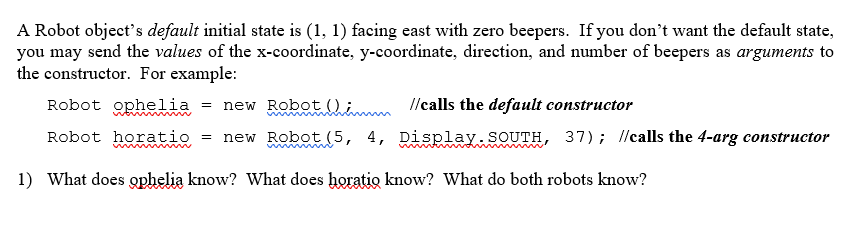
Robot Ophelia knows her coordinates (1, 1), the direction she’s facing (east), and how many beepers she has (0). This is because the default constructor is called.
Robot Horatio also knows his coordinates (5, 4), direction (south), and number of beepers he has. (37). This is the 4 argument constructor.
Both robots know the same things.

Robot pete = new Robot(4, 3, Display.WEST, 50);
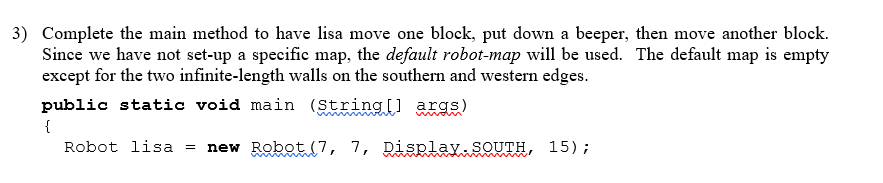
lisa.move();
lisa.putBeeper();
lisa.move();
}
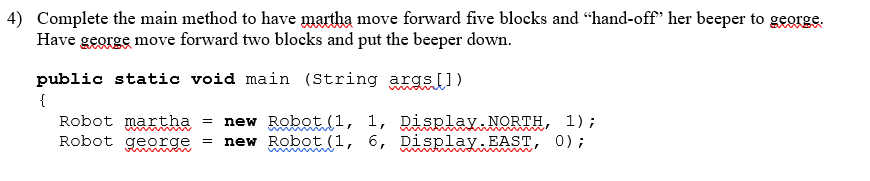
martha.move();
martha.move();
martha.move();
martha.move();
martha.move();
martha.putBeeper();
george.pickBeeper();
george.move();
george.move();
Q5: Without the method “Display.openWorld,” the default map will open.
Java Applications:
All java programs require a public static void main method.
that’s the entry point for running code - all the statements in the main will execute in order.
No main = no runnable code
Curly bracket starts the main { and also ends the main }
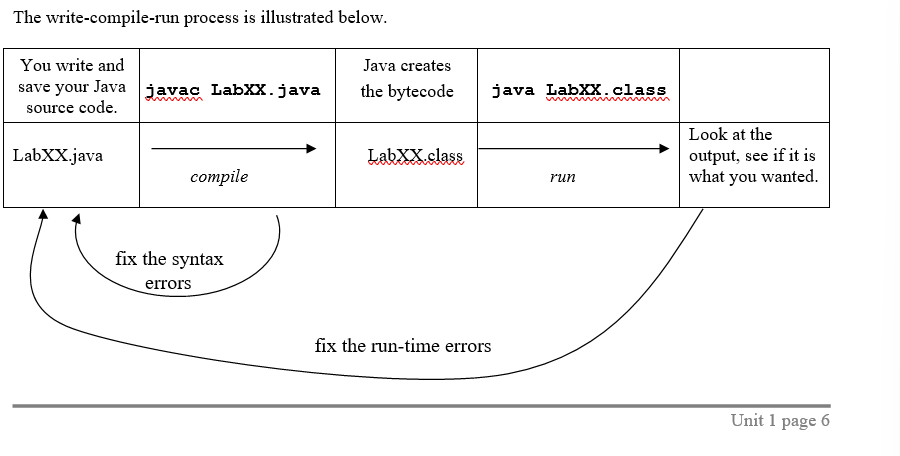
When clicking Compile: you are running a program called Javac.
The compiler checks for syntax errors, then import files.
All the source code is translated into bytecode via the compiler.
Lab01: Students and Books !!
An identifier: the name of a class, object, or method.
An identifier can be any unique sequence of numbers, letters, or the “_” underscore character.
Identifiers cannot begin with numbers.
An identifier cannot be a Java keyword, and identifiers are case sensitive.
lisa is not equal to Lisa. (for identifiers)
By convention, class names begin with uppercase letters.
Methods, objects, and variables begin with lowercase letters.
Constant values, such as EAST, are written in all caps.
to instantiate means to create an instance of a class - an object.
In this lab, the class is Robot, and we instantiated the robots Lisa & Pete.
An object knows how to do things in its methods.
We call a method / send a message to a robot object by using dot notation
Pete.move();
pete, the identifier, and name of the object, comes before the dot in this notation.
the identifier, move, named after the method, is placed after the dot.
In this line of code, pete (the object) will execute the method. (move).
Fields store an object’s private information about it’s state such as location, direction faced, and amount of beepers.
Homework and Exercises:
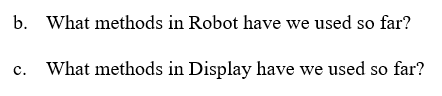
b. We have used turnLeft, move, pickBeeper, and putBeeper.
c. openWorld(string), setSize(x,y), and setSpeed(x).

compiling identifiers: mrsAdams, r2_d2.
identifies as a class by convention: Hal9000
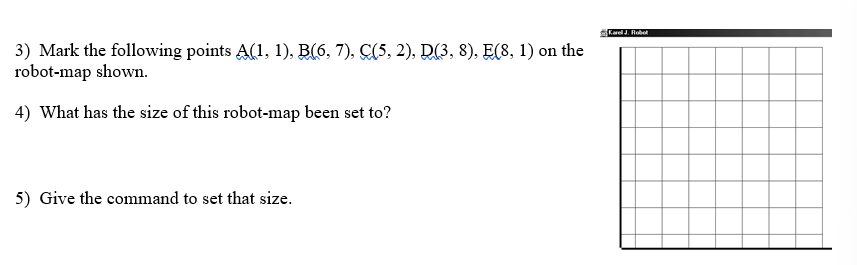
3) Already can be done, yay algebra!
4) 8×8
5) Display.setSize(8, 8);
Errors and Syntax:
Java compilers checks your work for errors upon compiling your code.
When you misspell Robot as Robt, that is a lexical error.
Lexical Error: because Robt is undefined in this case.
The error message will nicely tell you where the error is.
Syntax Error: basically breaks the rules of calling commands in Java, like a grammatical error in English.
Runtime Error: An error where when your program runs, things you commanded aren’t actually possible. Such as placing a beeper at a coordinate like (9,9) when the plane is only 8×8.
Logic Error: Self explanatory, the program doesn’t do what it was intended to do because of programmer’s fault.
Lab02: Escape the Maze !!
In object Oriented programming, we usually don’t change classes and their methods. Instead, we extend upon the class, define a new class, and give it the new feature you want.
In this case, we want to turn right, but robot only knows turnLeft. We extend upon robot, and create Athlete, and create it a turnRight instance method.
Extends means that an athlete isa robot. Isa means that athlete inherits attributes of the robot class.
The methods from the robot class don’t have to be rewritten since athlete automatically inherits them. (due to “extends”)
We can use robot’s existing methods to create a new method. Turning right is the same thing as turning left 3 times. So to create the turn right method, we just put 3 turn left statements.
Lab02 will use the athlete class, so we can say Lab02 hasa athlete.
UML Diagrams:
In UML diagrams, we list the names of our classes such as robot, athlete, Lab02, and display. We then draw arrows to show the isa and hasa relationships between these classes.
A dashed horizontal arrow = hasa
thick vertical arrow = isa
Athlete isa robot. robot isn’t an athlete.
Homework and Exercises:
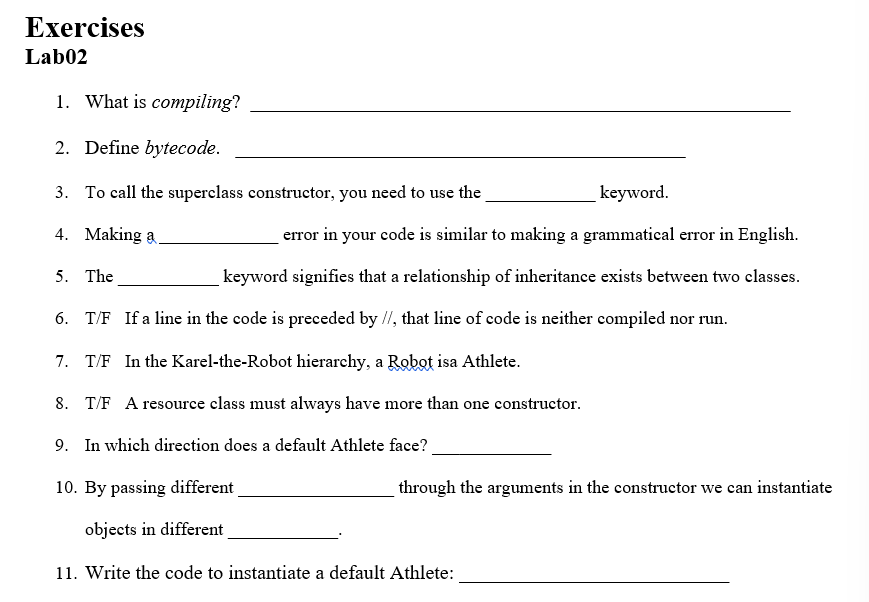
1) Converting source code into bytecode.
2) The code generated by the compiler.
3) super
4) Syntax
5) Isa
6) True
7) False
8) False?
9) North
10) values, positions.
11) Athlete Bob = new Athlete();
Resource and Driver Classes, Class and Primitive Types:
In Lab02, we wrote a driver class and a resource class.
Driver classes contain the main method
The resource class contained the code for an Athlete.
the driver class is the client, and the resource class is the server.
The client sends messages and the server knows how to respond.
Data types specify how different kinds of data are stored and manipulated.
Classes define complex types, and they encapsulate data and methods.
An object’s data and methods are private inside the object.
Robot Karel = new Robot();
This command does 3 things.
1) It creates a reference, Karel
2) It instantiates a new robot object
the = sign makes the reference point to the object

Two or more references can point to a single object.
In Java, some data types aren’t complex, but are called primitive.
Examples of primitives: int for integer, double for decimals, boolean for true or false.
These data types aren’t accessed by references.
The data is stored in memory spaces called variables.
A type declaration assigns a name to a memory space, and also assigns a value sometimes.
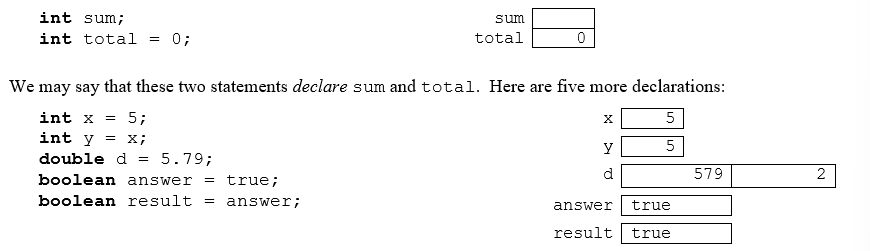
public Athlete(int x, int y, int dir, int beep) is the 4 argument constructor.
it creates four variables (memory spaces) for integers, and doesn’t assign values.
When you call the constructor by passing values, the values are assigned to those memory spaces.
Constructors:
A constructor method is a method that creates an object and initializes private data.
In the case of Lab02 for Athlete, it was done by the “super” command.
The no-argument constructor is easy to call and always instantiate in a default state.
To create different locations of athletes, creating a 4-arg constructor is helpful, so that it can be instantiated in any state.
In Java, subclasses inherit methods, not constructors.
The subclass constructors need explicit calls, the super command.
Super: calls the constructor of the class above the current class, the superclass!
So, Athlete’s super calls robot’s constructor.
Constructors have rules as well.
The constructer method’s name must match the name of the class.
constructors are not labeled with keywords.
The super method must find a corresponding constructor in the class above it.
You need a 4 argument constructor in robot, to use a super in athlete for a 4 argument constructor.
Lab03 Climb Every Mountain !!
We wanted climber to have a variable x-position so we created an one argument constructor. But, since we were using super, and there’s no matching constructor in the superclass, we passed in other values as well.(the values the default constructor uses)
Homework and Exercises:

public Elf()
{
super(1, 90, Display.SOUTH, Display.INFINITY)
}

public Spartan(int x, int y)
{
super(x, y, Display.EAST, 1);
}

public Spartan()
{
super();
}
Passing Arguments:
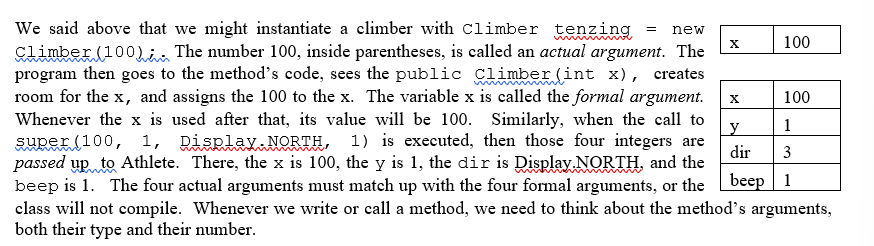
In Lab04, we will pass objects as arguments
“takeTheField(maria);”
The computer will see “public static void takeTheField(Athlete arg)
Both Maria and arg point to the same Athlete object.
Lab04, Take The Field !!
class methods store code accessible to anyone without needing to create an object. The class already knows how to perform the method.
All class methods are marked by the word static, and placed before the main method.
Instance methods are methods written in classes, where the object must be instantiated before using the method. In this case, only the object knows how to perform the method.
Take the field is a class method, turn right is an instance method in the Athlete class.
Homework And Exercises:
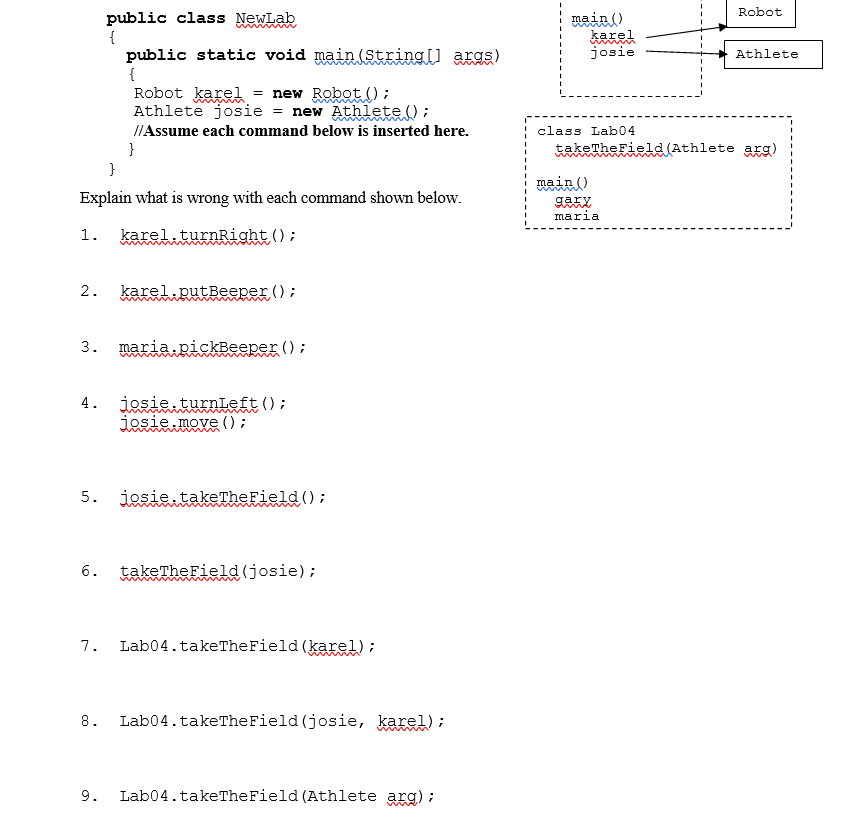
1) Karel cannot turn right, he’s a robot.
2) Karel doesn’t have beepers to put down due to the default constructor.
3) Maria isn’t instantiated in the main method? Or if she is, it’s fine.
4) nothing wrong with that.
5) You can’t put the reference before a class method.
6) That is correct.
7) karel is a robot and cannot take the field.
8) Karel, again is not a robot, and cannot take the field.
9) You can’t start it with Lab04.
Class Hierarchy:
Hierarchies can be depicted by UML diagrams.
We can see the inheritance relationships
Robot is the superclass of athlete (the subclass).
Climber is the subclass of Athlete along with racer.
A climber isa robot, because an athlete isa robot, and a climber isa athlete
subclasses also inherit the name of a superclass.
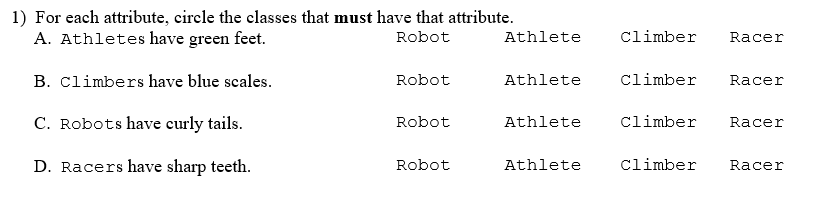
If Athletes have green feet: Climbers and Racers
Climbers have blue scales: Only climbers
Robots have curly tails: All of them have curly tails
Loops:
When you want to repeat certain commands or a sequence of commands, a loop can be helpful.
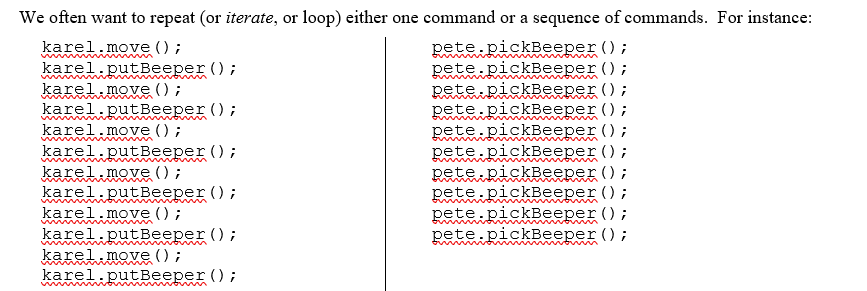
In this first example, you want to move and put a beeper exactly 6 times.
In the second example, you want to pick a beeper 10 times.
Since we know how many times, beforehand, to carry out this command, we can use a for-loop.
for (int k = 1; k <= 6, k++) // For loop for the first sequence.
{
karel.move();
karel.putBeeper();
}
for (int k = 1; k <= 10; k++)
pete.pickBeeper(); // you don’t need braces for only one command in a loop
For-loops have 3 parts
the variable k’s beginning, where it ends, and how k increases.
k++ is the increment operator, and makes the value of k increase by one.
the loop variable does not have to be denoted as k.
Lab05, Shuttle Run !!
We used for-loops to create multiple iterations of tasks
Similar to how we did the example for-loops above.
For-loops, While-loops, If statements:
For loops can be rewritten as while loops

By convention, for-loops are used for definite iterations, and while-loops are used for indefinite loops, where you don’t know how many times to loop.
An example of a conventional while-loop:

We don’t necessarily know how long Karel will be next to a beeper.
If statements are similar, but only make one decision, and checks for the condition only once.
Return methods vs void methods.
Void methods take action and change situations - turn right, turn left
Return methods provide info about a robot’s situation - number of beepers
Return methods have many varieties because there are diff info types
Booleans are true or false values, such as checking if a robot is next to a beeper.
The “!” operator is called the NOT operator.
In this case: !karel.frontIsClear()
Without the exclamation, and a wall in front of Karel, it would report true.
With the exclamation, it would report false, since the front is clear.
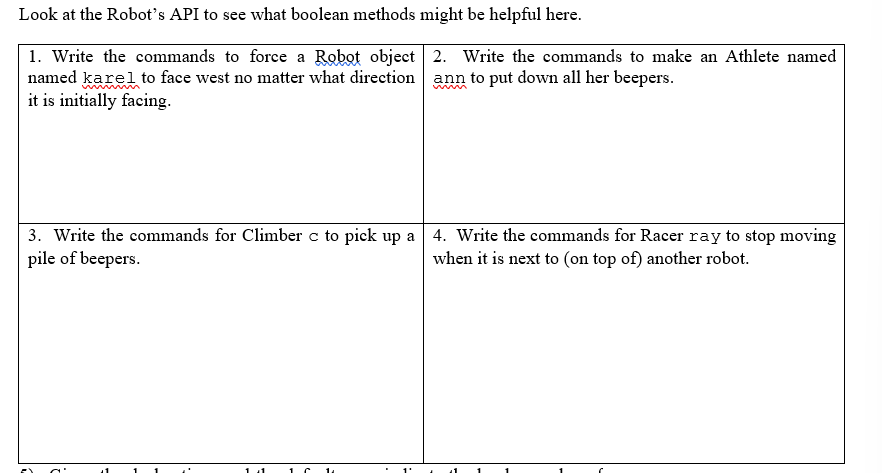
Good practice questions for commanding!!
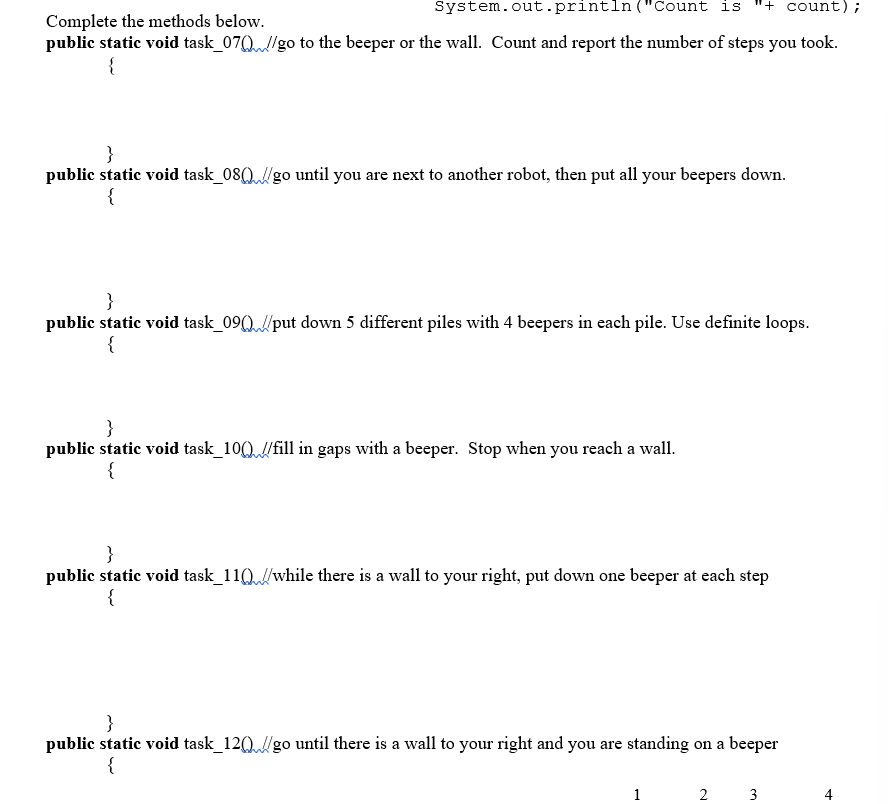
Lab06, A Half-Dozen Tasks !!
good Exercises to do (kind of hard for me):
Lab07, Exploration !!
We used the principle of polymorphism in this lab
Polymorphism is where you give commands to a superclass reference, such as robot, but the subclass object, such as athlete, will carry out the command.
Example: Robot Karel = new Athlete();
The robot is the reference, yet the Athlete carries out the command.
Example: Climber karel = new HillClimber();
karel.climbUpRight();
even though we are referencing climber, hill climber’s version of climb up right will be carried out. the method was over-ridden.
Karel thinks it’s a climber, but behaves like a hillclimber.
Lab08, Hurdle Racing !!
Used same polymorphism principles as last lab
Jumping over different types of hurdles!
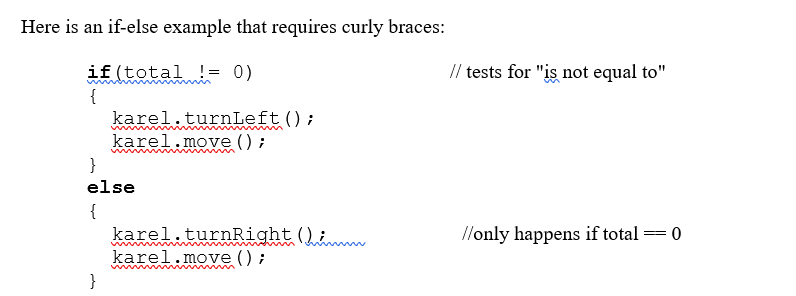
Decision Structures:
if (total == 0) // tests for equality, “is equal to”
If the total value is equal to 0, some action will be carried out.
Lab 10, Maze Escaping !!
Couldn’t do that lab, mentally scarred!
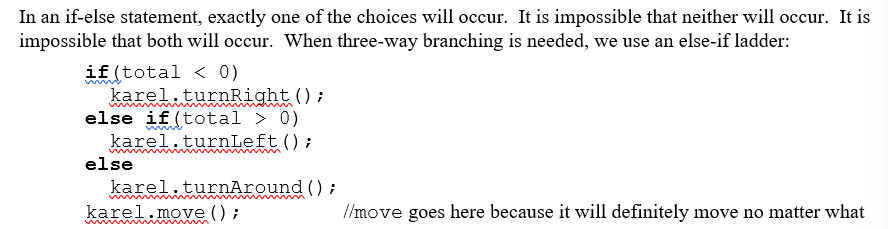
Basically just a decision tree, the same as above.
Abstract Methods:
An interface tells you what you can do to / or with a thing.
You just need to know what methods are available, and don’t care about how these methods work.
Sometimes it is our job to implement the interface.
An abstract method specifies interfaces, but not their implementation.
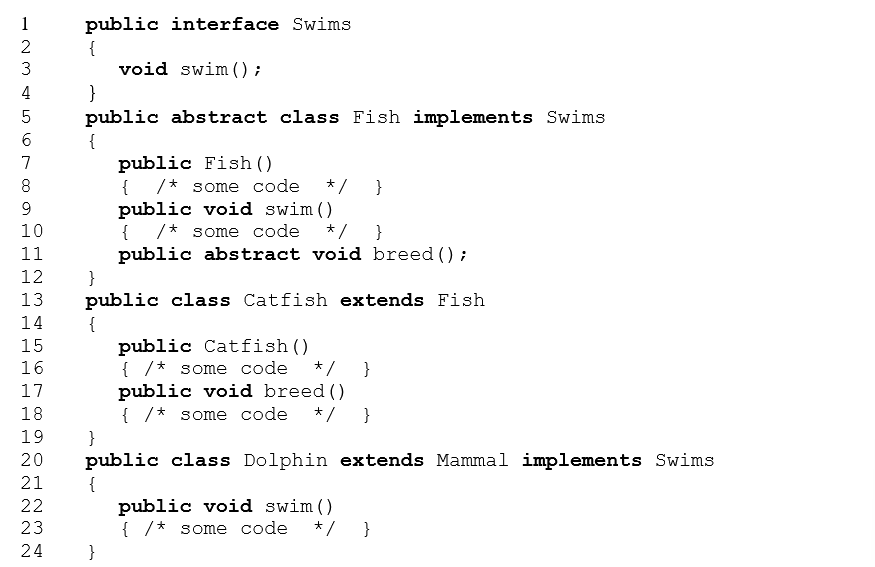
In the abstract class Digit, the abstract method is display
public abstract void display();
The semi-colon is there, because an abstract method has no body
The code for the abstract method has to be given elsewhere, usually in a class that extends the abstract class, known as the concrete class.
You can’t instantiate objects from abstract classes, but you can from concrete classes.
You have to provide the implementation code for every abstract method upon extending an abstract class.
Interfaces:
Interfaces tell you what methods are available.
They contain lists of abstract methods, which are to be defined in subclasses.
In this class: we’ll use the “Workable” interface.
Remember, interfaces don’t supply implementation code.
Java uses a key word, implements, to promise that the subclass will provide all the code for all the abstract methods.
AKA the subclass will implement the interface.
Example: public class Harvester extends Robot implements Workable
Lab12, Harvesting and Carpeting !!
Homework and Exercises:
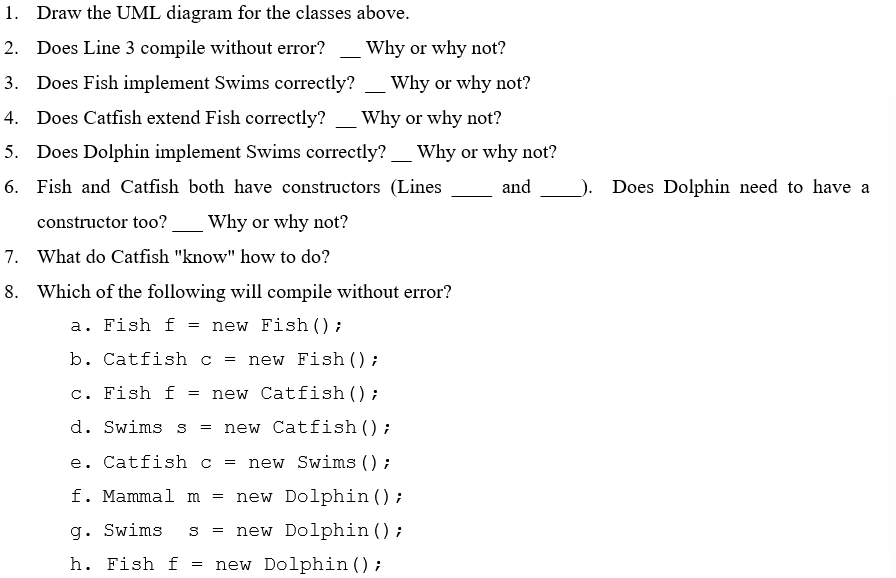
Do this later..(idk how to!)
Threads:
Programmers use abstract classes and interfaces to guarantee certain subclasses methods.
In Lab14, and example of this is Thread and Runnable.
Java uses thread and runnable for each object to do their methods at the same time.
UNIT 1 DONE !! UNIT 2 - Graphics and Animation
Robot worlds in JKarel were depicted in graphics windows.
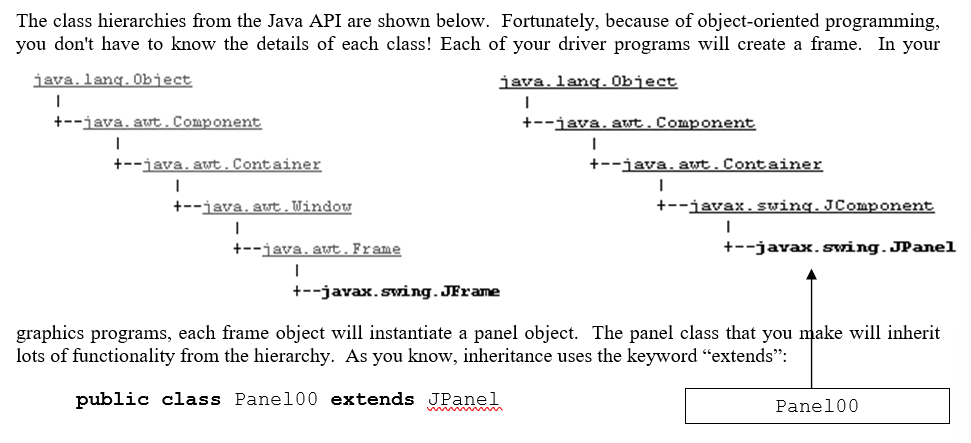
Graphics windows are created as instances of the JFrame class.
A frame is a window with a border and title bar.
Content is made visible on frames using panels.
Drivers will create FRAMES
Graphics programs will have the frame instantiate a panel object.
Panel classes will inherit lots of functionality “extends”
Panel00 isa JPanel isa JComponent isa Container isa Component isa object.
Frames are able to hold panels because they are containers.
Panels can eventually hold subpanels.
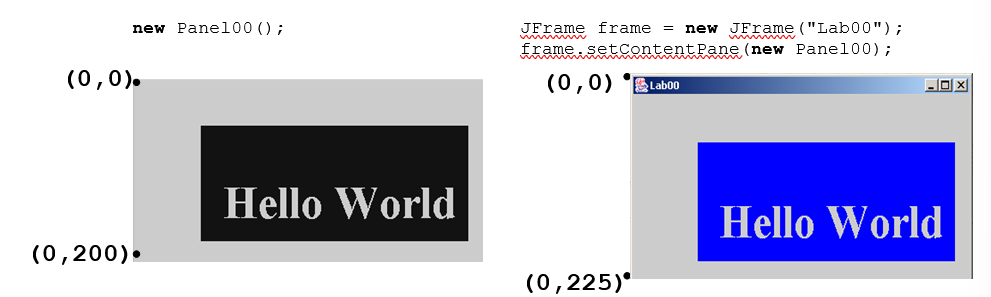
Graphics coordinate system is different.
The upper-left corner is the origin and is (0,0)
As you move to the right, x-values increase
As you move vertically down, the y-values increase.
The moving point is the origin for the 2 bullets above.
Lab00, Hello World !!
graphics programs have two files, driver and resource class.
Driver sets up the JFrame and instantiates the panel
The panel is the resource, where all action happens.
Similarly, main methods are required.
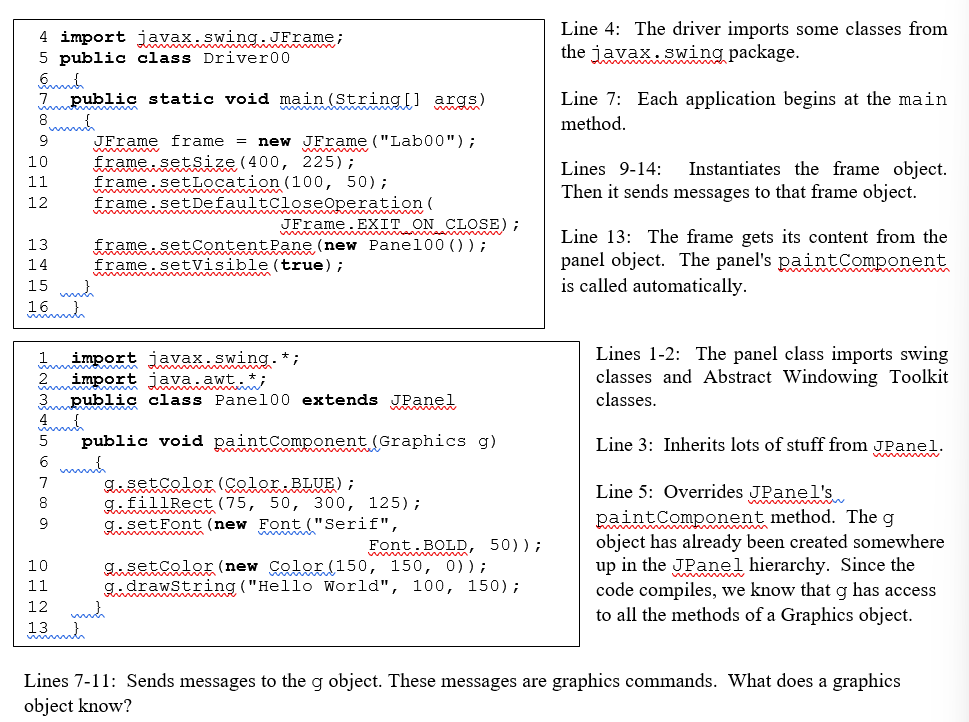
For lines 7-11, remember both the formal argument and the simple one point to the panel. this is why we use g.
Setting colors can be done many ways.
JGrasp provides you with many automatic colors, so you can simply say g.setColor(Color.RED);
You can also set color using RGB: g.setColor(new Color(0, 0, 0));
To set darker and lighter shades: g.setColor(Color.RED.darker());
After setting a color, anything written or drawn after that command will be in the same color.
The font constructor takes 3 arguments: style, type, and size.
Style: fonts like Arial, monospaced.
type: plain, italic, or bold.
Size: how big it is
Setting a font can be done in different ways
1) g.setFont(new Font(“Serif”, Font.PLAIN, 8));
2) Font f2 = new Font(“SansSerif”, Font.BOLD, 20);
g.setFont(f2);
Drawing strings takes three arguments, a string, and a pair of coordinates.
The coordinates specify the baseline of the text, the bottom of letters
Ex: g.drawString"(“Hello”, 50, 50);
Drawing Shapes:
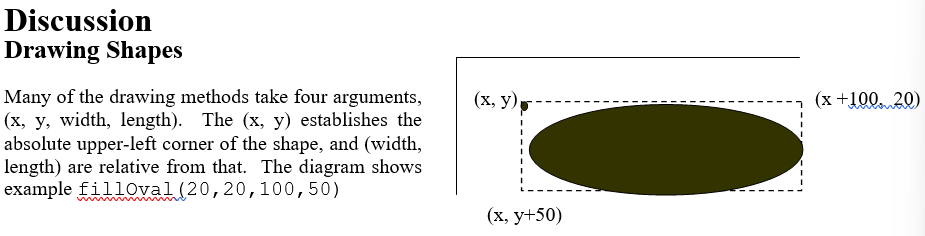
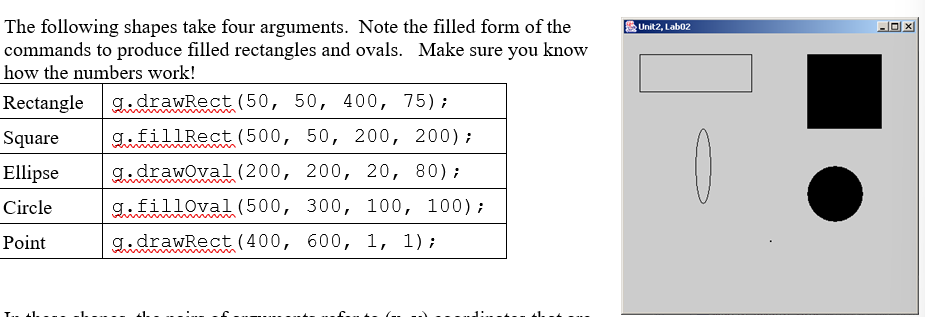
Many drawing methods take four arguments- x, y, width, length.
(x, y) refers to the upper left corner of the shape
The width and height are relative from that (x + 100) (y + 20) etc.
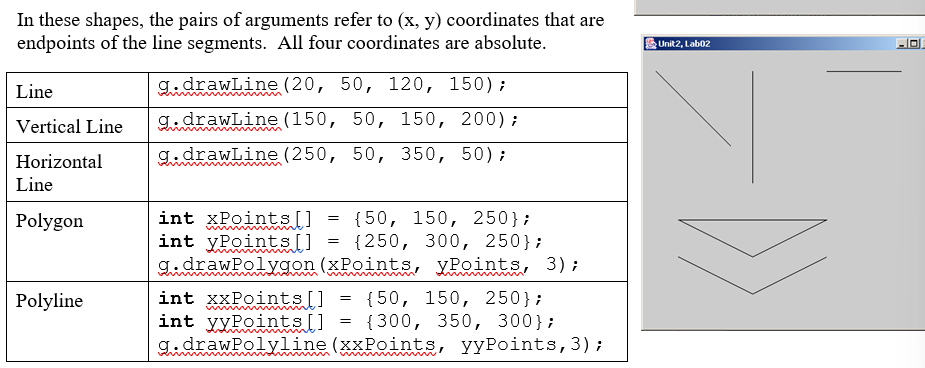
The third argument to both Polygon and Polyline is the number of points that make up the polygon or polyline.
The third argument = length of each array
Polygons automatically connects the last point back to the first, a polyline does not.
The order of the points for a polygon makes a difference!!
Loops and Graphics:
Loops can be used to draw repeating shapes in graphics
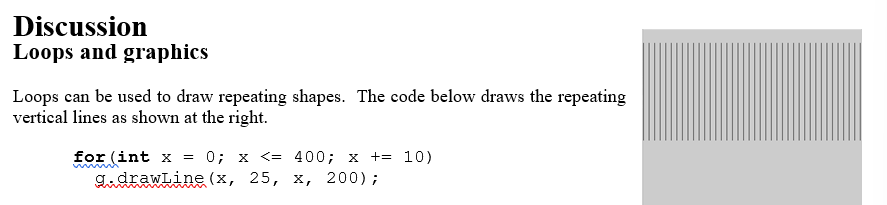
We know these are vertical lines, by just looking at the code, because the y-values AKA endpoints are constant.
The x-changing signifies that these lines are vertical.
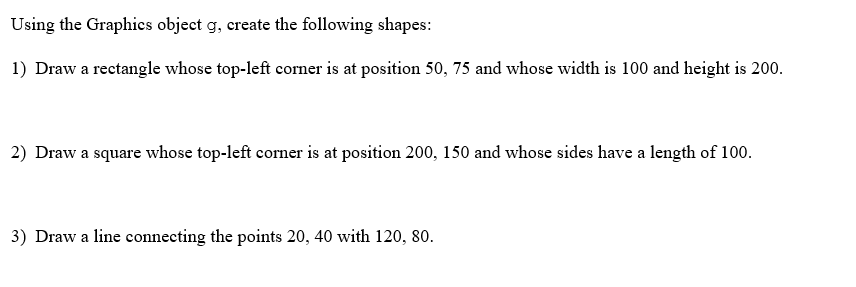
1) g.drawRect(50, 75, 100, 200);
2) g.drawRect(200, 150, 100, 100);
3) g.drawLine(20, 40, 120, 80);
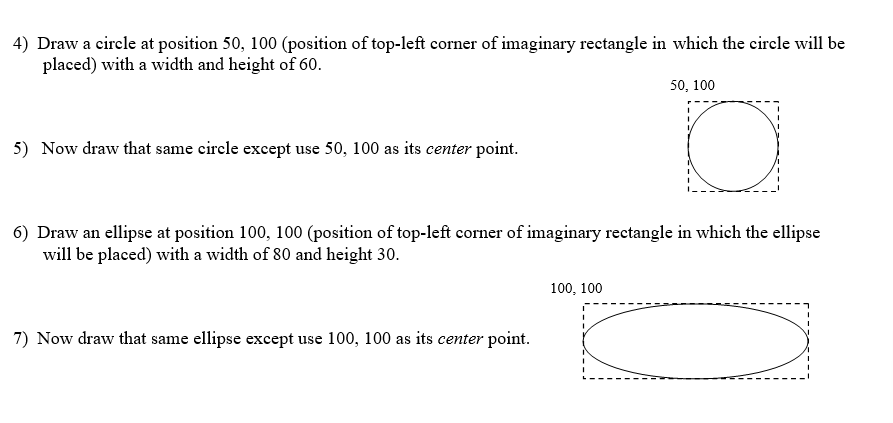
4) g.drawOval(50, 100, 60, 60);
5) g.drawOval(20, 70, 60, 60); // subtract the radius from top-left coordinates
6) g.drawOval(100, 100, 80, 30);
7) ??
Lab02, Our Fearless Leader !!
Java uses an ImageIcon to store jpgs, jpegs, gifs, and png files.
ImageIcon thomas = new ImageIcon(“tj.jpg”);
the image can be display by using the following commands:
g.drawImage(thomas.getImage(), 50, 50, null); // original size
g.drawImage(thomas.getImage()), 50, 50, 25, 75, null); // scaled image
The 25 and 75 arguments scale the image 25 pixels wide by 75 pixels high
The null is a place holder for an object we do not care to instantiate
null = empty
ImageIcon created object Thomas, Thomas knows his own image, drawImage gets Thomas’s image, g paints the panel, and the panel appears on the screen.
fillOval can be used to draw circles, 4 arguments needed
the first 2 specify upper-left corner of the rectangle enclosing the oval.
The other 2 arguments specify the width and height of the enclosing square, AKA the diameter of the circle.
To draw a circle with the center (x,y) and radius r, you can use:
g.fillOval(x - r, y - r, 2 * r, and 2 *r);
compiler won’t compile 2r, only 2 * r
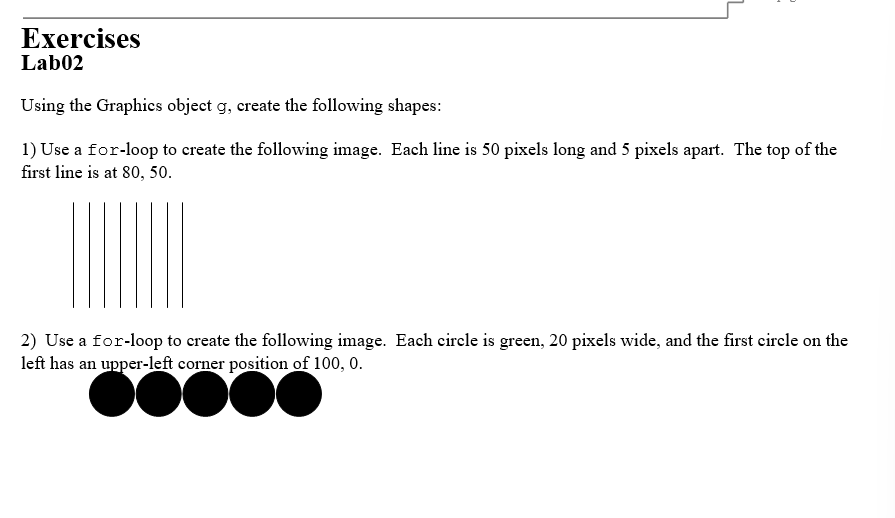
1) for (int x = 80; x <= 120; x+= 5)
g.drawLine(x, 50, x, 100);
2) for (int x = 100; x< 200; x+= 20)
g.fillOval(x, 0, 20, 20);
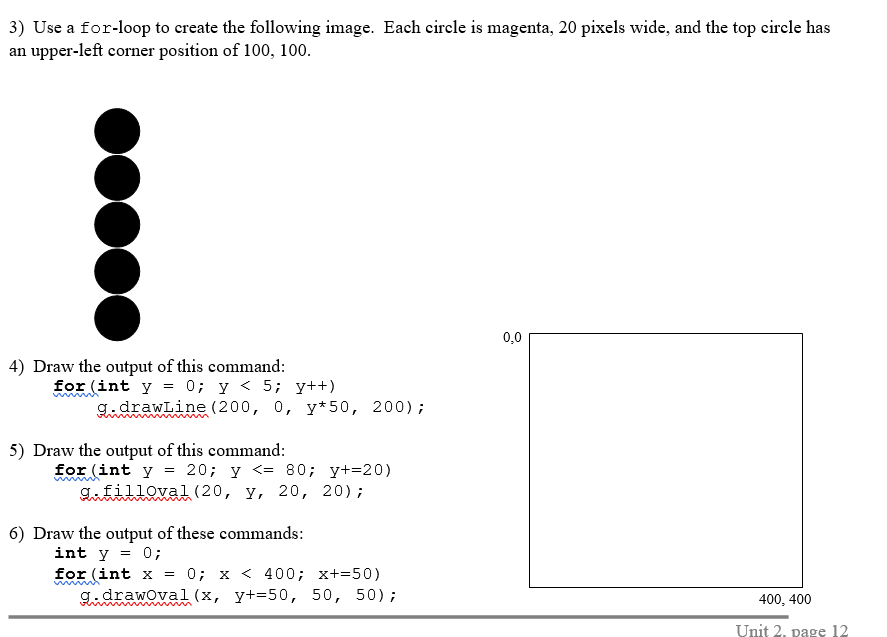
3) for (int k = 100; k < 200; k++)
g.fillOval(100, k, 20, 20);
4-6 is easy.
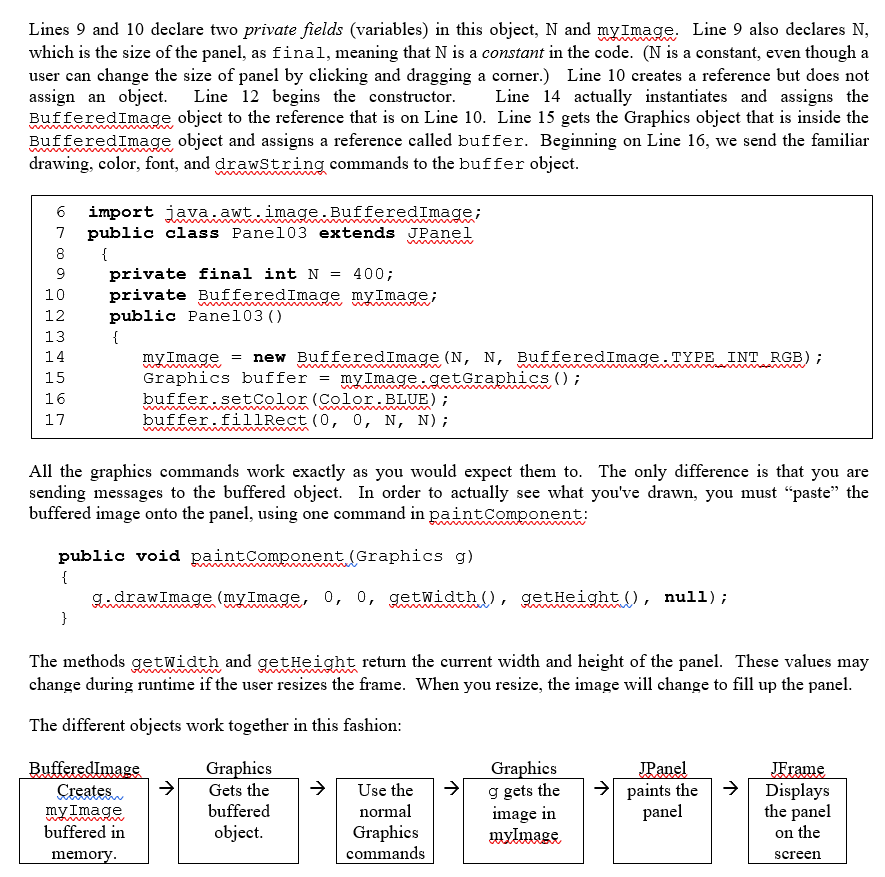
Buffering an Image:
Up till this lab, we drew graphics directly on the panel by sending commands to the g object in the method paintComponent.
Now, we will draw the image in an off-screen buffer, or temporary storage area, and then paste the complete imagine on the screen once at the end.
Drawing a buffer is way faster then drawing on the screen.
Lab03, Webbing and Sunshine !!
Trauma from this lab (no notes)
Lab05, BUGS !!
Accessor methods are ones that retrieve data about a certain object.
For examples, getX(), and getY() return the x and y coordinates of the object. The x and y coordinates are private fields, and this allows us to access them.
Remember, the job of a constructor in this class is to initialize the private data, AKA, assigning values to the fields.
Modifier methods change data in an object’s fields. The name of modifier methods usually begins with “set.” These methods also require arguments.
Abstract Classes and Subclass Objects:
The turtle class has both static and non-static fields and methods.
Static fields and methods stay in the class, the “class knows,” similar to class methods.
The non-static fields and methods are within the object, like Athlete.java.
We know that the turtle class is abstract, since once of the methods, drawShape is abstract.
Turtles do not know what shapes to draw, the method is abstract and not defined.
Turtle’s subclasses will define what shapes to draw.
heading of 0: EAST, heading of 90: NORTH, heading of 180: WEST, 270: South.
Accessors are GETTERS, modifiers are SETTERS.
accessors GET data from an object’s fields.
Lab06, Square Turtles !!
Overridden methods are when you take a method from the superclass, and re-define it in the subclass. If you instantiate an object of that subclass, it’s definition of the method will be carried out.
In contrary, overloaded methods are difference. Such as public void drawShape(); and public void drawShape(5);. One takes an argument while the other doesn’t.
Access Modifiers:
Methods can also be private. Private methods can only be called by other methods inside the SAME class. This means that if we had a private method in SquareTurtle, it couldn’t be called in the Driver.
Lab09, Twisty Turtles !!
How to design a resource class
public class _ extends _
{
private fields
constructors
accessor methods
modifier methods
instance methods
}
Lab10, Polka Dots !!