[Chp 1] Overview of Computers and Programming Languages and Basic Elements of C++
Learning Outcomes:
Understand and explain computer hardware and software
Understand and explain computer programming and programming languages
[1.1] Brief History Overview of Computers
The history of computers began with early calculating devices like the abacus, followed by mechanical devices such as Pascal’s Pascaline and Leibniz’s calculator, which expanded aritmetic capabilities. In 1800s, Jacquard’s punched cards introduced the idea of storing instructions, a concept crucial to computing. Charles Babbage designed early programmable machines, and Ada Lovelace is recognized as the first computer programmer.
By the late 19th century, Herman Hollerith’s punched-card machines revolutionized data processing and led to the creation of IBM. The mid-20th century saw the first large computers, including the Mark I and ENIAC, followed by von Neumann’s architecture, which shaped modern computer design. Advances such as transistors, intergrated circuits, and microprocessors made computers smaller, faster, and more affordable.
From the 1970s onwards, personal computers emerged with companies like Apple and IBM, leading to widespread public use. Today, computers are powerful, affordable, and integrated into daly life, supportiing technologies like artificial intelligience, mobile computing, GPS, and global communications.
[1.2] Elements of a Computer System
A computer is an electronic device that performs basic commands such as input, output, storage, and arithmetic or logical operations. A computer system consists of hardware and software, with major hardware components including the CPU, main memory (RAM), input/output devices, and secondary storage.
Central Processing Unit [CPU]
Acts as the computer’s brain: computes calculations and logical operations
More powerful the CPU = Higher processsing speeds
Random Access Memory/Main Memory [RAM/MM]
Connected to the CPU and temporarily stores programs and data while being used — contents are lost once computer is turned off
Memory is oragnized into memory cells which have a unique location called address of the cell. Address cells stroe instructions or data in binary form
(Binary form is a way of representing information using only two digits: 0 and 1.)
Secondary Storage
Is a permanent data storage, which can transfer data to and from main memory for processing
Examples: hard disks, flash drives, CD-ROMs
Input/Output Devices
Input devices: keyboard, mouse, scanner, camara and secondary storage
Accepts data and programs for the computer to compute
Output devices: monitors, printer, secondary storage
Displays results after computer completes computation
Software
Consists of programs written to perform tasks
Created using programming languages
Two main types of software:
System programs
Controls the computer’s overall operation by managing memory, input/output, storage
Ex. operation systems like Windows, macOS, etc
Application programs
Designed for specific tasks
Ex. word processing, spreadsheets, games
Theey run under the control of the operating system
[1.3] Language of a Computer
Computers are electronic devices that process information using electrical signals. When you type a character (like A or B), the computer stores it as binary data, not letters.
Types of Electrical Signals
Analog signals
Continuous, smoothly varying waves
Used to represent sound (e.g. audio tapes)
Copies lose quality overtime
Digital signals
represented using 0s and 1s
0 = low voltage
1 = high voltage
More reliable and can be copied exactly
Used by computers
(Ex. When you make a copy of an audio tape, the sound quality of the copy is not as good as the original tape. On the other hand, when you copy a CD, the copy is the same as the original.)
Machine Language
Machine language is the language of a computer
Consists of sequences of 0s and 1s
These sequences are called:
Binary digits (bits)
Binary numbers/binary code
Bits and Bytes
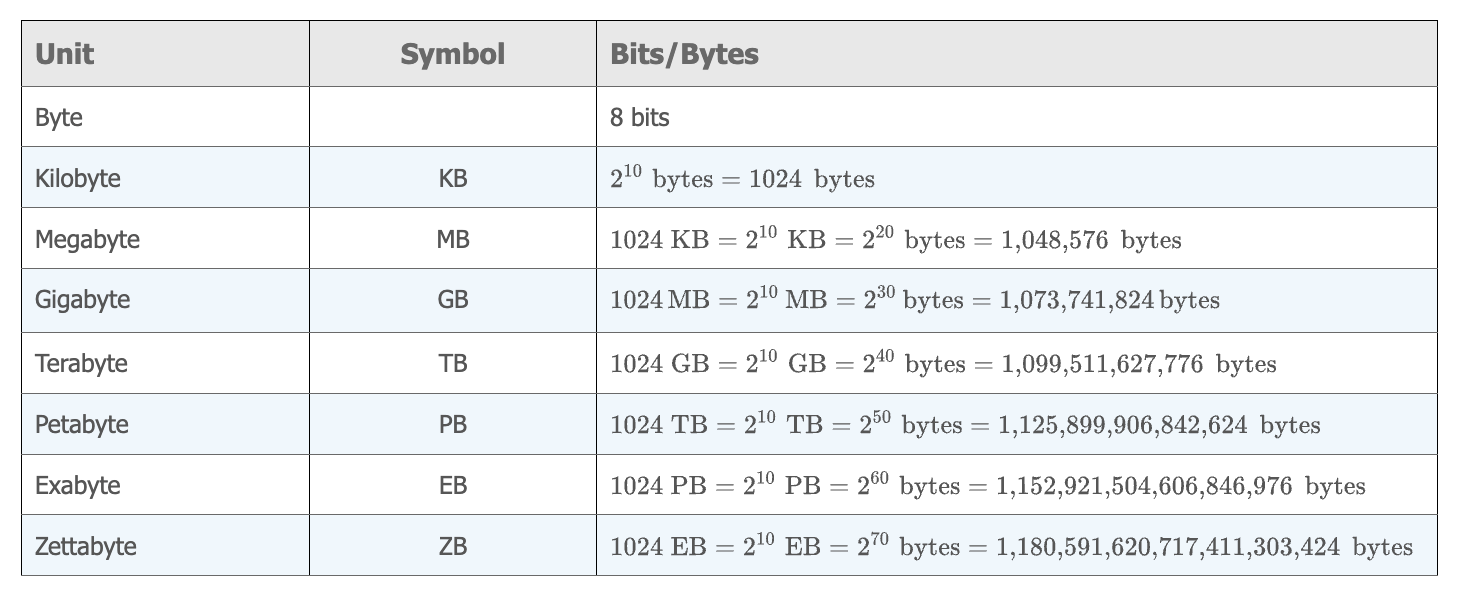
Bit: one binary digit (0 or 1)
Byte: 8 bits
Kilobyte (KB): bytes = 1024 bytes
Larger memory units are built from bytes
Character Encoding
Every letter, number and symbol is stored as a unique binary code
Computers use encoding schemes to map characters to binary
ASCII (American Standard Code for Information Interchange) Encoding
Uses 7 bits
Can represent 128 characters (numbered 0-127)
Characters are stored based on their position number
Examples:
A
Position 65
Binary: 10000013
Position 51
Binary: 0110011NOTE: ASCII positions start at 0, not 1. The binary value is the binary form of the character’s position
[1.4] Evolution of Programming Languages
All computers store and process data as binary, but machine languages may differ for each computer; machine language is machine-dependent. Programming was very difficult and error-prone.
Assembly Language
Developed to make programming easier than machine language
Uses mnemonics (easy-to-remember words) instead of binary codes
Example:
LOAD instead of 100100
MULT instead of 100110
STOR instead of 100010
Easier to read and write than machine language
Limitations:
Computers cannot execute assembly language directly
Must be translated to machine language
Translator:
Assembler → converts assembly language into machine code
High-Level Languages
Designed to be closer to human (natural) language
Easier to read, write, and understand
Allow programmers tofocus on logic, not machine details
Examples:
BASIC, FORTRAN, COBAL, C, C++, C#, Java, Python
Compilers
High level languages cannot be executed directly
Must be tranlated into machine language
Translator:
Compiler → converts high-level language programs into machine code
[1.5] Processing C++ Program
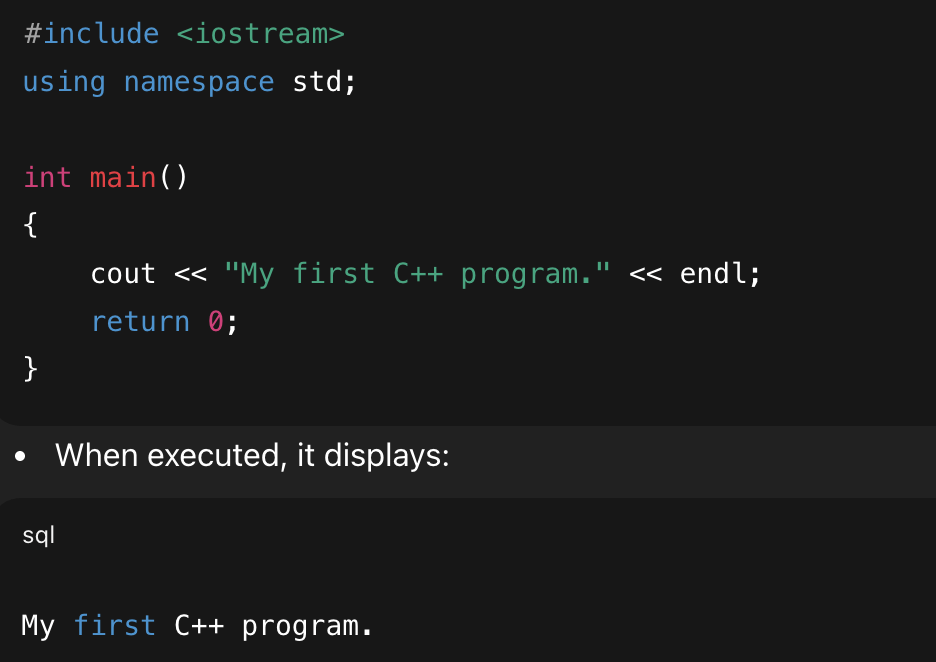
Steps to Processing a C++ Program
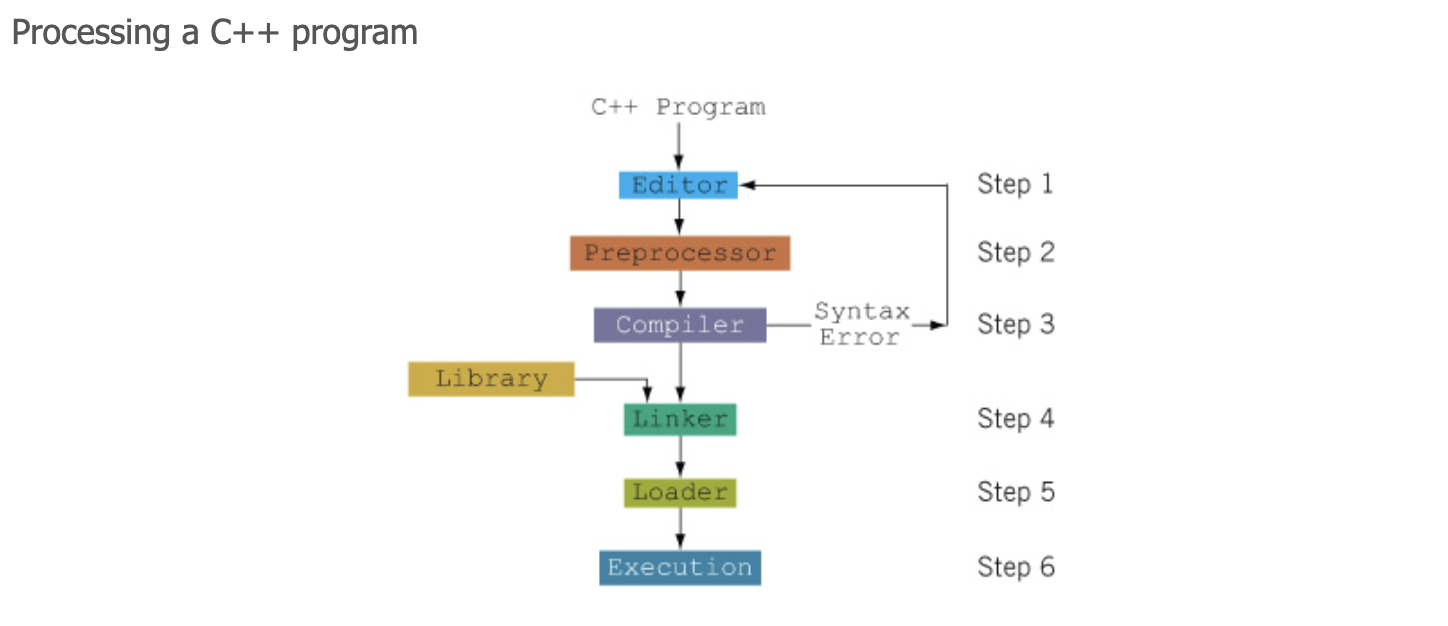
STEP 1: Editor
You write the program by following the syntax of a high-level language, using text editor
The program is called the source code or source program
Saved with extension .cpp
Example: FirstCPPProgram → FirstCPPProgram.cpp
STEP 2: Preprocessor
Handles preprocessor directives
Lines beginning with #
Example: #include <iostream>Processed by the preprocessor
Includes necessary code from libraries before compilation
STEP 3: Compiler
Checks the program for and syntax errors
If errors exist → program will NOT compile
Syntax error = grammar mistakes in the code
If correct → translate source code into machine language
Output is called an ‘object program’
STEP 4: Linker
Combines the object program with library code
Libraries contain prewritten code (eg. input/output functions)
Produces an executable program
STEP 5: Loader
Loads the executable program into RAM
STEP 6: Execution
The program is run
Output is displayed on the screen
Integrated Development Environment (IDE)
An IDE combines
Text editor
Compiler
Linker
Program execution tools
Makes programing easier
Examples of IDEs:
Visual C++ Express
Visual Studio
C++ Builder
Dev-C++
Build/Rebuild
Compiles and links the program automatically
Produces executable code
[1.6] Programming with the Problem Analysis-Coding-Execution Cycle
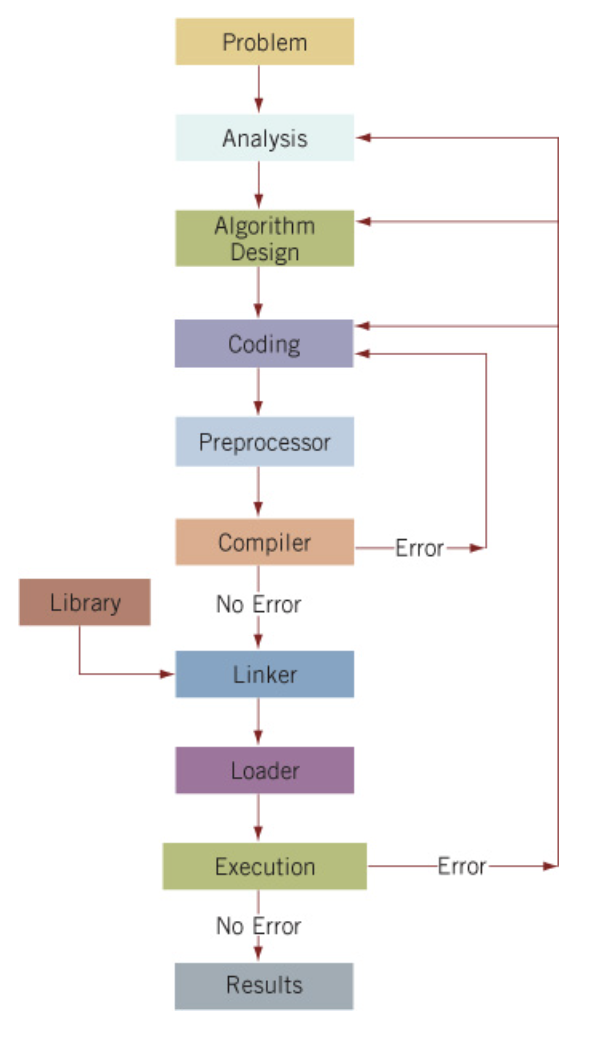
Three Main Programming Steps
Analyze the problem and design an algorithm
Implement the algorithm in a programming language
Maintain and modify the program as requirements change
STEP 1: Problem Analysis (IMPORTANT)
Throughly understad the problem
What is the problem asking?
What must the program accomplish?
Understand the Requirements
Requirements may include:
Does the program:
Interact with the user?
Manipulate data?
Produce output?
What does the input look like?
What should the output look like?
How should results be formatted?
If data is involved:
Know what the data is
Know how it is represented
Look at sample data
Break Complex Problems into Subproblems
Analyze each subproblem seperately
Determine requirements for each part
STEP 2: Algorithm Design
An algorithm is a step-to-step solution
Written in plain language of pseudocode
Should be clear, logical and correct
Verifying correctness:
Test with sample data
Perform mathematical checks if needed
STEP 3: Coding
Convert the algorithm into C++ code
Enter code using text editor
Ensure the program follows C++ syntax rules